High-resolution book scanners make it much easier to digitize books, bound files, and oversized pages without damaging the originals. The best models combine sharp imaging, page-flattening tools, and reliable OCR for searchable files.
In this roundup, we focused on scanners that balance image quality, speed, and usability so you can choose the right setup for home, office, education, or archival work.
Best 10 High Resolution Book Scanners Picks for 2026
Premium High-Resolution All-in-One

- 38MP sensor with 410 DPI capture
- Curve-flattening for bound books
- OCR for searchable files and 180+ languages
Best For: Fast, detailed scanning of books and A3 documents
Large-Format Archiving Pick
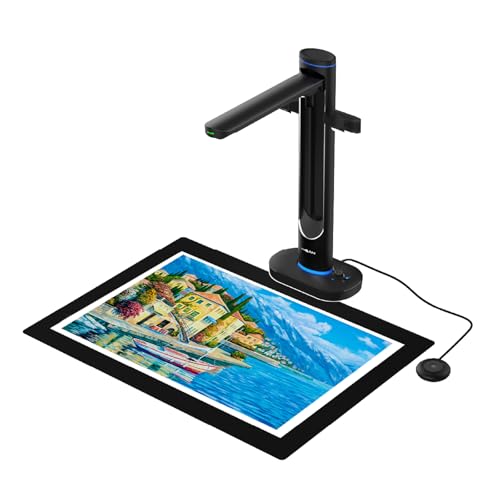
- Dual 48MP sensors with up to 600 DPI
- Captures A2 books and documents overhead
- OCR plus text-to-speech support
Best For: Oversized books, archives, and classroom materials
Portable AI Scanning Choice

- A3/A4 overhead scanning in a foldable design
- AI auto-flatten and deskew tools
- Searchable PDF, Word, and JPG output
Best For: Portable scanning for home or small-office use
Classic Overhead Scanner

- Overhead scanning without cutting pages
- Auto Book Correction for curve distortion
- Multi-document detection and page-turning scan modes
Best For: Non-destructive scanning of books, magazines, and photos
Editor’s Choice
CZUR ET18 Pro 18MP Professional Book Scanner

- 18MP HD camera with A3 capture
- Auto-flatten and deskew for books
- ABBYY OCR to PDF, Word, and Excel
Best For: People who need fast, high-detail desktop book scanning
Best Portable Pick
CZUR Shine Ultra Pro 24MP Portable Book Scanner

- 24MP auto-focus camera with A3 support
- Foldable, height-adjustable portable design
- Outputs JPG, PDF, searchable PDF, Word, and Excel
Best For: Portable book scanning for home, learning, or light office use
Best Workflow Features
Innex DS200 26MP USB Book Scanner

- Up to 26MP resolution with A3 support
- Curve flattening, OCR, and finger removal
- Foot pedal and hand switch for easier workflow
Best For: Structured scanning in libraries, offices, and schools
Portable Thin-Book Scanner

- 13MP CMOS camera for detailed scans
- Fast roughly 1-second-per-page operation
- Flattening tech works best on thinner books
Best For: Thin books, flat papers, and document-camera use
High-Detail Book Scanner

- 24MP camera with 5696 x 4272 resolution
- 3rd-gen flattening and deskew tech
- Supports Windows, macOS, and Ubuntu Linux
Best For: High-detail scanning with stronger page correction
Large-Format Book Scanner
VIISAN S21 Large Format Scanner

- A2 capture size handles oversized pages
- 26MP resolution with software-enhanced detail
- Flattening and finger-removal tools included
Best For: Oversized books, journals, newspapers, and maps
Premium High-Resolution All-in-One – CZUR ET MAX 38MP Book Scanner
If you want high resolution book scanners for large volumes and detailed archives, the CZUR ET MAX is built for speed and clarity. Its 38MP sensor, 410 DPI capture, and curve-flattening tools make it a strong fit for bound books, business documents, and other A3-size materials that need clean digital copies.
Best For: Users who need fast, high-detail scanning of books, documents, and A3 pages with OCR support.
Pros:
- 38MP CMOS sensor captures detailed images at 7168 × 5376 resolution.
- Patented curve-flattening helps correct warped book pages automatically.
- OCR supports searchable/exportable files and 180+ languages.
- Scans up to A3 size and can finish a page in about 1.5 seconds with practice.
Cons:
- Not recommended for glossy or highly reflective materials.
- Arabic OCR support is limited by operating system and model conditions.
- Some languages, including Thai and Hebrew, are not supported.
This is a practical choice if your priority is high-resolution book scanning with broad software compatibility and strong OCR features. It is especially appealing for users who want a fast overhead workflow without unbinding materials.
Large-Format Archiving Pick – VIISAN S48 Duo 48MP Scanner
The VIISAN S48 Duo stands out among high resolution book scanners for users who need large-format capture without pressing on fragile materials. With dual 48MP sensors, A2-sized coverage, and AI-assisted page cleanup, it is geared toward libraries, classrooms, offices, and archival work.
Best For: Archiving oversized books, manuscripts, and documents that need detailed capture and accessibility features.
Pros:
- Dual 48MP cameras deliver sharp scans up to 600 DPI.
- Overhead design handles A2 materials without flattening or damaging pages.
- AI processing helps flatten curves, remove finger marks, and clean backgrounds.
- Includes OCR and text-to-speech for searchable and accessible content.
Cons:
- Heavier than some competing overhead scanners at 2.8 kg.
- Needs a minimum of 4GB RAM, with 16GB recommended for smoother use.
- Requires USB 2.0 and enough desk space for large-format scanning.
If you need a scanner for preservation-focused work, this model offers the most room for oversized materials in this group. It is especially useful when scan quality, accessibility, and non-destructive handling all matter.
Portable AI Scanning Choice – CZUR Aura Pro Book Scanner
For buyers comparing high resolution book scanners, the CZUR Aura Pro is a compact overhead model that balances portability with useful automation. It captures A3 and A4 materials, uses AI-assisted deskewing and auto-flattening, and can output searchable files for everyday scanning projects.
Best For: Home users and small offices that want a foldable scanner with fast OCR workflow.
Pros:
- Captures A3 and A4 documents with a 4320 × 3240 resolution sensor.
- AI software helps flatten curved pages and deskew scans.
- Outputs JPG, Word, PDF, and searchable PDF files.
- Foldable, portable design is easier to move and store.
Cons:
- Uses a CIS sensor rather than the higher-end sensors found on some premium models.
- OCR language support excludes Thai, Hebrew, and Arabic.
- Smaller sheet capacity than tray-style scanners, since it is designed for one-page overhead capture.
The Aura Pro is a solid pick if you want a simple, portable way to digitize books and documents without a complicated setup. It is best for light-to-moderate scanning where convenience matters as much as image quality.
Classic Overhead Scanner – ScanSnap SV600 Book Scanner
The ScanSnap SV600 is a straightforward overhead option for people who want to scan books, magazines, and newspapers without cutting or damaging them. While it is not a high-resolution book scanner in the same spec-heavy sense as newer models, it remains a practical pick for flexible document capture and simple correction features.
Best For: Users who want an easy overhead scanner for books, newspapers, photos, and mixed document stacks.
Pros:
- Scans books and magazines directly without damaging the originals.
- Auto Book Correction helps flatten curve distortion.
- Multi Document Detection can crop and rotate several items in one scan.
- Page Turning Detection and Time Mode support more natural scanning workflows.
Cons:
- Listed resolution is 1200, which is lower than higher-end premium book scanners.
- Heavier and bulkier than portable scanners at 6.6 pounds.
- Best suited to Windows 10/11 or macOS Monterey 12 and later.
This scanner makes sense if your priority is convenience and non-destructive scanning rather than chasing the highest sensor specs. It is a dependable overhead solution for home, office, or light archival use.
Editor’s Choice – CZUR ET18 Pro 18MP Professional Book Scanner
If you want high resolution book scanners that can handle serious digitizing work, the CZUR ET18 Pro is built for fast book and document capture with strong image quality. Its 18MP HD camera, A3 support, and auto-flatten deskew tech make it a practical fit for converting bound pages into searchable files without a long warm-up time.
Best For: Users who want a higher-end USB book scanner for A3 books, searchable OCR files, and quick page-by-page capture.
Pros:
- 18MP HD camera with 4896 × 3672 resolution for detailed scans
- Auto-flatten and deskew technology designed for curved book pages
- Converts to PDF, searchable PDF, Word, Tiff, and Excel with ABBYY OCR
- Scans A3-size documents and claims about 2 seconds per page once you get used to it
Cons:
- USB cable connection only; no Wi-Fi support
- Glary papers are not recommended
- Some OCR language limitations apply, including Thai and Hebrew
Overall, the ET18 Pro stands out when scan quality and book handling matter more than portability. It is a solid desktop option for users who want a fast workflow and a wide range of output formats.
Best Portable Pick – CZUR Shine Ultra Pro 24MP Portable Book Scanner
Among high resolution book scanners, the CZUR Shine Ultra Pro focuses on portability without giving up large-format capability. It uses a 24MP auto-focus camera, supports A3 scanning, and includes flattening software for book pages, making it a flexible choice for home, remote learning, or light office use.
Best For: Buyers who want a lightweight USB book scanner that is easy to move and still offers strong resolution.
Pros:
- 24MP camera with upgraded 5696 × 4272 resolution
- Supports A3 scanning and output to JPG, PDF, searchable PDF, Word, and Excel
- 90° foldable design and adjustable height for portability
- Works with Zoom, Skype, and Google Meet for remote learning or web conferencing
Cons:
- Glossy materials like glossy photos and magazines are not recommended
- OCR does not currently support Thai, Hebrew, or Arabic
- Notes suggest CZUR ET is the better choice if you need professional-level scanning
The Shine Ultra Pro is a good fit if you want a more portable scanner for books and documents rather than a full desktop workflow. It balances resolution, A3 support, and easy setup in a compact form.
Best Workflow Features – Innex DS200 26MP USB Book Scanner
If you are comparing high resolution book scanners for efficient capture, the Innex DS200 puts workflow features front and center. It offers up to 26MP resolution, A3-size scanning, and software tools like curve flattening, OCR, auto-cropping, page-turn detection, and finger removal to streamline book and document digitizing.
Best For: Libraries, offices, and schools that want a feature-rich USB scanner for fast, organized scanning.
Pros:
- Up to 26MP resolution for fine detail
- Supports A3 documents and 120+ language OCR
- Software includes curve flattening, auto-cropping, page-turn detection, and finger removal
- Includes LED lamp, laser guide, hand switch, and foot pedal for flexible operation
Cons:
- Listed optical resolution is 300 dpi in the details
- Requires USB connection and is not described as portable
- No macOS/Windows version-specific OCR language breakdown is provided in the notes
For users who care about scanning speed and workflow automation, the DS200 is the most process-oriented option here. Its mix of high-resolution capture and hands-free controls makes it especially useful in structured scanning environments.
Portable Thin-Book Scanner – CZUR Shine Ultra
If you want high resolution book scanners that can double as a document camera, the CZUR Shine Ultra is a flexible pick for home, classroom, or office use. Its 13MP CMOS camera, fast one-second-per-page workflow, and page-flattening tech make it practical for thinner books and flat documents alike.
Best For: Users who need a compact overhead scanner for thin books, papers, and remote teaching setups.
Pros:
- 13MP camera with A4/A3-equivalent detail for sharp captures
- Patented flattening technology helps reduce curved-book distortion
- About 1 second per page for quick scanning sessions
- Works as both a scanner and a USB document camera
Cons:
- Only suitable for thinner books; thicker books are better suited to CZUR ET series
- Not compatible with Android or iOS
- OCR language support excludes Thai, Hebrew, and Arabic
The Shine Ultra is best viewed as a speed-first overhead scanner with solid OCR and practical portability. If your priority is quick digitizing of books and documents rather than heavy-duty archival scanning, it offers a strong balance of resolution and convenience.
High-Detail Book Scanner – CZUR ET24 Pro
For shoppers comparing high resolution book scanners, the CZUR ET24 Pro stands out with a 24MP camera, upgraded flattening technology, and broad desktop compatibility. It is aimed at users who want a more robust overhead scanner for books, documents, and mixed materials, with extra lighting support for better capture quality.
Best For: Buyers who need a high-resolution book scanner with stronger flattening, OCR, and multi-platform support.
Pros:
- 24MP camera with 5696 x 4272 resolution for high-detail capture
- 3rd-gen flattening and deskew tech for curved book pages
- Supports Windows, macOS, and Ubuntu-based Linux systems
- Side lights plus head light help reduce glare on many pages
Cons:
- Very glare-prone papers are not recommended
- Arabic OCR is limited by operating system support
- Bulkier and heavier than portable scanner-style options
The ET24 Pro is the more feature-rich choice when image quality and page correction matter most. Its combination of high resolution, OCR conversion, and lighting control makes it a strong fit for serious scanning workflows.
Large-Format Book Scanner – VIISAN S21 Large Format Scanner
The VIISAN S21 is a practical option if you need high resolution book scanners for oversized materials as well as standard books and documents. With an A2 capture area, 26MP resolution, and software tools for flattening and finger removal, it is built for detailed overhead digitizing in larger formats.
Best For: Scanning large-format books, journals, newspapers, maps, and mixed documents.
Pros:
- A2 capture size is ideal for oversized pages and layouts
- 26MP resolution with software-enhanced up to 600 DPI
- Auto-flatten, finger removal, and double-page splitting in software
- OCR can export to PDF, Word, Excel, EPUB, and text formats
Cons:
- Bundled software is not compatible with ARM-based Windows devices
- Very glare-prone papers are not recommended
- Built-in LEDs are not ideal for use in bright light
The S21 is the strongest match when page size is as important as image quality. Its large capture area and document-correction tools make it especially useful for archives, libraries, and anyone handling oversized originals.
How We Picked the Best High Resolution Book Scanners
We prioritized image clarity, OCR support, auto-flattening or deskew tools, capture size, and workflow speed. Since High Resolution Book Scanners are often used for mixed materials, we also looked at overhead design, portability, and how well each model handles curved pages and thick bindings.
Quick Comparison
If you need the highest-detail capture for large pages, look at A2/A3-capable models with stronger sensors. For everyday document digitizing, compact A3 scanners may offer a better mix of price, desk space, and convenience. If portability matters, thinner USB-powered options are usually the easiest to move between rooms or locations.
Key Buying Factors for High Resolution Book Scanners
Resolution and Sensor Quality
Higher megapixels can help preserve fine text, illustrations, and small annotations, but the real-world result also depends on optics, lighting, and software processing. Choose enough resolution for your documents without overpaying for specs you will not use.
Page Size and Book Handling
Check the maximum capture area first. A3 works well for most books and office materials, while A2 is better for large-format archives, textbooks, maps, and spreads. Overhead designs are usually the safest choice for bound materials because they reduce pressure on the spine.
OCR and Workflow Features
OCR can turn scans into searchable and editable files, which is essential for archiving, research, and office retrieval. Features like auto-flatten, deskew, finger removal, and batch capture save time and improve consistency, especially when scanning long projects.
Software, Compatibility, and Output
Look for software that exports common file types and works smoothly with your operating system. If you plan to share files widely, confirm support for PDF, searchable PDF, and image formats you already use.
Who Should Buy Which High Resolution Book Scanners?
Choose a compact A3 model if you want an efficient scanner for books, forms, and general desktop use. Pick an A2-capable scanner if you need to preserve large pages or handle frequent archival work. Portable High Resolution Book Scanners are a better fit for educators, traveling professionals, and anyone with limited space. If your main goal is searchable digitization, prioritize OCR quality and automation over raw resolution alone.