Choosing the right folder can save hours of repetitive work, especially when you need consistent folds for mailers, invoices, letters, and inserts.
This roundup focuses on programmable paper folding machines that balance speed, ease of use, and the fold types most offices actually need.
Best 10 Programmable Paper Folding Machines Picks for 2026
Compact Office Folder
Martin Yale P7500 Automatic Feed Paper Folder

- Up to 4,000 sheets per hour
- 50-sheet feed tray for easier loading
- Letter, half, Z-fold, and double parallel
Best For: Small offices and mailrooms needing simple automatic folding
High-Volume Touchscreen Folder
Formax FD 38Xi Fully-Automatic Document Folder

- Up to 17,000 sheets per hour
- Touchscreen control with preset folds
- Stores up to 36 custom folds
Best For: Busy teams needing fast, programmable folding
Batch Processing Folder
Dynafold 102N Paper Folding Machine
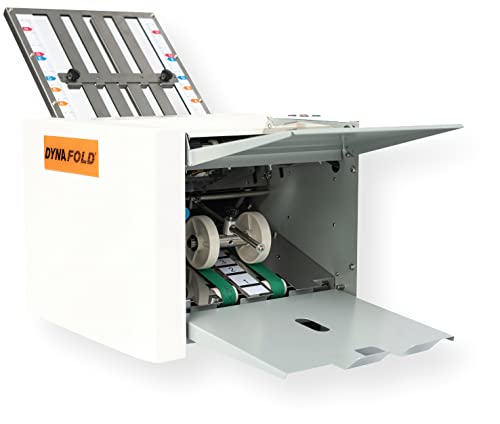
- Up to 8,000 sheets per hour
- Push-button operation with counter
- Self-adjusts for paper thickness
Best For: Letter-size batch folding with simple controls
Stapled-Set Folder
Martin Yale 1501X Automatic Paper Folder

- Up to 7,500 sheets per hour
- Five fold types for common jobs
- Manual feed for stapled sets up to 3 sheets
Best For: Mixed office folding with occasional stapled sets
Office-Friendly Auto Folder
United Office Products F100 Automatic Paper Folder

- 156 sheets per minute output
- Letter and legal with 4 fold types
- 200-sheet hopper and LCD controls
Best For: Routine office, school, and church folding jobs
High-Capacity Desktop Folder
Formax FD 300 Desktop Document Folder

- Up to 7,400 folded sheets per hour
- Drop-in feed with AutoBatch control
- C, Z, V, and Double Parallel folds
Best For: High-volume offices that want neat, repeatable batch folding
Speedy Multi-Format Folder
Banfluxion Digital Paper Folder 110V
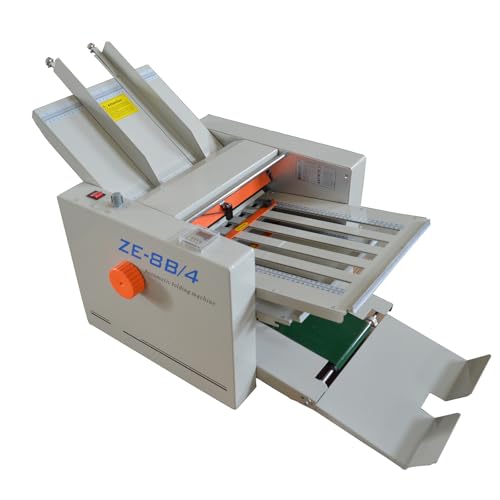
- Wide size range from 2" x 3" to 12" x 27"
- Variable speed with digital counter
- Auto-feed design for continuous operation
Best For: Print shops and offices with varied folding needs
High-Volume Office Folder
MBM FO0604 408A Automatic Programmable Tabletop Folder
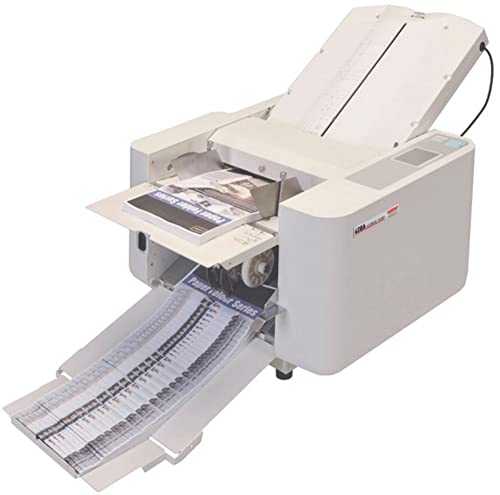
- Stores 12 custom folds in memory
- Up to 14,400 sheets per hour
- Supports 3.5" x 5" to 11" x 17" paper
Best For: Offices and mailrooms needing fast, programmable multi-fold output
Compact Desktop Folder
P6500 My Office Products Desktop Paper Folder

- Letter or half-fold only
- Handles 1-3 sheet sets, including stapled sets
- Up to 1,800 sheets per hour
Best For: Small offices needing simple, compact folding for letter-size documents
Small-Office Letter Folder
Martin Yale P6500 Desktop Paper Folding Machine

- Tri fold and half fold support
- Manual feed with automatic folding
- Up to 1,800 sheets per hour
Best For: Routine letter-size folding in small offices and mailrooms
Compact Office Folder – Martin Yale P7500 Automatic Feed Paper Folder
If you need programmable paper folding machines for steady office output, the Martin Yale P7500 is a practical tabletop choice for everyday mailroom and business tasks. It handles common letter and legal-size sheets with multiple fold options and a simple feed design, making it easier to keep routine folding work moving without a complicated setup.
Best For: Small offices, mailrooms, churches, and similar spaces that need straightforward automatic folding for common document jobs.
Pros:
- Produces up to 4,000 folded sheets per hour for efficient batch work
- Accepts up to 50 sheets in the feed tray for convenient loading
- Supports letter, half, Z-fold, and double parallel fold options
- Simple operation means minimal training is needed
Cons:
- Built for 8.5″ x 11″ and 8.5″ x 14″ 20lb bond paper, so it is not a universal media machine
- Lower capacity and speed than higher-end fully automated models
This model is a sensible pick if you want reliable folding without extra complexity. It is best viewed as a compact productivity tool rather than a high-volume programmable document system.
High-Volume Touchscreen Folder – Formax FD 38Xi Fully-Automatic Document Folder
Among programmable paper folding machines, the Formax FD 38Xi stands out for high-volume processing and easy touchscreen control. It is built for busy environments where operators may need to start folding quickly, store preset folds, and handle larger jobs with minimal manual adjustment.
Best For: Mailrooms and office teams that need fast, programmable folding with preset and custom fold storage.
Pros:
- Processes up to 17,000 sheets per hour for large jobs
- Touchscreen control panel allows fast walk-up operation
- Pre-programmed for 6 popular fold types and 18 preset fold settings
- Can store up to 36 custom folds in memory
Cons:
- Designed for larger workloads, so it may be more machine than a small office needs
- Its feature set is more advanced than basic folding models
This is a strong fit when speed and repeatability matter most. If you want a folding system that can remember settings and keep large batches moving, it is one of the most capable options here.
Batch Processing Folder – Dynafold 102N Paper Folding Machine
If you are comparing programmable paper folding machines for dependable batch work, the Dynafold 102N offers a straightforward push-button design with solid throughput. It is set up for letter-size documents and includes self-adjusting paper thickness handling, which helps it stay practical for repeat folding tasks.
Best For: Users who want a simple batch-processing folder for letter-size documents with easy operation.
Pros:
- Folds up to 8,000 sheets per hour
- Push-button operation keeps use simple
- Self-adjusting for paper thickness
- Includes output conveyor stacker and resettable counter
Cons:
- Supported paper size is letter only
- No touchscreen or stored custom-program features are listed
The 102N focuses on practical throughput and ease of use rather than advanced automation. That makes it a good fit for teams that want reliable batch folding without extra complexity.
Stapled-Set Folder – Martin Yale 1501X Automatic Paper Folder
For offices looking at programmable paper folding machines that can handle both standard sheets and small stapled sets, the Martin Yale 1501X offers useful versatility. It supports several common fold types and includes manual feed capability for stapled sets of up to three sheets, which can be handy for varied document workflows.
Best For: Offices, schools, churches, and associations that need automatic folding plus limited stapled-set handling.
Pros:
- Folds 8.5″ x 11″ and 8.5″ x 14″ documents automatically
- Offers five fold types, including letter, half, Z-fold, double-parallel, and gate fold
- Handles up to 7,500 sheets per hour
- Manual feed bypass supports stapled sets of up to 3 sheets
Cons:
- Manual feed is limited to small stapled sets
- Feed trays are not fixed to the machine, which may not suit every workspace
This is a flexible midrange folder if your work mixes standard documents with occasional stapled packets. It is less about advanced programming and more about practical, everyday versatility.
Office-Friendly Auto Folder – United Office Products F100 Automatic Paper Folder
If you need programmable paper folding machines for everyday office mailing and handout prep, the United Office Products F100 is built for straightforward, high-volume use. It handles letter and legal paper, offers C, Z, Half, and Double Parallel folds, and keeps folded sheets neatly stacked for easy collection.
Best For: Offices, schools, and churches that want a simple automatic folder with dependable speed and easy setup.
Pros:
- Processes up to 156 sheets per minute for fast batch folding.
- Supports letter and legal sizes with four fold types.
- 200-sheet hopper helps reduce reloading during jobs.
- LCD control panel and 3-digit counter make operation simple.
Cons:
- Fold options are limited to the standard formats listed.
- 6-month warranty is shorter than many buyers may prefer.
This is a practical choice if you want an easy-to-run desktop folder for routine documents rather than a more advanced production system.
High-Capacity Desktop Folder – Formax FD 300 Desktop Document Folder
For buyers comparing programmable paper folding machines with more control and throughput, the Formax FD 300 is set up for efficient desktop production. It uses a drop-in top-feed system, handles up to 200 sheets of 20# paper, and offers four fold types with an output conveyor for orderly stacking.
Best For: Offices or mailrooms that need fast, organized folding with batch control and a wider paper range.
Pros:
- Folds up to 7,400 sheets per hour for high-volume work.
- Drop-in top-feed design avoids paper fanning during setup.
- LCD panel includes a 3-digit counter and AutoBatch function.
- Output conveyor and stacker wheels help keep folded stacks neat.
Cons:
- Heavier and larger than basic desktop folders.
- Paper handling tops out at 8.5″ x 14″ and up to 30# weight.
The FD 300 stands out when organization and repeatable batch folding matter as much as speed, especially for users who want a more polished workflow.
Speedy Multi-Format Folder – Banfluxion Digital Paper Folder 110V
If you’re looking at programmable paper folding machines for mixed media and larger-format jobs, this Banfluxion digital paper folder brings a wider size range and adjustable speed. It supports paper from 2″ x 3″ up to 12″ x 27″, includes four adjustable plates, and is designed for continuous auto-feed operation.
Best For: Offices, banks, and print shops that need a compact desktop machine for varied folding tasks.
Pros:
- Handles a broad paper range, from small pieces to large sheets.
- Infinitely variable speed regulator helps match the task.
- Digital counter supports precise sheet counts.
- Rubber rollers and emergency stop add stability and safety.
Cons:
- At 112.4 pounds, it is much heavier than typical desktop units.
- The product notes do not list a fold-per-hour rating.
This model is a strong fit when you need flexibility more than simplicity, especially for environments that regularly handle different document sizes and folding needs.
High-Volume Office Folder – MBM FO0604 408A Automatic Programmable Tabletop Folder
For buyers comparing programmable paper folding machines, the MBM FO0604 Model 408A is built for fast, repeatable folding in busy office settings. It handles letter through larger 11″ x 17″ sheets, stores custom fold settings in memory, and is designed for teams that need to switch between fold types without a steep learning curve.
Best For: Offices, mailrooms, and print teams that need a tabletop folder for frequent multi-fold jobs and higher daily output.
Pros:
- Stores 12 custom folds in memory for repeated jobs.
- Supports 18 standard folds and paper sizes from 3.5″ x 5″ to 11″ x 17″.
- Fast output up to 14,400 sheets per hour.
- 500-sheet capacity suits larger folding runs.
Cons:
- Designed for office use, so it is larger than a desktop personal folder.
- Best suited to users who regularly need multiple fold types.
This model stands out when speed, capacity, and programmable fold memory matter more than compact size. It is a practical fit for organizations that want a dependable automatic folder for ongoing document processing.
Compact Desktop Folder – P6500 My Office Products Desktop Paper Folder
If you want one of the more compact programmable paper folding machines for routine office work, the P6500 is aimed at simple letter and half-fold tasks. It is a hand-fed desktop unit that automatically folds inserted sheets, making it a straightforward choice for small batches and everyday paperwork.
Best For: Small offices, schools, and mail prep tasks that mainly use 8.5″ x 11″ paper in short runs.
Pros:
- Automatically folds inserted paper for letter or half-fold jobs.
- Handles 1-3 sheet sets, including stapled sets.
- Compact desktop design fits smaller work areas.
- Rated for up to 1,800 sheets per hour.
Cons:
- Limited to letter-size paper and two fold styles.
- Lower capacity than larger office folders.
This is a sensible pick when you need dependable folding without a large machine or advanced fold options. Its simple format and small footprint make it easy to slot into light-duty office workflows.
Small-Office Letter Folder – Martin Yale P6500 Desktop Paper Folding Machine
The Martin Yale P6500 is a practical option in programmable paper folding machines when your workflow centers on standard letter-size documents. Its manual-feed, automatic operation handles tri-fold and half-fold formats, so it fits everyday office folding, envelope stuffing, and basic document prep.
Best For: Small mailrooms, offices, and schools that need a desktop folder for routine 8.5 x 11 folding jobs.
Pros:
- Folds 8.5 x 11 paper into tri fold or half fold formats.
- Manual feed with automatic folding keeps operation simple.
- Can handle stapled or unstapled documents when hand-fed.
- Compact desktop size suits limited workspaces.
Cons:
- Built for letter-size paper rather than larger sheets.
- Limited to two fold styles.
For basic folding tasks, this machine focuses on simplicity and everyday utility rather than advanced programmability. It is best viewed as a reliable desktop helper for consistent, small-scale document handling.
How We Picked the Best Programmable Paper Folding Machines
We prioritized Programmable Paper Folding Machines that offer a practical mix of fold presets, throughput, paper handling, and day-to-day reliability. The best choices in this category are not just fast; they are easy to set up, consistent across batches, and suitable for the volume your office actually produces.
We also looked for useful operator features such as counters, touchscreen or LCD controls, batch processing, conveyor stacking, and capacity ranges that match both small office and higher-volume environments.
Quick Comparison: What Matters Most
Start by matching fold volume to your workload. Desktop units are usually better for occasional runs and smaller teams, while tabletop and fully automatic machines make more sense for recurring mailings and larger print jobs. If you fold the same document types often, programmable settings can cut setup time and reduce errors.
Also compare sheet capacity, supported paper sizes, and output handling. A machine that folds quickly but struggles to stack output neatly can slow down your workflow just as much as a smaller model.
Key Buying Factors for Programmable Paper Folding Machines
Fold Types and Presets
Look for the fold patterns you use most, such as letter, half, Z, gate, or double parallel. More presets are useful if your documents vary, but a well-designed machine with fewer, easier-to-access settings may be faster in practice.
Speed and Capacity
High sheet-per-hour numbers matter most when you regularly process large batches. For lighter office use, a moderate-speed machine with dependable feed accuracy can be the better value.
Paper Compatibility
Check supported paper weights, sizes, and whether the machine handles stapled sets, coated stock, or mixed document types. Compatibility is one of the biggest factors in whether a folder feels versatile or limited.
Controls and Ease of Use
Programmable Paper Folding Machines should simplify work, not add training time. Clear controls, counters, and saved settings are especially helpful when multiple staff members use the same machine.
Output Handling
Conveyor stackers and neat output trays help keep folded sets organized. If you handle larger runs, this feature can be just as important as raw folding speed.
Who Should Buy Which Programmable Paper Folding Machines?
Small offices and departments with light mail volume should focus on compact, easy-to-operate desktop models. Teams that fold frequently or in larger batches should look at higher-capacity tabletop or fully automatic units with stronger output handling and more fold options.
If your documents change often, choose a programmable model with flexible presets and broader paper support. If your workflow is repetitive, prioritize speed, accuracy, and quick setup over extra features you may never use.