If you’re building a polished video podcast setup, the right switcher can make your show faster to produce and easier to run live. It keeps camera changes, graphics, and audio control in one place.
Below, we’ve rounded up 10 of the best options for different studio sizes, budgets, and workflows so you can choose with confidence.
Best 10 Video Switchers for Podcast Studios Picks for 2026
Flagship All-in-One Studio Switcher
RØDECaster Video Professional Video Switcher

- Up to 6 inputs: 4 HDMI and 2 USB
- Seven customizable multi-source scenes
- Built-in audio inputs, streaming, and ISO recording
Best For: Podcasters who want a premium all-in-one production console
Compact HDMI Streaming Switcher
Blackmagic ATEM Mini Pro Bundle

- 4 HDMI inputs with multiview monitoring
- Built-in audio mixer and key transitions
- USB-C webcam output for streaming workflows
Best For: Small podcast and livestream setups centered on HDMI cameras
Compact Podcast Production Console
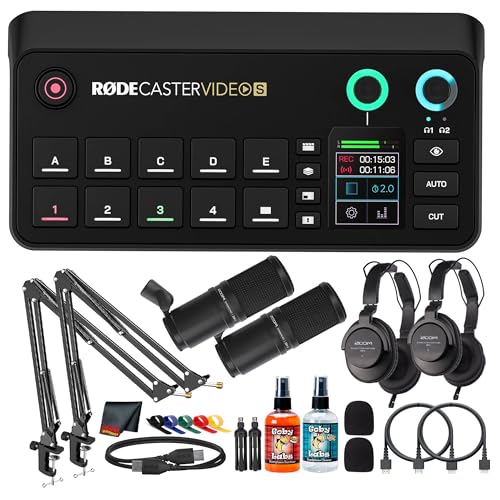
- Up to 4 video sources with HDMI, USB-C, and NDI
- Touchscreen control with mix layers and keyers
- Streams over Wi-Fi 6 or Ethernet with recording support
Best For: Compact podcast studios and solo creators
ISO Recording Streaming Switcher
Blackmagic ATEM Mini Pro ISO Bundle

- Records up to 5 isolated H.264 streams
- 4 HDMI inputs with multiview and keyers
- Built-in audio mixing and USB-C webcam output
Best For: Podcasters who want ISO recording for smoother post-production
All-in-One Podcast Switcher Bundle

- 4-source 1080p60 switching with NDI support
- Built-in audio mixing with Revolution Preamps
- Streams via Wi‑Fi 6 or Ethernet and records locally
Best For: Podcasters who want one compact console for video and audio
Multi-Cam Streaming Switcher

- 4-channel HDMI switching with 4K60 input support
- PTZ control with 9 recallable presets
- Built-in audio mixing plus UVC/IP streaming
Best For: Small studios that need multi-cam switching and PTZ control
All-in-One Video Podcast Switcher

- Four inputs: 3 HDMI plus 1 USB
- Five custom scenes with overlays and chroma keying
- ISO recording and direct streaming over Wi‑Fi or Ethernet
Best For: Podcast crews that want integrated switching and audio in one unit
Integrated podcast console
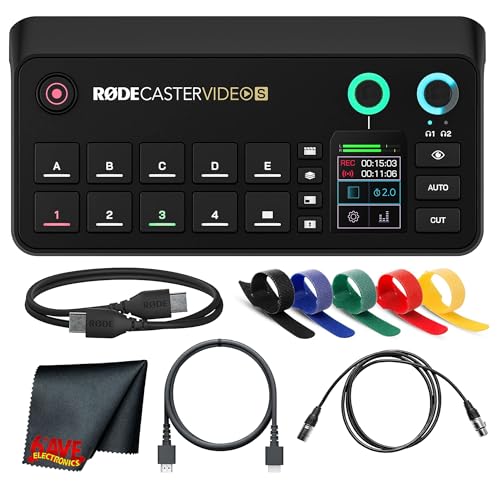
- All-in-one video and audio console
- Up to four 1080p60 sources
- Touchscreen control with studio audio
Best For: Solo podcasters and compact studios
Expandable live streaming switcher

- 4 HDMI and 4 SDI inputs
- PTZ, NDI, and web browser control
- USB recording with dual streaming support
Best For: Larger studios needing flexible multi-camera routing
Scene-first podcast switcher

- 3 HDMI plus USB or network input
- Five customizable multi-source scenes
- ISO recording and direct streaming
Best For: Creators who want polished scene-based switching
Flagship All-in-One Studio Switcher – RØDECaster Video Professional Video Switcher
If you want one of the most capable video switchers for podcast studios, the RØDE RØDECaster Video is built to handle multi-camera shows with minimal external gear. It combines up to six video inputs, custom scenes, strong onboard audio, and direct streaming/recording tools in a single desk-friendly unit.
Best For: Podcasters and studio teams that want a premium all-in-one switcher with integrated audio, scene control, and ISO recording flexibility.
Pros:
- Supports up to six sources: 4x HDMI plus 2x USB.
- Seven fully customisable multi-source scenes, plus media, overlays, chroma key, and transitions from the front panel.
- Two Neutrik combo jacks with Revolution Preamps for XLR mics or other audio sources.
- Can stream via Wi-Fi or Ethernet and record to external USB storage, including ISO recording.
Cons:
- More advanced than a basic two- or four-input switcher.
- Its full feature set is geared toward users who will actually use scenes, overlays, and auto-switching.
Overall, this is a strong fit for podcast studios that need a polished live workflow and want both video production and serious audio handling in one console.
Compact HDMI Streaming Switcher – Blackmagic ATEM Mini Pro Bundle
The Blackmagic Design ATEM Mini Pro is a straightforward pick among video switchers for podcast studios that want dependable HDMI switching without a huge learning curve. It offers four HDMI inputs, multiview monitoring, built-in audio mixing, and direct USB-C webcam output for streaming or recording workflows.
Best For: Podcast studios, educators, and small live-stream setups that need a compact HDMI switcher with multiview and simple streaming support.
Pros:
- Four HDMI inputs with 4-camera multiview.
- Includes Cut, Mix, Dip, Wipe, and DVE transitions.
- Built-in 6-input, 2-channel audio mixer.
- USB-C output can be used for webcam out and recording support.
Cons:
- No USB camera inputs listed, so it is more HDMI-focused.
- Fewer onboard production features than the larger all-in-one consoles.
For creators who mainly run HDMI cameras and want a compact switcher that covers the essentials, this bundle is a practical studio upgrade.
Compact Podcast Production Console – RØDECaster Video S Bundle
The RØDE RØDECaster Video S is aimed at podcast studios and solo creators who want video switching, scene control, and audio mixing in a more compact production console. It supports up to four 1080p60 sources, includes NDI support, and brings together touchscreen control, onboard processing, and streaming tools in one streamlined system.
Best For: Podcasters and solo creators who want a compact but feature-rich console for video, audio, and live streaming.
Pros:
- Supports up to four 1080p60 sources, including 3 HDMI and 1 USB-C input.
- Up to four NDI streams for flexible network-based workflows.
- Revolution Preamps, combo XLR/quarter-inch inputs, phantom power, and Aphex processing.
- Streams over Wi-Fi 6 or Ethernet and can record to internal storage or USB media.
Cons:
- Lower input count than the larger RØDECaster Video model.
- Best suited to compact productions rather than bigger multi-camera studios.
This bundle makes sense if you want a modern podcast desk setup with strong audio, scene layering, and easy live operation without jumping to a larger studio rig.
ISO Recording Streaming Switcher – Blackmagic ATEM Mini Pro ISO Bundle
For podcast studios that care about post-production, the Blackmagic Design ATEM Mini Pro ISO adds ISO recording to the familiar compact ATEM workflow. It keeps the same four HDMI inputs, multiview, transitions, and audio mixing, while also recording multiple H.264 streams for more flexible editing later.
Best For: Creators who want a compact HDMI switcher with isolated recording for easier post-editing.
Pros:
- Records up to 5 separate H.264 video streams in real time.
- Four HDMI inputs with 4-camera multiview.
- Includes Cut, Mix, Dip, Wipe, and DVE transitions plus keyers.
- Built-in 6-input, 2-channel audio mixer and USB-C webcam output.
Cons:
- Still limited to four HDMI inputs.
- More focused on recording and switching than on built-in all-in-one podcast features.
If your studio workflow benefits from isolated files and easier edit control, this is one of the most practical video switchers for podcast studios in the compact HDMI category.
All-in-One Podcast Switcher Bundle – RODECaster Video S Bundle
The RODE RODECaster Video S bundle is built for creators looking for video switchers for podcast studios that also keep audio under control. It combines switching, scene building, and onboard audio mixing in a compact console, so solo hosts and small teams can manage live production without a pile of extra gear.
Best For: Podcasters and solo creators who want an all-in-one video and audio workflow in one streamlined box.
Pros:
- Supports up to four 1080p60 sources, plus up to four NDI streams
- Built-in audio tools include Revolution Preamps, phantom power, and Aphex processing
- Offers scene layers, chroma keyers, downstream keyers, and dual media players
- Can stream over Wi‑Fi 6 or Ethernet and record to internal storage or USB media
Cons:
- Best suited to 1080p workflows rather than higher-resolution switching
- More advanced than a basic mixer, so setup may take some learning
As a podcast studio switcher, this RODECaster stands out for combining video control and serious audio features in a single console. If you want fewer boxes, faster scene changes, and clean integrated sound, it is a strong fit for a polished studio-style setup.
Multi-Cam Streaming Switcher – FoMaKo KC602 4K Mixer
The FoMaKo KC602 is a practical pick in video switchers for podcast studios when you need multi-camera control, live streaming, and audio inputs in one unit. Its 4-channel HDMI design, built-in screen, and PTZ support make it useful for small studio productions that want straightforward hands-on operation.
Best For: Podcast studios, live streamers, and small production teams that want affordable multi-camera switching with PTZ control.
Pros:
- 4K60 input with 1080p60 output and low-latency signal processing
- Controls up to 4 PTZ cameras and stores 9 presets
- Includes UVC streaming, IP streaming, and USB recording options
- Offers XLR balanced audio input, phantom power, EQ, and monitoring
Cons:
- Output recording is limited to 1080p60
- More complex than a simple switcher, especially if you do not need PTZ control
The KC602 is geared toward creators who want lots of connectivity and control in a compact format. If your podcast studio needs camera switching, streaming flexibility, and built-in audio mixing, it delivers a lot of functionality for the category.
All-in-One Video Podcast Switcher – RØDECaster Video S
The RØDE RØDECaster Video S is designed for video switchers for podcast studios that need a clean all-in-one workflow. It handles four video inputs, multi-source scenes, and built-in audio interfacing, making it a strong option for podcasters who want front-panel control and flexible live production features.
Best For: Podcast teams and creators who want a dedicated video switcher with integrated audio and easy scene control.
Pros:
- Switches up to four sources: 3 HDMI inputs and 1 USB input
- Supports five custom multi-source scenes, overlays, transitions, and chroma keying
- Includes two Neutrik combo jacks with Revolution Preamps for XLR microphones and other sources
- Streams over Wi‑Fi or Ethernet and records directly to external USB storage, including ISO recording
Cons:
- Limited to 1080p60 rather than 4K switching
- Best value comes when you plan to use both the video and audio features
For podcast studios, this model is especially appealing if you want switching, scene creation, and audio interfacing in one device. It is built for a streamlined production setup where live control and post-production flexibility both matter.
Integrated podcast console – RODECaster Video S
If you want video switchers for podcast studios that reduce rack clutter, the RODECaster Video S is built as a compact all-in-one console for switching, audio mixing, and camera control. It suits creators who want an integrated workflow for live scenes, overlays, and clean sound without adding a stack of extra boxes.
Best For: Solo podcasters and small studios that want a streamlined video and audio production hub.
Pros:
- Combines video switching, audio mixing, and USB connectivity in one unit.
- Supports up to four 1080p60 sources, including HDMI, USB-C, and NDI inputs.
- Includes touchscreen control, rotary encoder, mix effect layers, chroma keying, and dual media players.
- Offers Revolution Preamps, phantom power, and Aphex processing for studio-grade audio.
Cons:
- Limited to 1080p60 sources in the supplied notes.
- Best suited to streamlined productions rather than large input-heavy setups.
Overall, this is a strong fit if you want a podcast-focused production console that keeps switching and audio management under one roof. The built-in streaming, recording, and control options make it especially appealing for creators who value simplicity and speed.
Expandable live streaming switcher – Tenveo PC500 4K switcher
For video switchers for podcast studios that need more inputs and more routing flexibility, the Tenveo PC500 is positioned as a professional live streaming mixer with HDMI, SDI, PTZ, and NDI support. It is a practical option when a podcast setup also needs multi-camera production, real-time monitoring, recording, and web-based control.
Best For: Larger podcast studios and production teams that want flexible camera inputs and live streaming tools.
Pros:
- Accepts 4 HDMI inputs, 4 SDI inputs, and a USB input with NDI support.
- Supports PTZ camera control, preset positions, AI tracking, and cruise tracks.
- Can stream via UVC and IP protocols including SRT, RTMP, RTSP, and NDI.
- Includes USB recording, dual recording options, and customizable outputs.
Cons:
- More complex than a simple podcast-only switcher.
- Designed for broader live production use, so it may be more machine than a small studio needs.
This is the most expandable pick in the group and makes sense if your podcast studio also handles live broadcasts or multi-camera shows. The mix of SDI, HDMI, PTZ, and network streaming support gives it room to grow with a production workflow.
Scene-first podcast switcher – RØDECaster Video Core
The RØDECaster Video Core is aimed at podcast studios that want simple multi-camera switching with scene-based control instead of a traditional hardware-only workflow. It combines HDMI inputs, USB or network input support, overlays, transitions, and integrated audio preamps in a compact production console.
Best For: Podcast creators who want custom scenes, automatic switching, and direct streaming control.
Pros:
- Switches up to four sources with 3 HDMI inputs plus USB or network input.
- Supports five customizable multi-source scenes with transitions and real-time preview.
- Includes two Neutrik combo jacks with Revolution Preamps for clean audio capture.
- Offers auto-switching, chroma keying, media playback, and ISO recording.
Cons:
- Limited to 1080p video in the supplied notes.
- Only three HDMI inputs are specified, so it is less input-heavy than larger switchers.
This model is a good middle ground for podcast studios that want polished scene control without overcomplicating the setup. Its mix of automatic switching, streaming, and recording features makes it practical for shows that need both speed and polish.
How We Picked the Best Video Switchers for Podcast Studios
We focused on practical features that matter in real podcast workflows: camera input count, HDMI and USB compatibility, audio integration, ease of switching, livestream support, and how well each unit fits solo hosts or small teams. We also looked for options that balance simplicity with enough room to grow.
Quick Comparison
If you want the simplest setup, entry-level HDMI switchers are usually the easiest path. If you need tighter control over audio and multi-camera scenes, all-in-one production consoles offer a cleaner workflow. For hybrid studios, look for models that combine USB connectivity, scene memory, and reliable 1080p or 4K input support.
Key Buying Factors for Video Switchers for Podcast Studios
Inputs and Camera Expansion
Count your current cameras, then add one more if you plan to expand. A 3- or 4-input unit works for many podcasts, while larger studios may want extra HDMI or SDI options.
Audio Control
For Video Switchers for Podcast Studios, integrated audio mixing can save time and reduce gear clutter. If you already use an external mixer, make sure the switcher can fit into that workflow cleanly.
Streaming and Recording Workflow
Some switchers are built for direct livestreaming, while others are better for recording and post-production. If you edit heavily, features like ISO recording or scene recall can be especially useful.
Resolution and Output
Most podcast studios will be well served by 1080p60, which is smooth, efficient, and widely compatible. Choose 4K support only if your cameras and editing pipeline truly need it.
Who Should Buy Which Video Switchers for Podcast Studios?
Solo creators and smaller podcasts should prioritize ease of use and integrated audio. Growing shows with multiple cameras should look for flexible input options and cleaner scene management. If you produce live shows or want more advanced control, step up to a more capable all-in-one console or ISO-capable model. The best choice is the one that matches your current setup without boxing you in later.