Wall mounted touchscreen kiosks can streamline check-in, pricing, automation, and self-service without taking up valuable floor space. The best options balance display size, touch accuracy, connectivity, and durability for the job at hand.
Below, you’ll find a focused roundup of ten standout picks for commercial and smart-home use, along with a practical guide to help you compare them quickly.
Best 10 Wall Mounted Touchscreen Kiosks Picks for 2026
Retail Price Checker
JEESTON 8-inch Wall Mount Touch Screen Kiosk

- 8-inch capacitive touchscreen
- Built-in 1D/2D QR scanner
- Intel i5 with WiFi and RJ45
Best For: Retail price checks and compact self-service terminals
Smart Home Control Panel
10.1" Android 14 Wall Tablet with POE and MQTT

- Android 14 with Google Play
- POE wall-mounted smart panel
- MQTT, LED lights, and sensors
Best For: Smart home and smart building control
Industrial Touch Monitor
21.5" IP65 Wall Mount Kiosk Display
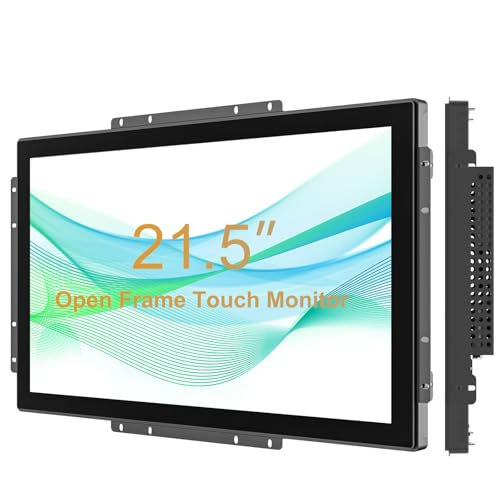
- 21.5-inch Full HD touchscreen
- IP65 surface and IK08 glass
- Works with Windows, Android, Linux
Best For: Durable public kiosks and industrial touch displays
PoE Panel PC
RAYPODO 10.1" Android 14 Wall Kiosk

- Android 14 with RK3576S
- PoE over RJ45 for cleaner installs
- Built for 24/7 fixed deployment
Best For: Commercial fixed installs and PoE kiosk setups
Rugged Wall-Mount Monitor

- Full HD 15.6-inch touch display
- IP65 surface with IK08 glass
- Wall mount and VESA ready
Best For: industrial kiosks and durable wall-mounted touch displays
Smart Home Wall Control

- PoE-powered wall mount tablet
- Android 11 with RK3566 processor
- Wi-Fi, Bluetooth, and Ethernet
Best For: smart home wall panels and compact control hubs
All-in-One Kiosk PC
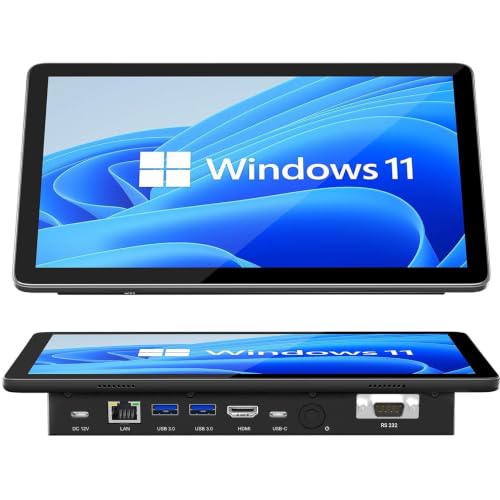
- Windows 11 Pro with Celeron N5095
- Embedded design with VESA mounting
- Dual HDMI and USB-C connectivity
Best For: embedded kiosks and control stations needing built-in PC power
Compact wall-mount option
10.1" IRXSEE IPS touchscreen monitor

- 10-point capacitive touch with HDMI/VGA/USB support
- IP65 front and aluminum alloy housing
- Includes VESA wall mount and built-in speakers
Best For: Space-saving kiosks and POS counters
Rugged open-frame pick
8" RIUIIN open-frame touchscreen monitor

- 10-point G+G capacitive touch
- IP65 front and IK09 impact protection
- Open-frame design for panel or VESA mount
Best For: Integrated kiosks and automation panels
Balanced kiosk display
10.4" IRXSEE 4:3 touchscreen monitor

- 10-point capacitive touch with HDMI/VGA/USB
- IP65 front and aluminum alloy housing
- Built-in speakers plus VESA wall mount
Best For: Traditional 4:3 kiosk and POS installations
Retail Price Checker – JEESTON 8-inch Wall Mount Touch Screen Kiosk
This wall mounted touchscreen kiosk is built for quick customer lookups in retail spaces. The 8-inch capacitive display, integrated 1D/2D scanner, and Windows 10 setup make it a practical fit for price checking, self-service inquiries, and compact POS workflows.
Best For: Retailers, convenience stores, supermarkets, and hotels that need a compact wall-mounted price checker or self-service terminal.
Pros:
- 8-inch capacitive touchscreen with 1024 × 768 resolution
- Built-in 1D/2D barcode and QR code scanner
- Intel Core i5, 8GB RAM, and 128GB storage for commercial use
- WiFi plus RJ45 Ethernet for flexible network setup
Cons:
- Smaller screen than larger kiosk displays
- Designed around fixed installation rather than portable use
Overall, this model is a strong fit if you want a space-saving kiosk with scanner integration and a familiar Windows environment. It prioritizes practical retail tasks over flashy extras, which is often exactly what these installations need.
Smart Home Control Panel – 10.1" Android 14 Wall Tablet with POE and MQTT
If you’re shopping for wall mounted touchscreen kiosks for smart home control, this Android 14 panel is aimed squarely at that use case. It combines a 10.1-inch touchscreen, POE support, MQTT compatibility, and built-in LED ambient lighting for fixed-installation control centers.
Best For: Smart home users, hotel management setups, and unattended control applications that want an Android wall panel with MQTT and LED features.
Pros:
- Android 14 with Google Play Store access
- POE-capable wall-mounted design for cleaner installs
- MQTT support with LED lights and temperature/humidity sensors
- Built-in kiosk mode for controlled use
Cons:
- No built-in battery
- No camera included
This is a feature-rich panel for people who want more than a basic display. It makes sense when you need an always-mounted Android kiosk that can integrate with home automation apps and smart building workflows.
Industrial Touch Monitor – 21.5" IP65 Wall Mount Kiosk Display
For wall mounted touchscreen kiosks that need a larger, tougher display, this 21.5-inch industrial monitor is built for demanding environments. It pairs Full HD resolution with 10-point touch, IP65 water and dirt resistance, and an IK08-rated tempered glass surface.
Best For: Industrial kiosks, public-facing displays, and wall-mounted interactive stations that need durability and a larger screen.
Pros:
- 21.5-inch Full HD 1920 × 1080 display
- 10-point capacitive touch works with gloves
- IP65-rated surface and IK08 vandal resistance
- Wide compatibility with Windows, Android, and Linux
Cons:
- Requires separate host device for computing
- Larger form factor needs more wall space
This monitor is a solid choice when durability matters as much as interactivity. Since it is a display rather than a full kiosk computer, it works best as part of a broader integrated system.
PoE Panel PC – RAYPODO 10.1" Android 14 Wall Kiosk
This wall mounted touchscreen kiosk is designed for fixed commercial installs where clean wiring and long-term reliability matter. With Android 14, PoE support, and both desktop and wall-mount options, it fits meeting rooms, reception areas, control panels, and kiosk systems.
Best For: Commercial installations that want a compact Android panel with PoE, Ethernet, and 24/7 fixed-operation support.
Pros:
- Android 14 with RK3576S processor, 4GB RAM, and 64GB ROM
- PoE support through RJ45 for one-cable power and network
- Built for 24/7 fixed deployment with no internal battery
- Supports WiFi, Bluetooth, Ethernet, and USB connectivity
Cons:
- 10.1-inch screen may be small for some signage uses
- No built-in battery for portable operation
For installers and business users, the appeal here is simple: it is purpose-built for stable wall-mounted deployments. The PoE option especially helps reduce cable clutter in commercial spaces.
Rugged Wall-Mount Monitor – 15.6" IP65 Open Frame Monitor
If you need wall mounted touchscreen kiosks for a high-traffic space, this 15.6-inch open frame monitor is built for durability and straightforward integration. It combines full HD resolution, 10-point capacitive touch, and a rugged front surface, making it a practical fit for kiosks, control points, and interactive displays where reliability matters.
Best For: Industrial kiosks, wall-mounted displays, and shared-use touch interfaces that need a rugged front panel.
Pros:
- 1920 x 1080 resolution with 10-point capacitive touch for responsive interaction.
- IP65-rated surface and IK08 tempered glass help protect against water, dirt, and vandalism.
- Supports wall mounting with 100×100 VESA holes and includes a desktop stand.
- Works with Windows, Mac OS, Android, and Linux via USB, VGA, or HDMI.
Cons:
- Open-frame design may require more planning for enclosure or flush installation.
- Primarily a monitor, so it depends on an external connected system for computing.
This is a strong choice when the priority is a tough touch display rather than an all-in-one computer. Its wide compatibility and wall-mount support make it especially useful for kiosk-style deployments that need a clean, durable front end.
Smart Home Wall Control – 10.1" PoE Android Wall Tablet
For wall mounted touchscreen kiosks centered on home automation, this 10.1-inch Android tablet offers a neat, power-over-Ethernet setup and a compact wall-mount design. It is meant to act as a central control screen for smart devices while also handling everyday tablet tasks like media playback, browsing, and app access.
Best For: Smart home wall control panels, apartment automation hubs, and space-saving touchscreen installs.
Pros:
- Wall-mount design with PoE charging helps reduce cable clutter.
- Android 11 and RK3566 processor provide a modern, smooth interface.
- Built-in Wi-Fi, Bluetooth, and Ethernet support flexible connectivity.
- Can run apps, music, video, and smart home control from one device.
Cons:
- 10.1-inch 1280 x 800 display is modest for more demanding kiosk graphics.
- Best suited to control and media use rather than heavy-duty industrial applications.
Overall, this tablet is best when you want a simple wall interface for daily control tasks instead of a rugged commercial kiosk. The PoE design and built-in networking make it especially appealing for tidy, always-on installations.
All-in-One Kiosk PC – 10.1" Win 11 Touch Panel PC
If your wall mounted touchscreen kiosks need built-in computing power, this 10.1-inch industrial panel PC is designed to do more than just display content. It combines a touchscreen, Windows 11 Pro, and a Celeron N5095 processor in an embedded form factor, making it useful for kiosks, automation stations, and control consoles.
Best For: Kiosks and embedded control stations that need an all-in-one Windows touchscreen with strong I/O.
Pros:
- Windows 11 Pro and Celeron N5095 provide a ready-to-use PC platform.
- Embedded installation with reserved VESA mounting holes suits high-traffic setups.
- Dual HDMI 2.0 output supports expanded display configurations.
- Includes multiple I/O options, including USB 3.0, USB-C, and DB9 RS232.
Cons:
- 10.1-inch 1280 x 800 screen is compact for users who want more display space.
- More computer-centric than a dedicated display, so it may be more system than some kiosks need.
This model stands out when you want a kiosk panel that already includes the computer inside the unit. Its mix of touch input, Windows software support, and broad connectivity makes it a practical choice for technical installs and automation use cases.
Compact wall-mount option – 10.1" IRXSEE IPS touchscreen monitor
If you want a wall mounted touchscreen kiosk display that stays compact while still offering strong compatibility, this 10.1-inch IRXSEE monitor is a practical fit. It works with HDMI, VGA, USB touch, and audio, and the included VESA wall mount makes installation straightforward for kiosks, POS stations, CCTV setups, and small industrial work areas.
Best For: Compact kiosks, POS counters, and wall-mounted business stations that need a 10.1-inch touchscreen with broad device support.
Pros:
- 10-point capacitive touch supports pinch-to-zoom and precise multi-touch control.
- IP65 front protection and aluminum alloy housing suit dusty or moisture-prone environments.
- Built-in dual speakers plus 3.5mm audio output add flexibility for interactive setups.
- Includes a VESA wall mount and supports both wall and arm mounting.
Cons:
- 10.1-inch 1280 x 800 resolution is modest compared with larger kiosk displays.
- Brightness is listed at 250cd/m², which may be limiting in very bright spaces.
This is a solid choice when space is tight and you need a durable touchscreen monitor with easy mounting and broad device compatibility. The feature set is well balanced for everyday kiosk and business use rather than high-end visual detail.
Rugged open-frame pick – 8" RIUIIN open-frame touchscreen monitor
For wall mounted touchscreen kiosks that need a rugged, install-ready panel, this 8-inch RIUIIN open frame monitor is built around durability and integration. It combines 10-point capacitive touch, HDMI/VGA compatibility, and IP65 front protection, making it well suited for kiosk, automation, and hospitality environments where reliability matters.
Best For: Kiosk integrators and industrial installs that need a compact open-frame touchscreen with strong front-panel protection.
Pros:
- G+G 10-point capacitive touch provides responsive, accurate interaction.
- IP65 front rating and IK09 impact resistance add durability.
- Open-frame design supports VESA or panel mount installation.
- 3-year warranty and 8-hour response support are strong for deployment projects.
Cons:
- 8-inch 1024 x 768 native resolution is functional but basic.
- Open-frame styling is best for integration, not standalone desktop use.
If your priority is a tough kiosk display that can be built into a custom enclosure or panel setup, this model is a sensible pick. The included mounting flexibility and industrial protections make it especially relevant for controlled commercial installations.
Balanced kiosk display – 10.4" IRXSEE 4:3 touchscreen monitor
This 10.4-inch IRXSEE model is a strong fit for wall mounted touchscreen kiosks that need a slightly larger display in a classic 4:3 format. It offers HDMI, VGA, USB touch, audio support, built-in speakers, and a VESA wall mount, making it versatile for POS terminals, medical setups, CCTV stations, and industrial spaces.
Best For: Businesses that want a 10.4-inch wall-mounted touchscreen with a traditional 4:3 layout and broad compatibility.
Pros:
- 10-point capacitive touch supports smooth multi-touch input.
- 4:3 1024 x 768 display suits many kiosk and POS applications.
- IP65 front protection and aluminum alloy housing improve durability.
- Includes built-in speakers and a VESA wall mount for easier setup.
Cons:
- Resolution and brightness are practical, not premium, for the size.
- 4:3 aspect ratio may not suit every modern content layout.
For buyers who want a dependable wall-mounted kiosk screen with a familiar aspect ratio and easy installation, this monitor lands in a useful middle ground. It balances durability, touch performance, and input flexibility without pushing into oversized or expensive territory.
How We Picked These Wall Mounted Touchscreen Kiosks
We focused on models that fit real-world wall-mounted use cases, including retail price checking, industrial control, home automation, and embedded business displays. Priority went to screen size, touch responsiveness, mounting flexibility, operating system support, power and network options, and protection ratings that matter in busy environments.
We also looked for signs of long-term usefulness, such as PoE support, VESA or open-frame compatibility, HDMI/USB connectivity, and panels designed for 24/7 operation.
Quick Comparison of Wall Mounted Touchscreen Kiosks
In general, smaller 8-inch and 10.1-inch units are better for compact wall installs, access points, and smart home dashboards. Mid-size 15.6-inch and 21.5-inch screens work better for customer-facing kiosks, control rooms, and shared business interfaces where readability matters more. Open-frame monitors are usually the best fit when you are integrating into custom cabinetry, kiosks, or enclosures.
Key Buying Factors for Wall Mounted Touchscreen Kiosks
Screen Size and Viewing Distance
Choose the size based on how far users will stand from the display. Smaller panels are ideal for close interaction, while larger screens improve readability and usability in public-facing spaces.
Operating System and Software Compatibility
Android tablets are often easiest for smart home, signage, and web-based apps. Windows-based panel PCs are better when you need desktop software, local control systems, or broader enterprise compatibility.
Touch Type and Durability
Capacitive multi-touch is the standard for smooth, modern interaction. If the kiosk will face dust, splashes, or heavy use, look for industrial build quality and front protection such as IP65 or IK-rated construction.
Mounting and Power
For wall installs, check VESA support, embedded mounting options, or true wall-mount form factors. PoE can simplify deployment by delivering power and data over a single cable, which is especially helpful for cleaner commercial installs.
Ports and Integration
Match the ports to your setup. HDMI, USB, RJ45 Ethernet, RS485, and relay support can all matter depending on whether you are connecting peripherals, automation hardware, or a networked control system.
Who Should Buy Which Wall Mounted Touchscreen Kiosks?
If you need a simple front-end for check-in, room control, or smart-home access, a compact Android wall tablet is usually the best choice. If you need a rugged interface for retail, factory, or public-facing use, choose an industrial touchscreen monitor or open-frame model with stronger protection and flexible integration.
If your project requires local apps, Windows software, or heavier multitasking, an embedded Windows panel PC is the most capable option. For buyers building a custom kiosk enclosure, open-frame Wall Mounted Touchscreen Kiosks usually offer the most installation freedom.