Choosing the right network storage expansion chassis can make a major difference in capacity, airflow, and long-term upgrade flexibility. The best options let you add drives or expansion cards without replacing your entire system.
In this roundup, we focus on practical picks for home labs, small businesses, and pro users who need more storage, better rack integration, or external PCIe expansion.
Best 10 Network Storage Expansion Chassis Picks for 2026
Desktop JBOD Expansion
QNAP TL-D800C 8-Bay USB-C Enclosure
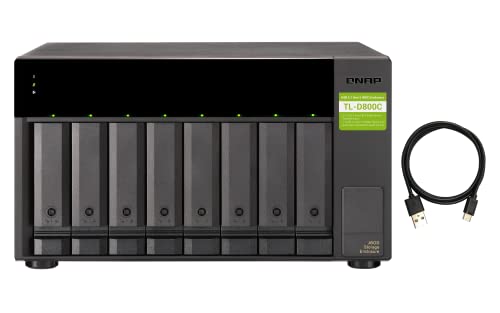
- 8-bay desktop JBOD storage enclosure
- USB 3.2 Gen 2 Type-C connectivity
- Supports QNAP NAS, Windows PCs, and servers
Best For: Desktop expansion of NAS, PC, or server storage
High-Density Rack Chassis
Rosewill RSV-H424 24-Bay 4U Server Case
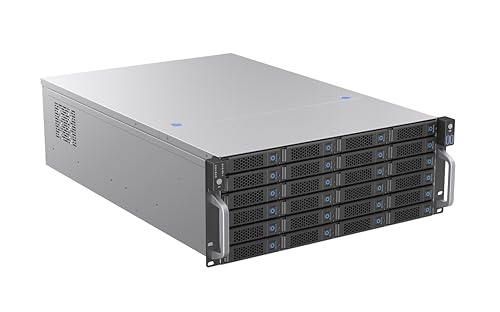
- Up to 24 hot-swap 3.5-inch bays
- 12Gbps SATA/SAS storage design
- E-ATX compatible with hot-swap PWM cooling
Best For: High-capacity rackmount storage servers
Rackmount Expansion NAS
QNAP TR-004U 4-Bay Storage Unit

- 4-bay rackmount NAS expansion unit
- USB 3.0 Type-C with RAID mode dip switch
- Lockable trays and QNAP storage monitoring support
Best For: QNAP storage expansion with rackmount convenience
General-Purpose Server Case
Rosewill RSV-R4000U 4U Rackmount Chassis
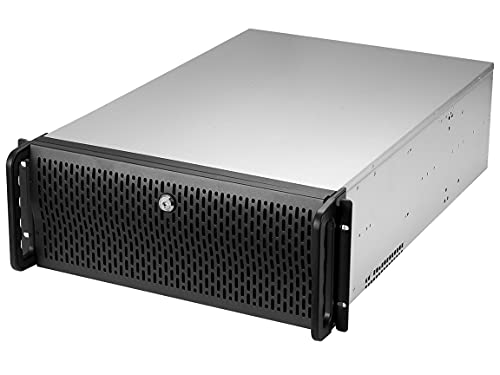
- 8 x 3.5-inch bays plus 3 x 5.25-inch bays
- ATX/CEB support with 7 PCI slots
- Pre-installed fans, front lock, and USB 3.0
Best For: Rackmount server builds needing flexible drive expansion
High-Capacity NAS Tower
SilverStone CS383 8-Bay Hot-Swappable Chassis

- Eight hot-swappable drive trays
- E-ATX / SSI-EEB motherboard support
- Dual-PSU capable with 8 expansion slots
Best For: Full-tower NAS builds that need hot-swap storage and serious expansion
Rackmount Storage Base
Rosewill RSV-Z2600U 2U Rackmount Server Case

- 2U rackmount chassis with hardware included
- Four 3.5" bays plus one 5.25" slot
- Three 80mm PWM fans and four PCI slots
Best For: Small rackmount server builds that need basic storage and expansion
Thunderbolt Expansion Box
StarTech TB31PCIEX16 Thunderbolt 3 PCIe Chassis

- Thunderbolt 3/4 external PCIe expansion
- One PCIe 3.0 x16 slot for single-width cards
- Driverless macOS and Windows support
Best For: Users who want to add one external PCIe card to a laptop or desktop
High-Capacity 3U Storage Build
RackChoice 3U Rackmount Server Chassis

- Up to 8 x 3.5-inch drives
- ATX, Micro-ATX, and Mini-ITX support
- Preinstalled front and rear fan setup
Best For: Short-depth storage builds needing lots of 3.5-inch bays
Flexible Expansion Layout
3U Rackmount Industrial Computer Case
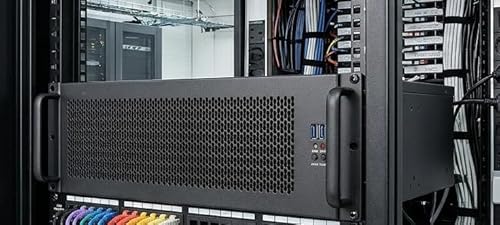
- PCIe 4.0 riser included
- Supports 360mm liquid CPU AIO
- Up to 2 vertical and 3 horizontal expansion slots
Best For: Compact rack builds needing flexible PCIe and cooling support
Compact 4U Rack Storage
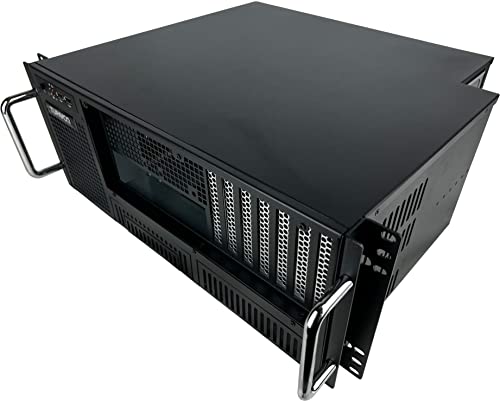
- 7 full-height expansion slots
- 8 bays with 6 x 3.5-inch positions
- Front-access PCI and I/O layout
Best For: Rugged 4U rack builds that need easy access and expansion
Desktop JBOD Expansion – QNAP TL-D800C 8-Bay USB-C Enclosure
QNAP TL-D800C 8 Bay Desktop JBOD Storage Enclosure | USB 3.2 Gen 2 Type-C Connectivity
Check Price On AmazonIf you need a straightforward network storage expansion chassis for a QNAP NAS, Windows computer, or server, the TL-D800C offers 8-bay JBOD capacity in a compact desktop enclosure. Its USB 3.2 Gen 2 Type-C connection is built for fast external storage expansion without requiring a complicated rack setup.
Best For: Users who want a simple 8-bay desktop expansion unit for NAS, PC, or server storage growth.
Pros:
- 8 x 3.5-inch SATA bays for high-capacity diskless expansion
- USB 3.2 Gen 2 Type-C connectivity for modern systems
- Works with QNAP NAS, Windows computers, desktops, laptops, and servers
- Includes power supply, cable, tray key, and drive screws
Cons:
- Diskless enclosure, so drives must be purchased separately
- Desktop tabletop design is not rackmount
- Limited to one USB Type-C host connection
The TL-D800C is a practical pick when you want a large-capacity external expansion chassis with simple setup and broad device support. It fits best in environments that value easy scaling over internal installation complexity.
High-Density Rack Chassis – Rosewill RSV-H424 24-Bay 4U Server Case
For builders who need a network storage expansion chassis with serious bay count, the RSV-H424 packs up to 24 x 3.5-inch hot-swap SATA/SAS drives into a 4U rackmount design. It is aimed at dense storage servers where E-ATX compatibility, strong airflow, and serviceability matter.
Best For: Rackmount storage servers that need maximum drive density and enterprise-style cooling.
Pros:
- Supports up to 24 hot-swap 3.5-inch drives
- 12Gbps SATA/SAS backplane capability for high-bandwidth storage builds
- E-ATX and SSI-EEB motherboard compatibility for large server configurations
- 3 hot-swap 120x38mm PWM fans and support for 2 x 2U redundant PSU
Cons:
- Large 4U chassis requires rack space and heavier handling
- Built for server hardware, so it is overkill for basic home storage needs
- Drives, motherboard, and power supplies are not included
This chassis makes sense when storage density and serviceable cooling are more important than compact size. It is a strong foundation for a high-capacity rack server built around expansion and uptime.
Rackmount Expansion NAS – QNAP TR-004U 4-Bay Storage Unit
QNAP TR-004U 4 Bay Rackmount NAS Expansion - Optional Use as a Direct-Attached Storage Device
Check Price On AmazonThe TR-004U is a practical network storage expansion chassis for users who want to add drive space to a QNAP NAS or use a direct-attached storage device. Its rackmount form factor, USB 3.0 Type-C port, and RAID management options make it a flexible fit for small-to-mid storage expansions.
Best For: QNAP users and rack setups that need a 4-bay expansion unit with RAID flexibility.
Pros:
- 4-bay rackmount enclosure for SATA drive expansion
- USB 3.0 Type-C connectivity for external attachment
- Supports hardware control and software control RAID modes via dip switch
- Lockable drive trays help prevent accidental removal
Cons:
- Limited to four drives
- Assembly is required
- Primarily designed for QNAP NAS management and integration
For buyers who want a compact expansion chassis with RAID support and rackmount convenience, the TR-004U is a focused solution. It is especially useful when you want storage growth without moving to a full server chassis.
General-Purpose Server Case – Rosewill RSV-R4000U 4U Rackmount Chassis
If you need a network storage expansion chassis-style server case with room for drives and add-in hardware, the RSV-R4000U offers 8 internal 3.5-inch bays, 3 additional 5.25-inch device bays, and ATX/CEB compatibility. It is designed as a roomy rackmount platform for storage builds that still need expansion slots and front-panel convenience.
Best For: Users building a rackmount server or storage system that needs flexible drive and device expansion.
Pros:
- 8 internal 3.5-inch HDD bays plus 3 x 5.25-inch device bays
- ATX and CEB motherboard compatibility with 7 PCI expansion slots
- 4 pre-installed fans for airflow and cooling support
- Front panel lock, LED indicators, and 2 x USB 3.0 ports
Cons:
- Not a dedicated external JBOD enclosure
- Only 8 internal drive bays, so it is smaller than high-density storage chassis options
- Requires full server build components rather than plug-and-play setup
The RSV-R4000U is a versatile rack case when you want storage expansion and standard server chassis flexibility in one enclosure. It suits builders who need drive capacity, expansion room, and front-panel usability in a 4U form factor.
High-Capacity NAS Tower – SilverStone CS383 8-Bay Hot-Swappable Chassis
Silverstone Technology CS383 8-Bay hot-swappable high Performance Full Tower NAS Chassis, SST-CS383
Check Price On AmazonIf you want a network storage expansion chassis that can grow with a serious home lab or small server setup, the SilverStone CS383 is built around space and flexibility. It supports E-ATX and SSI-EEB motherboards, eight hot-swappable drive trays, and room for large cooling hardware, making it a strong fit for storage-heavy builds.
Best For: Users who need a full-tower NAS chassis with hot-swap bays, broad motherboard support, and room for high-end expansion.
Pros:
- Eight hot-swappable 3.5″/2.5″ drive trays with SAS-12G and SATA-6G support
- Supports up to 8 expansion slots and graphics cards or adapter cards up to 340mm
- Fits up to 420mm radiators or 186mm tall air coolers
- Dual-PSU capable and can add up to 4 more 5.25″ bays
Cons:
- Large full-tower footprint will not suit compact spaces
- Designed for advanced builds, so it may be more chassis than a basic NAS user needs
Overall, the CS383 is a purpose-built enclosure for expansion-focused storage builds where drive access, motherboard compatibility, and cooling headroom matter more than size. It is a practical choice when your network storage expansion chassis needs to handle both disks and add-in hardware.
Rackmount Storage Base – Rosewill RSV-Z2600U 2U Rackmount Server Case
The Rosewill RSV-Z2600U is a straightforward network storage expansion chassis for rackmount environments that need dependable drive and card support in a compact 2U footprint. With four internal 3.5″ bays, one 5.25″ slot, and four PCI slots, it gives you enough room to build out a modest server without unnecessary complexity.
Best For: Rack-mounted server or storage builds that need a compact 2U chassis with basic expansion.
Pros:
- 2U rackmount design with included mounting hardware
- Four internal 3.5″ bays plus one 5.25″ device slot
- Four PCI slots and Micro-ATX support for expansion
- Three pre-installed 80mm PWM fans for airflow
Cons:
- Only supports Micro-ATX motherboards
- Drive capacity is limited compared with larger NAS chassis
If you need an affordable, rack-ready enclosure for a smaller storage or server build, this Rosewill chassis covers the essentials well. It is best viewed as a practical network storage expansion chassis for users who value rack compatibility and simple cooling over maximum drive density.
Thunderbolt Expansion Box – StarTech TB31PCIEX16 Thunderbolt 3 PCIe Chassis
For users who need to add a PCIe card to a laptop or desktop, this StarTech Thunderbolt 3 PCIe expansion chassis offers a practical external expansion path. It provides one PCIe 3.0 x16 slot over Thunderbolt 3/4, supports up to 40Gbps bandwidth, and is meant for single-width cards rather than graphics cards.
Best For: Laptops and desktops that need external PCIe expansion for capture, networking, or storage cards.
Pros:
- One external PCIe 3.0 x16 slot over Thunderbolt 3/4
- Supports single-width cards up to 8 inches long
- Driverless compatibility with macOS and Windows
- Built-in fan, daisy-chain support, and included Thunderbolt cable
Cons:
- Does not support GPU graphics cards
- Only one PCIe slot limits expansion density
This is a focused solution rather than a general-purpose enclosure, but that makes it useful when you only need one high-value add-in card outside the case. As a network storage expansion chassis, it makes sense for external fiber, Ethernet, or NVMe adapter use where Thunderbolt connectivity is already part of the system.
High-Capacity 3U Storage Build – RackChoice 3U Rackmount Server Chassis
If you want a network storage expansion chassis with lots of physical drive capacity, this 3U RackChoice enclosure is built around storage density first. It supports ATX, Micro-ATX, and Mini-ITX boards, with room for up to 8 x 3.5-inch drives or a mixed 6 x 3.5-inch plus 2 x 2.5-inch layout, making it a practical fit for compact server and NAS-style builds.
Best For: Builders who want a short-depth rackmount chassis with strong 3.5-inch drive capacity and flexible motherboard support.
Pros:
- Supports up to 8 x 3.5-inch drives, or a mixed 6 x 3.5-inch + 2 x 2.5-inch layout
- Includes front 2 x 120mm and 1 x 80mm fans, plus 2 x 60mm rear fans pre-installed
- Works with standard ATX or SFX power supplies using the included bracket
- Fits ATX, Micro-ATX, and Mini-ITX motherboards in a 3U rackmount format
Cons:
- An ATX board can sit partly under the PSU, which limits access to some components
- The PSU occupies two PCI slot spaces
- GPU clearance is limited unless HDD brackets are removed
This is a straightforward storage-focused chassis for users who need more bays than a typical tower can offer. The tradeoff is tighter internal access, but the preinstalled fan setup and flexible drive layout make it a strong foundation for a compact network storage expansion chassis.
Flexible Expansion Layout – 3U Rackmount Industrial Computer Case
For a network storage expansion chassis that needs a more specialized expansion layout, this 3U IPCHASSIS case stands out with its multi-directional PCIe design. It supports ATX, CEB, MicroATX, and Mini ITX boards, includes a PCIe 4.0 riser cable for vertical GPU mounting, and is built to accommodate a 360mm liquid CPU AIO.
Best For: Builders who need flexible PCIe placement, SFX power support, and liquid-cooling compatibility in a 3U rack case.
Pros:
- Includes a PCIe 4.0 riser cable for stable vertical GPU mounting
- Supports up to 2 vertical full-height and 3 horizontal full-height expansion slots
- Designed for 360mm liquid CPU AIO cooling
- Tailored for SFX power supplies to improve airflow and cable management space
Cons:
- Storage bay capacity is not emphasized in the supplied specs
- Best suited to builds that can use the included PCIe layout rather than standard slot-heavy configurations
- Front I/O is useful, but the chassis is more expansion-focused than drive-dense
If your build prioritizes PCIe flexibility and thermal headroom over maximum drive count, this chassis makes sense. It is a strong option for a compact rack system that needs modern expansion support alongside network storage expansion chassis duties.
Compact 4U Rack Storage – Tupavco TP1842 Server Chassis
This 4U Tupavco chassis is a practical pick when you want a network storage expansion chassis with easier front access and a bit more room than a 3U case. It supports ATX, Micro ATX, and Mini-ITX motherboards, offers 7 full-height expansion slots, and includes eight drive bays split across 2 x 5.25-inch and 6 x 3.5-inch positions.
Best For: Buyers who want a rugged 4U rackmount case with accessible expansion slots and solid drive capacity.
Pros:
- Front-access design makes PCI card ports and I/O components easier to reach
- Includes 7 full-height expansion slots and 8 total drive bays
- Ships with 1 x 120mm and 2 x 80mm fans installed
- Built from heavy-duty SGCC steel with aluminum handles
Cons:
- At 15 inches deep, it is not the shortest rack case in this group
- PSU is not included
- Drive layout is split between 5.25-inch and 3.5-inch bays rather than all dedicated storage bays
For a rack system that balances storage, expansion, and serviceability, this model is easy to evaluate. The front-access design and rugged build make it well suited to a dependable network storage expansion chassis that may also need room for add-in cards.
How We Picked These Network Storage Expansion Chassis
We focused on chassis that offer real expansion value, not just empty bays. That means prioritizing drive count, connectivity, cooling quality, form factor compatibility, and the ability to fit common upgrade paths such as SATA, SAS, USB, Thunderbolt, or PCIe expansion. We also looked at ease of installation and whether the chassis makes sense for a desktop, rackmount, or workstation setup.
Quick Comparison
The lineup covers three main use cases: drive expansion enclosures for attaching more storage to an existing system, rackmount server chassis for building dense storage servers, and PCIe expansion chassis for adding cards to laptops or compact systems. If you need simple external storage, a direct-attached JBOD-style unit is usually the easiest fit. If you want to build a full storage box, a rackmount chassis with strong cooling and multiple bays is the better route.
Key Buying Factors for Network Storage Expansion Chassis
Drive Capacity and Drive Type
Start with the number and type of bays you need. Larger 3.5-inch bays are ideal for bulk storage, while mixed 3.5-inch and 2.5-inch support adds flexibility for SSDs and cache drives. Make sure the chassis supports the interface you plan to use, especially SATA and SAS for storage-focused builds.
Connectivity and Expansion Method
For external storage expansion, USB 3.2 Gen 2 and Thunderbolt are the most relevant connections. Thunderbolt is generally better for high-bandwidth workflows and external PCIe use, while USB-based units are simpler and often more affordable. If you are building a server, internal backplane layout and PSU support matter more than external port count.
Cooling, Noise, and Physical Size
Storage chassis can generate a lot of heat, especially when packed with mechanical drives. Look for enough fan mounts, good front-to-back airflow, and a chassis depth that matches your rack or desk space. Compact cases are easier to place, but deeper units often provide better drive and cable clearance.
Expandability and Platform Fit
Some users need a pure storage box, while others need PCIe slots for networking, capture cards, or HBA adapters. Check compatibility with your motherboard size, power supply type, and any hot-swap or backplane features before buying.
Who Should Buy Which Network Storage Expansion Chassis?
If you want easy external drive expansion, choose a USB or Thunderbolt-based option. If you are building a high-capacity server, a multi-bay rackmount chassis is usually the better fit. If your goal is to add internal cards to a laptop or small desktop, a PCIe expansion chassis is the most practical choice. For most buyers, the right Network Storage Expansion Chassis is the one that matches both your storage target and your cooling needs, not just the highest bay count.