Need a fast, stand-alone way to clone drives and wipe data safely? The best duplicators can save time for IT teams, refurbishers, and service shops.
This roundup focuses on models that combine dependable duplication with secure erase options, from basic 1:1 units to higher-capacity bay systems.
Best 10 Hard Drive Duplicators with Secure Erase Picks for 2026
Versatile M.2 + SATA Pick
StarTech M.2/SATA Duplicator & Eraser

- Handles M.2 NVMe, M.2 SATA, and 2.5/3.5-inch SATA
- Secure Erase, Full Erase, Quick Erase, and HPA modes
- Standalone operation with OSD and tool-less design
Best For: One-box cloning and sanitizing across mixed drive types
Simple High-Speed SATA Choice
Systor 150MB/s Standalone Duplicator

- Standalone 1:1 copy and erase with no PC needed
- Supports 2.5-inch SSDs and 3.5-inch SATA HDDs
- Up to 150MB/s with DoD 5220.22-M sanitization
Best For: Straightforward SATA cloning and sanitizing at a good pace
Dedicated SATA Wipe Tool
StarTech Single-Bay SATA Eraser

- Standalone sanitizer for 2.5/3.5-inch SATA drives
- Secure, Enhanced Secure, and Cryptographic Erase modes
- Supports 4Kn drives plus LCD and RS232
Best For: Dedicated SATA data destruction and compliance-focused wiping
Entry-Level SATA Option
Systor 90MB/s Standalone Duplicator

- Standalone 1:1 duplication and erase
- Works with 2.5-inch SSDs and 3.5-inch SATA HDDs
- DoD 5220.22-M sanitization support
Best For: Basic SATA cloning and wiping on a tighter budget
Dual-Bay Duplicator Dock

- Offline cloning for SATA HDDs and SSDs
- Also functions as a USB 3.0 docking station
- Plug-and-play, no drivers needed
Best For: Users who need a simple dual-bay cloning dock
Standalone Eraser Duplicator
Systor 1:11 HDD/SSD Duplicator
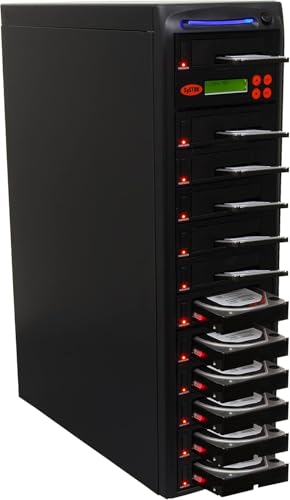
- Standalone duplicator, eraser, and sanitizer
- Supports DoD 5220.22-M sanitization
- Copies drives up to 300MB per second
Best For: IT users who need duplication plus sanitization
IT Pro Duplicator Dock
StarTech Standalone Dual Bay Cloner

- Standalone sector-by-sector cloning
- Also functions as a USB-to-SATA dock
- Supports 2.5-inch and 3.5-inch SATA drives
Best For: IT professionals needing a versatile cloner dock
Standalone 1-to-2 Duplicator
Vinpower HDDMINI 1-to-2 Clone Duplicator

- No-PC standalone operation
- Smart Copy, Raw Mode, and Read Error Skip
- Secure erase with DoD-style wiping
Best For: Portable SATA cloning and secure erasing
IT-Grade 1:1 Cloner & Sanitizer

- 1:1 standalone SATA duplicator
- 4 erase modes incl. Secure Erase and 3-pass overwrite
- LCD menu with Copy & Compare verification
Best For: IT deployment, recovery, and drive sanitizing
4-Bay Docking Cloner & Wiper
StarTech SATDOCK4U3RE Multi-Drive Sanitizer

- 4-bay standalone cloning and erasing
- Secure Erase with NIST SP 800-88 Purge
- Also works as USB 3.0/eSATA docking station
Best For: People who want cloning, erasing, and drive docking in one
Versatile M.2 + SATA Pick – StarTech M.2/SATA Duplicator & Eraser
For buyers comparing hard drive duplicators with secure erase, this StarTech unit stands out because it handles both M.2 NVMe/M.2 SATA and 2.5/3.5-inch SATA drives in one standalone box. It supports multiple duplication and wipe modes, so it is a practical choice when you need cloning and sanitizing without relying on PC software.
Best For: IT teams and technicians who need one tool for M.2 and SATA duplication plus compliant secure erasure.
Pros:
- Supports M.2 NVMe, M.2 SATA, and 2.5/3.5-inch SATA drives
- Offers Quick Erase, Full Erase, Secure Erase, and adjustable HPA modes
- Meets NIST SP 800-88 Rev 1 and references DoD 5220.22-M support
- Standalone operation with on-screen display and tool-less design
Cons:
- Uses a 1-to-1 duplicator format, so it is not for multi-drive bulk cloning
- Best fit is limited to the supported M.2 and SATA drive types
This is the most versatile option here if you need both cloning and secure erasure across newer M.2 and standard SATA drives. The feature set is geared toward managed workflows, especially where sanitizer settings and compatibility matter.
Simple High-Speed SATA Choice – Systor 150MB/s Standalone Duplicator
If you want hard drive duplicators with secure erase in a straightforward standalone design, this Systor model is built for simple 1:1 copying and sanitization. It supports 2.5-inch SSDs and 3.5-inch SATA hard drives, and it runs without a computer or software.
Best For: Users who want a no-PC standalone duplicator and eraser for common 2.5-inch and 3.5-inch SATA drives.
Pros:
- Standalone operation with no computer or software required
- Supports both 2.5-inch SSDs and 3.5-inch SATA hard drives
- Copies data-only or whole drives at up to 150MB/s
- Can erase drives and is compliant to DoD 5220.22-M sanitization
Cons:
- SATA-focused design, so it is not for M.2 or NVMe drives
- Fewer advanced erase options are listed than on higher-end sanitizers
This is a practical pick if your workflow centers on standard SATA media and you value speed plus simplicity. It is less feature-rich than some premium sanitizers, but it covers the core duplication and erase tasks well.
Dedicated SATA Wipe Tool – StarTech Single-Bay SATA Eraser
Among hard drive duplicators with secure erase, this StarTech model is more of a dedicated sanitizer than a copier. It works as a standalone 2.5/3.5-inch SATA eraser with multiple wipe modes, including Secure and Enhanced Secure Erase, plus support for 4Kn drives.
Best For: IT professionals who need a dedicated SATA drive sanitizer with multiple erase standards and 4Kn support.
Pros:
- Standalone eraser with no computer required
- Supports 2.5-inch and 3.5-inch SATA HDD/SSD drives, including 4Kn
- Includes Quick, overwrite, Custom, Secure, Enhanced Secure, and Cryptographic Erase modes
- LCD interface, RS232 port, and upgradeable firmware
Cons:
- Single-bay design means it is not a multi-drive duplicator
- Only applies to SATA drives, not M.2 or NVMe media
This is the strongest match when secure data destruction is the priority and duplication is not the main task. Its range of erase modes and 4Kn compatibility make it useful in more controlled IT environments.
Entry-Level SATA Option – Systor 90MB/s Standalone Duplicator
This Systor unit is a lower-speed but still practical option for buyers looking at hard drive duplicators with secure erase for standard SATA media. It handles 2.5-inch SSDs and 3.5-inch SATA hard drives in a standalone setup, making it useful for basic cloning and sanitization tasks.
Best For: Budget-conscious users who need a simple standalone duplicator and eraser for common SATA drives.
Pros:
- Standalone design with no computer or software required
- Supports both 2.5-inch and 3.5-inch SATA drives
- Copies data-only or whole drives
- Erase functions are compliant to DoD 5220.22-M sanitization
Cons:
- Slower than higher-speed models at up to 90MB/s
- Does not support M.2 or NVMe drives
If you only need the essentials, this model covers cloning and secure wipe duties without extra complexity. The lower transfer rate is the main tradeoff, but the standalone operation keeps it easy to deploy.
Dual-Bay Duplicator Dock – SABRENT USB 3.0 Dual Bay Dock
If you want hard drive duplicators with secure erase in a simple dock form factor, this Sabrent unit covers the basics well. It supports standalone offline cloning for 2.5-inch and 3.5-inch SATA HDDs or SSDs, and it also works as a USB 3.0 drive dock for quick access to your disks.
Best For: Users who want a dual-bay SATA dock with offline cloning for occasional drive duplication.
Pros:
- Standalone offline cloning with no software required.
- Supports 2.5-inch and 3.5-inch SATA HDDs and SSDs.
- Works as a USB 3.0 docking station for drive access.
- Plug-and-play design with no drivers needed.
Cons:
- Notes mention cloning, but not secure erase or sanitization features.
- Listed support says up to 10TB in the supplied bullets.
- Clone speed is listed as up to 60Mbps in the notes.
This is a practical pick if your main need is an easy dual-bay duplicator and dock in one unit. It is less suitable if secure erase is a must-have requirement.
Standalone Eraser Duplicator – Systor 1:11 HDD/SSD Duplicator
For buyers comparing hard drive duplicators with secure erase, this Systor model is the most directly aligned with that need. It is a standalone duplicator, eraser, and sanitizer that can copy HDDs or SSDs at up to 300MB per second while also supporting DoD 5220.22-M data sanitization.
Best For: IT users who need a standalone duplicator with erase and sanitization support.
Pros:
- Standalone operation with no computer or software required.
- Supports duplication, erasing, and sanitizing in one unit.
- Claims compliance to DoD 5220.22-M data sanitization.
- Can copy drives at up to 300MB per second.
Cons:
- The supplied notes only mention 3.5-inch form factor in the detailed specs.
- It is listed as a 1:11 duplicator, so the workflow may be more specialized than a basic dock.
- Details appear focused on SATA drives rather than broader interface support.
This is the strongest match if secure erase is central to your buying decision. It is geared more toward dedicated duplication and sanitization than casual drive docking.
IT Pro Duplicator Dock – StarTech Standalone Dual Bay Cloner
This StarTech model is a strong fit if you need hard drive duplicators with secure erase only in the broad sense of complete drive copying and recovery tooling. It is a standalone dual-bay SATA duplicator and dock that performs sector-by-sector cloning of 2.5-inch and 3.5-inch drives, including empty sectors, with no computer required.
Best For: IT professionals who want a versatile standalone cloner and docking station.
Pros:
- Standalone sector-by-sector duplication with no computer required.
- Supports 2.5-inch and 3.5-inch SATA HDDs and SSDs of any capacity.
- Also works as a USB-to-SATA docking station.
- Includes 2-year warranty and lifetime technical assistance.
Cons:
- The supplied notes do not list a secure erase or sanitization mode.
- Target disk must be equal to or larger than the source disk.
- IDE support requires a separate adapter.
It stands out as a well-rounded duplicator dock for professional use, especially when you want cloning plus drive access in one device. If secure erase is required, though, this is not the model in the group that explicitly advertises it.
Standalone 1-to-2 Duplicator – Vinpower HDDMINI 1-to-2 Clone Duplicator
If you want hard drive duplicators with secure erase in a compact standalone unit, this Vinpower model is built for straightforward SATA cloning and wiping without a PC. It supports 2.5″ and 3.5″ HDDs/SSDs, offers Smart Copy for accessible data and Raw Mode for bit-by-bit duplication, and includes Read Error Skip for drives with bad sectors.
Best For: Field use, standalone cloning, and secure erasing of SATA HDDs/SSDs.
Pros:
- Standalone operation requires no computer.
- Secure erase mode follows a DoD 5220.22-M-style process.
- Smart Copy, Raw Mode, and Read Error Skip add flexibility for recovery and cloning jobs.
- Supports 3TB+ drives for larger-capacity archives.
Cons:
- Only duplicates 1 source to 2 targets.
- Focused on SATA drives, so compatibility is narrower than multi-interface units.
- At 14 ounces, it is portable but still a dedicated hardware tool.
This is a practical pick if you need a compact duplicator that can both clone and securely erase drives in the same standalone workflow. Its strongest advantage is the combination of recovery-friendly copy modes and a secure wipe option in a portable chassis.
IT-Grade 1:1 Cloner & Sanitizer – StarTech SATDUP11 SATA Wiper
For buyers comparing hard drive duplicators with secure erase, this StarTech standalone 1:1 unit focuses on IT workflows like backup, recovery, deployment, and drive sanitizing. It supports 2.5″ and 3.5″ SATA HDDs/SSDs, includes an LCD menu, and offers multiple duplication and erase modes so you can choose between quick wiping and more thorough sanitization.
Best For: IT teams that need a standalone SATA cloner and wiper with multiple erase options.
Pros:
- Three duplication modes cover sector-by-sector, system/file, and all-partitions copying.
- Four erase modes include Quick Erase, Secure Erase, Single Overwrite, and 3-Pass Overwrite.
- LCD menu and Copy & Compare help manage and verify jobs.
- Supports 2.5″ and 3.5″ SATA drives with no OS required.
Cons:
- Designed as a 1:1 duplicator, so it does not support multi-target cloning.
- Supported interface expansion requires separate adapters.
- Built for SATA drives, not broad native multi-bay compatibility.
This is a strong fit if you want a dependable standalone tool with both duplication and secure erase choices in one box. The combination of verification, multiple wipe modes, and IT-oriented support makes it especially useful for controlled drive handling.
4-Bay Docking Cloner & Wiper – StarTech SATDOCK4U3RE Multi-Drive Sanitizer
If you need hard drive duplicators with secure erase and also want a dock for everyday drive access, this 4-bay StarTech unit combines both roles. It supports standalone sector-by-sector cloning, Quick Erase and Secure Erase, and can also function as a USB 3.0 or eSATA docking station for 2.5″ and 3.5″ SATA drives, with IDE adapters included.
Best For: Users who want a 4-bay dock that can clone, erase, and serve as a working drive station.
Pros:
- Four-bay design supports cloning, erasing, and docking in one unit.
- Secure Erase uses a NIST SP 800-88 Rev 1 Purge approach.
- Includes IDE adapters for older 40-pin and 44-pin drives.
- USB 3.2 Gen 1 and eSATA host connections add flexibility.
Cons:
- Standalone cloning is limited to sector-by-sector mode.
- Target disk must be equal to or larger than the source disk.
- Some host features are optional rather than built into the core standalone workflow.
This model stands out if you want a duplicator that does more than wipe and clone by also serving as a practical dock. The extra bay count and broader compatibility make it a versatile pick for mixed storage tasks.
How We Picked the Best Hard Drive Duplicators with Secure Erase
We looked for Hard Drive Duplicators with Secure Erase that balance speed, drive support, and practical standalone operation. Priority went to models that support common SATA HDDs and SSDs, include recognized erase methods, and offer clear status feedback for easier workflows.
Quick Comparison
If you mainly clone one drive at a time, a 1:1 unit is usually the simplest and most affordable choice. Dual-bay and 1:2 systems give you more flexibility, while 1:3 and 1:11 duplicators are better for higher-volume tasks. If secure wiping is your priority, verify the erase standard and whether the unit can sanitize SSDs as well as hard drives.
Key Buying Factors for Hard Drive Duplicators with Secure Erase
Erase Method and Compliance
Look for NIST 800-88, DoD 5220.22-M, or crypto-erase support if you need documented data sanitization. For SSDs, secure erase support should be explicitly listed, since not every cloner handles flash memory equally well.
Drive Compatibility
Check support for 2.5-inch and 3.5-inch SATA drives, plus M.2 SATA or NVMe if your workflow includes newer storage types. Some units are clone-only for SATA, while others also sanitize through USB-to-SATA dock functionality.
Speed and Throughput
Higher transfer rates matter when you duplicate large capacities or many drives per day. Keep in mind that real-world speed depends on the slower drive, the erase mode, and whether the unit is cloning, copying, or wiping.
Bay Count and Workflow
A larger bay count reduces turnaround time for batch jobs. Still, a smaller standalone duplicator can be the smarter buy if you only need occasional one-to-one cloning or secure erase tasks.
Who Should Buy Which Hard Drive Duplicators with Secure Erase?
Choose a 1:1 model if you want an affordable, straightforward tool for occasional cloning and sanitizing. Pick a dual-bay system if you need more flexibility for mixed workloads. Go with a 1:3 or 1:11 duplicator when throughput matters most, such as in IT deployment, refurbishment, or data disposal environments.
For buyers comparing Hard Drive Duplicators with Secure Erase, the right choice usually comes down to three things: the erase standard you need, the drive types you handle most, and how many drives you process per session.