Under Desk PC Mount review is straightforward because the product has a narrow job and a clear set of constraints.
If your desk leg dimensions match, this mount solves a real space and protection problem without adding floor clutter.
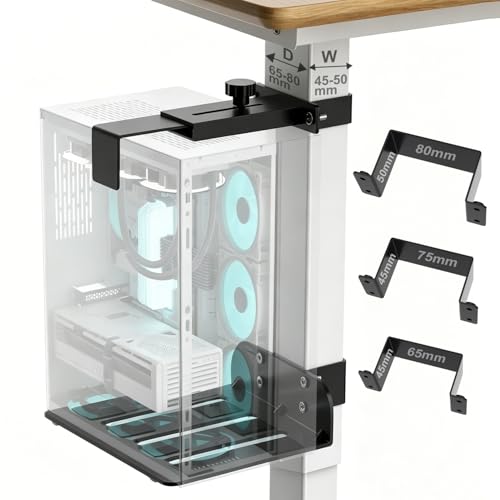
Under Desk PC Mount Review Summary
The Under Desk PC Mount is a sensible buy for people who want to lift a desktop tower off the floor, free up room, and reduce exposure to bumps, dust, and moisture.
It is best for standing desks and fixed-leg desks that match one of the listed leg sizes, and it makes the most sense when you want a no-drilling solution that still feels purposeful rather than improvised.
Its main appeal is that it is not trying to be universal in a vague way.
The listing gives specific desk-leg dimensions, a clear case-width range, and a stated weight capacity, which makes the purchase decision more concrete.
That specificity is a strength if you have the right desk; it is also the main reason some buyers should skip it.
Review Scorecard
| Category | Score | Rationale |
|---|---|---|
| Fit precision | 9/10 | The mount is designed for three fixed rectangular desk-leg sizes, so compatibility is clearly defined instead of guessed. |
| Installation ease | 8/10 | No drilling is required, and the package includes hardware and an installation guide. |
| Stability | 8/10 | The U-clamp design and top/bottom hold are built to reduce wobble and keep the tower secure. |
| Cooling and airflow | 9/10 | The open-frame layout helps keep the PC elevated and exposed to airflow rather than boxed in. |
| Protection | 8/10 | Raising the case off the floor helps reduce kick damage, dust buildup, and moisture exposure. |
| Value for the right buyer | 8/10 | Strong feature set, but only if your desk leg dimensions and PC width fall within the stated range. |
| Versatility | 5/10 | The fit is intentionally limited, so it is not the best choice for irregular desk frames or oversized cases. |
If you want a dedicated under-desk tower mount and you are willing to measure first, this is a good, practical purchase.
If you want a universal PC holder for any desk, this is the wrong kind of product.
Key Features and Specifications of Under Desk PC Mount
The listing focuses on three compatibility points: desk leg dimensions, PC case width, and supported load.
The mount is designed to fit three fixed rectangular desk-leg sizes: 2 5/8″ x 1 3/4″ (65 mm x 45 mm), 3″ x 1 3/4″ (75 mm x 45 mm), or 3 1/8″ x 2″ (80 mm x 50 mm).
That is the single most important detail because this is not a broad clamp that works on every frame shape.
For the computer tower itself, the holder is described as fitting cases from 5.7″ to 9.84″ wide.
That range is useful for buyers comparing compact towers, standard mid towers, and slightly larger cases, but it still demands a careful measurement before ordering.
The mount uses a U-bracket clamp design and does not require drilling.
The listing also says it holds up to 40 lb, which gives a decent sense of where the product sits: it is meant for ordinary desktop towers rather than oversized workstation enclosures.
Other notable listing details:
- Open-frame construction for better airflow
- Non-slip pads to help protect the case finish
- Hardware accessories and a detailed installation guide included
- Best suited for standing desks, especially with inverted legs
- Six-month guarantee period mentioned in the listing
Taken together, these features point to a very specific use case: a tower mount for a compatible desk frame where the buyer wants a cleaner setup without permanent modification.
Pros and Cons of Under Desk PC Mount
Pros
- No drilling required, which makes it easier to install and easier to remove later.
- The compatibility info is unusually specific, which reduces guesswork.
- The open design should help maintain airflow around the tower.
- Elevating the PC helps protect it from floor dust, accidental kicks, and moisture.
- The 40 lb capacity is a meaningful baseline for many everyday tower builds.
- Non-slip pads are a nice detail for case protection.
Cons
- The fit is restricted to only three desk-leg size options.
- The tower width range is useful, but still demands careful measurement.
- Buyers with standard straight desk legs or unusual frame geometry may find it unusable.
- It is aimed at a narrow audience, so the upside is high only when compatibility is exact.
- The listing does not suggest broader adjustability beyond the stated range.
The biggest takeaway is that this is a precision fit accessory, not a flexible universal bracket.
That makes it more reliable for the right desk, but more frustrating if you order first and measure later.
Who Should Buy Under Desk PC Mount?
This product is a strong fit for people who already know they want their tower off the floor and who have a compatible desk frame.
It also makes sense for anyone using a standing desk, because the elevated placement keeps the PC in a cleaner, more deliberate position and can make cable routing feel tidier.
It should also appeal to buyers who dislike drilling into furniture.
If you rent, swap desks frequently, or simply prefer reversible hardware, the clamp-on design is a practical advantage.
You should consider skipping it if your desk leg dimensions do not match the listing exactly.
The same caution applies if your tower is outside the stated width range or if your workspace uses a desk frame shape that is not one of the three supported options.
This is also not the best choice if you want a mount that can be moved between very different desks without rechecking fit.
The product is built around a measured, fixed setup, and that is both its strength and its limitation.
Installation and Fit Considerations
Measure the Desk Leg First
The mount is only as good as the measurement.
Because the listing calls out three exact rectangular leg sizes, the safest buying process is to confirm the desk leg width and thickness before placing the order.
That keeps the no-drill design from turning into a compatibility headache.
Check the Tower Width
The holder is meant for cases between 5.7″ and 9.84″ wide.
That is a practical range, but case shape matters.
A tower that technically fits by width can still feel awkward if side panels, cable runs, or front-panel clearance make the enclosure bulkier than the measurement suggests.
Think About Desk Positioning
The mount works especially well when the tower can sit close enough to the desk frame for stable support without interfering with leg movement, foot space, or cable bends.
In a standing desk setup, that placement can keep the machine accessible while still out of the way.
Evaluate the Surface Protection
The inclusion of non-slip pads is a small but meaningful detail.
They help reduce sliding and protect the case finish, which matters if you are mounting a painted or powder-coated tower that you want to keep looking clean over time.
Alternatives to Under Desk PC Mount
If your desk does not match the leg sizes, or if you want a broader range of mounting styles, there are a few credible alternatives worth considering.
HUANUO and VIVO are often the first places to look if you want a more familiar under-desk tower mount category with different adjustment styles.
Mount-It! and StarTech are worth checking when you want to compare bracket geometry, build style, or a different approach to tower positioning.
The key comparison point is compatibility.
This Under Desk PC Mount is attractive because it is specific.
A broader alternative may be better if your desk frame is less standard, but you may give up the clean certainty this model offers.
Is Under Desk PC Mount Worth It?
Yes, if your desk legs match the listed sizes and your PC falls within the stated width range.
In that case, the Under Desk PC Mount offers a focused, no-drill way to clean up the workspace, improve tower placement, and reduce the usual floor-level risks.
If you are still unsure about the fit, measure first and buy only when the numbers line up.
For the right desk, this is a practical accessory.
For the wrong desk, it is an avoidable return.