ACEMAGIC Mini PC K1 review is aimed at buyers who want a compact Windows desktop that stays simple, quiet, and desk-friendly.
It leans into practical office use, home productivity, and multi-monitor setups rather than flashy performance claims.
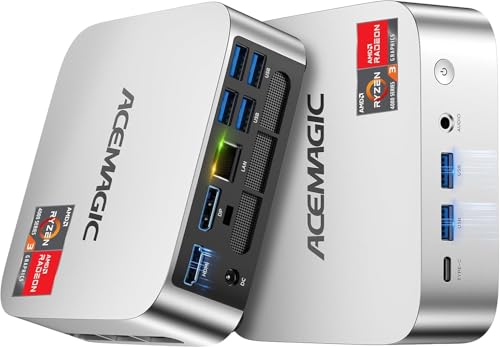
ACEMAGIC Mini PC K1 Review Summary
The ACEMAGIC Mini PC K1 is a sensible choice if you want a small Windows 11 Pro computer for everyday work, browser-heavy multitasking, streaming, and a tidy desk setup.
Its strongest appeal is the combination of a Ryzen 7330U, 16GB of DDR4 memory, a 256GB SSD, built-in power supply, and support for triple 4K display output.
This is not a gaming tower replacement or a workstation for sustained heavy creation work.
It is better understood as a compact general-purpose desktop for people who value low noise, simple cabling, and enough connectivity to run a modern office or home command center.
Review Scorecard
| Category | Score | Why it scores here |
|---|---|---|
| Everyday productivity | 8/10 | Ryzen 7330U and 16GB RAM are a strong fit for office apps, tabs, and light multitasking. |
| Desk footprint | 9/10 | The small chassis and VESA support make it easy to hide behind a monitor. |
| Noise and cooling | 8/10 | Listing emphasizes quiet operation, especially at light load, which suits workspaces. |
| Connectivity | 8/10 | Gigabit Ethernet, USB-C, HDMI, DP, audio, and multiple USB-A ports are practical. |
| Display flexibility | 9/10 | Triple-display support with 4K output is a major advantage for productivity users. |
| Storage expandability | 7/10 | The included 256GB SSD is modest, but expansion support helps long-term use. |
| Value fit | 8/10 | The feature set is well aligned to office and home use without unnecessary bulk. |
Review Scorecard Takeaway
Best for buyers who want a tidy, quiet, multi-monitor mini PC for work. The K1’s strengths line up well with home office users, admins, students, and anyone who wants a small system that can live behind a monitor and disappear into the setup.
Key Features and Specifications of ACEMAGIC Mini PC K1
The listing positions the K1 around an AMD Ryzen 7330U processor with 4 cores and 8 threads, a 2.3GHz base clock, and up to 4.3GHz boost.
ACEMAGIC also frames it as more power-efficient at 28W, which matters more for a compact office machine than raw benchmark bragging rights.
It ships with Windows 11 Pro, 16GB of DDR4 memory, and a 256GB M.2 2280 SSD.
That is enough for the usual office stack, browser tabs, cloud tools, meetings, and media playback, while leaving room to grow if you add more storage later.
Key listed hardware and usability details:
- AMD Ryzen 7330U processor
- 4 cores / 8 threads
- 28W power target
- 16GB DDR4 RAM
- 256GB M.2 2280 SSD
- Expandable storage support up to 4TB through additional SSD options
- Windows 11 Pro preinstalled
- Gigabit Ethernet
- WiFi 5 and Bluetooth 4.2
- 6x USB 3.2 Type-A ports
- 1x USB-C with DP 1.4 and 10Gbps data transfer
- 1x HDMI 2.0
- 1x DisplayPort 1.4
- 1x 3.5mm audio jack
- Built-in power supply
- VESA mount support
- Approximate compact size of 5 x 5 x 1.6 inches
Two details stand out beyond the raw specs.
First, the built-in power supply reduces cable clutter because you do not have to manage a separate external brick.
Second, the triple-display output makes this more useful than many basic mini PCs that only handle one or two screens comfortably.
Pros and Cons of ACEMAGIC Mini PC K1
Pros
- Compact and easy to place behind a monitor or in a bag for travel between workspaces.
- Quiet cooling focus should suit offices and shared rooms better than louder small desktops.
- Triple-display support is genuinely useful for productivity and monitoring setups.
- Lots of practical ports reduce the need for dongles and hubs.
- Windows 11 Pro included is a plus for users who want business-oriented features from the start.
- Built-in power supply keeps the desk cleaner.
Cons
- 256GB storage is small for users with large media libraries or many local projects.
- WiFi 5 and Bluetooth 4.2 are not the latest standards, which may matter to some buyers.
- Not aimed at demanding creative work or gaming if you want a bigger performance headroom.
- The listing leans on feature claims more than detail, so buyers should judge it as a practical office machine rather than a benchmark monster.
Who Should Buy ACEMAGIC Mini PC K1?
Buy the ACEMAGIC Mini PC K1 if you want a compact Windows desktop for everyday productivity and you care more about footprint, noise, and connectivity than raw graphics power.
It makes sense for home office users, small business setups, reception desks, student desks, admin stations, and anyone building a multi-monitor workspace.
It is also a good fit if you want a machine that can sit permanently behind a monitor with minimal cable mess.
The built-in power supply, VESA support, and small size all point toward that use case.
You should probably skip it if you need a desktop for heavy video editing, 3D work, modern gaming, or large local storage libraries without upgrades.
The base 256GB SSD is serviceable, but it is not generous, and the overall configuration is clearly oriented toward practical daily computing.
Performance and Usage Notes for ACEMAGIC Mini PC K1
Office Work and Browsing
For browser-based work, documents, spreadsheets, email, and remote meetings, the K1 has the right ingredients on paper.
The Ryzen 7330U and 16GB RAM should be enough for multitasking across typical work apps without making the system feel overbuilt for the task.
Multi-Monitor Productivity
The triple-display support is the feature that most clearly separates this mini PC from basic entry-level boxes.
If your workflow benefits from a main display, a reference screen, and a communications screen, the HDMI, DP, and USB-C video output combination is a practical advantage.
Noise, Size, and Desk Integration
ACEMAGIC emphasizes quiet cooling and a small chassis, and those are exactly the kinds of features that matter when the computer sits close to where you work.
A mini PC should disappear into the environment, not dominate it, and this one appears designed with that goal in mind.
Storage and Expansion Planning
The included 256GB SSD is fine for a light office profile, but buyers who keep large files locally should plan ahead.
The expansion support up to 4TB is useful, but it also means the base configuration is best treated as a starting point rather than a complete storage solution.
Alternatives to ACEMAGIC Mini PC K1
If you like the idea of a small Windows desktop but want to compare other lines, these are sensible Amazon search alternatives:
Beelink and MINISFORUM are the most obvious comparison points because they are widely associated with compact office and home desktop machines.
ASUS and Intel NUC searches are worth checking if you want a more established mini PC ecosystem or different chassis and port layouts.
Is ACEMAGIC Mini PC K1 Worth It?
The ACEMAGIC Mini PC K1 is worth considering if your priority is a compact, quiet, multi-monitor Windows desktop for office and home productivity.
Its value comes from the overall package: Ryzen 7330U, 16GB RAM, Windows 11 Pro, triple-display support, and a clean physical design.
It is not the right pick if you want maximum performance, large built-in storage, or a machine for demanding creative work.
But if you want a practical mini PC that should fit neatly into a desk setup and handle ordinary work with minimal fuss, the K1 makes a strong case.