LENTION 6-in-1 USB-C Hub review is about a very specific kind of convenience: turning one USB-C port into the ports many laptops no longer include.
If you need a compact desk companion for work, study, or travel, this model has a strong, practical feature set.
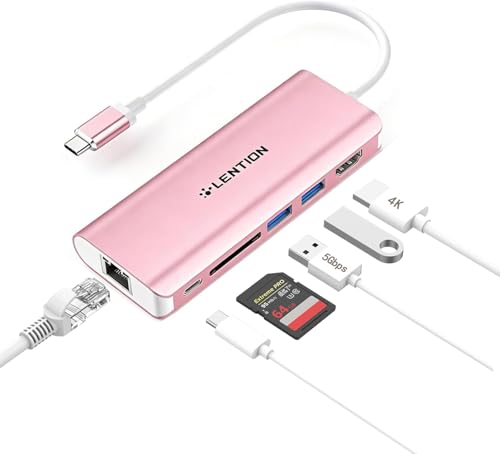
LENTION 6-in-1 USB-C Hub Review Summary
The LENTION 6-in-1 USB-C Hub makes sense for buyers who want a simple, wired, all-in-one dock for a USB-C laptop or tablet without moving into full dock territory.
Its mix of dual USB-A ports, HDMI, Ethernet, SD card support, and USB-C power delivery covers the most common daily tasks in a single adapter.
Verdict: this is a function-first hub for people who value stable connectivity over flashy extras.
It is especially appealing for remote workers, students, and anyone who regularly switches between a monitor, peripherals, wired internet, and charging.
Review Scorecard
| Category | Score | Why it earns that score |
|---|---|---|
| Port variety | 9/10 | Two USB 3.0 ports, HDMI, Ethernet, card reader, and USB-C PD cover the core use cases most buyers want. |
| Everyday usefulness | 9/10 | The layout fits common work and study setups without unnecessary complexity. |
| Display support | 8/10 | HDMI 1.4 with 4K@30Hz is useful for monitors and TVs, though it is not the highest refresh option. |
| Wired networking | 9/10 | Gigabit Ethernet is a major plus for stable home-office or classroom connections. |
| Charging flexibility | 8/10 | Pass-through USB-C charging reduces cable clutter, but it is still a hub, not a power station. |
| Compatibility breadth | 9/10 | The listing targets macOS, iPadOS, Windows, ChromeOS, and other full-function USB-C devices. |
| Value for focused buyers | 8/10 | It concentrates on the ports most people actually use rather than packing in niche extras. |
Key Features and Specifications of LENTION 6-in-1 USB-C Hub
The product data points to a compact 6-in-1 adapter built around everyday laptop expansion.
The listing emphasizes dual USB 3.0 ports, HDMI output, Ethernet, a card reader, and USB-C pass-through charging.
- Two USB 3.0 ports: the hub supports data transfer up to 5Gbps, which is useful for flash drives, keyboards, mice, and external storage.
- HDMI output: the HDMI 1.4 port supports mirror or extended display modes.
- Resolution support: the listing states 4K@30Hz and 2K@60Hz, with backward compatibility for lower resolutions.
- Ethernet: wired networking supports 10/100/1000 Mbps connections for stable internet access.
- Card reader: the SD slot works with SD, SDHC, SDXC, and MMC cards.
- Power delivery: the USB-C charging port supports pass-through charging up to 60W in the listing text.
- Compatibility: the product is positioned for MacBook Pro, MacBook Air, iMac, Surface devices with USB-C, Chromebooks, iPads, and other full-function Type-C devices.
- Design note: the model shown is the C68 Rose Gold variant, which matters if you want the finish to match a laptop or desk setup.
What stands out here is not raw novelty but balanced coverage.
This is the kind of hub that tries to make a laptop feel less constrained without adding many complications.
Pros and Cons of LENTION 6-in-1 USB-C Hub
Pros
- Covers the essentials well for office, school, and travel use.
- Gigabit Ethernet is a strong advantage for stable video calls, downloads, and shared networks.
- Two USB-A ports are still practical because many peripherals remain USB-A.
- Card reader support is helpful for photographers, content creators, and anyone moving files from cameras or memory cards.
- Compact single-cable setup reduces the number of dongles and adapters you need to carry.
Cons
- 4K output is limited to 30Hz, which is fine for productivity but less ideal for smooth motion or premium display use.
- Only two USB ports may feel limiting for users with multiple accessories.
- No extra ports beyond the basics, so power users may want a larger dock.
- USB-C charging is pass-through, not a replacement for a dedicated charger.
The pros and cons of the LENTION 6-in-1 USB-C Hub show a clear product philosophy: keep the hub small, keep the port set practical, and avoid bloating it with features that would raise cost or size without helping the typical buyer.
Who Should Buy LENTION 6-in-1 USB-C Hub?
This hub fits buyers who need a dependable daily adapter more than a workstation dock.
If your laptop has only USB-C ports and you routinely connect a monitor, Ethernet cable, keyboard, mouse, and charger, the LENTION 6-in-1 USB-C Hub makes that setup much easier.
It is a sensible choice for:
- Students who need one adapter for class, dorm, and library use.
- Remote workers who want wired internet and monitor support in a portable package.
- Travelers who prefer a single compact hub instead of multiple dongles.
- Mac, Windows, Chromebook, and iPad users with full-function USB-C support.
- Anyone using SD cards and wanting an easy way to import files.
It may not be the best pick for:
- Gamers or motion-heavy creators who care about higher refresh output.
- Users with many peripherals who need more than two USB ports.
- People wanting a full dock with multiple displays and broader expansion.
In short, this is for buyers asking whether the LENTION 6-in-1 USB-C Hub is worth it for practical everyday use.
For that audience, the answer is often yes.
Display, Networking, and Charging Performance
HDMI for Everyday Monitors
The HDMI 1.4 output is the hub’s most obvious productivity feature.
It supports 4K at 30Hz, which is adequate for spreadsheets, writing, browsing, and video playback on a secondary display.
If you mostly work in static windows and documents, that is enough.
Ethernet for Stable Work
The built-in Ethernet port is one of the strongest reasons to choose this hub over a cheaper minimalist adapter.
A wired connection is valuable in shared homes, classrooms, and offices where Wi-Fi is inconsistent or congested.
For video calls and file transfers, that stability matters more than extra novelty ports.
Power and Peripheral Balance
The USB-C charging pass-through keeps one port available while still letting you power the host device.
That matters for laptops and tablets used at a desk, because the hub is meant to stay attached while you work.
The dual USB-A ports also reduce friction for older accessories that still dominate real-world setups.
Card Access and File Transfer
The card slot broadens the hub’s usefulness beyond pure laptop expansion.
If you move photos, media, or documents from SD media, having a built-in reader avoids carrying another accessory.
It is a simple feature, but it makes the hub feel more complete for mixed office and content workflows.
Alternatives to LENTION 6-in-1 USB-C Hub
If you want a different balance of ports or a different brand ecosystem, a few common Amazon search alternatives are worth considering:
Anker and UGREEN are the most obvious comparison points if you want broadly similar multiport adapters.
Belkin is a sensible search if you prefer a more established accessory brand.
Satechi is worth looking at if you want a more design-conscious hub that still targets desk use.
The right alternative depends on whether you care most about more ports, a different finish, or a dock that better matches your specific laptop and workspace.
Is LENTION 6-in-1 USB-C Hub Worth It?
The LENTION 6-in-1 USB-C Hub is worth it if your goal is straightforward expansion, not maximum port count.
It brings together the features most people actually use: monitor output, Ethernet, card access, USB-A peripherals, and charging passthrough.
Buy it if you want a compact hub for a USB-C laptop or tablet and you value stable wired networking and general day-to-day convenience.
Skip it if you need higher-refresh display output, multiple monitor support, or a more advanced dock-style setup.
For the right buyer, this is a practical, no-nonsense USB-C hub that does its job without much fuss.