Choosing the right desktop can make a home office feel faster, quieter, and easier to manage. The best options balance speed, display support, size, and long-term value.
Below, we’ve narrowed the field to 10 picks that cover everything from compact SFF systems to all-in-one and tower desktops, so you can match the machine to your workspace and workload.
Best 10 Desktop Computers for Home Offices Picks for 2026
Space-Saving Business Pick
HP ProDesk 400 G9 SFF for Home Offices

- Small-form-factor design saves desk space
- 32GB RAM and 1TB PCIe SSD
- Dual 4K display support with Wi‑Fi
Best For: Compact home offices needing secure, dual-monitor-ready business basics
Clean All-in-One Choice
Dell 27-inch AIO for Home Offices

- 27-inch FHD IPS display with 99% sRGB
- Built-in 5MP+IR camera and dual speakers
- Stand helps keep the desk clutter-free
Best For: Users who want an all-in-one desktop with a tidy footprint and built-in video-call features
Budget Office Tower
HP Pro Tower 290 G9 for Home Offices

- 13th Gen Intel Core i3 for everyday office work
- 8GB RAM and 256GB SSD
- Includes Wi‑Fi, HDMI, VGA, keyboard, and mouse
Best For: Simple home offices that need a low-cost, ready-to-use productivity tower
Compact Power Option
ACEMAGIC M5 Mini PC for Home Offices
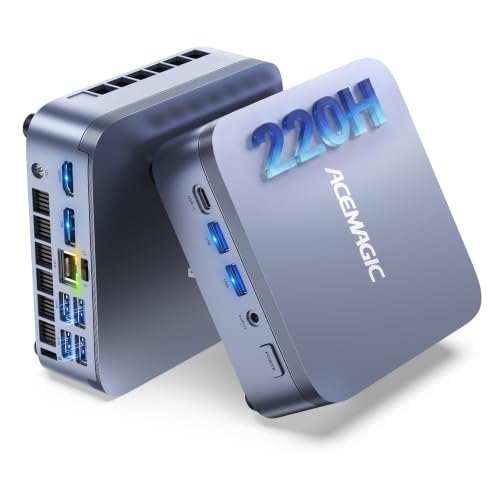
- Intel Core 5 220H for high-end multitasking
- 24GB LPDDR5 RAM with dual SSD slots
- Triple 4K display support in a tiny chassis
Best For: Space-conscious home offices that still need strong multitasking and multi-monitor support
Premium AI Tower
Dell Core Ultra 7 Home Office Desktop

- Intel Core Ultra 7-265 with built-in AI support
- Up to four FHD monitors or two 4K displays
- Tool-less entry for easier upgrades
Best For: home office users who want a fast, upgrade-friendly business desktop
Space-Saving Slim PC
Dell Core Ultra 5 Home Office Desktop

- Slim chassis fits small workspaces
- Core Ultra 5-225 with built-in AI support
- Supports up to four FHD monitors
Best For: small home offices that need a compact desktop with productivity features
Best Overall
Lenovo IdeaCentre 3 SFF for Fast Everyday Work

- 10-core Core i5-14400 for responsive performance
- 32GB RAM and 1TB SSD support heavy multitasking
- Wi-Fi 6, Bluetooth 5.1, HDMI, VGA, and USB-C
Best For: Home office users who want a fast, compact desktop with plenty of memory and storage.
Best Renewed Value
Dell Optiplex 3060 with 1TB SSD

- Core i5-8500 and Windows 11 Pro for office basics
- 32GB RAM and 1TB SSD listed in the product specs
- Built-in Wi-Fi, Bluetooth, HDMI, and DisplayPort
Best For: Budget-minded home office buyers who want a renewed Windows 11 Pro desktop with good storage and memory.
Best Bundle
Dell OptiPlex 5040 SFF with 24-Inch Monitor

- Comes with a new 24-inch FHD monitor and peripherals
- Windows 11 Pro, Wi-Fi, and Bluetooth included
- 256GB SSD for quick startup and daily office use
Best For: Buyers who want a complete home office desktop bundle with a monitor included.
Space-Saving Business Pick – HP ProDesk 400 G9 SFF for Home Offices
If you want desktop computers for home offices that stay compact without giving up everyday business features, the HP ProDesk 400 G9 SFF is a practical fit. Its small-form-factor build, dual 4K display support, and wired accessories make it easy to set up a tidy workstation for email, documents, and multitasking.
Best For: Home office users who want a compact Windows 11 Pro desktop with strong connectivity and dual-monitor support.
Pros:
- Compact SFF design helps save desk space.
- 32GB RAM and 1TB PCIe SSD support fast multitasking and quick boot times.
- Dual 4K display support plus USB-C, HDMI, DisplayPort, RJ-45, and Wi‑Fi.
- Windows 11 Pro with TPM 2.0 and HP Wolf Security adds business-focused protection.
Cons:
- Celeron G6900 processor is aimed at daily computing rather than heavy workloads.
- 90-day warranty is shorter than many office PCs.
Overall, this is a good pick if your home office priorities are space efficiency, security, and simple setup. It looks especially appealing for users who rely on multiple displays and want a dependable small desktop for routine work.
Clean All-in-One Choice – Dell 27-inch AIO for Home Offices
For desktop computers for home offices where a cleaner setup matters, this Dell 27-inch all-in-one keeps the PC and display in one unit. The FHD IPS panel, ComfortView Plus, and built-in webcam make it a convenient option for working, video calls, learning, or light everyday use.
Best For: Home office buyers who want an all-in-one with a large display, webcam, and clutter-free setup.
Pros:
- 27-inch FHD IPS display with 99% sRGB and narrow borders.
- ComfortView Plus is designed to reduce blue light during long sessions.
- 5MP+IR camera, dual Bluetooth speakers, and Dolby Atmos support.
- Innovative stand leaves space to store the keyboard underneath.
Cons:
- All-in-one design offers less flexibility than a traditional tower for future upgrades.
- Windows 11 Home is less business-focused than Pro.
This model makes sense if you value simplicity and a neat desk more than expansion options. It is a well-rounded home-office system for users who spend time on calls, content, and standard productivity tasks.
Budget Office Tower – HP Pro Tower 290 G9 for Home Offices
If you are comparing desktop computers for home offices on a tighter budget, the HP Desktop Tower 290 G9 is built around the essentials. It includes a 13th Gen Intel Core i3, wired keyboard and mouse, Wi‑Fi, and the core ports needed for standard office tasks and legacy monitor support.
Best For: Budget-minded home office users who need a straightforward tower for office apps, browsing, and document work.
Pros:
- 13th Gen Intel Core i3 handles everyday office workloads.
- 8GB RAM and 256GB SSD provide basic multitasking and quick boot times.
- HDMI, VGA, RJ-45, USB, and Wi‑Fi cover modern and legacy setups.
- Includes wired keyboard and mouse for an immediate setup.
Cons:
- 8GB RAM and 256GB SSD are modest for heavier multitasking.
- Windows 11 Home and web-based Office 365 are more basic than pro software bundles.
This is a practical choice when you want an affordable, ready-to-work tower rather than extra bells and whistles. It fits well in simple home workspaces where reliability and core productivity matter most.
Compact Power Option – ACEMAGIC M5 Mini PC for Home Offices
When you want desktop computers for home offices with a very small footprint but serious performance, the ACEMAGIC M5 Mini PC stands out. Its Intel Core 5 220H, 24GB LPDDR5 memory, dual SSD slots, and triple 4K display support make it suitable for demanding multitasking in a compact setup.
Best For: Home office users who need a tiny PC with strong multitasking, modern connectivity, and multi-monitor support.
Pros:
- Intel Core 5 220H delivers H-series class performance for heavy multitasking.
- 24GB LPDDR5 RAM and dual SSD slots support fast, responsive workflows.
- Supports three 4K displays through USB-C, DP1.4, and HDMI.
- Windows 11 Pro, Wi‑Fi 6, Bluetooth 5.2, and Gigabit Ethernet suit office use.
Cons:
- Factory-soldered memory is not upgradable.
- Storage expansion depends on the dual M.2 slots rather than a traditional internal drive bay.
This mini PC is a strong match if you want to maximize desk space without settling for entry-level speed. It is especially appealing for multi-tab workers, creators, and anyone building a clean, monitor-heavy home office.
Premium AI Tower – Dell Core Ultra 7 Home Office Desktop
If you’re comparing desktop computers for home offices, this Dell Tower Desktop is built for users who want more power, stronger multitasking, and room to grow. The Intel Core Ultra 7 processor with built-in AI support is aimed at productivity work, while the tower design and tool-less access make upgrades easier down the road.
Best For: Home office users who want a fast, upgrade-friendly desktop for business tasks and multi-monitor setups.
Pros:
- Intel Core Ultra 7-265 with built-in AI support for modern productivity tasks
- Supports up to four FHD monitors or two 4K displays
- Tool-less entry and removable side panel make upgrades simpler
- Includes TPM security and 1-year onsite service
Cons:
- Uses integrated graphics, so it is not ideal for demanding creative or gaming workloads
- Full tower size may take more desk or floor space than a slim desktop
Overall, this is a strong pick if your home office needs a business-ready desktop with modern processor features, solid security, and flexible display support. It leans more toward everyday productivity than specialized graphics performance.
Value Business Tower – HP Pro Tower 290 G9 with 2-Monitor Support
For desktop computers for home offices, this HP Pro Tower 290 G9 is a practical choice if you want a straightforward business PC with useful ports and everyday multitasking support. It combines 16GB RAM, a fast PCIe SSD plus 1TB HDD storage, and Windows 11 Pro in a package that covers core office needs well.
Best For: Home office buyers who want a budget-conscious business desktop with solid storage and wired connectivity.
Pros:
- 16GB RAM helps with multitasking
- 256GB PCIe M.2 SSD plus 1TB HDD for speed and extra storage
- Supports two monitors at 4K resolution
- Includes Wi-Fi 6, Bluetooth, HDMI, VGA, and 8 USB ports
Cons:
- Uses a 12th Gen Core i3 processor rather than a higher-end chip
- Integrated graphics limit it to basic visual workloads
This model makes sense if your home office priorities are reliability, storage, and connectivity instead of premium performance. The included keyboard and mouse also make it easy to set up right away.
Space-Saving Slim PC – Dell Core Ultra 5 Home Office Desktop
If your workspace is tight, this Dell Slim Desktop is a smart fit among desktop computers for home offices. It keeps the same modern Core Ultra platform and multi-monitor flexibility as larger models, but in a slimmer chassis that is easier to place in small offices or shared work areas.
Best For: Small home offices that need a compact desktop with strong everyday productivity features.
Pros:
- Intel Core Ultra 5-225 with built-in AI support
- Slim design is better suited to small workspaces
- Supports up to four FHD monitors or two 4K displays
- Tool-less entry and removable side panel simplify upgrades
Cons:
- Device-only style means you may need to supply your own monitor and peripherals
- Integrated Intel UHD Graphics 730 is limited for graphics-heavy use
For a home office setup where desk space matters, this is the most space-efficient option in the group without giving up useful business features. It is a practical everyday desktop with room for future upgrades.
Best Overall – Lenovo IdeaCentre 3 SFF for Fast Everyday Work
If you want one of the more capable desktop computers for home offices, this Lenovo IdeaCentre 3 SFF brings strong everyday performance in a compact tower. The 10-core Intel Core i5-14400, 32GB of RAM, and 1TB SSD make it a practical pick for multitasking, office apps, browser tabs, and storage-heavy work.
Best For: Home office users who want a fast, compact desktop with plenty of memory and storage.
Pros:
- 10-core Intel Core i5-14400 with up to 4.7 GHz turbo
- 32GB RAM and 1TB SSD for smooth multitasking and quick loads
- HDMI plus VGA, Wi-Fi 6, Bluetooth 5.1, Ethernet, and USB-C
- Includes wired keyboard and mouse for an out-of-box setup
Cons:
- Integrated Intel UHD Graphics 730 is fine for office work, not demanding creative tasks
- Uses a small-form-factor tower, so expansion needs may be more limited than larger desktops
Overall, this Lenovo stands out as a balanced home office desktop with modern connectivity and more RAM than many basic systems. It is a strong fit if you want speed, storage, and a tidy footprint in one package.
Best Renewed Value – Dell Optiplex 3060 with 1TB SSD
For shoppers comparing desktop computers for home offices on a tighter budget, this renewed Dell Optiplex 3060 focuses on the essentials. It pairs an Intel Core i5-8500, 32GB RAM, and a 1TB SSD with built-in Wi-Fi, Bluetooth, and Windows 11 Pro, making it a straightforward workstation for daily productivity.
Best For: Budget-minded home office buyers who want a renewed Windows 11 Pro desktop with good storage and memory.
Pros:
- 32GB DDR4 RAM and 1TB SSD for smooth everyday use
- Windows 11 Pro installed for a business-ready setup
- Built-in Wi-Fi and Bluetooth for flexible connectivity
- Includes DisplayPort and HDMI output for monitor hookups
Cons:
- Older Core i5-8500 processor compared with newer desktop CPUs
- Renewed unit includes a 90-day warranty
- Product details list 8GB RAM installed despite the higher-capacity specs shown elsewhere, so double-check the configuration
This Dell makes sense if your priority is a well-equipped, lower-cost office desktop rather than the newest hardware. The included wireless support and large SSD help it stay practical for routine work.
Best Bundle – Dell OptiPlex 5040 SFF with 24-Inch Monitor
If you need a ready-to-go option among desktop computers for home offices, this Dell OptiPlex 5040 bundle is appealing because it includes a new 24-inch FHD monitor, keyboard, and mouse. With an Intel Core i5, 8GB of RAM, a 256GB SSD, Wi-Fi, Bluetooth, and Windows 11 Pro, it covers the basics for everyday work.
Best For: Buyers who want a complete home office desktop bundle with a monitor included.
Pros:
- Includes a new 24-inch 1080p monitor plus keyboard and mouse
- Windows 11 Pro and Wi-Fi/Bluetooth make setup simple
- SSD storage helps keep boot and load times snappy
- HDMI and DisplayPort support common monitor connections
Cons:
- 8GB RAM is enough for basics but lighter than many higher-end office desktops
- 256GB SSD may feel limited if you store lots of files locally
- Older Core i5-6500 platform is not as fast as newer processors
This Dell bundle is a practical choice if you want to avoid shopping for a monitor separately. It is best suited to standard office tasks, web work, and general home productivity.
How We Picked the Best Desktop Computers for Home Offices
For this roundup of Desktop Computers for Home Offices, we focused on models that fit real-world work needs: reliable multitasking, solid storage, modern connectivity, and practical form factors. We also considered how well each system suits common home-office tasks like video calls, spreadsheets, browser-heavy workflows, cloud apps, and light creative work.
We gave extra weight to desktops with enough memory for smooth multitasking, SSD storage for fast boot and load times, and ports or wireless features that make it easier to connect monitors, peripherals, and home networks.
Quick Comparison
Towers usually offer the best upgrade potential and performance headroom. Small form factor desktops save space and still deliver strong everyday speed. All-in-one systems reduce cable clutter and are a good fit for simple setups. Mini PCs are best when desk space is extremely limited, while refurbished or older business desktops can offer strong value if you want more RAM and storage for less money.
Key Buying Factors for Desktop Computers for Home Offices
Performance and Multitasking
For most home-office users, a modern Intel Core i5-class processor or better and at least 16GB of RAM is a smart baseline. If you keep many tabs open, run large files, or use multiple apps at once, 32GB can provide a noticeably smoother experience.
Storage
An SSD is the priority for fast startup and responsive daily use. A 512GB drive is a good starting point for many users, while 1TB is better if you store large project files, recordings, or lots of local documents.
Size and Layout
Choose a tower if you want room to expand later. Pick a small form factor desktop if desk space is limited. An all-in-one can simplify the workspace, but it usually offers less upgrade flexibility. Mini PCs are ideal for minimal setups, but they may rely more heavily on external accessories and monitor connections.
Ports, Displays, and Connectivity
Check for the right mix of USB-A, USB-C, HDMI, and Ethernet. Dual-monitor support is especially useful for productivity, and Wi-Fi 6 or built-in wireless can help if your router is not near the desk.
Who Should Buy Which Desktop Computers for Home Offices?
If you want the best all-around work machine, choose a newer business desktop or tower with 16GB to 32GB of RAM and an SSD. If space matters most, go with a slim desktop, SFF model, or mini PC. If you want a cleaner setup with fewer cables, an all-in-one is the easiest choice. Budget shoppers can look at older refurbished systems, but they should pay close attention to storage, RAM, and whether the hardware still feels fast enough for daily use.
In short, the best Desktop Computers for Home Offices are the ones that match your workload, workspace, and upgrade plans—not just the highest specs on paper.