If you want a more natural sketching workflow, a drawing tablet with screen can make a big difference. You see your lines where you draw them, which often means faster learning and better control.
Below, we’ve rounded up 10 strong options for different budgets, desk sizes, and skill levels so you can find the right display tablet without guesswork.
Best 10 Drawing Tablet with Screen Picks for 2026
Pro-level compact pen display

- 13.3-inch fully laminated screen
- 16,384 pressure levels with PenTech 4.0
- 99% sRGB with factory calibration
Best For: Portable creative work with strong color accuracy and shortcut control
Budget-friendly starter display

- 11.6-inch FHD IPS screen
- Battery-free pen with eraser end
- 6 shortcut keys and touch bar
Best For: Beginners, students, and teachers needing a compact display
Color-rich mid-size artist display

- 15.4-inch full-laminated anti-glare screen
- 16K-pressure X3 Pro stylus
- 99% sRGB plus 96% Adobe RGB
Best For: Detail-focused artists who want color depth and quick controls
Large-format immersive display
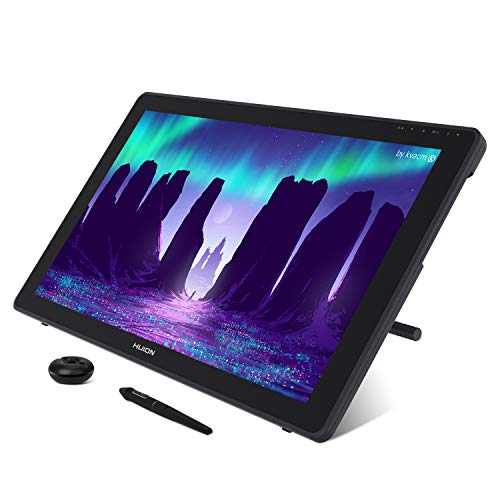
- 21.5-inch screen with 120% sRGB
- Anti-glare matte surface
- 8192-pressure battery-free stylus
Best For: Studio users who want a big, vivid drawing workspace
Precision Starter Pick
XPPen Artist 13.3 Pro V2 16K Drawing Display

- 16K stylus pressure with low-lag response
- Red dial and 8 keys for quick workflow control
- Full-laminated FHD screen with wide color gamut
Best For: Beginners and hobbyists wanting an easy pen display with strong color and control
Pro Color Control
HUION Kamvas 13 Gen 3 SE 16K Pen Display
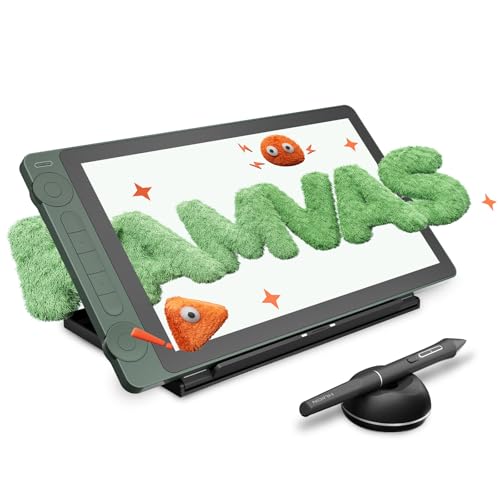
- PenTech 4.0 with 16K pressure sensitivity
- Factory-calibrated screen with ΔE<1.5
- Dual dials and silent shortcut keys
Best For: Artists and designers who want precision pen tracking and accurate color
Budget Compact Choice
GAOMON PD1161 11.6" FHD Pen Display

- 11.6-inch Full HD IPS screen with matte film
- 8192-pressure battery-free stylus with tilt
- 8 shortcut keys and 2 pen buttons
Best For: Beginners, students, and casual creators who want a compact entry-level pen display
Portable Precision
XPPen Artist 12 3rd 11.9" Drawing Tablet with Screen

- 11.9" laminated display with low-parallax feel
- Dual X-Dial wheels plus 8 shortcut keys
- 16K pen pressure with tilt support
Best For: Portable sketching, students, and artists who want compact control
Larger Workspace
XPPen Artist 15.6 Pro Drawing Monitor

- 15.6" full HD laminated screen
- Red Dial and 8 shortcut keys
- 8192-level battery-free stylus
Best For: Desktop artists and teachers who want a bigger pen display
Beginner-Friendly Pick
XPPen Artist 12 3rd Silver Drawing Display

- 11.9" anti-glare, paper-feel display
- One-cable USB-C setup for cleaner desks
- 16K pressure stylus with 60° tilt
Best For: Beginners and students who want an easy-to-set-up screen tablet
Pro-level compact pen display – HUION Kamvas 13 (Gen 3)
If you want a drawing tablet with screen that stays portable without cutting corners on color or control, the HUION Kamvas 13 (Gen 3) is a strong pick. Its 13.3-inch fully laminated panel, anti-sparkle Canvas Glass 2.0, and PenTech 4.0 stylus are built for artists who want a smoother, more precise desktop workflow.
Best For: Illustrators, designers, and creators who want a compact pen display with strong color accuracy and shortcut controls.
Pros:
- Fully laminated 13.3-inch screen with Canvas Glass 2.0 to reduce glare and improve accuracy
- PenTech 4.0 with 16,384 pressure levels and 2g initial activation force for natural line control
- Factory color calibration plus 99% sRGB and Rec.709 coverage for color-conscious work
- USB-C single-cable connection, 5 programmable shortcut keys, and dual dial buttons for workflow speed
Cons:
- Must be connected to a computer or laptop to work
- Uses a 13.3-inch display, so it may feel small for users who prefer a larger canvas
This is a practical choice if you value portability, calibrated color, and high pen sensitivity in a compact display tablet. The included adjustable stand also helps make longer sessions more comfortable.
Budget-friendly starter display – XP-PEN Artist12 11.6-inch
The XP-PEN Artist12 is a straightforward drawing tablet with screen for anyone who wants an affordable entry into pen displays. Its 11.6-inch FHD IPS panel, anti-reflective screen protector, and battery-free stylus make it a sensible pick for students, beginner artists, and remote work setups.
Best For: Students, teachers, and beginners who want a compact pen display for drawing, notes, and online collaboration.
Pros:
- 11.6-inch 1920×1080 IPS display with 72% NTSC / 100% sRGB color gamut
- Battery-free P06 pen with an eraser end and 8 replacement nibs included
- 6 customizable shortcut keys plus a programmable touch bar for faster navigation
- Compatible with Windows, Mac, and Linux, and usable for remote work or education
Cons:
- Must be connected to a computer to work
- Smaller screen size may feel limited for larger drawing projects
Artist12 makes sense if you want a compact pen display that covers the essentials without adding complexity. It is especially appealing as a teaching, learning, or first drawing-monitor setup.
Color-rich mid-size artist display – XPPen Artist 15.6 Pro V2
The XPPen Artist 15.6 Pro V2 is a drawing tablet with screen aimed at artists who want a larger workspace and more fine-tuned control. With a 15.4-inch full-laminated anti-glare panel, a 16K-pressure stylus, and a red dial for quick adjustments, it is designed for smoother detail work and faster navigation.
Best For: Artists and designers who want a mid-size pen display with strong color coverage and efficient workflow controls.
Pros:
- 16,384 pressure levels from the X3 Pro smart chip stylus for precise line work
- Full-laminated anti-glare glass helps reduce parallax and improve stroke accuracy
- 99% sRGB, 96% Adobe RGB, and 96% Display P3 color gamut for broad color coverage
- 8 customizable express keys plus a red dial for quick brush, zoom, and navigation control
Cons:
- Must be connected to a computer or laptop to use
- 15.4-inch size is less portable than smaller pen displays
This model stands out if you want a balanced mix of screen size, color performance, and shortcut control. The included foldable stand also helps support longer sessions with better ergonomics.
Large-format immersive display – HUION Kamvas 22 21.5-inch
If you want a drawing tablet with screen that gives you more room to create, the HUION Kamvas 22 offers a spacious 21.5-inch canvas and a 120% sRGB color gamut. It is built for artists who prefer a larger display, anti-glare matte finish, and a comfortable angled stand for longer work sessions.
Best For: Artists, designers, and animators who want a large pen display with vivid color and a paper-like matte surface.
Pros:
- Large 21.5-inch 1920×1080 display with 120% sRGB and 16.7 million colors
- Anti-glare matte film reduces reflections and adds a paper-like drawing feel
- Battery-free PW517 stylus with 8192 pressure levels, tilt response, and lag-free tracking
- Adjustable stand and USB-C options support more comfortable, flexible setups
Cons:
- Must be connected to a computer or laptop to use
- Larger size and 8.6-pound weight make it less portable than compact pen displays
Kamvas 22 is a strong fit if screen space matters more than portability. Its larger surface, vivid color, and included stand make it well suited to studio-style workflows.
Precision Starter Pick – XPPen Artist 13.3 Pro V2 16K Drawing Display
If you want a drawing tablet with screen that feels responsive right away, the XPPen Artist 13.3 Pro V2 is built around speed, control, and color confidence. Its 16K pressure stylus, red dial, and 8 shortcut keys make it a strong fit for artists who want a compact display with practical workflow tools.
Best For: Beginners and hobbyists who want an easy-to-use pen display with strong pressure response and color accuracy.
Pros:
- 16K pressure sensitivity and low-lag stylus response for smoother line control
- Red dial plus 8 customizable keys help speed up brush, zoom, and navigation tasks
- Full-laminated Full HD IPS screen with AG film reduces parallax and glare
- Wide color coverage, including 125% sRGB and 95% Display P3, supports vivid artwork
Cons:
- Requires connection to a computer or laptop and is not standalone
- Some display settings adjustments are Windows-only
This is a well-rounded choice if you want a pen display that balances ease of setup with more advanced creative controls. The included full-featured USB-C cable and broad software compatibility make it a flexible option for many common art workflows.
Pro Color Control – HUION Kamvas 13 Gen 3 SE 16K Pen Display
The HUION KAMVAS 13 (Gen 3) SE is a drawing tablet with screen aimed at artists who care about pen precision, color accuracy, and fast workflow control. With PenTech 4.0, 16K pressure sensitivity, dual dials, and factory calibration, it is a strong fit for detailed creative work on a compact display.
Best For: Artists and designers who want a color-accurate pen display with advanced pen tracking and dual dial controls.
Pros:
- PenTech 4.0 with 16K pressure and 2g initial activation force for refined stroke control
- Factory color calibration with ΔE<1.5 for accurate color output
- 2 dial controllers and 5 silent keys offer quick workflow adjustments
- Anti-sparkle nano-etched glass and full lamination help create a paper-like drawing feel
Cons:
- Not a standalone device and must be connected to a computer or supported Android device
- USB-C single-cable setup still depends on supported USB 3.1 Gen1 and DP 1.2 standards
If you want a compact pen display that emphasizes precision and accurate color, this model stands out with its calibrated screen and strong control layout. It is especially appealing for artists who want a more polished, professional-feeling setup without jumping to a larger display.
Budget Compact Choice – GAOMON PD1161 11.6" FHD Pen Display
The GAOMON PD1161 is a compact drawing tablet with screen for users who want a straightforward pen display for sketching, editing, and note-taking. Its 11.6-inch Full HD IPS panel, matte film, and battery-free stylus make it a practical entry-level option for getting started on-screen.
Best For: Beginners, students, and casual creators who want an affordable compact pen display for everyday art and writing tasks.
Pros:
- 11.6-inch Full HD IPS screen with matte film for a paper-like feel and reduced glare
- Battery-free AP50 stylus with 8192 pressure levels and tilt support
- 8 shortcut keys plus 2 pen buttons can be customized for faster workflows
- Works with Windows and Mac and supports creative software plus note-taking tools
Cons:
- Requires connection to a computer and is not standalone
- May need extra adapters depending on your laptop or desktop ports
- Some systems may need the included power adapter to run properly
This is a solid compact option if you want a smaller pen display without a lot of setup complexity. It does not offer the advanced pen pressure or premium color specs of higher-end models, but it covers the basics well for learning, sketching, and light design work.
Portable Precision – XPPen Artist 12 3rd 11.9" Drawing Tablet with Screen
If you want a compact drawing tablet with screen that still feels ready for serious work, the XPPen Artist 12 3rd is built around portability and control. Its 11.9" laminated display, dual X-Dial wheels, and 8 shortcut keys make it a practical pick for sketching, detailing, and editing without crowding your desk.
Best For: Students, traveling artists, and creators who want a lightweight pen display with quick-access controls.
Pros:
- Lightweight 1.58 lb design and 11.9" screen are easy to carry between classes or workspaces.
- Dual X-Dial wheels and 8 customizable keys help speed up brush changes and canvas zoom.
- AG etched glass and full lamination reduce glare and keep the pen cursor closely aligned.
- 16,384 pressure levels, 60-degree tilt support, and 10 replacement nibs support detailed drawing.
Cons:
- The smaller display may feel tight if you prefer a larger canvas for complex projects.
- It still requires a compatible device and is not a standalone tablet.
- Works best for users who value portability over maximum screen size.
Overall, this is a well-balanced screen tablet for artists who want a compact setup with strong pen performance and useful hardware controls. The color-calibrated Full HD panel also makes it suitable for work where accuracy matters.
Larger Workspace – XPPen Artist 15.6 Pro Drawing Monitor
The XPPen Artist 15.6 Pro is a drawing tablet with screen designed for artists who want more room to work and a classic pen-display layout. Its 15.6-inch full HD laminated panel, Red Dial, and 8 shortcut keys make it a strong fit for drawing, teaching, and editing on a connected computer.
Best For: Artists, teachers, and remote workers who want a larger pen display with efficient shortcut controls.
Pros:
- 15.6" full HD screen gives you a larger drawing area for detailed work.
- Full-laminated display helps reduce distraction and improves visual clarity.
- Red Dial and 8 customizable keys support faster workflow adjustments.
- 8192 pressure levels and the battery-free stylus are built for controlled sketching and line work.
Cons:
- It must be connected to a computer or laptop and is not standalone.
- Its size makes it less travel-friendly than smaller pen displays.
- The feature set is strong, but not as portable as compact 11.9-inch models.
This model makes sense if you want a more comfortable workspace and prefer a larger screen for drawing or teaching. It trades portability for viewing space, which many desktop users will appreciate.
Beginner-Friendly Pick – XPPen Artist 12 3rd Silver Drawing Display
If you are choosing your first drawing tablet with screen, this XPPen Artist 12 3rd version is tuned to feel approachable right away. It keeps the 11.9-inch format compact while adding 8 shortcut keys, nano-etched anti-glare glass, and a one-cable connection that simplifies setup for study or home use.
Best For: Beginner digital artists, art students, and users who want a simple setup with paper-like pen feedback.
Pros:
- AG+AF nano-etched glass aims for a paper-feel surface with reduced glare and smudges.
- One-cable USB-C connection helps keep the workspace clean and easier to manage.
- 16,384 pressure levels and 60-degree tilt support deliver responsive pen control.
- 8 customizable shortcut keys and the included foldable stand support efficient, comfortable use.
Cons:
- The 11.9" size may be limiting if you want a larger canvas for advanced illustration.
- It still depends on a compatible device for power and display input.
- Best suited to users who prioritize simplicity over a bigger screen area.
For beginners, this model stands out because it combines easy setup with capable pen performance and a forgiving, low-glare surface. It is a practical entry point if you want to learn on a proper screen tablet without adding clutter.
How We Picked the Best Drawing Tablet with Screen
We focused on practical features that matter most in everyday use: pen accuracy, display quality, pressure sensitivity, build quality, shortcut controls, and compatibility. We also looked for a range of sizes so this guide covers compact models for portability and larger pen displays for more comfortable long sessions.
Because a Drawing Tablet with Screen is often a daily creative tool, we favored models that balance image quality, stable pen performance, and value rather than chasing specs alone.
Quick Comparison: What Matters Most
If you need a portable setup, smaller 11.6-inch to 13.3-inch tablets are easier to carry and fit better on crowded desks. For illustration, animation, and detailed work, 15.6-inch and 21.5-inch options usually feel less cramped and reduce constant zooming and panning.
Color coverage, lamination, and anti-glare glass also affect the drawing experience. A laminated display can reduce the gap between nib and cursor, while better sRGB coverage helps artwork look more consistent across devices.
Key Buying Factors for a Drawing Tablet with Screen
Screen Size and Workspace
Choose a size based on how you work. Smaller screens are better for travel and tight desks, while larger displays suit detailed illustration, multi-window workflows, and longer sessions.
Pen Pressure and Tilt Support
Higher pressure levels can help with subtle line variation, but pressure alone does not guarantee better performance. Tilt support, stable tracking, and low lag are just as important for a natural feel.
Display Quality
Look at resolution, brightness, color gamut, and whether the panel is laminated. A better display can improve both drawing comfort and the accuracy of your on-screen colors.
Shortcuts and Workflow Features
Express keys and dials can speed up common tasks like brush changes, zooming, and undo. If you use your tablet for hours at a time, these controls can be more valuable than you expect.
Who Should Buy Which Drawing Tablet with Screen?
Beginners usually do best with a compact, affordable Drawing Tablet with Screen that keeps the learning curve manageable. Students and hobbyists may want a mid-size model for a better balance of workspace and portability. Professional illustrators, concept artists, and animators should lean toward larger, color-strong displays with more refined pen performance and stronger ergonomics.
If you are unsure, start with the size you can comfortably keep on your desk every day. For most buyers, the best choice is the one that fits your space, software, and workflow first.