Portable hard drive docking stations make it much easier to access, clone, and back up SATA drives without opening a PC or relying on a full enclosure. They’re a practical choice for anyone working with 2.5-inch or 3.5-inch HDDs and SSDs.
In this roundup, we focus on docks that balance speed, compatibility, and everyday usability so you can quickly find the right fit for storage expansion, drive recovery, or duplicate copies.
Best 10 Portable Hard Drive Docking Stations Picks for 2026
Dual-Bay Cloner for SATA Drives
SABRENT USB 3.0 Dual Bay Docking Station & Cloner

- Supports 2.5-inch and 3.5-inch SATA HDDs/SSDs
- Offline cloning up to 60Mbps
- Plug-and-play USB 3.0 with up to 5Gbps transfers
Best For: People who want a dual-bay SATA dock with offline cloning
High-Capacity Single-Bay Dock
ORICO USB 3.0 Dock for 2.5/3.5 SATA HDDs and SSDs

- Supports SATA HDDs and SSDs up to 22TB
- USB 3.0 with UASP and 5Gbps speeds
- Wide compatibility across Windows, Mac, Linux, and more
Best For: Buyers who need a compact dock with broad compatibility
Simple Lay-Flat Dock for SATA Drives
SABRENT USB 3.0 Lay-Flat SATA Dock

- Fits 2.5-inch and 3.5-inch SATA HDDs/SSDs
- Tool-free hot-swap design with UASP support
- Includes 12V power adapter for 3.5-inch drives
Best For: People who want a basic, reliable SATA dock
Cooling-Focused Lay-Flat Dock
ORICO Lay-Flat USB 3.0 SATA Dock with UASP

- Supports 2.5-inch and 3.5-inch SATA drives up to 24TB
- Lay-flat design promotes better heat dissipation
- USB 3.0 UASP with tool-free hot swapping
Best For: Users who prioritize cooling and high-capacity support
Budget Single-Bay Workhorse
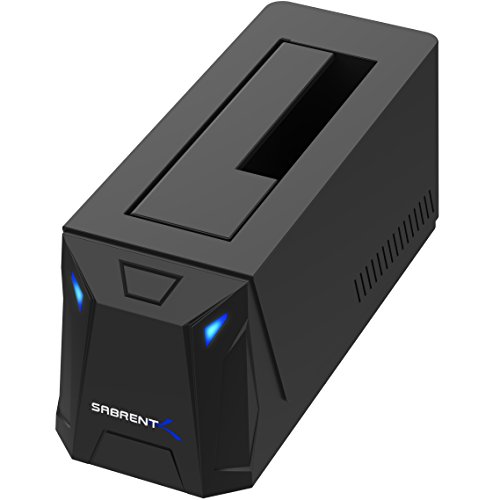
- 2.5"/3.5" SATA drive support
- USB 3.0 UASP up to 5Gbps
- AC adapter included; single-bay use
Best For: Simple single-drive SATA backups and transfers
Clone-and-Expand Dock
MAIWO Dual-Bay SATA Duplicator

- Dual bays with offline cloning
- Supports 2.5"/3.5" SATA drives
- Three USB 3.0 hub ports
Best For: Offline drive cloning and multi-drive backup jobs
Fast USB-C Pick

- USB-C with 10Gbps SATA support
- 2.5"/3.5" tool-free hot-swap dock
- Includes USB-A and USB-C cables
Best For: Fast USB-C backups and frequent drive swapping
Dual-Bay Offline Cloning Dock
FIDECO 2.5/3.5in SATA HDD/SSD Dock

- Dual-bay dock for two SATA HDDs or SSDs
- Offline clone button works without a PC
- USB 3.0 transfer up to 5Gbps
Best For: Drive swapping, backups, and no-PC cloning
USB-C Dual-Bay Cloner Dock
SABRENT EC-CH2B USB-C SATA Dock

- USB-C dual-bay dock with included cable
- Clones one SATA drive to another without a PC
- Hot-swappable support for two SATA drives
Best For: Laptop users who need USB-C and offline cloning
4-Bay Multi-Drive Dock
SABRENT DS-U3B4 4-Bay SATA Dock

- Holds up to four SATA HDDs or SSDs
- Trayless design for quick tool-free insertion
- Offline cloning and USB 3.0 up to 5Gbps
Best For: Managing multiple drives from one dock
Dual-Bay Cloner for SATA Drives – SABRENT USB 3.0 Dual Bay Docking Station & Cloner
If you want portable hard drive docking stations that can do more than just mount a single drive, this SABRENT dual-bay model is built for quick access and offline cloning. It supports 2.5-inch and 3.5-inch SATA HDDs or SSDs, works plug-and-play, and reaches up to 5Gbps over USB 3.0.
Best For: Users who need a dual-bay dock for SATA drives and simple offline cloning.
Pros:
- Supports two 2.5-inch/3.5-inch SATA HDDs or SSDs.
- Includes offline cloning support up to 60Mbps.
- Plug-and-play with no drivers required.
- Up to 5Gbps USB 3.0 transfer speeds.
Cons:
- Only supports SATA drives, not IDE or other formats.
- Offline cloning is slower than USB transfer speeds.
- Bulky compared with single-bay lay-flat docks.
This is a practical choice if you regularly swap between multiple bare SATA drives or need a dock that can clone without a computer. The dual-bay design adds flexibility, while the included power supply and broad drive support make it a capable desktop-style dock.
High-Capacity Single-Bay Dock – ORICO USB 3.0 Dock for 2.5/3.5 SATA HDDs and SSDs
This ORICO option fits neatly into the portable hard drive docking stations category if you want a simple single-bay dock with broad device compatibility. It supports 2.5-inch and 3.5-inch SATA drives up to 22TB, uses USB 3.0 with UASP for up to 5Gbps, and includes a 1m cable plus power supply.
Best For: Users who want a compact single-drive dock with wide OS and device support.
Pros:
- Supports 2.5-inch/3.5-inch SATA I/II/III HDDs and SSDs.
- Up to 22TB drive support.
- USB 3.0 with UASP and up to 5Gbps transfer speed.
- Works with Windows, Mac, Linux, iPad OS, and more listed devices.
Cons:
- Single-bay design only handles one drive at a time.
- Brand-new or unallocated disks need initialization in Disk Management.
- Does not support IDE or SAS drives.
For a straightforward dock that can handle modern large-capacity SATA drives, this ORICO unit covers the essentials without adding complexity. The tool-less, hot-swappable design and broad platform support make it a solid everyday backup and transfer station.
Simple Lay-Flat Dock for SATA Drives – SABRENT USB 3.0 Lay-Flat SATA Dock
Among portable hard drive docking stations, this SABRENT lay-flat model is a straightforward way to access bare SATA drives without tools. It works with 2.5-inch and 3.5-inch SATA I/II/III HDDs and SSDs, includes a 12V adapter for 3.5-inch drives, and uses USB 3.0 with UASP support.
Best For: Users who want a no-frills, single-drive SATA dock for everyday use.
Pros:
- Supports 2.5-inch and 3.5-inch SATA drives and SSDs.
- Tool-free, hot-swap design for easy drive changes.
- Includes a 12V/2A power adapter for stable 3.5-inch drive use.
- Plug-and-play on Windows, macOS, and Linux.
Cons:
- Does not support USB-C natively; host cable is USB Type-A.
- Only for bare SATA drives, not IDE, NVMe, or pre-enclosed USB drives.
- Single-bay design means one drive at a time.
This dock is a good fit if you mainly need a dependable, easy-to-use SATA reader for backups or occasional drive swaps. It keeps the feature set focused, with the included power adapter helping it stay stable with full-size desktop drives.
Cooling-Focused Lay-Flat Dock – ORICO Lay-Flat USB 3.0 SATA Dock with UASP
If you are comparing portable hard drive docking stations for long file transfers or backup jobs, this ORICO lay-flat dock stands out for its cooling-friendly design. It supports 2.5-inch and 3.5-inch SATA HDDs and SSDs up to 24TB, uses USB 3.0 with UASP for up to 5Gbps, and is built for tool-free, hot-swappable use.
Best For: Users who want a lay-flat SATA dock with stronger cooling focus and high-capacity support.
Pros:
- Supports 2.5-inch and 3.5-inch SATA drives up to 24TB.
- USB 3.0 with UASP and up to 5Gbps transfer speed.
- Lay-flat design helps improve natural heat dissipation.
- Tool-free, hot-swappable setup with included power adapter and cable.
Cons:
- Single-drive dock only.
- Best suited to SATA drives; not for other drive interfaces.
- Some setup still depends on using the included power adapter and cable.
This model is a strong pick if you want a simple dock that gives extra attention to airflow and thermal stability. The combination of 24TB support, plug-and-play compatibility, and a low-profile form makes it useful for regular data migration and backup work.
Budget Single-Bay Workhorse – SABRENT USB 3.0 SATA Dock
If you want a straightforward option among portable hard drive docking stations, this SABRENT dock keeps the focus on basic SATA drive access. It works with 2.5-inch and 3.5-inch SATA HDDs and SSDs, supports hot-swapping, and includes an AC adapter for stable power.
Best For: Users who need a simple single-drive dock for backups, drive checks, and occasional transfers.
Pros:
- Supports 2.5-inch and 3.5-inch SATA drives and SSDs up to 20TB
- USB 3.0 with UASP for up to 5Gbps transfer speeds
- AC adapter included and required for operation
- Auto-sleeps after 30 minutes of inactivity
Cons:
- Does not support SAS or M.2 NVMe drives
- New or blank drives must be initialized before they appear
- Single-bay design only supports one drive at a time
This is a practical pick if you mainly need a no-frills dock for SATA drives and value clear status LEDs plus easy hot-swap use. It is not built for broader drive compatibility, but for basic SATA tasks it covers the essentials well.
Clone-and-Expand Dock – MAIWO Dual-Bay SATA Duplicator
Among portable hard drive docking stations, this MAIWO model stands out because it combines a dual-bay dock with offline cloning and extra USB ports. It supports 2.5-inch and 3.5-inch SATA HDDs and SSDs, lets you duplicate drives without a computer, and uses a 12V 3A power supply for steady operation.
Best For: Users who want a dual-bay dock for offline cloning, backup work, and multi-drive handling.
Pros:
- Dual-bay design supports up to 48TB total capacity
- Offline cloning works without connecting to a computer
- USB 3.0 connection offers up to 5Gbps bandwidth
- Includes 3 USB 3.0 hub ports, with one port offering 2.4A charging
Cons:
- Only supports SATA HDDs and SSDs
- Bulkier than a basic single-bay dock
- Cloning is limited to source-to-target drive workflows
This is the most versatile choice in the group if your workflow includes duplication or repeated drive handling. The added hub ports are useful, but the real value is the offline clone function and dual-bay capacity.
Fast USB-C Pick – SABRENT USB-C 10Gbps Dock
If speed and modern connectivity matter, this SABRENT option is a strong fit for portable hard drive docking stations. It supports 2.5-inch and 3.5-inch SATA SSDs and HDDs over USB-C at 10Gbps, includes both USB-A and USB-C cables, and is built for easy tool-free drive swaps.
Best For: Users who want a higher-speed USB-C dock for fast backups and everyday SATA drive access.
Pros:
- USB 3.2 Gen 2×1 connection supports 10Gbps transfers
- Works with 2.5-inch and 3.5-inch SATA SSDs and HDDs
- Tool-free, hot-swappable design with retractable dust cover
- Includes both USB-A and USB-C to USB-C cables
Cons:
- Supports only one drive at a time
- Requires a power adapter for 3.5-inch HDDs
- Limited to SATA drives, not SAS or NVMe
This dock is the best fit if you want faster-than-basic SATA performance in a simple single-bay design. It keeps the setup clean and modern, while still staying focused on dependable drive access rather than extra features.
Dual-Bay Offline Cloning Dock – FIDECO 2.5/3.5in SATA HDD/SSD Dock
If you want portable hard drive docking stations that can handle everyday drive access and simple duplication, this FIDECO dual-bay model is built for that job. It supports two 2.5-inch or 3.5-inch SATA HDDs or SSDs at once, connects over USB 3.0 up to 5Gbps, and includes offline clone support when you do not want to use a computer.
Best For: Users who need a straightforward dual-bay SATA dock for backups, drive swapping, and offline cloning.
Pros:
- Supports two 2.5-inch and 3.5-inch SATA HDDs or SSDs simultaneously.
- Offline cloning works without a computer by pressing the Clone button.
- USB 3.0 connection supports speeds up to 5Gbps.
- Plug-and-play setup with no driver needed on supported systems.
Cons:
- Only supports SATA HDDs and SSDs, not other drive types.
- New drives may need initialization before the computer recognizes them.
Overall, this is a practical choice if you want a simple dual-bay dock that can both mount drives and clone them offline. Its broad OS compatibility and included power adapter make it a solid everyday utility for SATA users.
USB-C Dual-Bay Cloner Dock – SABRENT EC-CH2B USB-C SATA Dock
Among portable hard drive docking stations, this SABRENT dual-bay unit stands out if you want USB-C connectivity and a simple way to clone SATA drives. It mounts two 2.5-inch or 3.5-inch SATA HDDs or SSDs as separate drives over USB, while also offering offline one-to-one cloning when you do not want to connect it to a computer.
Best For: Laptop users and builders who want a USB-C dock for dual-drive access plus offline cloning.
Pros:
- USB-C dock end and included USB-C cable.
- Reads and writes two drives at once as separate volumes.
- Offline cloner works without a computer, up to 60MBps.
- Supports 2.5-inch and 3.5-inch SATA HDDs and SSDs.
Cons:
- Does not support IDE/PATA, M.2, or NVMe drives.
- USB-C cable may require an adapter or different cable if your computer lacks USB-C.
- Offline cloning target must be the same size as the source or larger.
This dock is a good fit if your workflow centers on SATA drives and you prefer USB-C hardware. It combines easy hot-swapping with practical offline cloning, making it useful for basic backup and duplication tasks.
4-Bay Multi-Drive Dock – SABRENT DS-U3B4 4-Bay SATA Dock
If you need portable hard drive docking stations with more room to work, this four-bay SABRENT dock is designed for multi-drive management. It supports up to four 2.5-inch or 3.5-inch SATA HDDs and SSDs, connects by USB 3.0 up to 5Gbps, and includes offline clone functionality for direct drive-to-drive copying.
Best For: Users who manage multiple SATA drives and want one dock for access, backups, and cloning.
Pros:
- Supports up to four SATA HDDs or SSDs at once.
- Offline clone function works without a computer.
- Trayless design makes drive insertion quick and tool-free.
- USB 3.0 connection offers up to 5Gbps transfer support.
Cons:
- Requires an external power adapter for operation.
- Only supports SATA drives, not other interface types.
This is the most capable option in the group if you regularly move between multiple drives or need one station for several backups. The tradeoff is size and power dependence, but the extra bays make it far more flexible for heavier use.
How We Picked Portable Hard Drive Docking Stations
We focused on models that are useful for real-world drive handling: broad 2.5/3.5-inch support, stable USB connections, cloning support where available, and enough power for desktop-class drives. We also favored docks with straightforward plug-and-play operation, since convenience is one of the main reasons buyers choose Portable Hard Drive Docking Stations in the first place.
Quick Comparison: What Matters Most
Before choosing, compare connection type, bay count, and whether you need cloning. USB 3.0 models are usually sufficient for most users, while USB-C and 10Gbps docks are better for faster workflows. Single-bay docks are simpler and cheaper; dual-bay and four-bay options are better for backups, transfers, and drive duplication.
Speed
Higher bandwidth helps when moving large video, photo, or backup files, but actual drive performance still depends on the HDD or SSD itself.
Bay Count
One bay is ideal for simple access, while dual-bay and multi-bay units are better if you regularly compare, clone, or archive multiple drives.
Cloning
If you need offline duplication, look for a dock with one-touch clone support and clear status indicators.
Key Buying Factors for Portable Hard Drive Docking Stations
Check drive compatibility first. Most buyers need support for both 2.5-inch and 3.5-inch SATA drives, but not every dock handles every form factor equally well. Power delivery also matters: 3.5-inch HDDs typically need external power, so a stronger adapter is important for stable operation.
Also consider UASP support for better transfer efficiency, especially on modern systems. If you plan to use the dock often, look for a design with solid drive insertion, clear LEDs, and an easy-to-read clone progress system. Extra USB hub ports can be helpful, but they should not be the main reason to buy unless you truly need that added convenience.
Who Should Buy Which Portable Hard Drive Docking Stations?
If you want a simple dock for occasional file access or backup, a basic single-bay USB 3.0 model is usually enough. If you frequently duplicate drives or manage system migrations, choose a dual-bay cloner. Power users, content creators, and IT-minded buyers may benefit most from faster USB-C options or four-bay docks that can handle larger workflows.
For most people shopping Portable Hard Drive Docking Stations, the best choice is the one that matches how often you swap drives, whether you need cloning, and how much speed you actually need. Prioritize reliability and compatibility over extra features you may never use.