The best Blu-ray drives for disc ripping make it easier to archive movie collections, access older discs, and create reliable digital backups. The right choice depends on more than advertised speed: compatibility, connection type, UHD support, software, and the drive’s ability to handle sustained reads all matter.
We selected 10 internal and external models covering portable use, Mac and PC compatibility, 4K UHD media, disc writing, and everyday playback. Use the guide below to narrow the list based on your computer, disc library, and ripping workflow.
Best 10 Blu Ray Drives for Disc Ripping Picks for 2026
Best Slim Mac/PC Pick
ASUS SBW-06D5H-U Slim Blu-ray Burner

- Ultra-slim 240 g external design
- USB-A and USB-C cables included
- BDXL and M-DISC support
Best For: Portable Blu-ray use across laptops and desktops
Best High-Speed External Pick
ASUS BW-16D1X-U 16x Blu-ray Drive

- 16x Blu-ray writing and reading
- BDXL support up to 128 GB
- Includes CyberLink disc software
Best For: Fast desktop-based Blu-ray writing and backups
Best Internal UHD Option

- Internal 9.5 mm SATA design
- Supports 4K UHD Blu-ray playback
- Reads and burns Blu-ray, DVD, and CD
Best For: Compatible laptops and desktops with slim SATA bays
Best Portable Software Bundle
Buffalo BRXL-PUS6U3-BK/N Blu-ray Drive

- Thin 260 g USB external design
- Includes playback, burning, and backup software
- Supports BDXL and M-DISC media
Best For: Portable disc work with bundled Windows and Mac software
Reliable Slim Rewriter
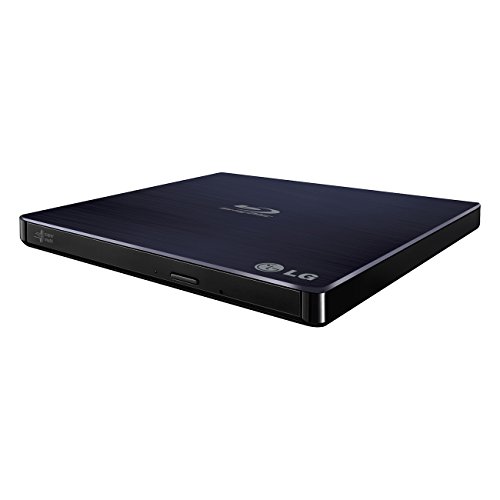
- Blu-ray, DVD, and CD support
- Windows and Mac compatible
- Slim USB 2.0 design with M-DISC support
Best For: Portable everyday disc reading and writing
UHD-Capable Aluminum Drive
archgon Premium Blu-ray Writer

- Reads UHD Blu-ray discs
- USB 3.0 with aluminum body
- Supports regular Blu-ray, DVD, and CD media
Best For: Windows PC users needing UHD Blu-ray capability
Flexible USB 3.0 Burner

- USB-A and USB-C connectivity
- Supports 50GB Blu-ray discs
- Works with Windows, macOS, and Linux
Best For: Portable standard Blu-ray burning across multiple operating systems
Versatile Dual-Interface Pick

- Reads and writes BD, DVD, and CD formats
- USB 3.0 and Type-C connectivity with extra power cable
- Up to 6X Blu-ray and 24X CD speeds
Best For: Computer users needing flexible USB connectivity and broad disc support
Full-Format Burning Choice

- Reads and burns BD-R/RE discs
- USB 3.0 and USB-C dual-interface cable
- Slim design with cable storage and up to 6X BD speed
Best For: Users who need Blu-ray burning as well as reading and ripping
Read-Only Blu-ray Option
Portable LLMHHKYK Blu-ray Drive

- Reads Blu-ray discs up to 6X
- Burns CDs and DVDs but not Blu-ray discs
- USB-A and USB-C connectivity in a portable design
Best For: Users who need Blu-ray reading with CD/DVD burning only
Best Slim Mac/PC Pick – ASUS SBW-06D5H-U Slim Blu-ray Burner
ASUS SBW-06D5H-U BDXL External Ultra Slim Blu-ray and MDisc Burner USB 3.1 USB-C 2 Cables Black
Check Price On AmazonIf you want blu ray drives for disc ripping that are easy to carry between computers, the ASUS SBW-06D5H-U is a practical external option. Its ultra-slim design connects through USB 3.1 and includes both Type-A and Type-C cables, while BDXL and M-DISC support add flexibility for larger or archival discs.
Best For: Laptop and desktop users who want a compact external Blu-ray burner with both USB-A and USB-C connectivity.
Pros:
- Ultra-slim, lightweight 240 g external design.
- Includes USB 3.1 Type-A and Type-C interfaces.
- Supports BDXL and M-DISC media.
- Works with compatible Mac OS systems and PCs.
Cons:
- Listed Blu-ray read speed is up to 8x, so it is not the fastest option here.
- Its external form requires desk or bag space and a USB connection.
The SBW-06D5H-U stands out when portability and connection flexibility matter more than maximum writing speed. It is a sensible choice for occasional disc reading, ripping, burning, and backup work across newer and older computers.
Best High-Speed External Pick – ASUS BW-16D1X-U 16x Blu-ray Drive
For blu ray drives for disc ripping where faster optical performance is a priority, the ASUS BW-16D1X-U offers up to 16x Blu-ray writing and reading. Its USB 3.0 connection works with Mac and PC computers, and BDXL support accommodates discs up to 128 GB.
Best For: Users who want a full-size external drive for high-speed Blu-ray writing, large-capacity media, and computer backups.
Pros:
- Up to 16x Blu-ray writing and reading speeds.
- BDXL support for storage capacities up to 128 GB.
- Compatible with Mac OS X 10.6 or later and multiple Windows versions.
- Includes CyberLink Power2Go software with optional encryption.
Cons:
- At 2.6 pounds, it is less portable than the slim external models.
- Requires a power adapter and power cord.
- Uses USB 3.0 rather than a USB-C connection.
This ASUS model is a strong fit for a permanent desk setup and speed-focused optical work. Its larger enclosure and external power requirement are trade-offs for the higher 16x performance and included software package.
Best Internal UHD Option – BU40N 4K SATA Blu-ray Drive
The BU40N is an internal 9.5 mm SATA choice for blu ray drives for disc ripping, reading, and writing in compatible laptops or desktop systems. It supports regular Blu-ray, DVD, CD, BDXL, and 4K UHD Blu-ray playback, though UHD playback is positioned for Windows systems using CyberLink PowerDVD.
Best For: Owners of compatible laptops or computers with a 9.5 mm SATA tray-loading optical-drive bay who need UHD playback and disc writing.
Pros:
- Supports 4K UHD Blu-ray playback on compatible Windows setups.
- Reads and burns Blu-ray, DVD, and CD media.
- Supports BDXL 100GB triple-layer discs and 3D Blu-ray.
- Includes a stated three-year after-service period.
Cons:
- Installation requires a compatible 9.5 mm SATA optical-drive bay.
- UHD playback is not supported on Mac according to the supplied notes.
- Drive-only package does not include external USB housing or cables.
The BU40N makes the most sense when you are replacing or adding an internal slim optical drive. Check the bay size, SATA compatibility, and operating-system software requirements before buying, especially if 4K UHD playback is important.
Best Portable Software Bundle – Buffalo BRXL-PUS6U3-BK/N Blu-ray Drive
For blu ray drives for disc ripping that balance portability with bundled tools, the Buffalo BRXL-PUS6U3-BK/N is a thin USB external drive for Windows PCs and Macs. It supports bus power with an included power-supply cable, writes BD-R at up to 6x, and comes with software for playback, burning, editing, backup, and photo work.
Best For: Users who want a lightweight external Blu-ray drive with broad USB compatibility and a ready-made software bundle.
Pros:
- Thin, lightweight 260 g portable design.
- Works with USB 3.2 Gen 1, USB 3.1, USB 3.0, and USB 2.0 Type-A ports.
- Includes PowerDVD, Power2Go, PowerDirector, PowerBackup, and PhotoDirector LE.
- Supports BD-R XL, BD-RE XL, M-DISC, DVD, and CD media.
Cons:
- BD-R writing speed tops out at 6x, while BD-R XL reaches 4x.
- Uses Type-A connectivity and may need the supplied power cable or a USB charger.
- The included manual language is not guaranteed to be English.
The Buffalo is a useful all-around external drive for people who value included applications and compatibility with older Type-A computers. Its moderate Blu-ray speeds make it better suited to routine ripping, playback, and backup than speed-critical workloads.
Reliable Slim Rewriter – LG BP50NB40
LG BP50NB40 6x Blu-ray Rewriter BD-RE/8x DVD±RW DL USB 2.0 Slim External Drive (
Check Price On AmazonThe LG BP50NB40 is a compact option for shoppers comparing blu ray drives for disc ripping and everyday optical-media tasks. Its USB 2.0 connection supports Windows and Mac computers, while the drive reads Blu-ray media and writes compatible discs in a slim external enclosure.
Best For: Users who want a lightweight, straightforward Blu-ray rewriter for Windows or Mac.
Pros:
- Supports Blu-ray, DVD, and CD media.
- Compatible with Windows and Mac PCs.
- Slim 0.6-inch form factor and 270-gram weight make it portable.
- Includes M-DISC support and a USB cable.
Cons:
- USB 2.0 is slower than the USB 3.0 alternatives in this roundup.
- The listed Blu-ray read speed is up to 8x.
This LG model is a practical pick when portability and broad computer compatibility matter more than the fastest interface. Its slim design and disc-format support make it useful for archiving, playback, and writing tasks.
UHD-Capable Aluminum Drive – archgon Premium Blu-ray Writer
archgon Premium Aluminum External USB 3.0 UHD 4K Blu-Ray Writer Super Drive for PC and Mac
Check Price On AmazonThe archgon Premium Aluminum drive stands out among blu ray drives for disc ripping with UHD Blu-ray reading capability and a USB 3.0 connection. It can read UHD discs and read or write regular Blu-ray, DVD, and CD media, but software and computer requirements are important considerations.
Best For: PC users seeking an external UHD-capable drive with a durable aluminum body.
Pros:
- Reads UHD Blu-ray discs and writes regular Blu-ray media.
- Supports DVD and CD reading and writing.
- USB 3.0 interface and aluminum enclosure.
- Supports M-DISC BD-R.
Cons:
- UHD playback requires compatible Windows PC hardware and separately purchased software.
- Mac users cannot use it for UHD Blu-ray playback according to the supplied notes.
- CyberLink PowerDVD is recommended for UHD playback but is not included.
This is the more specialized choice for users who need UHD Blu-ray support. Check the computer requirements before buying, especially if UHD playback is a priority, and plan for additional software.
Flexible USB 3.0 Burner – External Blu-ray Drive
This external model is a versatile choice among blu ray drives for disc ripping, with both USB-A and USB Type-C connectivity built into its cable. It supports 50GB Blu-ray discs, reaches up to 6x Blu-ray, 8x DVD, and 24x CD speeds, and works with Windows, macOS, and Linux.
Best For: Users who want broad operating-system support and convenient USB-A or USB-C connectivity.
Pros:
- Built-in USB 3.0 and Type-C cable supports modern and legacy ports.
- Reads and writes 50GB Blu-ray discs.
- Compatible with Windows, macOS, and Linux.
- Plug-and-play design with a slim portable form factor.
Cons:
- Does not support 4K Ultra HD Blu-ray discs.
- Playback and burning software is not included.
- Not compatible with Chromebooks, smartphones, tablets, TVs, or car players.
This drive offers strong connection flexibility and wide desktop operating-system coverage. It is well suited to standard Blu-ray archiving and burning, provided you supply compatible software and do not need 4K Ultra HD support.
Versatile Dual-Interface Pick – Dainty External Blu-ray Drive
If you need blu ray drives for disc ripping across newer USB-C laptops and standard USB-A computers, the Dainty external drive offers broad format support and up to 6X Blu-ray read speeds. Its dual USB power design can help maintain stable operation, though Blu-ray playback and writing require separate software.
Best For: Users who want a portable drive with USB-A and USB-C connectivity, BD, DVD, and CD support, and compatibility with Windows, macOS, and Linux.
Pros:
- Reads and writes compatible BD, DVD, and CD media.
- Supports up to 6X Blu-ray, 8X DVD, and 24X CD speeds.
- Includes USB 3.0 and Type-C connectivity plus an additional power cable.
- Compact design with claimed low noise and strong error correction.
Cons:
- Playback and writing software is not included.
- Not compatible with TVs, tablets, Chromebooks, game consoles, projectors, or vehicles.
- Maximum speeds vary by disc type and are not guaranteed for every task.
This is a flexible choice for computer-based disc work when you value connection options and stable power. Plan to supply compatible Blu-ray software before using it for playback or ripping workflows.
Full-Format Burning Choice – GOOBOX 6X BD-RE Drive
For blu ray drives for disc ripping that can also handle Blu-ray burning, the GOOBOX GBX-BD100 supports BD-R/RE, DVD, and CD media with USB 3.0 and USB-C connections. It is rated for up to 6X BD read and write speeds, while playback still depends on third-party software.
Best For: Users who need Blu-ray reading and burning, dual-interface connectivity, and a slim drive for Windows, Mac, or Linux computers.
Pros:
- Supports Blu-ray reading and BD-R/RE burning.
- Offers up to 6X BD, 8X DVD, and 24X CD read/write speeds.
- Integrated USB 3.0 and Type-C cable works with modern laptops and desktops.
- Slim, lightweight body includes cable storage and shockproof pads.
Cons:
- Third-party software is required for Blu-ray playback.
- 3D Blu-ray playback requires compatible software and a 3D-capable display.
- An external power cable may be needed with low-power devices.
The GOOBOX is the most capable option here for users who want a true BD-RE burner in addition to reading discs. Its portability and built-in cable storage also suit laptop-based archiving and ripping setups.
Read-Only Blu-ray Option – Portable LLMHHKYK Blu-ray Drive
If your blu ray drives for disc ripping shortlist does not require Blu-ray burning, this portable LLMHHKYK drive offers Blu-ray reading alongside CD and DVD burning. It connects through USB 3.0 or Type-C and supports Windows, Mac, and Linux, but Blu-ray playback requires separate software.
Best For: Users who need to read Blu-ray discs and burn CDs or DVDs without paying for Blu-ray write capability.
Pros:
- Reads Blu-ray discs at up to 6X, DVDs at 8X, and CDs at 24X.
- Burns CDs and DVDs while remaining unable to write Blu-ray discs.
- Provides both USB-A and USB-C connections with plug-and-play operation.
- Lightweight portable design includes an embedded data cable.
Cons:
- Cannot burn Blu-ray discs.
- Blu-ray playback requires third-party software.
- Not compatible with Chromebooks, TVs, tablets, iPads, or vehicles.
This drive makes sense when your workflow is Blu-ray reading or ripping plus occasional CD/DVD burning. Choose a different model if Blu-ray disc authoring or BD-R/RE backup is part of your plan.
How We Picked the Best Blu Ray Drives for Disc Ripping
We compared these drives by looking at the features that affect real-world disc archiving: Blu-ray and DVD compatibility, connection options, supported formats, portability, build quality, and stated read or write speeds. External models received particular attention because they are simpler to use with laptops and computers without an optical drive.
We also considered whether each drive supports BDXL, M-Disc, 4K UHD media, USB-C, or included playback and authoring software. These features do not guarantee compatibility with every ripping application, but they can make a drive more flexible for mixed collections.
Quick Comparison
- Best for portability: Slim external USB drives with bus power and USB-C support.
- Best for speed: Full-size external or internal drives advertising higher Blu-ray write speeds.
- Best for UHD collections: Drives specifically identified as 4K UHD-capable, subject to software and firmware requirements.
- Best for broad media support: BDXL or M-Disc-compatible models that also read and write DVDs and CDs.
- Best for flexible connections: Models with both USB-C and USB-A cables or adapters.
Key Buying Factors for Blu-Ray Drives for Disc Ripping
Drive Compatibility
Confirm that the drive supports the discs you plan to archive. Standard Blu-ray, dual-layer Blu-ray, BDXL, DVDs, and CDs are not interchangeable in every model. If your collection includes 4K UHD Blu-ray discs, look for explicit UHD support and verify that your operating system and ripping software can use the drive.
USB Connection and Power
USB 3.0 or newer is preferable for large transfers, although the drive’s optical mechanism often remains the limiting factor. USB-C is convenient for newer laptops, while bundled USB-A cables improve compatibility with older computers. Some slim drives run from USB power; others may require an additional power cable, especially during demanding writes.
Read and Write Speeds
Higher advertised speeds can shorten transfers, but actual performance varies by disc condition, media type, software, and sustained thermal limits. For ripping, stable reads and dependable error handling are generally more valuable than the highest maximum write rating.
Software and Operating System Support
Check whether playback or authoring software is included and whether it supports your version of Windows or macOS. Ripping applications may have separate format, encryption, and UHD requirements, so review their current compatibility before buying.
Who Should Buy Which Blu Ray Drives for Disc Ripping?
Choose a slim external model if you use a laptop, need occasional access to discs, or want a drive that can move between computers. A larger external drive is better for frequent archiving, higher write speeds, or a more substantial desktop setup. Pick an internal SATA model if you are upgrading a desktop and want a permanently installed drive with fewer external cables.
For mixed physical media collections, prioritize BDXL, DVD, and CD support. For 4K libraries, start with a model explicitly marketed for UHD and then verify software and firmware requirements. If you mainly rip standard Blu-rays, a reliable USB 3.0 or USB-C drive with broad operating-system support is usually the most practical choice.