Heavy laptops need more than a basic tray. The right mount should support your device securely while keeping the screen at a comfortable height and leaving valuable desk or vehicle space open.
We compared 10 laptop mounts for heavy devices across desk, pole, monitor-arm, and mobile-workstation designs to help you choose a stable setup for home offices, industrial spaces, vehicles, and shared workstations.
Best 10 Laptop Mounts for Heavy Devices Picks for 2026
Heavy-Duty Desk Pick
WALI 2-in-1 Laptop and Monitor Arm

- Supports laptops up to 22 lbs and monitors up to 26.4 lbs
- Full-motion adjustment with up to 19.3 inches of extension
- Ventilated tray with clamp and grommet installation
Best For: Heavy laptops and flexible desk workstations
Mobile Workstation Pick
MELIPRON No-Drill Truck Laptop Mount

- Installs to passenger seat rails without drilling
- Steel-and-aluminum build with dual USB cooling fans
- Adjustable height, tilt, rotation, and quick release
Best For: Technicians and contractors working from vehicles
Balanced Desk Option
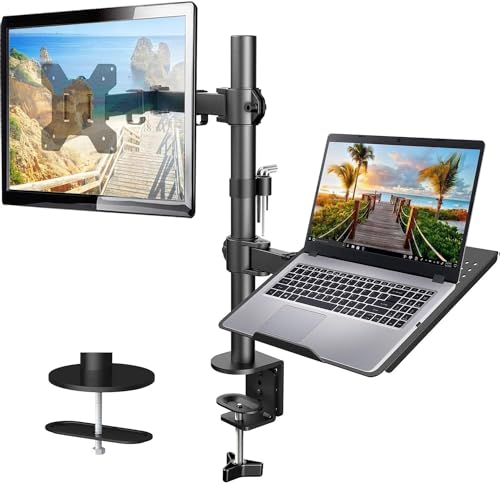
- Supports up to 22-lb monitors from 13 to 32 inches
- Ventilated 14-by-12-inch laptop tray
- Clamp or grommet mounting plus cable management
Best For: Wooden-desk home-office workstations
Pole-Mount Choice
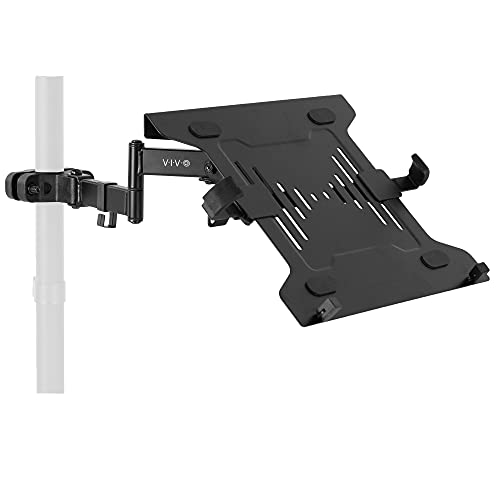
- Supports 10- to 15.6-inch laptops up to 9.9 lbs
- Clamps to 1.1- to 2.4-inch diameter poles
- Provides tilt, swivel, rotation, and cable management
Best For: Smaller laptops and existing pole-mounted setups
Best Heavy-Duty Desk Flexibility
HUANUO 2-in-1 Laptop and Monitor Mount

- 22-pound capacity for heavier setups
- Ventilated tray fits laptops up to 17 inches
- Converts to a 15- to 32-inch monitor arm
Best For: Flexible desk setups needing high weight capacity
Best Pole-Mounted Option
CondoMounts Strap-On Laptop Mount

- Supports devices up to 19 inches
- Tool-free strap fits 3- to 16-inch poles
- Rotates 360 degrees with adjustable tilt
Best For: Industrial, outdoor, and mobile workstations
Best Adjustable Desk Arm
MOUNT PRO Laptop and Monitor Mount

- Holds laptops up to 17 inches or monitors up to 32 inches
- Up to 19.8-pound monitor capacity
- Includes anti-slip pads, straps, and cable management
Best For: Convertible home-office and gaming workstations
Heavy-Duty VESA Tray
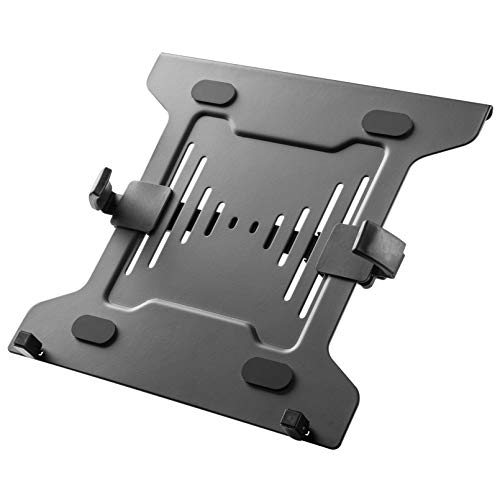
- Fits 10–15.6-inch laptops
- Supports 75x75mm and 100x100mm VESA mounts
- Ventilated, padded tray with adjustable clamps
Best For: Fixed ergonomic workstations and multi-screen setups
Flexible 2-in-1 Arm

- Supports laptops up to 17 inches
- Converts to a 13–34-inch monitor arm
- Offers tilt, swivel, and 360° rotation
Best For: Adjustable laptop-or-monitor desk workstations
Pole-Mount Workstation Holder

- Supports 12–18-inch laptops up to 15.4 pounds
- Clamps to 1.1–2.4-inch poles
- Full-motion adjustment with cable management
Best For: Pole-based workstations and larger laptops
Heavy-Duty Desk Pick – WALI 2-in-1 Laptop and Monitor Arm
For shoppers comparing laptop mounts for heavy devices, the WALI GSMP001NLP stands out with support for laptops up to 22 pounds and monitors up to 26.4 pounds. Its full-motion arm, ventilated tray, and clamp or grommet installation make it a flexible choice for a substantial home or office setup.
Best For: Heavy laptops, monitor-and-laptop workstations, and users who want to reclaim desk space.
Pros:
- Supports laptops up to 22 pounds and monitors up to 26.4 pounds.
- Offers tilt, swivel, rotation, height adjustment, and up to 19.3 inches of extension.
- Ventilated tray helps promote airflow, while clamp and grommet options suit desks 0.39 to 2.76 inches thick.
Cons:
- Monitor compatibility is limited to 17- to 32-inch screens despite the listed 34-inch maximum supported size.
- Grommet installation requires a suitable desk opening and compatible desk thickness.
With its high stated weight capacity and 2-in-1 design, this is one of the more capable desk-mounted options for heavy devices. It is especially practical when you want one arm to handle either a laptop or a VESA monitor.
Mobile Workstation Pick – MELIPRON No-Drill Truck Laptop Mount
For vehicle-based work, the MELIPRON is a specialized option among laptop mounts for heavy devices. Its aluminum-and-steel construction, seat-rail installation, built-in cooling fans, and adjustable positioning are designed for technicians, contractors, and other mobile users.
Best For: Fleet vehicles, service technicians, contractors, and drivers who need a removable in-car laptop station.
Pros:
- No-drill installation attaches directly to passenger seat rail bolts.
- Heavy-duty aluminum and steel construction is designed to remain stable on rough roads.
- Dual USB cooling fans, 360-degree swivel, and quick-release removal add practical mobile-use features.
Cons:
- At 12 pounds, the mount is substantially heavier than typical desk laptop holders.
- Fitment depends on compatible passenger-seat rail bolts and vehicle space.
- The supplied notes do not specify a maximum laptop weight.
This mount is best evaluated as a vehicle workstation rather than a conventional desk accessory. Its no-drill design and quick-release pole make it useful for shared vehicles, while the two-year warranty adds support for work-focused use.
Balanced Desk Option – HUANUO Laptop and Monitor Arm
The HUANUO HNCM2 is a practical choice for laptop mounts for heavy devices when a single desk arm must support both a laptop and a monitor. It holds up to 22 pounds, includes a ventilated 14-by-12-inch tray, and supports clamp or grommet mounting on compatible wooden desks.
Best For: Home-office users who want a laptop-and-monitor setup with integrated cable management.
Pros:
- Supports monitors up to 22 pounds and 13 to 32 inches with VESA 75×75 or 100×100 mounting.
- Ventilated laptop tray includes a protruding bottom lip to help secure the device.
- Provides tilt, swivel, rotation, height adjustment, and cable management.
Cons:
- Clamp and grommet hardware is specified for wooden desks only.
- The laptop tray dimensions may not suit larger laptops.
- Maximum extension is 16 inches, shorter than some competing desk arms.
This model offers a useful middle ground: a solid 22-pound capacity without the more specialized design of vehicle or pole mounts. Confirm your desk material, laptop dimensions, and monitor specifications before ordering.
Pole-Mount Choice – VIVO Universal Laptop Holder
The VIVO MOUNT-PL1A-LAP3 is a compact alternative for laptop mounts for heavy devices when your workspace already has a compatible support pole. Its adjustable clamp fits poles 1.1 to 2.4 inches in diameter and supports laptops up to 9.9 pounds, with a rotating design for collaboration.
Best For: Smaller laptops used with existing monitor stands, poles, or shared workstations.
Pros:
- Fits 10- to 15.6-inch laptops weighing up to 9.9 pounds.
- Compatible with poles from 1.1 to 2.4 inches in diameter.
- Offers tilt, swivel, 360-degree rotation, cable clips, and a removable VESA plate.
Cons:
- Its 9.9-pound capacity is lower than the other heavy-duty options in this roundup.
- It requires a compatible pole and does not provide a standalone desk clamp or base.
- It is not designed for laptops larger than 15.6 inches.
This is the most niche option here, but it can be an efficient way to add laptop support to an existing pole-mounted setup. Check both the pole diameter and laptop weight before purchase, especially for heavier devices.
Best Heavy-Duty Desk Flexibility – HUANUO 2-in-1 Laptop and Monitor Mount
For shoppers comparing laptop mounts for heavy devices, the HUANUO offers a sturdy desk-mounted setup with a 22-pound capacity. Its ventilated tray supports laptops up to 17 inches, while removing the tray converts the arm for 15- to 32-inch VESA monitors.
Best For: Users who want one desk mount for a large laptop or monitor and need substantial weight capacity.
Pros:
- Supports up to 22 pounds, making it suitable for heavier laptop or monitor setups.
- Ventilated 13.8-by-11.8-inch tray has 240 holes to improve airflow.
- Offers tilt, swivel, and 360-degree rotation, plus a 15-inch pole.
- Includes C-clamp and grommet mounting options with cable-management clips.
Cons:
- The laptop tray is limited to devices up to 17 inches.
- Monitor use requires removing the laptop tray and using a compatible VESA pattern.
The HUANUO stands out when weight capacity and configuration flexibility matter most. Its broad adjustment range and cooling tray make it a practical choice for a substantial laptop, while the convertible design keeps it useful if your setup changes later.
Best Pole-Mounted Option – CondoMounts Strap-On Laptop Mount
The CondoMounts CLMLTP1016 is a specialized choice among laptop mounts for heavy devices, designed for locations without a conventional desk. Its anti-slip, ventilated tray supports devices up to 19 inches and attaches to round or square poles with a tool-free ratchet strap.
Best For: Industrial, outdoor, mobile, and other workspaces where a desk or permanent drilling is not practical.
Pros:
- Fits laptops and devices up to 19 inches with an anti-slip ventilated tray.
- Heavy-duty strap mounts to round or square poles from 3 to 16 inches in diameter.
- Provides 360-degree rotation and adjustable tilt for positioning flexibility.
- Integrated cable clips help organize power and data cords.
Cons:
- It is designed for pole mounting rather than standard desk installation.
- The supplied details do not specify a maximum supported weight.
This mount is most compelling for unusual or mobile work areas, including warehouses, patios, studios, and events. The strap-based installation avoids drilling, while the large tray and adjustable positioning accommodate larger devices in places traditional stands cannot.
Best Adjustable Desk Arm – MOUNT PRO Laptop and Monitor Mount
The MOUNT PRO is a versatile pick for laptop mounts for heavy devices, combining a laptop tray with a monitor arm in one desk-mounted unit. It holds notebooks up to 17 inches, or monitors from 13 to 32 inches after the tray is removed, with a stated monitor capacity of up to 19.8 pounds.
Best For: Home offices, gaming setups, and workstations that switch between a laptop and an external monitor.
Pros:
- 2-in-1 design supports laptops up to 17 inches or VESA monitors up to 32 inches.
- Adjusts through -45 to +90 degrees of tilt, 180-degree swivel, and 360-degree rotation.
- Raises the display up to 16.9 inches and includes cable-management guides.
- Ventilated tray has anti-slip pads and Velcro straps to help secure a laptop.
Cons:
- The stated 19.8-pound capacity applies to monitor mode; the laptop capacity is not separately specified.
- The tray should not be rotated to a vertical position.
- Grommet mounting requires a compatible desk hole within the specified size range.
Choose the MOUNT PRO when adjustability and switching between device types are priorities. Its broad movement range supports ergonomic positioning, while the secured, ventilated tray makes it a capable option for a larger laptop without sacrificing future monitor compatibility.
Heavy-Duty VESA Tray – HumanCentric Laptop Mount
For shoppers comparing laptop mounts for heavy devices, the HumanCentric tray is a sturdy VESA-compatible option for laptops from 10 to 15.6 inches. Its adjustable clamps, rubber padding, and ventilated surface help create a secure, cleaner workstation when paired with a compatible monitor arm, stand, or wall mount.
Best For: Remote workers, creators, students, and multi-screen setups using a 75x75mm or 100x100mm VESA mount.
Pros:
- Supports 10–15.6-inch laptops with adjustable 9.5–16.5-inch clamps.
- Compatible with standard 75x75mm and 100x100mm VESA patterns.
- Rubber pads help prevent scratches, while ventilation holes encourage airflow.
- Alloy-steel construction weighs 3.1 pounds.
Cons:
- Monitor arm, stand, or wall mount is sold separately.
- Designed for standard VESA mounting rather than a standalone desk setup.
This is a practical pick when stability and workspace organization matter more than portability. The broad laptop-size range and heavy-duty clamp design make it well suited to fixed ergonomic workstations.
Flexible 2-in-1 Arm – HUANUO Laptop Mount
The HUANUO 2-in-1 is a versatile choice among laptop mounts for heavy devices, supporting notebooks up to 17 inches and switching to monitor duty when the tray is removed. Its articulating arm, desk-mounting options, and reinforced tray make it useful for adjustable home or office workstations.
Best For: Users who want one desk arm for a laptop or a 13–34-inch monitor, with broad positioning control.
Pros:
- Holds laptops up to 17 inches and monitors from 13 to 34 inches.
- Offers ±45° tilt, ±90° swivel, 360° rotation, and up to 18.1 inches of arm extension.
- Ventilated tray includes six anti-slip pads, a widened guard, and Velcro straps.
- Supports both C-clamp and grommet installation options.
Cons:
- The counterbalanced arm may rise when the laptop is removed.
- Its weight capacity varies from 4.85 to 19.8 pounds depending on the configuration.
Choose this model if flexibility is a priority. It can accommodate a larger notebook than many trays and transition to monitor mounting, though users should handle the arm carefully when unloading the laptop.
Pole-Mount Workstation Holder – PUTORSEN Laptop Tray
For laptop mounts for heavy devices in pole-based workstations, the PUTORSEN tray combines a steel platform with a full-motion arm. It clamps to poles measuring 1.1 to 2.4 inches in diameter and supports laptops from 12 to 18 inches, making it a useful option where a conventional desk clamp is not practical.
Best For: Users mounting a larger laptop to a compatible pole, monitor stand, or similar vertical support.
Pros:
- Supports 12–18-inch laptops up to 15.4 pounds.
- Fits poles from 1.1 to 2.4 inches in diameter.
- Provides +35° to −35° tilt, 180° swivel, and 360° rotation.
- Includes cable-management clips, installation hardware, and a removable VESA plate.
Cons:
- Requires a compatible pole within the specified diameter range.
- It is not a water-resistant mount.
- The pole-mount design may be less suitable for standard desks without a supporting pole.
This model stands out for heavier notebooks and unusual mounting locations. Its broad motion range and rotating pole clamp can help with collaboration or screen sharing, provided your existing pole meets the size requirements.
How We Picked These Laptop Mounts for Heavy Devices
We focused on mounts with clearly stated weight limits, broad device compatibility, and practical adjustment features. The selection includes desk-mounted arms, VESA-compatible trays, pole-mounted holders, and a no-drill vehicle stand so you can match the mount to your workspace.
We also considered tray dimensions, attachment methods, rotation, tilt, height adjustment, and installation requirements. A strong laptop mount should keep the computer supported during normal typing and repositioning without creating unnecessary instability.
Quick Comparison
- Desk arms: Best for ergonomic positioning, monitor integration, and freeing desk space.
- Pole mounts: Useful in industrial, medical, workshop, and mobile environments where a vertical post is available.
- VESA trays: A practical choice when you already own a compatible monitor arm or stand.
- Vehicle mounts: Designed for mobile work and quick deployment without permanently drilling into the vehicle.
Check each product’s listed capacity and dimensions before buying, especially if your laptop is a large workstation model or has a bulky protective case.
Key Buying Factors for Laptop Mounts for Heavy Devices
Weight Capacity and Tray Size
Choose a mount rated comfortably above your laptop’s actual weight. Leave extra capacity for a power brick, accessories, or a protective case. Tray width and depth matter just as much: an undersized platform can leave the computer unbalanced.
Mounting Method
Clamp-on desk mounts are convenient but require a sturdy desktop with suitable thickness. VESA trays work well with compatible monitor arms, while pole mounts depend on the diameter and strength of the supporting post. For vehicles, prioritize a secure base and a design intended to handle movement.
Adjustability and Stability
Look for height, tilt, rotation, and—where useful—full-motion adjustment. More articulation improves ergonomics, but every joint can introduce movement. For heavy laptops, firm tension controls, locking mechanisms, anti-slip surfaces, and a wide support platform are valuable.
Compatibility and Installation
Confirm laptop dimensions, VESA spacing, monitor compatibility, desk thickness, pole diameter, and clearance around nearby equipment. Tool-free straps are convenient, while bolted or clamped installations may provide greater long-term security.
Who Should Buy Which Laptop Mounts for Heavy Devices?
Choose a desk arm if you want a raised screen, a cleaner workstation, or the ability to switch between laptop and monitor use. Choose a VESA tray if you already have a monitor arm and need a simple laptop platform.
Choose a pole mount for equipment rooms, healthcare settings, workshops, and other spaces with an existing vertical post. Choose a vehicle stand if you need a portable mobile office for field work, service calls, or transportation-based operations.
For any category, prioritize a mount whose stated capacity exceeds your laptop’s weight and whose tray fully supports the device. That combination matters more than maximum motion or the lowest price.