The right workstation case has to do more than hold components. It should provide room for large graphics cards, powerful cooling, fast storage, and future upgrades without making maintenance unnecessarily difficult.
We compared 10 computer cases for workstations across expansion capacity, airflow, motherboard compatibility, drive support, acoustics, and overall practicality for professional builds.
Best 10 Computer Cases for Workstations Picks for 2026
Airflow Specialist

- Two 200 mm intake fans plus 140 mm rear exhaust
- Supports 420 mm radiators and 440 mm GPUs
- Includes fan hub, PWM controls, and dust indicator
Best For: Large, cooling-focused E-ATX workstation builds
Server-Scale Builder
Phanteks Enthoo Pro 2 Server Edition

- Supports SSI-EEB motherboards and 11 PCI slots
- Holds up to 10 HDDs or 11 SSDs
- Offers 15 fan positions and 480/360 mm radiator support
Best For: Highly expandable workstation and server systems
Durable Storage Tower
SilverStone SETA H2 Workstation Tower

- Supports up to 15 SSDs or HDDs
- Compatible with SSI-EEB through Mini-ITX boards
- Perforated front mesh and eight expansion slots
Best For: Storage-heavy, multi-GPU workstation builds
NAS-Focused Workhorse
JONSBO N5 NAS Workstation Case

- Supports 12 hot-swap HDDs and four SSDs
- Accommodates up to four GPUs and eight PCI slots
- Includes three rear 120 mm fans and USB-C
Best For: Compact home servers and storage-focused workstations
Expansion Powerhouse

- SSI-EEB and specialized motherboard support
- Up to 11 expansion slots with 407mm GPU clearance
- Dual-PSU and triple-360mm-radiator support
Best For: Multi-GPU professional workstations
Storage-Focused Builder

- Up to 13 total HDD and SSD positions
- Mesh panels with four included 120mm fans
- Vertical GPU and 360mm radiator support
Best For: NAS and storage-heavy workstation builds
Server-Grade Capacity

- E-ATX-compatible full-tower chassis
- Supports up to 11 HDDs or 13 SSDs
- Hot-swap support and USB 3.2 Type-C
Best For: AI servers, NAS, and media workstations
High-Airflow Workstation Pick

- Two 220 mm intake fans plus 180 mm exhaust
- Supports 430 mm GPUs and up to four dual-slot GPUs
- ATX/E-ATX support with flexible cooling options
Best For: AI workstations and multi-GPU builds
Quiet Office Workstation Option

- Two pre-installed Pure Wings 2 fans
- Repositionable HDD slots and removable ODD cage
- Supports radiators up to 360 mm
Best For: Quiet, customizable ATX office systems
Balanced Cooling and Noise Pick
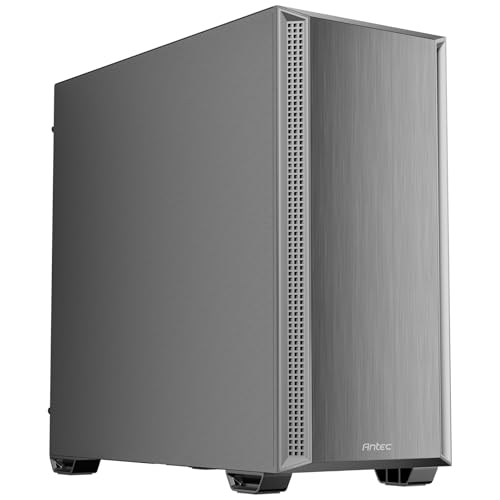
- Four included PWM fans for ready-made airflow
- 405 mm GPU and 360 mm top-radiator support
- Sound-dampening side panels reduce noise
Best For: Quietly cooled ATX systems with a large GPU
Airflow Specialist – ASUS ProArt PA602
For buyers comparing computer cases for workstations, the ASUS ProArt PA602 emphasizes high airflow, substantial component clearance, and practical cooling controls. Its full-tower layout supports E-ATX boards, large graphics cards, and a 420 mm radiator.
Best For: Air-cooled or liquid-cooled workstation builds that need strong ventilation and room for large components.
Pros:
- Includes two 200 mm front fans and a 140 mm rear exhaust fan.
- Supports a 420 mm radiator and graphics cards up to 440 mm.
- Provides a USB-C 20Gbps port, fan hub, and two-section PWM control.
- Front-panel IR dust indicator helps signal when cleaning is needed.
Cons:
- The full-tower chassis is large and weighs 35.5 pounds.
- It has only one listed USB 20 port alongside two USB 30 ports.
The PA602 is a strong choice when cooling and expansion room matter more than compact dimensions. Its preinstalled fans and dust reminder also make it convenient for sustained workstation use.
Server-Scale Builder – Phanteks Enthoo Pro 2 Server Edition
The Phanteks Enthoo Pro 2 Server Edition is built for unusually expansive workstation and server configurations. For computer cases for workstations, its SSI-EEB support, 11 expansion slots, extensive drive capacity, and up to 15 fan positions make it a flexible platform for demanding builds.
Best For: Multi-drive servers, high-end workstations, and builds using SSI-EEB or other large motherboards.
Pros:
- Supports SSI-EEB, E-ATX, ATX, Micro-ATX, and Mini-ITX motherboards.
- Offers 11 PCI slots and storage for up to 10 HDDs or 11 SSDs.
- Provides up to 15 fan positions, including three over the CPU and PCI area.
- Accommodates 480 mm and 360 mm radiators.
Cons:
- Its full-tower size may be excessive for simpler workstation builds.
- The listed warranty is one year.
Choose this case when expandability is the priority. It is especially well suited to systems that need many drives, multiple expansion cards, or extensive custom cooling.
Durable Storage Tower – SilverStone SETA H2 Workstation Tower
Silverstone Technology SETA H2 Full-Size Workstation Tower Chassis, SST-SEH2-B
Check Price On AmazonThe SilverStone SETA H2 is a full-size workstation chassis focused on durable construction, open front ventilation, and large-scale storage. Among computer cases for workstations, it supports SSI-EEB through Mini-ITX boards and provides eight expansion slots for multi-GPU configurations.
Best For: Storage-heavy workstations requiring broad motherboard compatibility and a robust steel chassis.
Pros:
- Fully perforated front mesh promotes unobstructed airflow.
- Supports up to 15 2.5-inch SSDs or 3.5-inch HDDs, including 15 mm SSDs.
- Compatible with SSI-EEB, SSI-CEB, E-ATX, ATX, Micro-ATX, and Mini-ITX boards.
- Offers eight expansion slots for multi-GPU setups.
Cons:
- Fans are not included.
- Cooling is listed as air-based, so additional fan planning is required.
The SETA H2 is a practical foundation for storage-rich professional systems, but budget for fans separately. Its steel construction and broad compatibility make it appealing for long-term, configurable builds.
NAS-Focused Workhorse – JONSBO N5 NAS Workstation Case
The JONSBO N5 combines a relatively compact footprint with extensive drive support and multi-GPU capability. For computer cases for workstations, it is aimed at home servers, NAS systems, and high-performance computing builds that need hot-swap storage in an E-ATX-compatible enclosure.
Best For: Home servers, NAS systems, and compact storage-focused workstations with multiple drives.
Pros:
- Supports 12 front-installation 3.5-inch hot-swap HDDs and up to four 2.5-inch SSDs.
- Can accommodate up to four GPUs and eight PCI expansion slots.
- Includes three built-in rear 120 mm fans.
- Offers USB 3.2 Gen 2 Type-C connectivity and a removable top cover.
Cons:
- GPU, power-supply, and drive capacity depend on component dimensions and configuration.
- CPU cooler clearance is limited to below 160 mm.
- The compact layout may require more careful installation than a conventional full tower.
The N5 stands out when drive density and server functionality are more important than traditional tower proportions. Check GPU, PSU, cooler, and AIO measurements carefully before building.
Expansion Powerhouse – SilverStone ALTA D1
Silverstone Technology ALTA D1 Full Tower Modular Workstation Chassis, SST-ALD1B
Check Price On AmazonThe SilverStone ALTA D1 is a strong choice among computer cases for workstations when your build requires specialized motherboard support, multiple GPUs, and substantial cooling capacity. Its full-tower design accommodates SSI-EEB and specialized form factor boards, while the modular layout supports dual PSUs and extensive expansion.
Best For: Professional workstation builders needing multi-GPU capability, SSI-EEB compatibility, and flexible power or cooling configurations.
Pros:
- Supports SSI-EEB and specialized 15.12-by-13.2-inch motherboards.
- Provides up to 11 expansion slots and 407mm of graphics card clearance.
- Supports multiple modules, dual PSUs, and up to three 360mm radiators.
- High-grade steel construction offers a durable enclosure.
Cons:
- Its full-tower dimensions require considerable desk or floor space.
- The specialized motherboard support may be unnecessary for standard desktop builds.
Choose the ALTA D1 when expansion flexibility matters more than compact dimensions. It is particularly suited to demanding workstation configurations that combine several GPUs with advanced cooling.
Storage-Focused Builder – DARKROCK Classico MAX
The DARKROCK Classico MAX is a practical option among computer cases for workstations that prioritize local storage and airflow. This full tower supports ATX, Micro-ATX, and Mini-ITX motherboards, with room for up to 13 hard drives, a vertical GPU, and a 360mm radiator.
Best For: Storage-heavy workstations, NAS builds, media systems, and users who want broad ATX compatibility with strong cooling options.
Pros:
- Supports up to 10 3.5-inch HDDs and three 2.5-inch SSDs.
- Mesh front and side panels promote airflow.
- Supports vertical GPU mounting and 360mm radiators on the top and front.
- Includes four pre-installed 120mm fans and a dust filter.
Cons:
- Its storage-oriented layout may be excessive for general-purpose builds.
- The full-tower footprint is larger than needed for compact systems.
The Classico MAX stands out when drive capacity is central to the build. Its mesh panels, included fans, radiator support, and vertical GPU option provide useful flexibility for storage-intensive systems.
Server-Grade Capacity – Rosewill Thor NAS
The Rosewill Thor NAS is designed for computer cases for workstations that also serve as NAS, media, or AI-server platforms. Its full-tower chassis supports Extended ATX motherboards, up to 11 3.5-inch hard drives or 13 2.5-inch SSDs, and expansion cards up to 400mm long.
Best For: AI servers, DIY NAS systems, media hubs, and professional builds requiring high-density storage and E-ATX support.
Pros:
- Supports Extended ATX motherboards and large component configurations.
- Accommodates up to 11 3.5-inch HDDs or 13 2.5-inch SSDs.
- Offers 11 external 5.25-inch bays for expansion and optical hardware.
- Includes a 140mm PWM fan, dust filter, hot-swap support, and USB 3.2 Type-C connectivity.
Cons:
- Only one fan is listed, so additional cooling may be useful for demanding builds.
- Its extensive bay capacity creates a large, server-oriented enclosure.
The Thor NAS is a sensible fit for infrastructure-style systems where drive capacity and expandability take priority. Its E-ATX support, hot-swap capability, and 400mm expansion-card clearance make it more suitable for server and NAS duties than ordinary desktop use.
High-Airflow Workstation Pick – HAF II 500
For demanding computer cases for workstations, the Cooler Master HAF II 500 emphasizes airflow, expansion, and graphics-card support. Its oversized front and rear fans, dedicated GPU airflow design, and ATX/E-ATX compatibility make it a strong fit for performance-focused builds.
Best For: AI workstations, multi-GPU systems, and high-performance ATX or E-ATX builds.
Pros:
- Includes two 220 mm front fans and one 180 mm rear exhaust fan.
- Supports graphics cards up to 430 mm and up to four dual-slot GPUs.
- Provides flexible fan, radiator, storage, and cable-management options.
Cons:
- Its large 21.3-pound chassis may be more case than a basic office build needs.
- Cooling-focused design may prioritize airflow over compact dimensions.
The HAF II 500 is a practical choice when workstation cooling and expansion capacity matter most. It is especially compelling for builds using multiple GPUs or large graphics cards.
Quiet Office Workstation Option – Pure Base 600
The be quiet! Pure Base 600 is one of the more office-friendly computer cases for workstations, combining two pre-installed quiet fans with flexible internal storage options. Its ATX compatibility and support for water-cooling radiators up to 360 mm allow room for customized professional systems.
Best For: Quiet office workstations, adaptable ATX systems, and builds using multiple hard drives.
Pros:
- Includes two be quiet! Pure Wings 2 fans for quiet operation.
- Repositionable HDD slots and a removable optical-drive cage improve flexibility.
- Supports radiators up to 360 mm for water-cooled systems.
Cons:
- Only two USB ports are listed.
- The product details identify it as a mini-tower despite its ATX support, so layout should be checked carefully for larger components.
The Pure Base 600 suits workstation users who value restrained acoustics and configurable storage more than maximum expansion. Its adjustable top cover also gives builders additional cooling flexibility.
Balanced Cooling and Noise Pick – Antec P7 S
The Antec P7 S balances airflow and acoustics for practical computer cases for workstations. It arrives with four PWM fans, dual side mesh intake, sound-dampening side panels, and clearance for high-end graphics cards up to 405 mm.
Best For: Quietly cooled ATX workstations with a powerful single graphics card.
Pros:
- Includes four PWM fans: three front intake fans and one rear exhaust fan.
- Supports graphics cards up to 405 mm and top radiators up to 360 mm.
- Sound-dampening side panels help reduce operating noise.
Cons:
- The listed cooling method is air, so liquid-cooling plans should account for radiator compatibility.
- It has one listed USB 3.0 port, although four total USB ports are specified.
The P7 S is a well-rounded option for workstation builders who want included airflow hardware without overlooking noise control. Its generous GPU clearance makes it suitable for many high-performance ATX configurations.
How We Picked the Best Computer Cases for Workstations
We focused on cases that can support demanding workstation hardware rather than basic office PCs. Our selection considers motherboard compatibility, internal clearance, expansion slots, cooling capacity, storage flexibility, cable management, and accessibility. Full-tower and server-oriented models receive particular attention for multi-GPU systems, high-capacity storage, and specialized motherboard formats, while mid-tower options remain useful for compact professional workstations.
Because workloads differ, there is no single best chassis for every buyer. A 3D artist may prioritize GPU airflow and radiator support, while a video editor or data professional may need multiple 3.5-inch drive bays. We also considered included fans and the practical value of each design before recommending these models.
Quick Comparison
| Best For | Case Type to Consider | Priority Features |
|---|---|---|
| Multi-GPU workstation | Full tower | Multiple slots, strong airflow, generous GPU clearance |
| Large storage server | NAS or server tower | Many drive bays, cooling, motherboard flexibility |
| Quiet professional desktop | ATX mid-tower | Sound control, simple layout, efficient cooling |
| Budget workstation | Airflow-focused mid-tower | Included fans, component clearance, upgrade room |
Key Buying Factors for Computer Cases for Workstations
Motherboard and Expansion Compatibility
Check whether the case supports your board size before comparing appearance or features. ATX is common, but E-ATX, SSI-EEB, and other workstation or server formats require additional clearance. Count the PCIe slots you need, especially if installing multiple graphics cards, capture cards, networking adapters, or storage controllers.
GPU, CPU, and Cooling Clearance
Professional GPUs and high-core-count processors can produce substantial heat. Confirm maximum graphics-card length, CPU cooler height, radiator support, and the number and size of fan mounts. A spacious case is valuable when components need unobstructed intake airflow or when several expansion cards sit close together.
Storage and Maintenance
For editing, virtualization, and storage-heavy workloads, evaluate both 3.5-inch and 2.5-inch mounting options. Tool-free trays, removable filters, accessible panels, and sensible cable-routing space can save considerable time over a long service life.
Noise, Size, and Connectivity
A full tower offers flexibility but needs substantial desk or floor space. Quieter cases may use more enclosed panels, while high-airflow designs often trade some acoustic isolation for cooling performance. Also check front-panel USB connectivity and whether the layout suits your workspace.
Who Should Buy Which Computer Cases for Workstations?
Choose a full-tower workstation or server chassis if you need multiple GPUs, an E-ATX or SSI-EEB motherboard, extensive cooling, or numerous drives. NAS-focused cases are the better choice for file servers, media libraries, and backup systems where drive capacity matters most.
For a conventional single-GPU workstation, an airflow-oriented ATX case usually provides the best balance of cost, size, and upgradeability. A quieter mid-tower is preferable for offices, studios, and recording environments, provided it has enough clearance for your planned hardware. Before buying, list every component—including future drives, radiators, and expansion cards—and verify the manufacturer’s clearance specifications.