The MT-VIKI KV18 USB VGA KVM Cable review starts with one simple question: does a niche cable actually make your setup better?
If you already use a compatible MT-VIKI KVM switch, the answer is usually yes.
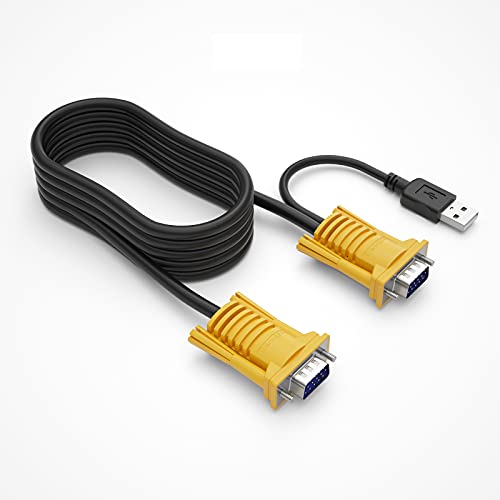
This is a tidy, purpose-built cable for buyers who want less clutter and fewer connection headaches.
MT-VIKI KV18 Review Summary
If you own a compatible MT-VIKI VGA KVM switch and want a cleaner, more reliable desktop or rack setup, the MT-VIKI KV18 USB VGA KVM Cable is an easy product to understand.
It is designed to combine monitor and USB keyboard/mouse connections into a single bonded cable, which is exactly what many KVM users need when they are trying to simplify cable routing and reduce mess behind a monitor, under a desk, or inside a small office rack.
From a buyer’s perspective, the biggest appeal is not flashy design or advanced features.
It is compatibility-focused convenience.
The MT-VIKI KV18 is most attractive to users who already know they need VGA video and USB 2.0 control connections, and who want a cable made specifically for MT-VIKI 2-, 4-, 8-, and 16-port VGA KVM switches.
That makes it a practical buy for offices, labs, test benches, and IT workstations where simple control of multiple PCs matters more than modern video features.
At the same time, this is not a universal KVM cable.
If your setup uses HDMI, DisplayPort, or another KVM brand, this model may not fit your needs.
In other words, the MT-VIKI KV18 USB VGA KVM Cable review comes down to a single buying rule: if your switch matches, the cable solves a real problem; if it does not, skip it.
Scorecard
| Category | Score | Why It Matters |
|---|---|---|
| KVM switch compatibility | 9.0/10 | Built specifically for MT-VIKI 2/4/8/16-port VGA KVM switches, the main buying factor. |
| Connector fit | 9.0/10 | Uses a VGA/SVGA HDB 15-pin male-to-male monitor connection plus USB 2.0 Type A for keyboard and mouse. |
| Cable construction | 8.0/10 | Bonded 2-in-1 design with a shielded PVC outer layer keeps the setup tidy and better protected. |
| Setup convenience | 8.0/10 | Combines monitor and USB links into one cable, simplifying routing between a PC and a KVM switch. |
| Length practicality | 7.0/10 | 6 ft / 1.8 m is useful for common desk and rack-adjacent setups without being excessive. |
| Data transfer performance | 7.0/10 | USB 2.0 is adequate for keyboard and mouse signals, though not for high-speed peripheral use. |
| Build and finish | 7.0/10 | PVC construction and round cable shape suggest a straightforward durable accessory. |
Bottom line: the MT-VIKI KV18 is a smart, low-drama accessory for the right KVM owner.
It earns its value by being specific, tidy, and easy to install.
Key Features and Specifications of MT-VIKI KV18
The most important thing to understand about the MT-VIKI KV18 USB VGA KVM Cable is that it is a utility cable, not an upgrade cable.
It is made to connect a personal computer to a compatible KVM switch with minimal fuss.
| Specification | Details |
|---|---|
| Brand | MT-VIKI |
| Model | KV18 |
| Product type | 2-in-1 USB/VGA KVM cable |
| Connector type | USB, VGA |
| Connector gender | Male-to-male |
| Video connector | VGA/SVGA HDB 15-pin male-to-male |
| USB connector | USB 2.0 Type A |
| Compatible devices | Personal computer |
| Recommended use | Connecting computers to KVM switches |
| Data transfer rate | 480 Mbps |
| Number of pins | 19 |
| Length | 6 ft / 1.8 m |
| Outer material | PVC |
| Item shape | Round |
| Color | Black & yellow |
| Package type | Sealed anti-static bag |
| Usage | Indoor |
Those specs tell you a lot about the intended buyer.
This is a classic VGA-era KVM accessory, and it uses the standard connection types you would expect in legacy office or lab hardware.
The bonded design is important because it reduces the number of loose cables running from each PC to the switch, which is especially helpful when you have multiple computers connected side by side.
The 480 Mbps USB 2.0 rating is perfectly normal for keyboard and mouse duties.
It is not designed to be a high-performance peripheral cable, and that is fine because KVM control signals are all it needs to handle.
Pros and Cons of MT-VIKI KV18
Every MT-VIKI KV18 USB VGA KVM Cable review should focus on fit and practicality, because this product succeeds or fails based on whether it matches your hardware.
Pros
- Simplifies KVM cabling by combining monitor and USB connections into one bonded cable.
- Designed for MT-VIKI VGA KVM switches, so the target use case is clear.
- Standard VGA and USB connectors are easy to identify and manage.
- Shielded PVC jacket adds basic protection and a neater overall finish.
- Useful 6 ft length fits many desk-side and rack-adjacent setups.
Cons
- Compatibility is limited and appears focused on MT-VIKI switches rather than universal KVM use.
- Only works with VGA, so it is not suitable for HDMI or DisplayPort systems.
- USB 2.0 is basic and intended for input devices, not broader high-speed use.
- No premium extras such as ferrite cores, angled connectors, or included adapters.
For most buyers, the advantages are practical rather than exciting.
That is not a criticism; it is exactly what a cable like this should be.
But the downsides matter if you are trying to buy once and avoid compatibility mistakes.
MT-VIKI KV18 Compatibility With VGA KVM Switches
Compatibility is the whole game here.
The MT-VIKI KV18 is made for MT-VIKI 2-port, 4-port, 8-port, and 16-port VGA KVM switches, and the product information makes it clear that it is not intended to work as a universal accessory across other brands.
That means the first question you should ask is not whether you need a KVM cable.
It is whether you need this exact style of KVM cable for your exact switch family.
If the answer is yes, the cable is a sensible fit.
If you are mixing brands, using an older switch with unusual pinouts, or trying to bridge into a newer digital video environment, you should slow down and verify the match before ordering.
From a buyer’s perspective, this is actually a positive sign.
Brand-specific cables often reduce guesswork because they are designed around known hardware.
The tradeoff is that they do not offer the flexibility of a generic solution.
Cable Layout and Connector Types
The MT-VIKI KV18 follows a simple 2-in-1 layout: one line carries VGA video, and the other carries USB control signals for keyboard and mouse.
That design choice is central to the product’s value.
The VGA/SVGA HDB 15-pin male-to-male monitor connection is what you expect in older KVM environments.
The USB 2.0 Type A connection handles control traffic for the input devices.
Together, they cover the two most essential functions in a traditional VGA-based KVM setup.
Because the cable is bonded, you are less likely to end up with tangled runs or mismatched lengths between the video and USB leads.
For IT users and home-office buyers who care about cable management, that can be a meaningful quality-of-life improvement.
The black-and-yellow look is also practical, since it makes the cable easy to spot during installation and tracing.
Is the 6 ft Length Enough for Your Setup?
The included 6 ft / 1.8 m length is one of the more important buying details.
In most normal desktop or equipment-rack-adjacent setups, it is a very workable length.
It gives enough slack to connect a PC to a KVM switch without forcing the cable into a tight bend or leaving excessive excess cable to bundle.
That said, length is one of the first things to check if you are buying for a deeper rack, a more spread-out workstation, or a setup where the PC and switch are not physically close.
In a typical office environment, 6 feet is often enough.
In a server closet or custom bench setup, it may be too short depending on layout.
Buyer tip: measure the actual path the cable needs to travel, not just the straight-line distance.
Cable routing around monitors, desk frames, or rack rails can use up length quickly.
Build Quality and Cable Protection
The construction here is straightforward, but that can be a good thing.
The cable uses a fully coated, shielded PVC outer layer with a round shape, which should help it hold up to normal indoor use while resisting everyday scuffs and handling.
This is not a ruggedized industrial cable, and it does not pretend to be.
What it does offer is a basic level of shielding and a cleaner physical profile than loose separate cables.
That matters in KVM environments, where signal reliability and cable organization are both part of the user experience.
One thing missing is premium cable hardware.
There are no notable extras like ferrite beads, right-angle plugs, or reinforced strain-relief features highlighted in the product data.
So while the build sounds perfectly acceptable, buyers should see it as a practical standard cable rather than a premium one.
Performance and Everyday Use
In real-world use, a cable like this should be judged on how invisibly it does its job.
For keyboard, mouse, and VGA monitor connections, the ideal result is simply that everything works when you switch between machines.
The USB 2.0 connection is more than enough for KVM control duties, and the VGA link is appropriate for compatible legacy displays or older system environments.
If your KVM switch and computer already expect this kind of setup, performance should feel routine in the best possible way: stable, predictable, and uncomplicated.
Where buyers can get into trouble is expecting this cable to solve broader video or device needs.
It is not a catch-all accessory.
It is optimized for a narrow job, and that narrow job is exactly why it makes sense for the right user.
MT-VIKI KV18 vs Alternatives
If you are comparing the MT-VIKI KV18 against other options, the best alternatives are usually not exotic brands.
They are other MT-VIKI VGA KVM cables, a brand-specific cable made for your exact KVM switch, or a different KVM cable standard altogether if your hardware is newer.
- MT-VIKI VGA KVM cable options if you need a different length or model match.
- HDMI KVM cable if your display chain is fully digital.
- DisplayPort KVM cable for modern workstation and monitor setups.
- USB VGA KVM cable if you are comparing generic cable types and can verify compatibility.
The deciding factor is not which cable looks better on paper.
It is which one fits your KVM switch and video standard without adapters.
If you already own an MT-VIKI VGA switch, the KV18 is the safer, more direct choice than a generic unknown.
Who Should Buy MT-VIKI KV18?
The MT-VIKI KV18 USB VGA KVM Cable is a strong fit for buyers who already have a compatible MT-VIKI VGA KVM switch and want a clean, reliable cable solution.
It is also a good fit for office admins, lab technicians, IT support staff, and home users managing multiple PCs from a single keyboard, mouse, and monitor station.
It makes the most sense for people who value simple cable management, use legacy VGA hardware, and want a purpose-built cable rather than a generic one.
You should probably skip it if you:
- Use a KVM switch from another brand and have not confirmed compatibility.
- Need HDMI, DVI, or DisplayPort support.
- Need a longer cable run for a larger rack or remote workstation.
- Want extra premium features instead of a basic utility cable.
Best fit: a buyer with a known-compatible MT-VIKI VGA KVM switch who wants to reduce clutter and avoid cable mismatch issues.
Who Should Buy MT-VIKI KV18?
If you are still deciding, focus on the setup itself.
The MT-VIKI KV18 is not about innovation; it is about matching the right hardware with the right cable.
Buy it if your goal is to connect one PC to a compatible MT-VIKI VGA KVM switch with a neat bonded cable and standard connectors.
Skip it if your setup is modern, mixed-brand, or too far apart for a 6-foot cable to be practical.
Is MT-VIKI KV18 Worth It?
So, is MT-VIKI KV18 USB VGA KVM Cable worth it?
For the right buyer, yes.
This is a niche accessory that does exactly what it claims to do, and that matters more than bells and whistles.
The value comes from three things: specific compatibility, cleaner cable management, and simple VGA/USB connectivity.
If those are the priorities in your setup, the MT-VIKI KV18 is a sensible purchase and likely the better choice than improvising with adapters or mismatched generic cables.
The main drawback is also clear: it is not universal.
That limits its audience, but it also makes the product easier to judge.
If you own the matching MT-VIKI VGA KVM switch family, this cable is a straightforward buy.
If you do not, look at other KVM cable options instead.
Final verdict: the MT-VIKI KV18 is worth buying when compatibility is confirmed and clean cable routing matters.
It is a practical, no-nonsense accessory for legacy VGA KVM setups, and that is exactly where it delivers the most value.