Looking for a serious JASZDOT 55 Smart Board review?
This 55-inch interactive display packs classroom-ready touch, 4K clarity, and broad connectivity into one wall-mount system.
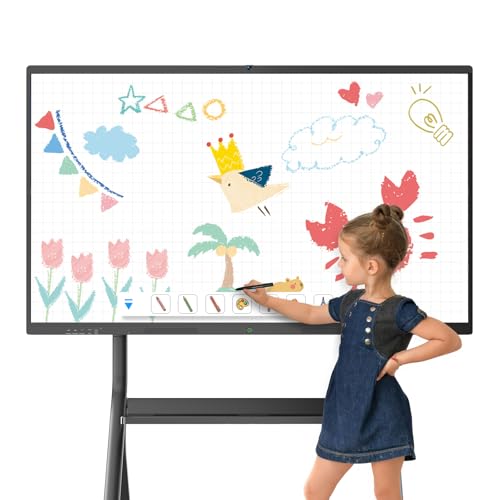
JASZDOT Smart Board Review Summary
If you want an all-in-one interactive display for teaching, meetings, or hybrid collaboration, the JASZDOT 55 Smart Board is built for exactly that job.
It combines a crisp 4K touchscreen, Android 14, generous memory, and unusually flexible ports, making it a strong fit for schools, offices, and training rooms that need more than a basic monitor.
From a buyer’s perspective, the biggest selling point is convenience: you get a large, touch-enabled presentation surface that can run apps, accept annotations, save whiteboard notes, and connect to both modern and legacy devices.
That makes it especially attractive for teams that want fewer moving parts and a smoother collaboration workflow.
Verdict: the JASZDOT 55 Smart Board is a best-fit purchase for classrooms, office meeting rooms, and trainers who will actually use the whiteboarding and conferencing tools.
If you only need a display, it may be more than you need; if you need a true interactive board, it brings real value.
Scorecard
| Category | Score | Why It Matters |
|---|---|---|
| Display Quality | 9.0 | True 4K UHD, 400+ nits brightness, and eye-care flicker-free viewing support shared use. |
| Touch Responsiveness | 9.0 | 20-point infrared touch with ±1mm precision and 6ms response time feels fast and accurate. |
| Software & Performance | 8.0 | Android 14, 8GB RAM, and 128GB storage should handle everyday collaboration smoothly. |
| Connectivity & Ports | 9.0 | Front, rear, and bottom ports cover HDMI, USB, VGA, LAN, DP, AV, MIC, RS232, and more. |
| Collaboration Features | 8.0 | Handwriting recognition, cloud saving, and conferencing support are useful for hybrid work. |
| Installation & Setup | 7.0 | Wall-mount design is clean, but installation still takes planning and proper support. |
Overall take: the JASZDOT 55 Smart Board stands out for display sharpness, touch accuracy, and connectivity flexibility.
Its value depends on whether your workflow truly benefits from interactive whiteboarding, not just screen sharing.
Key Features and Specifications of JASZDOT Smart Board
The JASZDOT Smart Board is a 55-inch wall-mount interactive whiteboard designed for office use, but it is equally relevant in classrooms and collaborative spaces.
The spec sheet is broad enough to support presentation, annotation, media playback, and conferencing without forcing you into a single ecosystem.
| Specification | Details |
|---|---|
| Brand / Model | JASZDOT / 55” Smart Board |
| Display | True 4K UHD touchscreen |
| Brightness | Over 400 nits |
| Operating System | Android 14 |
| Memory / Storage | 8GB RAM / 128GB internal storage |
| Touch Technology | 20-point infrared touch |
| Touch Precision | ±1mm |
| Response Time | 6ms |
| Connectivity | HDMI, USB, VGA, LAN, DP, AV, MIC, RS232, TF, coaxial, headphone |
| Front Ports | 2 USB, 1 HDMI, 1 TOUCH input |
| Rear Ports | TOUCH, 2 USB, TF card slot, HDMI, RS232, headphone jack |
| Included Accessories | Touch pen, wall mount, remote, screwdriver, M8 screws, AC power cord, manual, screen casting box |
| Material / Color | Metal construction, black finish, ABS frame |
| Mounting | Wall mount, vertical orientation |
What stands out here is the port selection. Many interactive displays focus on USB and HDMI alone, but the JASZDOT 55 Smart Board also includes VGA, RS232, AV, MIC, LAN, DisplayPort, and coaxial connections.
That makes it a better fit for mixed-tech environments where schools and businesses still rely on older hardware.
The 4K UHD panel and 400+ nits brightness also matter more than they sound on paper.
In a meeting room or classroom, clarity affects how easily people can read text, see slides, and follow annotation.
Brightness helps the board remain legible in well-lit rooms, which is a practical advantage over dimmer displays.
Pros and Cons of JASZDOT Smart Board
Here’s the clearest JASZDOT 55 Smart Board pros and cons breakdown for real buyers.
Pros
- Sharp 4K image quality with useful brightness for presentations and lessons.
- Fast, accurate multi-touch for collaborative writing and annotation.
- Android 14 adds a modern software base for apps and media.
- 8GB RAM and 128GB storage should support multitasking better than entry-level boards.
- Very flexible connectivity for modern and legacy devices alike.
- Useful bundled accessories reduce the number of extra items you need to buy.
Cons
- Wall-mount only limits flexibility if you need a mobile setup.
- Installation takes planning because this is a large interactive display, not a plug-and-play monitor.
- Feature depth may be overkill for users who only need basic slides or screen mirroring.
- Best value depends on workflow; if you do not use whiteboarding or conferencing tools, some features may go unused.
Bottom line: the strengths are clearly in the areas that matter most for collaborative work, but the drawbacks are just as clear for buyers who want simplicity or mobility.
Who Should Buy JASZDOT Smart Board?
The JASZDOT Smart Board is a smart buy for anyone building a collaboration-first workspace.
It makes the most sense for teachers, office teams, trainers, and hybrid presenters who need a display that can do more than just show content.
Good fit for:
- Teachers who want an interactive classroom display for lessons, writing, and media.
- Business teams that annotate slides, run meetings, or brainstorm in person.
- Training rooms that need a large shared writing surface.
- Home-office users who want premium presentation tools and conferencing support.
- Users with mixed device ecosystems who need both modern and legacy ports.
Skip it if:
- You only need a standard TV or basic monitor.
- You want a portable smart display that moves between rooms.
- You do not plan to use whiteboard, annotation, or collaboration features.
If your buying goal is a straightforward screen, this is probably too specialized.
If you need an interactive whiteboard with real teaching and meeting utility, it is much easier to justify.
How the Android 14 Interface Feels in Daily Use
One of the strongest design choices in the JASZDOT 55 Smart Board is the use of Android 14.
That matters because the operating system shapes how fast the board feels when you switch between apps, launch a whiteboard, open media, or move into a conference workflow.
With 8GB of RAM and 128GB of storage, this board should feel more capable than low-memory interactive displays that stutter when multitasking.
In practical terms, that means fewer slowdowns when you are switching between presentations, annotation tools, and casting functions.
From a buyer’s perspective, this is the sort of software setup that favors everyday use over demo use.
You do not want an interactive board that looks impressive for five minutes and then becomes clunky in real meetings.
The JASZDOT Smart Board appears better positioned for repeat use, which is exactly what schools and office teams need.
The main caution is that smart displays can vary in how polished their app environment feels.
Android 14 is a strong foundation, but buyers should still expect to spend time setting up the workflow that works best for their room.
Touch Accuracy for Teaching, Whiteboarding, and Annotation
Touch performance is one of the most important buying factors in any interactive display, and this is where the JASZDOT 55 Smart Board looks especially promising.
The board uses 20-point infrared touch with ±1mm precision and a 6ms response time, which are the kinds of numbers that suggest responsive writing and collaboration.
For teaching and meeting room use, that means the board should handle multiple users well enough for group annotation, quick marking, and collaborative brainstorming.
If several people are writing at once, a responsive touch layer reduces lag and frustration.
That is a big deal in classrooms where students may be taking turns, or in team sessions where the room needs to stay moving.
The support for smart handwriting recognition, one-touch color switching, and instant cloud saving adds real usability value.
These features are not just bullet points; they help turn the board into an actual working whiteboard rather than a glorified screen.
Best takeaway: if touch accuracy matters to your workflow, the JASZDOT Smart Board appears to be built for serious collaborative use rather than casual interaction.
Ports and Device Compatibility for Classroom and Meeting Room Setups
Connectivity is a major strength of the JASZDOT 55 Smart Board.
The board includes a wide mix of ports across the front, rear, and bottom, which makes it much easier to integrate into a real classroom or office environment.
Front connectivity includes two USB ports, one HDMI input, and one touch input.
Rear connectivity adds more USB, HDMI, a TF card slot, RS232, and a headphone jack.
Bottom ports are especially impressive, covering LAN IN, LAN OUT, HDMI, VGA, VGA IN, MIC IN, AV IN, AV OUT, COAXIAL, and DisplayPort.
This matters because modern rooms rarely run on one device type.
You may need to connect a laptop, a legacy presentation source, a microphone, a wired network, or a control system.
The JASZDOT Smart Board’s port layout gives it a real edge over simpler boards that force you to use adapters for everything.
Buyer advantage: if your room includes older projectors, legacy PCs, or AV gear, this board reduces compatibility risk.
That makes it especially attractive for schools, public institutions, and training departments that are not starting from scratch.
Caution: always confirm your wall layout, cable paths, and device compatibility before installation.
The board is flexible, but planning still matters.
Design, Build Quality, and Installation Notes
Design-wise, the JASZDOT Smart Board keeps things straightforward: black metal styling, ABS frame material, and a wall-mount format that looks professional in a classroom or conference room.
The vertical orientation and whiteboard-style layout make it feel like a purpose-built collaboration display rather than a repurposed TV.
The included accessories are a practical plus.
You get the smart board itself, a touch pen, wall mount, remote, Phillips screwdriver, M8 screws, a 60-inch AC power cord, user manual, and screen casting box.
That bundle helps reduce the number of separate purchases needed to get started.
Still, installation is not trivial.
A 55-inch interactive display is heavier and more involved than a consumer television, and the wall must support the unit securely.
Cable routing also needs to be thought through early, especially if you plan to use the variety of rear and bottom ports.
In short: the design is practical and professional, but it rewards buyers who are prepared to install it properly.
Best Use Cases: Home Office, Training Room, or Classroom
The JASZDOT 55 Smart Board is most convincing when it is used in a place where interaction matters.
That includes classrooms, training rooms, shared office spaces, and hybrid meeting rooms.
For classrooms, the combination of touch precision, annotation tools, and eye-care viewing makes it a better teaching aid than a plain screen.
For training rooms, the display is large enough for shared content and flexible enough for live note-taking.
For home offices, it is best suited to users who host presentations, teach remotely, or run regular collaborative sessions.
If you are only using it for passive video playback or occasional screen mirroring, the board is likely more display than you need.
The value rises sharply when several people interact with it during the week.
Comparable alternatives to consider include ViewSonic interactive display, Samsung Flip interactive whiteboard, Promethean ActivPanel, SMART Board interactive display, and a mobile smart board with stand if portability matters more than wall mounting.
My advice: compare the JASZDOT against these options based on installation style, port needs, and whether you want a fixed wall solution or a mobile cart setup.
What’s in the Box and Installation Notes
The included package is well thought out for a board in this category.
Having the touch pen, mounting hardware, remote, screwdriver, power cord, manual, and casting box included means you are not starting from zero when the board arrives.
This is especially useful for buyers who want to move quickly from unboxing to first use.
That said, the included hardware does not replace proper planning.
You still need to confirm mounting strength, room layout, and how the board will connect to your laptop or network.
The biggest installation consideration is the same one common to all interactive boards: once it is mounted, it is not something you casually relocate.
That is why this product makes the most sense in rooms with a stable purpose.
Is JASZDOT Smart Board Worth It?
Yes — for the right buyer, the JASZDOT 55 Smart Board is worth it. It delivers the core features that matter most in an interactive display: sharp 4K visuals, responsive multi-touch, modern Android software, and broad device compatibility.
What makes it stand out is not one single headline feature, but the way the parts work together.
The display quality supports visibility, the touch system supports collaboration, and the port selection supports real-world office and classroom setups.
That combination makes the JASZDOT 55 Smart Board review easy to frame around practical usefulness rather than gimmicks.
Buy it if you need a wall-mounted board for teaching, meetings, or training, and you will actively use the annotation and conferencing features.
Skip it if you want a simple screen, a portable setup, or something that can be moved around without installation work.
Final verdict: the JASZDOT 55 Smart Board is a smart, capable, and feature-rich interactive display that makes the most sense in collaborative spaces.
If your room needs a serious digital whiteboard, it is a compelling choice.