AsiaHorse Nyota Pro 120mm PC Fans are built for builders who want a cleaner interior without giving up airflow or lighting control.
If you are comparing them as an AsiaHorse Nyota Pro 120mm PC Fans review candidate, the standout is the modular daisy-chain layout.
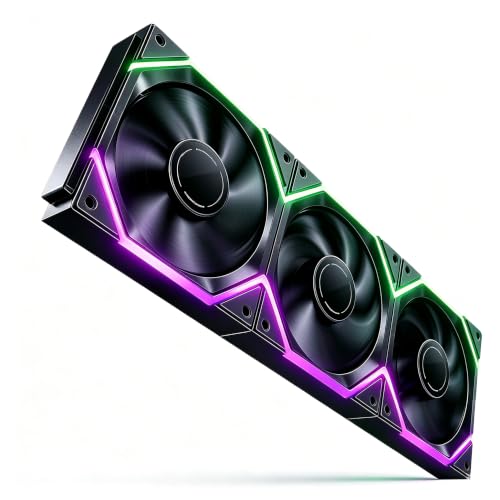
Nyota Pro Review Summary
The AsiaHorse Nyota Pro makes sense for a case builder or radiator upgrader who values tidy wiring, PWM control, and a more advanced ARGB look than a basic fan pack can offer.
It is especially relevant if you want to reduce cable clutter while still getting a 120mm fan that is positioned as a high-airflow, low-noise option.
What separates it from a generic RGB fan set is the combination of interlocking modular assembly, dual-zone asynchronous lighting, and standard 5V 3-pin ARGB compatibility.
That mix is aimed at users who care about both appearance and practical installation.
Review Scorecard
| Category | Score | Why it scores this way |
|---|---|---|
| Cable Management | 10/10 | Modular daisy-chain design can power the whole chain from a single cable. |
| Lighting Flexibility | 9/10 | 18 addressable LEDs and dual-zone control create more varied effects. |
| Cooling Potential | 8/10 | 2000RPM ceiling and 61.5CFM rating point to strong airflow for a 120mm fan. |
| Noise Profile | 8/10 | 29dB max is positioned as quiet enough for mainstream gaming builds. |
| Installation Fit | 9/10 | Standard 120x120x25mm sizing and radiator screws broaden compatibility. |
| Build Features | 8/10 | HDB bearings, rubber pads, copper connections, and flame-retardant braided cables add confidence. |
Key Features and Specifications of Nyota Pro
The Nyota Pro is a 120mm PWM fan sold for PC cases and liquid cooler use.
The listing highlights an 800 to 2000RPM operating range, a 61.5CFM maximum airflow figure, and a 2.16mmH2O maximum pressure rating.
Those numbers suggest a fan that is intended to stay relevant in both open case airflow roles and more restrictive radiator or filtered setups.
The most distinctive feature is the modular daisy-chain connection.
Instead of routing separate fan cables everywhere, the fan set uses an interlocking buckle-style design so multiple fans can connect as a chain.
In practice, that is the main reason to buy this model: less cable clutter and a cleaner-looking build.
Lighting is another major selling point.
AsiaHorse says the fan includes 18 addressable LEDs, split 9 per side, with dual-zone asynchronous control when paired with the UMBRA Hub and software.
That means the lighting side is not just decorative; it is part of the product identity.
Other listed details matter for real-world installation:
- Standard 120x120x25mm sizing fits common cases.
- 4-pin PWM gives automatic speed control from the motherboard.
- 5V 3-pin ARGB support keeps it compatible with many modern boards and accessories.
- Reversible blade design supports both intake and exhaust orientation.
- Thick anti-vibration rubber pads are included to help reduce resonance.
- High-density HDB bearings are used for long-term reliability.
- Braided flame-retardant cables and copper connections are presented as safety and durability upgrades.
- Radiator mounting screws are included for liquid cooler installations.
For a buyer reading this AsiaHorse Nyota Pro 120mm PC Fans review, the headline is straightforward: it is not just about lighting.
It is a cable-management-oriented fan design that still tries to meet normal cooling and noise expectations.
Pros and Cons of Nyota Pro
Pros
- Cleaner wiring than typical fan sets thanks to the modular chain concept.
- Flexible ARGB presentation with dual-zone asynchronous lighting support.
- Useful cooling headroom from the 2000RPM limit and strong airflow claim.
- Broad compatibility with standard 120mm mounting and 5V ARGB ecosystems.
- Build details feel considered, including rubber pads, HDB bearings, and braided cables.
Cons
- The best lighting features appear to depend on the AsiaHorse UMBRA Hub and software.
- Buyers who do not care about ARGB may be paying for features they will never use.
- The modular design is attractive, but some builders may prefer the certainty of more conventional fan wiring.
- The listing is strongest on feature claims; it gives less direct detail about acoustics under load beyond the 29dB figure.
Who Should Buy Nyota Pro?
This fan is a strong fit for builders who want a showcase PC with less cable mess.
If you are assembling a tempered-glass case, a themed gaming build, or a system where tidy wiring matters as much as thermal performance, the modular layout is a real advantage.
It also makes sense for users planning a radiator or case fan refresh who want PWM control and ARGB in one product.
The included radiator screws and standard dimensions help make it a practical swap for common 120mm positions.
You should probably skip it if you want a plain cooling fan with no lighting, no hub dependency, and no interest in software-driven effects.
In that case, a simpler PWM fan may be a better fit because you will not be paying for the modular ARGB system.
Cooling and Lighting Design Choices of Nyota Pro
Modular Fan-to-Fan Connection
The biggest design decision here is the interlocking modular structure.
AsiaHorse is clearly trying to solve one of the most annoying parts of RGB fan builds: cable routing.
For multi-fan installs, fewer leads and fewer visible wires can matter as much as raw performance numbers.
Dual-Zone ARGB Effects
The 18-LED layout is more interesting than a standard single-ring glow because it is split across both sides of the fan.
Dual-zone asynchronous control should appeal to builders who want visual depth rather than one uniform lighting pattern.
It is a feature aimed at display-first cases.
Airflow, Pressure, and Speed Range
The listed 800 to 2000RPM range, 61.5CFM airflow, and 2.16mmH2O pressure put the Nyota Pro in a category that should be capable enough for common gaming builds.
The numbers are not extreme, but they are credible for a 120mm PWM fan that needs to balance case airflow and some radiator duty.
Noise and Durability Details
The 29dB claim, anti-vibration pads, and HDB bearings point toward a product that is trying to avoid the usual RGB-fan tradeoff where looks come at the expense of acoustics.
The safety-oriented cable and copper details add confidence, even if most buyers will mainly notice the installation and lighting benefits first.
Alternatives to Nyota Pro
If you like the idea of a modular or premium fan but want to compare options, these are credible Amazon search starting points:
Noctua is the obvious pick if your priority is a no-nonsense performance-first fan.
Corsair and Lian Li are stronger comparison points if you want a polished ecosystem around lighting and coordinated build aesthetics.
ARCTIC is worth a look if you want practical airflow value with less emphasis on flashy design.
Is Nyota Pro Worth It?
Yes, if your build benefits from cleaner fan wiring and ARGB presentation. The AsiaHorse Nyota Pro is worth considering when the goal is a tidier interior, flexible lighting, and a 120mm PWM fan that still looks suitable for modern gaming or showcase builds.
If you only need basic airflow, this is more fan than you need.
But if the modular chain design and dual-zone lighting are features you will actually use, the Nyota Pro offers a distinctive mix of convenience and visual payoff that makes it easy to justify against ordinary RGB fans.