Need cleaner scans from curved pages, glossy paper, or thick books? The best book scanners with automatic page flattening can save time while improving readability and OCR results.
Below, we focus on practical picks for home archives, classrooms, offices, and digitization workflows where speed, image quality, and ease of use matter most.
Best 10 Book Scanners with Automatic Page Flattening Picks for 2026
AI Auto-Flatten Book Scanner
CZUR Aura Pro for Fast A3/A4 Scans

- Auto-flatten and deskew with AI and laser lines
- 2-second-per-page scanning with multiple output formats
- OCR supports 180+ languages and works on Mac/Windows
Best For: Fast overhead scanning of books and documents with curved-page correction
Overhead Book Scanner
ScanSnap SV600 for Non-Destructive Scanning

- Auto Book Correction flattens curved pages
- Scans books, magazines, and papers without cutting them
- Page Turning Detection and Multi Document Detection add convenience
Best For: Non-destructive overhead scanning of books and mixed paper items
Portable AI Flattening Scanner

- Three-laser flattening technology for curved books
- Auto-detect page turn with optional foot-pedal scanning
- 2-second pages plus 180+ language OCR support
Best For: Portable A3 book scanning with automation and curved-page correction
High-Res AI Book Scanner

- 24MP 4K scanning with AI auto-flattening
- Finger erasing plus searchable PDF and Office output
- Cloud export support for Dropbox, OneDrive, FTP, and email
Best For: Professional book and document scanning with high-resolution output
Portable Ultra Pro Book Scanner
CZUR Shine Ultra Pro Portable 24MP Book Scanner

- 24MP auto-focus camera with 5696×4272 resolution
- Software page flattening for curved book pages
- Portable, foldable design with Windows and Mac support
Best For: Portable home, study, or remote-work scanning
Fast Auto-Flatten Book Scanner
JOYUSING V320pro Fast Auto-Flatten Book Scanner

- Second-gen auto-flatten and deskew with laser lines
- Scans up to 40 pages per minute
- Windows/Mac support with A3 and A4 modes
Best For: Fast routine scanning with built-in page correction
High-Resolution AI Page Smoothing Scanner
VIISAN K48 48MP AI Page Smoothing Scanner
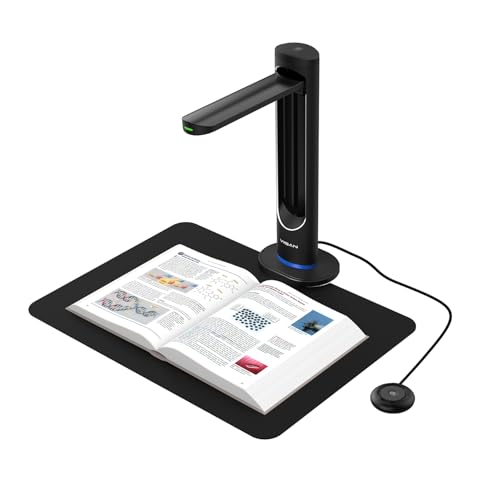
- 48MP sensor with up to 600 DPI capture
- AI page smoothing with automatic double-page splitting
- Laser positioning, auto-scan, and 4K live view
Best For: High-detail digitization and OCR workflows
Editor's Choice
IRIScan Desk 7 Pro 18MP 4K Book Scanner

- AI auto-flattening for curved book pages
- 18MP 4K capture with OCR support
- Finger erasing and desktop cropping features
Best For: People who want a versatile overhead scanner for books, OCR, and presentations
Large Format Pick
VIISAN S21 A2/A3 Auto-Flatten Scanner

- A2/A3 overhead scanner with auto-flattening
- 26MP capture and software-enhanced 600 DPI
- Finger removal and split-page tools
Best For: Large books, manuscripts, newspapers, and oversized documents
Budget-Friendly Pick

- Auto page flattening for curved pages
- Anti-glare LED lighting for clearer capture
- 16MP camera with 300 DPI output
Best For: Users needing simple A3 book scanning for home, school, or office
AI Auto-Flatten Book Scanner – CZUR Aura Pro for Fast A3/A4 Scans
If you want book scanners with automatic page flattening for quick home or office digitizing, the CZUR Aura Pro is built around speed and curved-page correction. It scans A3 and A4 material, uses AI software with three laser lines for flattening, and outputs JPG, Word, PDF, or searchable PDF.
Best For: Users who want a portable overhead scanner with fast 2-second pages, OCR, and AI flattening for books and documents.
Pros:
- Auto-flatten and deskew powered by AI plus three laser lines for curved books
- Fast 2-second-per-page scanning with JPG, Word, PDF, and searchable PDF output
- OCR supports 180+ languages, with Windows and macOS compatibility
- Includes a glare-free smart lamp with 4 color temperature settings
Cons:
- Thai, Hebrew, and Arabic OCR are not currently supported
- Mac Apple Silicon requires macOS 13 or later, which may limit older systems
Overall, the Aura Pro is a strong choice if you care most about accurate page flattening and quick, flexible document capture. Its mix of AI tools, lighting control, and broad file support makes it practical for mixed scanning tasks.
Overhead Book Scanner – ScanSnap SV600 for Non-Destructive Scanning
The ScanSnap SV600 is a straightforward pick among book scanners with automatic page flattening when you want non-destructive overhead scanning. It can scan books, newspapers, magazines, and loose items directly, while Auto Book Correction helps flatten page curves and correct distortion.
Best For: People who need an overhead scanner for books, magazines, clippings, and mixed paper items without cutting pages.
Pros:
- Auto Book Correction helps flatten curved pages and reduce distortion
- Page Turning Detection can start scans automatically as pages turn
- Multi Document Detection crops and rotates multiple items in one scan
- Point Retouch can remove fingers captured during scanning
Cons:
- Lower 1200 resolution than some newer high-resolution competitors
- Heavier desktop design at 6.6 pounds
For users focused on ease of use rather than maximum resolution, the SV600 offers a well-rounded overhead workflow. Its correction tools and automatic triggers make it a practical scanner for everyday book and document work.
Portable AI Flattening Scanner – CZUR Aura Pro for A3 Books
If you are comparing book scanners with automatic page flattening and want a portable overhead model, this CZUR Aura Pro version is built for quick scanning and simple workflows. It uses three laser lines for page flattening, can auto-detect page turns, and supports A3-size material with 2-second scanning speed.
Best For: Users who want a foldable scanner with auto scan, foot-pedal control, and strong curved-book correction.
Pros:
- Flattening technology uses three precise laser lines for curved pages
- Ultra-fast 2-second-per-page scanning for single sheets and double-page books
- Auto-detect page turn and auto scan, plus foot pedal support
- Includes supplemental side lights and a sound-controlled smart lamp
Cons:
- Thai, Hebrew, and Arabic OCR are not supported
- Sound-control depends on quiet conditions and working within about 10 ft
This model makes sense if you want a compact book scanner that still emphasizes page flattening and automation. The combination of auto scan, lighting, and OCR support gives it a flexible role in a home or office setup.
High-Res AI Book Scanner – IRIScan Desk 7 Business 24MP
The IRIScan Desk 7 Business is aimed at buyers who want book scanners with automatic page flattening plus higher-resolution capture. It combines 24MP 4K output, AI auto-flattening, and finger erasing, while supporting book curve flattening and multiple export formats.
Best For: Professionals, educators, and office users who want high-resolution book scanning with OCR and cloud export options.
Pros:
- 24MP 4K capture with 600dpi support for detailed scans
- AI auto-flattening and finger erasing for cleaner book pages
- Supports OCR, searchable PDF, PDF-A, and Office document formats
- Can export to cloud destinations like Dropbox, OneDrive, FTP, and email
Cons:
- Feature-rich software may be more than casual users need
- Short-arm document camera design may take some getting used to
For users who want a more advanced scanner for books and documents, the Desk 7 Business brings strong image quality and broad output options. Its mix of flattening tools, OCR, and real-time projection makes it especially useful in professional settings.
Portable Ultra Pro Book Scanner – CZUR Shine Ultra Pro Portable 24MP Book Scanner
If you want a book scanner with automatic page flattening that stays portable, the CZUR Shine Ultra Pro is built for quick digitizing of books, documents, and mixed office files. Its 24MP auto-focus camera and software-based page flattening are aimed at producing cleaner page captures without a lot of manual correction, and it can also export to JPG, PDF, searchable PDF, Word, and Excel.
Best For: Users who want a lightweight, adjustable USB book scanner for home, study, or remote work.
Pros:
- 24MP auto-focus camera with up to 5696×4272 resolution
- Software flattening for curved book pages
- Portable 90° foldable design with adjustable height
- Supports Windows and macOS, plus OCR in 180+ languages
Cons:
- Glossy photo and glossy magazine materials are not recommended
- Thai, Hebrew, and Arabic are not currently supported in OCR
Overall, this model makes sense if portability and broad file export options matter more than professional archive-grade scanning. It is a practical fit for users who want fast book flattening and flexible document capture in a compact setup.
Fast Auto-Flatten Book Scanner – JOYUSING V320pro Fast Auto-Flatten Book Scanner
The JOYUSING V320pro is a good option if you are comparing book scanners with automatic page flattening and want speed first. It uses second-generation auto-flatten and deskew technology, plus laser-assisted page handling, to help reduce curvature and keep pages aligned while scanning up to 40 pages per minute.
Best For: People who need a fast USB book scanner for routine office, classroom, or personal archiving tasks.
Pros:
- Second-gen auto-flatten and deskew tech with laser lines
- Up to 40 pages per minute with automatic continuous shooting
- Supports A3 and A4 scanning modes
- Works with Windows and macOS, with OCR and export options on Windows
Cons:
- Mac support is more limited than Windows for output formats
- Listed optical resolution is 260 dpi, which is lower than some premium models
- Best for books up to 3 cm thick
This scanner is most appealing when speed and built-in correction tools matter more than maximum resolution. It offers a straightforward all-in-one workflow for users who want quick book capture and simple format switching.
High-Resolution AI Page Smoothing Scanner – VIISAN K48 48MP AI Page Smoothing Scanner
For shoppers focused on book scanners with automatic page flattening and higher image quality, the VIISAN K48 stands out with a 48MP sensor and AI-assisted page smoothing. It is designed to reduce page curvature, finger shadows, and background interference while capturing books, documents, and archival materials at up to 600 DPI.
Best For: Users who want a high-resolution scanner for digitization, OCR, and live presentation use.
Pros:
- 48MP Sony CMOS sensor with up to 600 DPI capture
- AI-assisted page smoothing and automatic double-page splitting
- Laser positioning and auto-scan for precise, fast workflows
- OCR, Word/Excel export, MP3 output, and 4K live view
Cons:
- Requires Windows 10/11 or macOS 10.15+
- Heavier than some portable book scanner options at 1.5 kg
The K48 is the strongest fit when you want cleaner page flattening plus more detail for archiving or OCR-heavy work. Its combination of high resolution, AI correction, and USB 3.0 connectivity makes it well suited to classrooms, libraries, and office digitization setups.
Editor's Choice – IRIScan Desk 7 Pro 18MP 4K Book Scanner
If you’re comparing book scanners with automatic page flattening, the IRIScan Desk 7 Pro stands out as a flexible desktop option for books, documents, and presentations. Its AI auto-flattening and finger erasing features are aimed at cleaner page captures, while the 18MP 4K camera and OCR support make it useful for searchable files and document workflows.
Best For: Users who want a feature-rich overhead scanner for books, OCR, and classroom or office use.
Pros:
- AI auto-flattening helps reduce page curvature on book scans.
- 18MP 4K imaging with OCR and searchable PDF support.
- Finger erasing and desktop cropping add convenience for overhead scanning.
- Works with Windows and Mac, with Readiris PDF included.
Cons:
- Designed as a desktop device, so it is not a portable handheld scanner.
- Some advanced features depend on the bundled software workflow.
Overall, this is a practical choice if you want one scanner that can handle books, documents, and visual presentation tasks while keeping page correction built into the scanning process.
Large Format Pick – VIISAN S21 A2/A3 Auto-Flatten Scanner
For book scanners with automatic page flattening, the VIISAN S21 is built for large-format work and detailed overhead capture. It supports A2/A3 scanning, uses a 26MP camera, and includes software that can digitally flatten curved pages, erase fingers, and split double-page spreads for cleaner results.
Best For: Users who need A2/A3 overhead scanning for books, manuscripts, newspapers, and large documents.
Pros:
- Automatically digitally flattens curved pages in the bundled software.
- 26MP capture with software-enhanced up to 600 DPI.
- Supports finger removal, edge repair, and split-page processing.
- A2/A3 adjustable design suits large books and oversized documents.
Cons:
- Bundled software only supports x64 and x86 Windows and macOS systems.
- Not compatible with ARM-based devices such as Surface Pro X.
This is a strong fit if your scanning needs go beyond standard books and into oversized pages, archives, and mixed document workflows where software-assisted page correction matters.
Budget-Friendly Pick – VIISAN DL16 A3 Book Scanner
If you’re looking for book scanners with automatic page flattening in a simpler A3 format, the VIISAN DL16 covers the essentials. It combines auto page flattening with anti-glare LED lighting and a 16MP camera, making it a practical choice for digitizing bound books, artwork, and other large documents.
Best For: Home, school, library, or office users who need straightforward A3 overhead scanning with page correction.
Pros:
- Auto page flattening helps clean up curved book spreads.
- Anti-glare LED lighting improves page visibility on reflective materials.
- 16MP camera supports up to 300 DPI scanning.
- Compatible with Windows and Mac for general desktop workflows.
Cons:
- 300 DPI is lower than higher-resolution overhead scanners in this roundup.
- Focused on core scanning tasks without the more advanced workflow extras of pricier models.
It’s a sensible option if you mainly want reliable overhead book scanning with page flattening and better lighting, without moving into more specialized or premium features.
How We Picked the Best Book Scanners with Automatic Page Flattening
We prioritized Book Scanners with Automatic Page Flattening that balance scan quality, OCR support, ease of setup, and real-world versatility. We also favored models with useful deskew, finger-removal, and glare-reduction features, since those matter as much as raw resolution for book scanning.
Quick Comparison
For a fast shortlist, match the scanner type to your workflow: portable overhead scanners are best for occasional use and tight spaces, while higher-resolution USB document cameras are stronger for archiving, OCR-heavy work, and larger-format pages. If you scan mixed materials, look for adjustable stands, wide capture size, and strong software support.
Key Buying Factors for Book Scanners with Automatic Page Flattening
Page Flattening and Deskew Quality
Not all auto-flattening is equal. The best software reduces spine curvature without warping text or distorting margins. If you scan bound books often, prioritize models known for consistent edge correction and accurate page alignment.
Resolution and OCR Performance
Higher megapixels help with small text, diagrams, and archival work, but software matters too. Strong OCR can make searchable PDFs and editable exports more useful than a higher-resolution scan with weak text recognition.
Lighting and Glare Control
Anti-glare illumination and fingerprint removal are especially important for glossy pages, magazines, and older books. These features can reduce re-scans and improve contrast on tricky surfaces.
Format Support and Capture Area
Choose a scanner that matches your typical page size. A3 support is common for books and documents, while larger formats are better for oversized pages, textbooks, and reference materials.
Portability and Workflow
Consider whether you need a foldable scanner for travel or a more stable overhead setup for daily office use. Faster capture, simple software, and easy export options can matter more than extra features if you scan regularly.
Who Should Buy Which Book Scanners with Automatic Page Flattening?
Choose a compact portable model if you want occasional scanning for home, school, or small office use. Go with a higher-resolution overhead scanner if you need cleaner OCR, better archival output, or frequent batch scanning. If you handle thick books, glossy pages, or mixed paper sizes, the safest choice is a model with strong auto-flattening, glare reduction, and a generous capture area.
In short, the best Book Scanners with Automatic Page Flattening are the ones that fit your page sizes, scan volume, and software needs—not just the highest resolution on paper.