Choosing the right check scanner with an endorsement printer can streamline deposit processing, reduce manual handling, and help keep your workflow moving.
Below, we focus on the best 2026 options for busy teller lines, branch back offices, and business environments that need reliable capture and on-document endorsement.
Best 10 Check Scanners with Endorsement Printers Picks for 2026
Premium Teller Workhorse
Epson TM-S9000 Multifunction Scanner Printer

- Up to 200 dpm scanning
- 99.9% MICR accuracy
- Up to 16 lines of endorsement printing
Best For: Busy teller stations and retail counters
Compact Branch Scanner
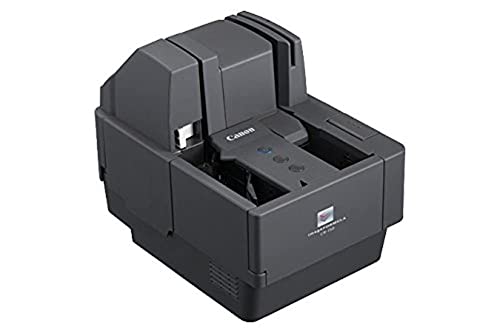
- Compact footprint for tight spaces
- Up to 150 checks per minute
- Imprinter and endorsement support
Best For: Small offices and branch teams
Integrated High-Speed Scanner
Epson TM-S9000II Multifunction Device

- Up to 225 dpm scan speed
- 100-check feeder with endorsement printing
- Check, ID card, and receipt handling
Best For: High-volume counters needing an all-in-one unit
Bank Check Scanner with Print Support

- Check scanner with printing capability
- USB desktop connection
- CIS/CMOS sensor with LED light
Best For: Simple bank or office check processing
Panini VX50.100NJ
High-Reliability Check Capture with Endorsement Options

- Accurate MICR reading and superior image quality
- Endorsement printing options for check workflows
- Handles checks plus slips, bills, vouchers, and coupons
Best For: Financial institutions and businesses needing reliable capture with endorsement options
Digital Check CheXpress CX35-NIJ
Quiet Single-Feed Scanner with Optional Endorser

- Single-feed scanner for one check at a time
- Optional rear inkjet endorser and front franker
- Quiet operation with feed-and-return or straight-through scan
Best For: Remote deposit and office workflows needing optional endorsement printing
Epson TM-S2000
Desktop Check Scanner with 1 Pocket

- 110 DPM desktop check scanner
- USB connection with 1-pocket handling
- Multiple resolutions up to 300 dpi optical
Best For: Simple, dependable desktop check scanning in bank or office settings
Desktop Check Scanner with Inkjet Endorser

- Built-in inkjet endorser
- 50-sheet capacity
- USB-connected check/document scanner
Best For: small offices needing simple desktop endorsement printing
Single-Feed Check Scanner for Dedicated Processing

- Single-feed check-focused scanner
- USB 2.0 connectivity
- CIS sensor with LED light source
Best For: controlled one-at-a-time check processing
Network-Ready Check Scanner with Rear Inkjet Endorser

- USB and Ethernet-capable
- 55/75/120 dpm speed options
- Rear inkjet endorser support
Best For: growing teams that need flexible network-ready scanning
Premium Teller Workhorse – Epson TM-S9000 Multifunction Scanner Printer
For check scanners with endorsement printers, the Epson TM-S9000 is built for busy teller stations and retail counters that need scanning, MICR reading, endorsement printing, and receipt output in one device. It’s aimed at high-throughput workflows, with fast desktop scanning, a 100-check feeder, and integrated thermal printing to keep transactions moving.
Best For: Teller stations and retail counters that need an all-in-one check handling device
Pros:
- Fast scanning speed up to 200 dpm
- 99.9% MICR accuracy for check reading
- Up to 16 lines of endorsement printing
- Integrated thermal receipt printer and USB hub
Cons:
- Renewed unit, so condition depends on the seller
- 90-day limited warranty is shorter than many new devices
- Uses a single pocket design
Overall, this is a strong fit when you want one multifunction unit to handle scanning, endorsement, and printing without extra hardware. It’s especially appealing for staffed payment environments that value speed and integrated workflow features.
Compact Branch Scanner – Canon imageFORMULA CR-150
If you’re comparing check scanners with endorsement printers for a smaller office or branch, the Canon imageFORMULA CR-150 focuses on compact size and straightforward check handling. It scans up to 150 checks per minute and includes MICR, OCR, and imprinter/endorsement capabilities for physical and virtual endorsements.
Best For: Space-limited offices and financial teams that need compact check processing
Pros:
- Compact design for limited workspace
- Up to 150 checks per minute scanning speed
- MICR and OCR support for accurate data capture
- Imprinter and endorsement capabilities
Cons:
- Single-sheet capacity is listed at 150, so it’s not aimed at very large batches
- Simplex duplexing only
- One-year warranty may be modest for heavier-use deployments
The CR-150 is a practical choice when desk space matters more than maximum throughput. It brings the core check-processing features you need without taking over a counter.
Integrated High-Speed Scanner – Epson TM-S9000II Multifunction Device
The Epson TM-S9000II is a compelling option among check scanners with endorsement printers because it combines check and ID card scanning, cashier’s check printing, and integrated thermal receipt printing in one compact unit. With scan speeds up to 225 dpm, a 100-check feeder, and up to 16 lines of endorsement printing, it is built for fast transactional work.
Best For: High-volume financial counters that want scanning, endorsement, and receipt printing in one device
Pros:
- Fast scan speeds up to 225 dpm
- Handles check and ID card scanning
- Up to 16 lines of endorsement printing
- Includes a mag stripe reader and LCD status display
Cons:
- Configured without hub and MSR in this listing’s title, so check the exact package contents
- No ink required, which may limit use cases to its built-in thermal and printing functions
- USB-only connection may be restrictive in some setups
For teams that want a single workstation device to do a lot of the check-processing work, this model offers strong speed and integrated features. It stands out when throughput and consolidation matter.
Bank Check Scanner with Print Support – Digital Check CX30
The Digital Check CX30 is a straightforward fit if you need check scanners with endorsement printers in a USB-connected desktop setup. It is positioned as a bank check scanner with printing capability, using CIS/CMOS optical sensing and LED lighting for check capture in a compact single-device workflow.
Best For: Bank and office environments that need simple check scanning with print capability
Pros:
- Check scanner with printing capability
- USB connection for easy desktop setup
- CIS/CMOS optical sensor technology
- LED light source for scanning support
Cons:
- Fewer detail specs are provided than on competing models
- No explicit endorsement-line count is listed
- Windows 7 minimum system requirement is dated
The CX30 keeps the feature set focused on check capture and printing rather than extra multifunction extras. That makes it best for buyers who want a simpler, more direct scanning-and-printing device.
Panini VX50.100NJ – High-Reliability Check Capture with Endorsement Options
If you want check scanners with endorsement printers for teller, back-counter, or remote deposit workflows, the Panini VX50.100NJ is built around reliable check capture basics. It emphasizes accurate MICR reading, strong image quality, and paper handling, while also offering endorsement printing options and support for non-check document types like utility bills and vouchers.
Best For: Financial institutions and businesses that need dependable check capture with endorsement-printing flexibility.
Pros:
- Accurate MICR reading and superior image quality
- Impeccable paper handling for check workflows
- Endorsement printing options included in the design
- Useful for both check and non-check documents
Cons:
- Listed as no inkjet printer in this model
- Bulkier enterprise-style unit than a simple desktop scanner
This is a practical fit if your priority is dependable capture performance rather than extra consumer-style features. It combines throughput-oriented check handling with enough flexibility for broader payment and coupon processing.
Digital Check CheXpress CX35-NIJ – Quiet Single-Feed Scanner with Optional Endorser
The Digital Check CheXpress CX35-NIJ is a straightforward option in check scanners with endorsement printers when you want single-feed operation and optional print features. It scans one check at a time, runs quietly, and can be configured with an optional single-line rear inkjet endorser and/or front franker depending on your setup.
Best For: Remote deposit users and offices that need a compact single-check scanner with optional endorsement capability.
Pros:
- Single-feed design takes one check at a time
- Quiet operation for desk-side use
- Optional rear inkjet endorser and front franker
- Feed-and-return or straight-through scan path
Cons:
- Non-inkjet model, so printing is optional rather than built in
- Must be matched to your software provider and model requirements
Overall, this model makes sense when you want simple, controlled check processing and may need endorsement features without committing to a fully integrated printing setup. The optional connectivity and UV-capable variants add flexibility for specialized environments.
Epson TM-S2000 – Desktop Check Scanner with 1 Pocket
Epson A41A268031 TM-S2000 Desktop Check Scanner, 110DPM, USB, 1 Pocket, Dark Gray
Check Price On AmazonFor buyers comparing check scanners with endorsement printers, the Epson TM-S2000 is a desktop check scanner focused on solid capture basics rather than printer extras. It offers 110 DPM performance, USB connectivity, and a 1-pocket design, making it a practical choice for routine bank check scanning.
Best For: Everyday desktop check scanning in banking or office environments that want a simple, dependable unit.
Pros:
- 110 DPM desktop scanner for check workflows
- USB connection keeps setup simple
- 1-pocket design for organized handling
- Supports multiple image resolutions up to 300 dpi optical
Cons:
- No endorsement printing features listed in the supplied details
- Designed primarily for bank checks, not broader document versatility
The TM-S2000 is best viewed as a straightforward check scanner when reliability and easy setup matter more than extra printing capability. If you need integrated endorsement printing, you’ll want to confirm that feature separately before buying.
Desktop Check Scanner with Inkjet Endorser – Digital Check TS240-50IJ
If you need check scanners with endorsement printers for a small office or teller workflow, the Digital Check TS240-50IJ combines check scanning with an integrated inkjet endorser. It uses USB connectivity, handles bank checks and documents, and is built around a 50-sheet capacity for routine batch processing.
Best For: Offices that want a compact check scanner with built-in inkjet endorsement and USB setup.
Pros:
- Integrated inkjet endorser for printing on checks during scanning
- 50-sheet standard capacity supports small batch workflows
- USB connection keeps setup straightforward
- Rated at 300 resolution with 24 bpp color depth
Cons:
- Requires Windows 7 or newer based on the listed minimum system requirements
- Uses 45 watts, which may matter for always-on desktop deployment
This model is a practical fit when you want a straightforward check scanner with endorsement printing built in, rather than a more complex network device. Its feature set is centered on basic check and document handling, so it makes the most sense for users who value simplicity and a dedicated desktop footprint.
Single-Feed Check Scanner for Dedicated Processing – Epson CaptureOne TM-S1000
The Epson CaptureOne is aimed at users comparing check scanners with endorsement printers for dedicated check handling, especially where a single-feed workflow is enough. It scans checks via USB 2.0, uses a CIS sensor and LED light source, and is listed with very fast scan speed for document processing.
Best For: Users who need a dedicated single-feed check scanner for controlled, one-at-a-time processing.
Pros:
- Designed specifically for checks, with a document-scanner form factor
- USB 2.0 interface for standard desktop connectivity
- CIS sensor and LED light source for document capture
- Very fast listed scan speed at 500 mm/s
Cons:
- Single-feed design is less suited to higher-volume batch scanning
- Minimum system requirements list Windows 7
This model makes sense when the priority is a dedicated check scanner rather than a high-capacity multi-feed unit. The supplied specs point to a focused, office-oriented scanner that keeps the workflow simple for one-at-a-time check handling.
Network-Ready Check Scanner with Rear Inkjet Endorser – Digital Check TS250-55IJ
If you want check scanners with endorsement printers and need more flexibility than a basic USB-only model, the Digital Check TS250-55IJ is built for both USB and Ethernet-capable operation. It offers scan speeds of 55, 75, or 120 documents per minute, and the rear inkjet endorser is included on the 120 dpm model while optional on the 55/75 dpm versions.
Best For: Teams that want a network-ready check scanner with optional or included inkjet endorsement support.
Pros:
- USB and Ethernet-capable for flexible deployment
- Multiple speed options: 55, 75, or 120 documents per minute
- Rear inkjet endorser available, with the 120 dpm model listed as standard
- Optional network-ready receipt printer support via ReceiptNOW Elite
Cons:
- Software and financial institution support should be confirmed before purchase
- Ink cartridge PN-MS0083 is required for the endorser
This is the most flexible pick in the group if you want a check scanner that can move from desktop USB use to network operation. The model’s speed options and endorsement support make it a stronger fit for workflows that may grow beyond basic single-user scanning.
How We Picked These Check Scanners with Endorsement Printers
We focused on models built for real-world deposit and teller workflows, prioritizing scan speed, feed reliability, endorsement method, connectivity, and daily duty cycle. We also considered whether a unit uses inkjet or thermal endorsement, since that affects maintenance, operating costs, and long-term consistency.
Quick Comparison
The right choice depends on volume and document handling needs. Higher-speed multifunction units are a better fit for active teller environments, while compact desktop models can suit smaller branches or limited-volume offices. If you want simpler maintenance, look closely at no-ink or thermal-print designs; if you need more flexible endorsement placement, inkjet models may be worth the tradeoff.
Key Buying Factors for Check Scanners with Endorsement Printers
Scan Speed and Duty Cycle
Match the scanner’s rated documents per minute to your daily workload. Overbuying can waste budget, but underbuying can create bottlenecks at peak times.
Endorsement Type
Inkjet endorsement is common and flexible, but it adds consumables and occasional maintenance. Thermal or no-ink approaches can reduce upkeep and improve consistency, especially in high-throughput settings.
Paper Handling and Feed Capacity
Look at feeder size, single-feed vs. batch-feed behavior, and how well the scanner handles mixed document conditions. Reliable feeding matters as much as raw speed.
Integration and Connectivity
USB remains standard for many desktop deployments, while some multifunction units add hubs or broader device integration for teller stations. Make sure the scanner fits your existing software and workstation setup.
Operating Costs
Beyond purchase price, factor in ink, maintenance, and downtime. A lower-cost scanner can become expensive if consumables or service needs are high.
Who Should Buy Which Check Scanners with Endorsement Printers?
High-volume branches and teller lines should lean toward faster multifunction systems with stronger endorsement support. Smaller offices, credit unions, or low-to-moderate volume teams may prefer compact scanners that are easier to deploy and maintain. If your priority is minimizing upkeep, choose one of the Check Scanners with Endorsement Printers that uses thermal or no-ink technology. If flexibility and established workflow integration matter more, an inkjet model may be the better fit.
In short, the best option is the one that balances speed, document handling, and endorsement method with your actual deposit volume and staffing model.