Digital microscopes with measurement software make it easier to inspect, document, and measure small details with confidence. They are a smart fit for electronics, coin grading, biology, repair work, and quality control.
Below, you’ll find ten strong options chosen for image quality, measurement support, ease of use, and value across different budgets and use cases.
Best 10 Digital Microscopes with Measurement Software Picks for 2026
Precision Measurement Pick
Dino-Lite AM4113T 1.3MP USB Microscope

- 20x–50x optical range with 1.3MP imaging
- Measurement units include inches, mm, and micrometers
- DinoCapture and DinoXcope software for Windows/Mac
Best For: inspection tasks that need calibrated measurement software
Software-Heavy Camera Pick
AmScope 5MP USB Microscope Camera
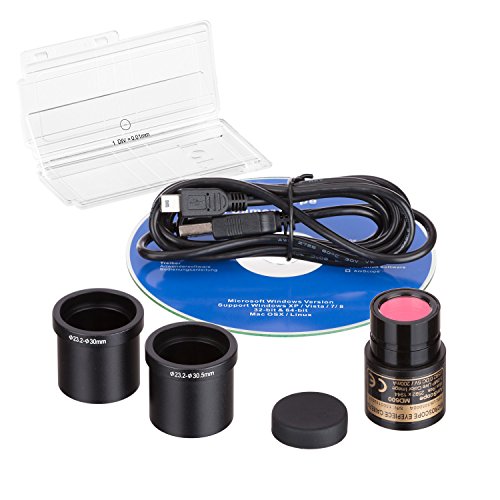
- 5MP USB camera with still and live video
- Windows software includes measurement and stitching
- Calibration kit included for precise setup
Best For: buyers who need calibration and advanced Windows analysis tools
Screen-Based Viewing Pick
TOMLOV DM9 Max 10.1" Digital Microscope

- 10.1-inch IPS display with wide viewing angle
- PC connection and one-button capture
- 10 LED lights plus remote control
Best For: coin collectors and repair users who prefer a built-in screen
High-Resolution Camera Pick
AmScope 12MP USB Digital Eyepiece Camera

- 12MP CMOS imaging for detailed capture
- Windows software includes measurement and video recording
- Linux and Mac support stills and video
Best For: users upgrading an existing microscope for higher-resolution measurement work
Multi-Lens Soldering Pick
Andonstar AD246S-M 3-Lens HDMI Microscope

- Three interchangeable lenses for repair, coins, and slides
- Windows measurement software for length and area readings
- 7-inch LCD plus HDMI output for bench viewing
Best For: Electronics repair and users who need PC-based measurements
Portable Screen Scout
LCD Digital Microscope 4.3-Inch 10MP

- 4.3-inch LCD screen for standalone viewing
- Rechargeable battery and 32GB card included
- 8 adjustable LEDs for brighter inspections
Best For: Portable viewing and quick image/video capture
Measurement-Ready Handheld
Celestron 5MP Digital Microscope
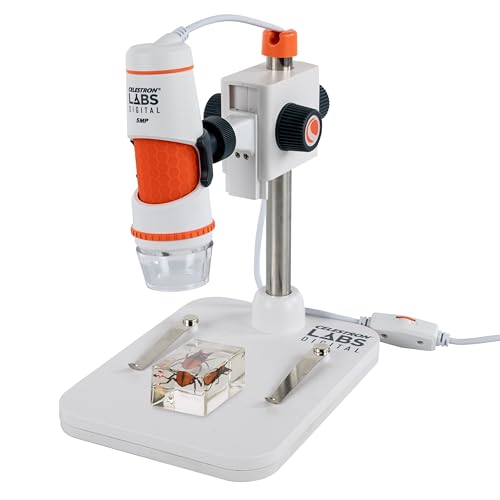
- Free software supports measurement and annotation
- Includes calibration ruler for more accurate work
- 5MP sensor with handheld or stand use
Best For: Computer-based measurement, capture, and annotation
Multi-Use Lab Pick
5-Lens 7-inch HDMI Digital Microscope

- 5-lens design for coins, slides, and repair work
- 7-inch IPS screen with HDMI output
- Mechanical X-Y stage and 32GB storage included
Best For: Users who want one bench microscope for multiple viewing tasks
Windows Measurement Budget Pick
USB 40X-1000X Microscope with Metal Stand
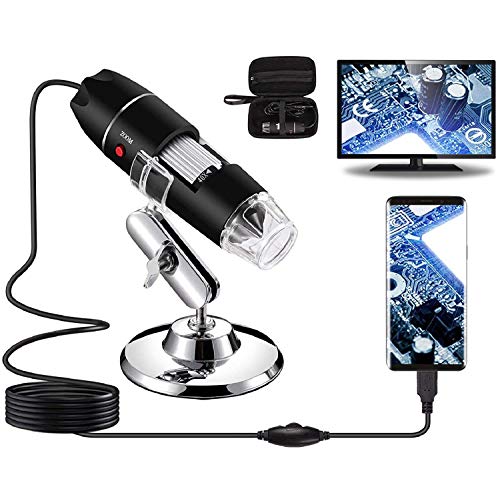
- Capture, record, and measure with installed software
- Measurement software works only on Windows
- Includes stand, ruler, OTG adapter, and carrying case
Best For: Budget buyers who need Windows-based measurement and recording
Easy-Use Compatibility Pick
1080P USB Handheld Microscope with Metal Stand

- Plug-and-play with wide device compatibility
- 1920x1080P live viewing, photos, and video
- Full-metal stand and cable controls
Best For: People who want a simple USB microscope that works across many devices
Precision Measurement Pick – Dino-Lite AM4113T 1.3MP USB Microscope
If you want one of the more practical digital microscopes with measurement software, the Dino-Lite AM4113T is built around inspection and measurement rather than just simple viewing. Its 1.3MP sensor, 20x–50x optical range, and included Windows/Mac software make it a strong fit for users who need capture, annotation, and unit-based measurements in inches, millimeters, or micrometers.
Best For: Users who need a USB microscope with built-in measurement tools for inspection work on Windows or Mac.
Pros:
- Measurement software supports inches, millimeters, and micrometers.
- Included DinoCapture and DinoXcope software works on Windows and Mac.
- 1.3MP resolution with 30 FPS video and USB connectivity.
- MicroTouch helps simplify image capture during inspection.
Cons:
- Lower image resolution than 5MP or 12MP camera-style alternatives.
- Standard working distance may be less ideal for some larger objects.
Overall, this is a focused choice for buyers who care most about measurement and workflow software. It is less about a giant screen or high megapixel counts and more about dependable capture, analysis, and calibrated inspection.
Software-Heavy Camera Pick – AmScope 5MP USB Microscope Camera
For shoppers comparing digital microscopes with measurement software, this AmScope 5MP USB camera stands out as a software-first option. It captures still images and live video, and the included Windows software adds editing, stitching, EDF, and measurement functions for more advanced analysis work.
Best For: Users who want a microscope camera with calibration and advanced Windows software tools.
Pros:
- 5MP camera captures still images and live video.
- Windows software includes measurement, stitching, and EDF functions.
- Calibration kit is included for precise measurement.
- Fits 23mm, 30mm, and 30.5mm mounting sizes with adapters.
Cons:
- Software feature set is focused on Windows.
- Requires a compatible host device rather than having its own built-in screen.
This is a solid choice if your priority is software capability and measurement support over a standalone display. The calibration kit and broader imaging tools make it especially useful for inspection workflows where accuracy matters.
Screen-Based Viewing Pick – TOMLOV DM9 Max 10.1" Digital Microscope
The TOMLOV DM9 Max is a good option if you want a digital microscope with measurement software support in a more screen-centric setup. It pairs a 10.1-inch IPS display with up to 1500X zoom, PC connection, and one-button recording, making it easier to inspect coins, solder joints, and small repair details without relying only on a computer.
Best For: Hobbyists and repair users who want a large-screen microscope that can also connect to a PC or monitor.
Pros:
- 10.1-inch IPS screen with a 178° viewing angle.
- PC connection supports larger viewing for inspection work.
- Includes one-button photo/video capture with 16GB SD card storage.
- 10 LED lights with dimmable lens and gooseneck lighting.
Cons:
- Measurement software is not highlighted as a core feature in the supplied details.
- Best suited to screen-based use rather than compact portable inspection.
For buyers who want an easy-to-view microscope first and foremost, this model brings a lot of convenience. It is especially appealing for longer observation sessions where a built-in display and remote control reduce fatigue and setup hassle.
High-Resolution Camera Pick – AmScope 12MP USB Digital Eyepiece Camera
If your priority is image resolution in digital microscopes with measurement software, the AmScope MD1200A is a strong camera-style option. Its 12MP sensor, Windows measurement tools, and support for Linux and Mac image capture make it a versatile fit for users who want to document, measure, and process microscope images from a computer.
Best For: Users who want a high-resolution microscope camera with measurement features and broad software support.
Pros:
- 12MP color CMOS camera for detailed imaging.
- Windows software includes stitching, EDF, video recording, and measurement functions.
- Linux and Mac software can record video and still images.
- Supports multiple mounting sizes with included adapters.
Cons:
- Camera-only design means you need a compatible microscope setup.
- Native feature depth is strongest on Windows compared with the other platforms listed.
This model makes the most sense for users who already have a microscope body and want stronger imaging plus software-based measurement. It is a practical upgrade path for documentation and analysis tasks where resolution matters.
Multi-Lens Soldering Pick – Andonstar AD246S-M 3-Lens HDMI Microscope
If you want digital microscopes with measurement software for repair, coins, or classroom demos, this Andonstar model stands out for its three interchangeable lenses and Windows PC measurement tools. The 7-inch LCD, HDMI output, and included boom arm make it a practical bench microscope for detailed work and shared viewing.
Best For: Electronics repair, soldering, coin inspection, and users who want PC-based measuring features.
Pros:
- Includes professional measurement software for length and area measurements on Windows
- Three lens options cover soldering, coin viewing, and biological slides
- 2160P recording plus HDMI output supports clearer viewing on a larger screen
- Upgraded boom arm stand is built for adjustable, high-temperature workspaces
Cons:
- Measurement features require connection to a Windows PC
- Magnification depends on the lens and digital zoom combination, so results vary by mode
- Best suited to bench use rather than fully portable field observation
Overall, this is the most versatile option here for hands-on bench tasks, especially if measurement software is part of your workflow. It mixes flexibility, strong display options, and accessory support in one repair-friendly package.
Portable Screen Scout – LCD Digital Microscope 4.3-Inch 10MP
This LCD digital microscope is a straightforward choice if you want a compact viewer with basic capture features and easy focusing. For shoppers comparing digital microscopes with measurement software, note that this model emphasizes portability, screen viewing, and recording, but the supplied notes do not mention measurement tools.
Best For: Portable inspection, hobby viewing, and quick captures on the built-in screen.
Pros:
- Built-in 4.3-inch LCD screen makes standalone viewing easy
- Rechargeable battery supports 4 to 5 hours of cordless use
- Includes 32GB microSD card for saving images and videos
- 8 adjustable LED lights help improve visibility across different subjects
Cons:
- No measurement software is listed in the supplied product details
- Maximum magnification is lower than some bench-style microscope setups
- Best used for general inspection rather than advanced analysis
In short, this is a practical grab-and-go microscope for users who value a screen, battery power, and simple recording. It is less compelling if software-based measurement is a must-have.
Measurement-Ready Handheld – Celestron 5MP Digital Microscope
Among digital microscopes with measurement software, this Celestron model is geared toward users who need image capture, annotation, and calibrated measurements from a computer. Its handheld design, included stand, and polarizing filter make it useful for coins, circuit boards, textiles, and other reflective specimens.
Best For: Educators, hobbyists, and PC users who want capture, measurement, and annotation tools.
Pros:
- Free Celestron Labs software supports viewing, capture, measurement, and annotation
- Calibration ruler is included for more accurate measurement workflows
- 5MP sensor and up to 2592 x 1944 image capture provide detailed output
- Handheld or stand-mounted use adds flexibility for different setups
Cons:
- Works with personal computers only, so it is not a standalone LCD microscope
- Maximum magnification is lower than some bench microscopes
- Designed around USB-C computer use rather than battery-powered portability
For buyers who care most about measurement and documentation, this is the most software-focused option in the group. It is a strong fit when you want a dependable digital microscope workflow on Windows or Mac.
Multi-Use Lab Pick – 5-Lens 7-inch HDMI Digital Microscope
If you want digital microscopes with measurement software support in a more versatile lab-style setup, the LM266S stands out for its 5-lens design, 7-inch IPS screen, and HDMI output. It’s built to handle coins, biological slides, and repair work, making it a flexible option when you need one microscope for multiple tasks.
Best For: Buyers who want a multi-purpose digital microscope for slides, coins, and soldering with a large screen and X-Y stage.
Pros:
- 5-lens-in-1 design supports coin viewing, biological slides, and soldering/repair use.
- Mechanical X-Y stage helps keep specimens steady for more controlled positioning.
- 7-inch IPS display plus HDMI output makes viewing easy on-screen or on a larger monitor.
- Captures 24M photos and 2160P video, with 32GB storage included.
Cons:
- Measurement software is not mentioned in the supplied notes.
- Better suited to bench use than highly portable field work.
- More complex than a simple handheld USB microscope.
This is the strongest pick here for buyers who value versatility and a built-in viewing setup. The LM266S is especially appealing if you need a microscope that can switch between specimen types without giving up screen-based convenience.
Windows Measurement Budget Pick – USB 40X-1000X Microscope with Metal Stand
Among digital microscopes with measurement software, this Bysameyee model is a practical budget-friendly option for capture, recording, and Windows-based measuring. It offers 40X to 1000X magnification, a metal stand, and broad device support, making it a straightforward choice for everyday inspection tasks.
Best For: Windows users who want a simple USB microscope for capture, recording, and measurement on a budget.
Pros:
- Includes capture and video recording features with installed software.
- Measurement software is supported for Windows users.
- Works with Windows, Mac, Linux, and Android devices with OTG support.
- Comes with a metal stand, ruler, OTG adapter, driver, and carrying case.
Cons:
- Measurement software only works for Windows users.
- Not compatible with iPhone or iPad.
- Handheld USB form factor is less specialized than a lab-style microscope.
This is a solid pick if your priority is practical inspection plus measurement on a computer. The included accessories and broad compatibility make it easy to start using, but Windows is the key platform if measurement is your main goal.
Easy-Use Compatibility Pick – 1080P USB Handheld Microscope with Metal Stand
If you’re comparing digital microscopes with measurement software support, the Jiusion 1080P model is attractive for its plug-and-play setup and unusually wide device compatibility. It delivers Full HD viewing, a metal stand, and a brightness dial on the cable, so it’s designed for quick inspection rather than complicated setup.
Best For: Users who want a simple, widely compatible USB microscope with Full HD viewing and a stable stand.
Pros:
- Compatible with iPhone, iPad, Android, Mac, Windows, Linux, and Chrome OS.
- 1080P HD resolution supports live viewing, photos, and video recording.
- Full-metal stand adds stability compared with plastic stands.
- Cable includes a brightness dial and capture button for easier use.
Cons:
- Measurement software is not mentioned in the supplied notes.
- Some phones require OTG to be enabled before use.
- USB handheld design is less specialized than a dedicated bench microscope.
This model is best if compatibility matters more than advanced lab features. It offers a clean, stable, and easy-to-start experience, which makes it a good everyday microscope for quick viewing and recording.
How We Picked These Digital Microscopes with Measurement Software
We focused on models that pair usable magnification with reliable measurement tools, since software quality matters as much as lens specs. Priority went to microscopes that offer clear imaging, stable stands or screens, calibration support, and compatibility with common operating systems or built-in displays.
We also favored products that make measuring practical in real use, not just on paper. That means software or workflows that support calibrated distance, area, angle, or scale measurements, along with enough resolution for inspection work.
Quick Comparison
If you want a fast shorthand: handheld models are best for portability and quick checks, USB cameras suit computer-based workflows, and screen-equipped digital microscopes are easiest when you want an all-in-one setup. Higher megapixel counts can help, but they do not replace good optics, lighting, and calibration.
Key Buying Factors for Digital Microscopes with Measurement Software
Measurement Accuracy and Calibration
Look for software that includes calibration tools and lets you set a known reference scale. Without calibration, measurements may be close but not dependable enough for serious inspection or documentation.
Resolution, Optics, and Working Distance
For Digital Microscopes with Measurement Software, image clarity matters more than raw magnification. A sharper sensor, better lens, and usable working distance make it easier to focus, position samples, and read measurement overlays.
Display Type and Workflow
Built-in LCD models are convenient for standalone use, while USB microscopes are better if you want to save files, annotate images, or work at a desk with a larger monitor. Choose based on how often you’ll measure and record findings.
Lighting and Stability
Adjustable LED lighting and a solid stand improve repeatability, which is essential for measurement tasks. For soldering, coins, and small parts, stability often matters more than extremely high magnification.
Who Should Buy Which Digital Microscopes with Measurement Software?
Electronics repair and soldering: Choose a screen-based or stand-mounted model with steady focus, good lighting, and easy measurement overlays.
Coins, collectibles, and hobby inspection: Pick a microscope with strong image detail, convenient software measurement, and enough working space for handling items.
Lab, slides, and structured analysis: Look for more advanced optics, calibration support, and precise movement control such as a mechanical stage or fine focus.
Portable field use: A handheld or compact USB microscope is the better choice if you need quick measurements away from a desktop setup.
In short, the best choice depends on how you plan to inspect, measure, and document your samples. If measurement is a core requirement, prioritize calibration, image quality, and a workflow that fits your day-to-day tasks.