Choosing the right player can make or break a multi-display rollout. The best digital signage players for multiple screens deliver stable playback, simple scheduling, and remote management without adding extra complexity.
Below, we’ve narrowed the field to 10 options that balance performance, ease of use, and business-ready features for retail, restaurants, offices, and other commercial environments.
Best 10 Digital Signage Players for Multiple Screens Picks for 2026
Compact 4K Single-Screen Option
OptiSigns OptiStick Digital Signage Player

- Android-based HDMI stick for one screen
- 4K UHD with Wi-Fi and Ethernet
- Remote management through OptiSigns
Best For: Small deployments that want easy setup and cloud control
Reliable Appliance for Simple Playback
BrightSign LS425 Digital Signage Appliance
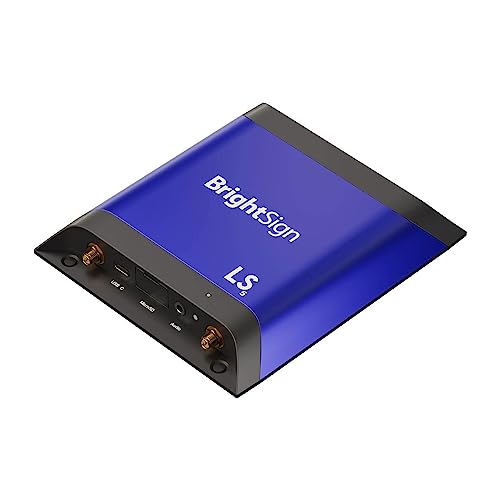
- HD and 4K playback with HTML5 support
- BrightSign OS focuses on uptime and security
- Works online or offline
Best For: Teams that need dependable playback on each display
Easy Multi-Location Starter

- Set up one or multiple sticks with a free app
- Auto-launches CMS in kiosk mode
- Wi-Fi 6E with 4K and secure storage
Best For: Businesses rolling out several CMS-managed screens
Premium Managed Player
OptiSigns Pro Digital Signage Player
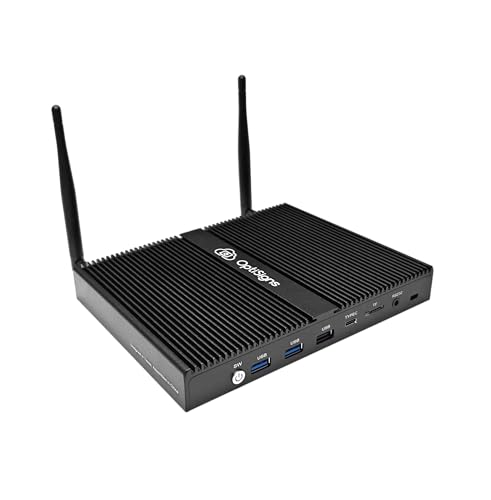
- Quad-core Intel player with 4GB RAM and 128GB SSD
- Built for 24/7 use with passive cooling
- Wi-Fi 6, Ethernet, and HDMI-CEC support
Best For: Larger OptiSigns deployments that need stronger hardware
Cloud-Controlled 4K Menu Board
EZ AD TV Digital Signage Player

- 4K playback with cloud-based updates
- Template Builder, Video Studio, and mobile app
- HDMI, Ethernet, USB-A, and memory card support
Best For: Cloud-managed menu boards and TV signage
Compact Cached Player
XOGO Mini Max Digital Signage Media Player
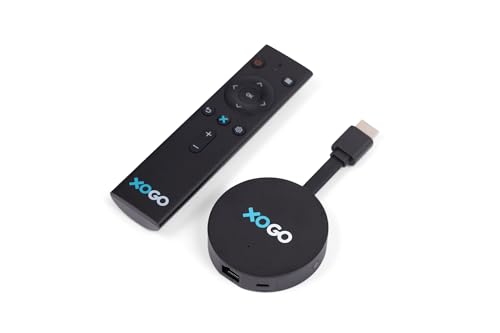
- Smooth 4K playback with cached cloud content
- Free XOGO Manager app with scheduled playlists
- Compact TV-stick design with WiFi 6 and Ethernet
Best For: Simple, compact screen deployments
Multi-Screen Video Wall Hub

- Up to 8K video wall creation
- Group screens or play unique content per screen
- Canvas-based alignment with rotation support
Best For: Video walls and flexible multi-screen layouts
Budget CMS Pick
Lunzn YM05 4K CMS Signage Player

- No-subscription CMS with self-registration
- Central remote control for grouped players
- Works in horizontal or vertical layouts
Best For: Budget-minded teams managing multiple screens remotely
Multi-Screen Controller
MT-VIKI MT-AX4 4-Screen Signage Player

- Controls four outputs from one device
- Offers app, desktop, RS232, and button control
- Includes scheduling and layout options
Best For: Food and retail spaces needing one-box control for four displays
Commercial Reliability Pick
BrightSign LS445 4K Digital Signage Player
- Plays 4K video plus HTML5 content
- Runs BrightSign OS for stability and uptime
- Includes free Control Cloud remote management
Best For: Commercial installs that need compact, reliable remote-managed playback
Compact 4K Single-Screen Option – OptiSigns OptiStick Digital Signage Player
If you need digital signage players for multiple screens, this OptiSigns OptiStick is best understood as a one-screen building block rather than a hub. It’s a compact Android-based 4K UHD HDMI stick with pre-installed OptiSigns software, so it suits teams that want simple deployment and remote screen management without adding bulky hardware.
Best For: Small deployments that want easy setup, 4K output, and OptiSigns cloud management for each screen.
Pros:
- Pre-installed OptiSigns Player with remote management through the portal or Admin app
- 4K UHD output with 4K HDR support and AV1 decoding
- Built-in Wi-Fi and Ethernet for flexible connectivity
- Compact stick form factor makes installation simple
Cons:
- One OptiStick powers one screen, so it does not reduce hardware needs for multi-screen setups
- OptiSigns subscription is required
- Free plan supports up to 3 screens per account with branding
This is a practical pick if you’re standardizing on OptiSigns and want a low-profile player for each display. For larger rollouts, just plan around the one-device-per-screen model.
Reliable Appliance for Simple Playback – BrightSign LS425 Digital Signage Appliance
For digital signage players for multiple screens, the BrightSign LS425 is a dependable appliance when you want consistent playback across individual displays. It’s built for HD and 4K video, HTML5 widgets, graphics, and digital audio, with BrightSign OS focused on reliability, security, and uptime.
Best For: Teams that need a reliable signage appliance for straightforward playback on each screen.
Pros:
- Plays HD and 4K video, HTML5, graphics, and digital audio
- Runs BrightSign OS for reliability, security, and uptimes
- Supports connected or offline environments
- Ultra-thin design fits into tight spaces
Cons:
- Notes emphasize playback and reliability more than advanced app ecosystem details
- Single touchscreen experiences are supported, but broader multi-screen control is not highlighted
- May be more appliance-oriented than plug-and-play stick options
This is a strong choice if your priority is stable signage playback rather than a feature-heavy interface. It fits well where each screen needs a solid, dedicated appliance.
Easy Multi-Location Starter – Amazon Signage Stick
If you’re comparing digital signage players for multiple screens, the Amazon Signage Stick is built around simple rollout and centralized CMS use. It auto-launches your CMS in kiosk mode, supports setup for one or multiple sticks through the free app, and adds Wi-Fi 6E plus 4K output for business signage.
Best For: Businesses that want a low-friction way to set up and manage several signage screens through a CMS.
Pros:
- Supports setup for one or multiple Signage Sticks with the free mobile app
- Auto-launches CMS in kiosk mode for unattended operation
- Wi-Fi 6E and 4K support in a compact device
- Secure boot, encrypted storage, and regular updates
Cons:
- Works with CMS providers, so a CMS subscription is required
- Details focus on CMS-driven use rather than standalone local media playback
- Support for advanced control is tied to the mobile app and CMS setup
This is a good fit if you want a straightforward, business-ready player for distributed screens. It’s especially appealing when you prefer app-based setup and CMS compatibility over complex hardware.
Premium Managed Player – OptiSigns Pro Digital Signage Player
For buyers shopping digital signage players for multiple screens, the OptiSigns Pro stands out as a more powerful managed player for larger or more demanding setups. It includes a pre-installed OptiSigns Player, remote management, 160+ app integrations, and hardware built for 24/7 operation with 4K Ultra HD support.
Best For: Teams that want a stronger OptiSigns player for dependable multi-screen deployments and richer automation.
Pros:
- Intel Pentium quad-core CPU, 4GB RAM, and 128GB SSD for more headroom
- Passive cooling and secure Linux OS for 24/7 operation
- Wi-Fi 6, Ethernet, HDMI-CEC, and RS-232 for flexible integration
- Supports auto power-on and RTC wake-up for smarter automation
Cons:
- OptiSigns subscription is needed
- Free plan supports up to 3 screens with branding
- More hardware than a simple HDMI stick, so it may be overkill for basic use
This is the most robust OptiSigns option in the group, especially if you need reliable uptime and better connectivity options. It makes sense when your signage network is growing and you want more capable hardware behind it.
Cloud-Controlled 4K Menu Board – EZ AD TV Digital Signage Player
If you need digital signage players for multiple screens with easy remote updates, the EZ AD TV box is built around cloud-based control, 4K playback, and flexible layouts. It works with TVs for instant product ads, menu boards, and slideshow-style content, while the mobile app and template tools make day-to-day management simpler.
Best For: Businesses that want cloud-managed signage, menu boards, and flexible on-screen layouts.
Pros:
- 4K content playback with support for image and video formats
- Cloud-based wireless content updates from the website
- Template Builder, Video Studio, YouTube Loader, and mobile app support
- Multiple connectivity options: HDMI, Ethernet, USB-A, and memory card reader
Cons:
- Free plan limits you to 50 slides per box
- Best fit for TV-based displays rather than specialized AV setups
- Does not include smart home compatibility
Overall, this is a practical pick if you want signage that is easy to update remotely and does not require a complicated workflow. Its layout flexibility and content tools make it especially useful for simple business display installations.
Compact Cached Player – XOGO Mini Max Digital Signage Media Player
For buyers comparing digital signage players for multiple screens, the XOGO Mini Max focuses on simple deployment, smooth 4K playback, and cloud-delivered playlists. It connects to any screen, caches content locally, and uses the free XOGO Manager app so you can upload graphics, videos, URLs, and widgets without adding much setup complexity.
Best For: Teams that want a compact, easy-to-manage player for straightforward screen deployments.
Pros:
- Plays smooth 4K video content
- Cloud content is cached locally, so playback continues if internet drops
- Free XOGO Manager app for playlist scheduling and PIN-based setup
- Compact design with WiFi 6, Ethernet, 32GB storage, and HDMI
Cons:
- Designed around the XOGO platform and XOGO Manager app
- Uses a TV-stick form factor, which may not suit every installation
- Not marketed for advanced multi-zone or video-wall features
This is a strong choice if you value reliability and simplicity over advanced AV features. Its local caching and small size make it easy to hide behind a display while keeping content playing smoothly.
Multi-Screen Video Wall Hub – MAWi Player v2
If your priority is digital signage players for multiple screens, the MAWi Player v2 is built for grouped displays, video walls, and AV-over-IP workflows. It supports up to 8K resolution, can place screens anywhere on a canvas, and can rotate them at any angle, making it a more specialized option for synchronized multi-screen layouts.
Best For: Video walls and grouped display installations that need flexible screen positioning.
Pros:
- Creates video walls in minutes with up to 8K resolution
- Lets you align and rotate screens anywhere on a canvas
- Can play different content on each screen or the same content on a group
- Includes a lifetime subscription with 1 year of software updates
Cons:
- Per-screen software license required
- More specialized than a basic single-display signage player
- Best suited to installations that need MAWi-based workflows
MAWi Player v2 stands out when the job involves coordinating multiple screens rather than just feeding one display. Its grouping and canvas tools make it a strong fit for custom wall layouts and coordinated visual setups.
Budget CMS Pick – Lunzn YM05 4K CMS Signage Player
If you’re looking for digital signage players for multiple screens, this Lunzn YM05 is built around central remote management rather than a one-off local player. It turns a TV into an ad display and uses a non-subscription CMS with a local US server option, so you can control players across different locations without monthly or yearly fees.
Best For: Teams that want a low-cost CMS-based player for remote control across multiple locations and mixed horizontal or vertical screens.
Pros:
- Non-subscription CMS with self-registration using the player SN
- Central control for all players, including grouping by location
- Supports horizontal and vertical screen layouts
- Schedule playback plus automatic on/off timing
Cons:
- Uses an 8 GB storage capacity, which is limited for larger local libraries
- TV-box form factor may not suit dedicated commercial enclosure setups
- Best fit depends on your willingness to manage CMS registration and setup
This is a practical choice if you want basic multi-location signage control without recurring CMS fees. The built-in scheduling, remote access, and USB autoplay make it useful for straightforward ad rotation on compatible TVs.
Multi-Screen Controller – MT-VIKI MT-AX4 4-Screen Signage Player
For digital signage players for multiple screens, the MT-VIKI MT-AX4 is designed around four-output control from one central device. It supports wireless management, scheduling, and synchronized rotation, making it a strong fit for menu boards, retail promos, and other multi-display setups that need coordinated playback.
Best For: Restaurants, bubble tea shops, and retail locations that need one controller to manage four screens at once.
Pros:
- Four video output ports for multi-screen setups
- Remote control options via app, desktop software, RS232, and onboard buttons
- Supports layout options like 2×2, 1×3, and 1×4
- Scheduling tools for different playlists by date and time
Cons:
- Screen rotation applies to all four displays together, not individually
- Wireless is the headline feature, but it also relies on LAN for stable 24/7 use
- Best suited to four-screen deployments rather than larger display networks
This model makes sense when you want coordinated control over several screens from a single box. Its flexible layouts and content scheduling are especially useful for businesses that change promotions often.
Commercial Reliability Pick – BrightSign LS445 4K Digital Signage Player
If reliability matters most in digital signage players for multiple screens, the BrightSign LS445 is built for commercial displays with a focus on security, uptime, and simple installation. It plays 4K video, HTML5 content, graphics, and digital audio, while the included Control Cloud subscription supports remote content management.
Best For: Commercial signage deployments that prioritize stability, compact hardware, and remote control over feature-heavy consumer extras.
Pros:
- Plays 4K video and HTML5 content at full resolution
- Runs BrightSign OS for security, reliability, and uptime
- Includes free Control Cloud subscription for remote management
- Ultra-thin design with locking power cord for tight installs
Cons:
- Ethernet is the primary connection; Wi-Fi requires an optional module
- Button control is basic compared with app-based controllers
- Designed as a signage appliance, so it is less flexible than general-purpose media boxes
The LS445 stands out when your priority is dependable commercial playback instead of broad consumer streaming features. Its compact body and signage-focused OS make it a solid fit for behind-display installations.
How We Picked the Best Digital Signage Players for Multiple Screens
For this roundup, we focused on Digital Signage Players for Multiple Screens that can handle dependable playback, remote content control, and commercial use. We prioritized hardware known for 4K support, network connectivity, scheduling tools, and compatibility with common signage workflows. We also looked for options that make sense across different deployment sizes, from a single location to a broader multi-screen setup.
Quick Comparison
Some players are best for straightforward plug-and-play signage, while others are built for more advanced control, HTML5 content, or larger commercial installations. If you need simple cloud-managed playback, stick-style and compact Android options are usually easiest. If you need enterprise-grade stability, dedicated commercial appliances from brands like BrightSign are often the safer long-term choice.
Key Buying Factors for Digital Signage Players for Multiple Screens
Output and Resolution
Check how many displays the player can support and whether it delivers the resolution you need. For menu boards, lobby displays, and product walls, 4K output is often the best default because it preserves text clarity and image quality.
Management and Scheduling
Multi-screen deployments are much easier when you can update content remotely, assign playlists by location, and automate dayparting. Cloud dashboards are especially useful if you manage multiple sites or need frequent content changes.
Connectivity and Stability
Ethernet is preferable for critical installs, especially where uptime matters. Wi-Fi can work well for lighter setups, but wired networking usually provides better reliability for Digital Signage Players for Multiple Screens.
Software Compatibility
Make sure the player supports your CMS, media formats, and any interactive or HTML5 content you plan to use. If your content includes web apps, motion graphics, or dynamic menus, compatibility matters as much as raw hardware specs.
Commercial Durability
For always-on use, look for stable thermal performance, 24/7 operation, and hardware designed for business environments. Consumer devices can work in a pinch, but commercial players generally offer better long-term dependability.
Who Should Buy Which Digital Signage Players for Multiple Screens?
Choose a simple stick-style or Android-based player if you want fast setup and straightforward cloud management. Choose a dedicated commercial appliance if uptime, scalability, and consistency are your top priorities. Choose a specialized multi-output controller if you need synchronized menu boards or split-screen layouts across several displays. In short, the right choice depends on whether you value simplicity, enterprise reliability, or advanced multi-screen control.