Accurate color is non-negotiable when you edit video. The wrong display calibration can make skin tones, shadows, and highlights look fine on your screen but wrong everywhere else.
This roundup of display calibrators for video editing focuses on reliable tools that help you trust what you see, whether you work on SDR, HDR, OLED, or high-brightness reference displays.
Best 10 Display Calibrators for Video Editing Picks for 2026
Advanced Hybrid Editing
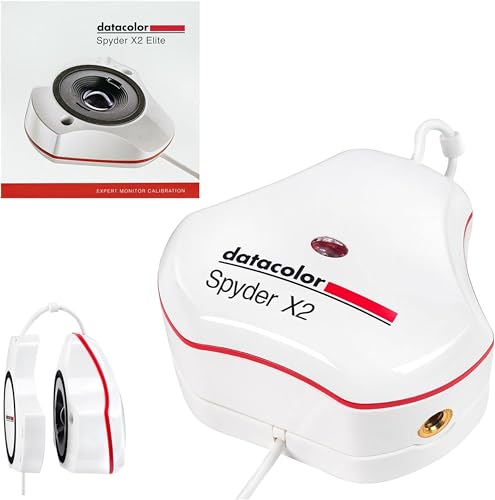
Spyder X2 Elite for Photo and Video
- Rec. 709 and Rec. 2020 video targets
- Advanced display mapping and soft proofing
- USB-C connection with USB-A adapter
Best For: Hybrid photo/video creators needing advanced monitor calibration
Reliable Monitor Profiling

- Easy to use with ccProfiler or i1Profiler
- High repeatability across display types
- Projector profiling and ambient light support
Best For: Editors wanting repeatable monitor profiling with projector support
Flexible Modern Setup
SpyderPro for Accurate Video Color

- Supports OLED, Mini LED, and LED backlights
- Unlimited gamma, whitepoint, and brightness settings
- Integrated USB-C cable and projector calibration
Best For: Video editors with mixed monitor types and modern laptops
Complete Color Management
ColorChecker Studio for Display and Print

- Profiles monitors, printers, scanners, and projectors
- Includes ColorChecker Classic Mini for camera profiling
- Ambient light measurement supports print matching
Best For: Creators needing one tool for monitor, camera, and print workflows
Fast, Easy Monitor Calibration
Spyder X Pro for First-Time Users

- Quick calibration in about a minute or two
- Single-click workflow with 12 targets
- Supports multiple laptops and desktop monitors
Best For: First-time users seeking simple monitor calibration for editing
Capture-to-Edit Color Workflow

- Colorimeter profiles up to 10,000 nits
- Includes ColorChecker Passport Video 2 reference tool
- Aims to improve capture, editing, and delivery consistency
Best For: Videographers and photographers needing both monitor calibration and camera reference
Advanced HDR Calibration and Control

- 3-in-1 tool adds calibration, OSD control, and ASUS Dial
- Measures up to 10,000 nits for HDR displays
- Supports ProArt Calibration and ColourSpace CMS
Best For: Creators who want calibration plus direct display and software control
Quick-Start Choice
Calibrite Display 123 for Easy Monitor Calibration

- Easy 1 2 3 calibration workflow
- Supports up to 2 displays
- Before-and-after verification view
Best For: Editors who want simple, dependable monitor calibration
Workflow Bundle
Calibrite Creator Kit for Capture-to-Edit Color Control

- Includes Display 123 plus Passport Video 2
- Supports white balance and exposure reference
- Covers capture through post-production
Best For: Filmmakers and hybrid creators needing capture and monitor color control
Advanced Hybrid Editing – Spyder X2 Elite for Photo and Video
If you want display calibrators for video editing that also handle photo work, the Datacolor Spyder X2 Elite is built for that hybrid workflow. It adds Video & Cinema targets for Rec. 709 and Rec. 2020, plus advanced display mapping and analysis for more controlled calibration.
Best For: Hybrid photo/video creators who want advanced monitor calibration with Rec. 709 and Rec. 2020 support.
Pros:
- Includes Video & Cinema targets for Rec. 709 and Rec. 2020
- Offers advanced display mapping, analysis, soft proofing, and Studio Match
- Remastered software has a cleaner, more concise UI
- Native USB-C connection with a USB-A adapter included
Cons:
- Best fit for users who need more than basic calibration
- Focused on monitor calibration rather than full studio profiling
Overall, this is a strong pick if you need one calibrator that can serve both photography and video work. The advanced targets and multi-monitor tools make it especially useful for creators who want tighter control over their editing display.
Reliable Monitor Profiling – ColorChecker Display Pro
The Calibrite ColorChecker Display Pro is a practical choice among display calibrators for video editing when you want fast, repeatable monitor profiling. Its optical design is made for high repeatability across the same display and across different display types, which helps keep color profiling consistent.
Best For: Editors who want a straightforward, repeatable monitor calibrator with projector support.
Pros:
- Powerful and easy to use with ccProfiler or i1Profiler software
- High repeatability on the same display and across different display types
- Rotatable diffuser arm supports projector profiling and ambient light measurement
- Integrated tripod mount adds flexibility for larger venues
Cons:
- Primarily centered on monitor and projector calibration
- Does not include broader printer or scanner profiling features
This is a solid monitor calibrator if your priority is dependable display profiling without extra complexity. The added projector and ambient-light functions make it useful for editors who work in more than one viewing setup.
Flexible Modern Setup – SpyderPro for Accurate Video Color
The datacolor SpyderPro is aimed at creators who need display calibrators for video editing across modern monitors and laptops. It supports wide LED, standard LED, OLED, and Mini LED backlights, while also offering unlimited gamma, whitepoint, and brightness settings for more precise tuning.
Best For: Video editors with mixed monitor types who want broad compatibility and flexible calibration controls.
Pros:
- Supports wide LED, standard LED, OLED, and Mini LED displays
- Unlimited gamma, whitepoint, and brightness settings
- Includes projector calibration and Display Analysis/MQA
- Integrated USB-C cable and support for unlimited displays
Cons:
- Requires its software workflow to get the most from advanced options
- Focuses on display calibration rather than broader studio profiling
For editors with newer screens or multiple display types, SpyderPro offers a flexible path to accurate color. Its combination of wide hardware support and customizable settings makes it a strong fit for evolving edit bays.
Complete Color Management – ColorChecker Studio for Display and Print
If you need display calibrators for video editing plus a wider color workflow, the Calibrite ColorChecker Studio goes beyond basic monitor profiling. It is an all-in-one spectrophotometer for display, projector, printer, and scanner profiling, and it also includes a ColorChecker Classic Mini for camera profiling.
Best For: Creators who need one tool for monitor calibration plus print, camera, and scanner workflows.
Pros:
- Profiles monitors, laptops, projectors, printers, paper, cameras, and scanners
- Adaptive iterative profiling is designed to improve results over repeat sessions
- Ambient light measurement helps match display luminance for print comparisons
- Includes ColorChecker Classic Mini and monitor profiling holder pouch
Cons:
- More tool than you need if you only calibrate one editing monitor
- Best value comes from using its full color-management feature set
This is the most complete option in the group for users who manage color across capture, edit, and output. If your video work also touches print or camera profiling, the broader feature set can simplify your whole workflow.
Fast, Easy Monitor Calibration – Spyder X Pro for First-Time Users
If you want display calibrators for video editing that keep things simple, the Datacolor Spyder X Pro is built for quick, reliable monitor calibration on desktops and laptops. Its lens-based color engine, room-light monitoring, and single-click workflow make it a practical pick when you need accurate color without a steep learning curve.
Best For: First-time users who want straightforward monitor calibration for editing photos and video on one or more displays.
Pros:
- Quick calibration takes just a minute or two.
- Easy single-click workflow with 12 predefined calibration targets.
- Room-light monitoring and automatic profile changing help maintain consistency.
- SpyderProof lets you compare before-and-after results using your own images.
Cons:
- It is focused on monitor calibration rather than camera reference tools.
- Designed for desktop and laptop displays, not phones.
For editors who want an uncomplicated way to improve screen color accuracy, this is a strong entry point. It emphasizes speed, simplicity, and dependable display tuning across multiple monitors.
Capture-to-Edit Color Workflow – Calibrite Video Photo Kit
Among display calibrators for video editing, this Calibrite kit stands out because it combines monitor calibration with a camera reference system. The Display Plus HL colorimeter profiles very bright panels, while the ColorChecker Passport Video 2 helps with white balance, exposure, and camera matching for a more controlled workflow from capture to post.
Best For: Videographers and photographers who want monitor calibration plus on-set color reference tools in one kit.
Pros:
- Display Plus HL measures up to 10,000 nits for high-luminance displays.
- Profiles mini-LED, OLED, and Apple XDR panels.
- ColorChecker Passport Video 2 supports white balance, exposure control, and camera matching.
- Designed to improve color consistency across capture, editing, and delivery.
Cons:
- It is a two-piece kit, so it is more involved than a basic colorimeter.
- Best suited to users who will use both the display and capture-reference tools.
This is a strong choice if your editing work starts before the timeline, not just at the monitor. It is built for creators who need dependable color management across multiple cameras, software platforms, and bright modern displays.
Advanced HDR Calibration and Control – ASUS ProArt CaliContrO MCA02
If you need display calibrators for video editing and also want hands-on control, the ASUS ProArt CaliContrO MCA02 goes beyond basic calibration. It combines an integrated colorimeter with hardware/software calibration support, OSD control, and an ASUS Dial for quicker adjustments inside creator workflows.
Best For: Creators who want monitor calibration plus built-in control features for editing and display tuning.
Pros:
- 3-in-1 design combines colorimeter, display OSD control, and ASUS Dial features.
- Measures up to 10,000 nits for HDR calibration on LED, OLED, and Mini-LED displays.
- Supports hardware and software calibration with ProArt Calibration and Light Illusion ColourSpace CMS.
- Reversible USB-C connection keeps setup simple.
Cons:
- Compatible software and OS requirements are more specific than on basic calibrators.
- Built for desktop use rather than portable monitoring.
This model is aimed at serious creators who want calibration plus faster screen and software control in one device. It is a good fit if your editing workflow benefits from both accurate color and direct access to adjustments.
Quick-Start Choice – Calibrite Display 123 for Easy Monitor Calibration
If you want display calibrators for video editing that keep setup simple, the Calibrite Display 123 is built around a guided Easy 1 2 3 workflow. It helps correct common monitor color shifts, supports up to two displays, and includes a before-and-after check so you can verify the result without getting buried in settings.
Best For: Creators who want a straightforward monitor calibration tool for a dual-display editing setup.
Pros:
- Guided 1 2 3 software workflow keeps calibration approachable.
- Supports up to 2 displays for matching a multi-screen workspace.
- Before-and-after check makes it easy to confirm the change.
- USB-C connection and compact body are easy to place on-screen.
Cons:
- Designed for ease of use, not the advanced controls of higher-end profiling tools.
- Best suited to monitor calibration rather than full capture-to-edit color management.
For editors who mainly need reliable screen accuracy without a complex workflow, this model is a practical fit. It keeps the focus on getting consistent viewing on one or two monitors so your edits are easier to trust.
Workflow Bundle – Calibrite Creator Kit for Capture-to-Edit Color Control
For display calibrators for video editing that also help on set, the Calibrite Creator Kit combines the Display 123 colorimeter with the ColorChecker Passport Video 2. That means you can handle monitor calibration and capture-time color control in one kit, making it easier to keep exposure, white balance, and screen color aligned through the whole workflow.
Best For: Filmmakers and hybrid creators who want one kit for both capture reference and monitor calibration.
Pros:
- Includes both a monitor colorimeter and a video/photo capture reference tool.
- Passport Video 2 supports white point and exposure reference on set.
- Display 123 provides easy monitor profiling for editing and grading.
- Useful for maintaining consistency from capture through post-production.
Cons:
- More specialized than a stand-alone monitor calibrator if you only need screen profiling.
- Extra capture tool may be unnecessary for editors who work entirely in post.
If your workflow spans filming, photography, and editing, this bundle covers more of the color pipeline than a monitor-only device. It is a strong choice when you want fewer guesswork corrections and a more consistent process from set to final delivery.
Pro HDR Option – Calibrite Display Pro HL for Bright Modern Panels
If your editing setup includes a bright mini-LED, OLED, or HDR display, this Calibrite Display Pro HL is the most advanced of the display calibrators for video editing in this group. Its high-luminance sensor measures up to 3000 nits, and the PROFILER software gives you Basic and Advanced modes for dialing in white point, luminance, gamma, contrast ratio, and validation checks.
Best For: Editors working on high-brightness or HDR-capable monitors who want deeper profiling control.
Pros:
- High-luminance sensor measures up to 3000 nits.
- Supports LCD, mini-LED, OLED, and compatible projectors.
- PROFILER software offers Basic and Advanced adjustment options.
- Validation, uniformity, and flare-correction tools help confirm results.
Cons:
- More feature-rich than needed for users who only want a basic quick calibration.
- Advanced controls may be more involved than beginner-friendly models.
For modern editing monitors, especially brighter HDR panels, this is the strongest tool here for detailed profiling and verification. It is a better match when accuracy, repeatability, and multi-display consistency matter more than simplicity.
How We Picked the Best Display Calibrators for Video Editing
We prioritized calibration tools that are practical for real editing workflows: dependable sensor accuracy, support for modern display types, software quality, and brightness range. We also considered ease of use, whether the tool is suited to occasional calibration or regular pro use, and how well it fits common video-editing setups.
Quick Comparison
At a high level, the best Display Calibrators for Video Editing fall into a few groups: simple colorimeters for straightforward monitor setup, advanced colorimeters for HDR and wide-gamut panels, and spectrophotometers for users who also need projector or printer profiling. Beginners usually want speed and simplicity, while color-critical editors may prefer broader feature support and higher luminance measurement.
Key Buying Factors for Display Calibrators for Video Editing
Display Type and Brightness Range
Make sure the calibrator supports your monitor technology. OLED, mini-LED, and very bright HDR displays can exceed the limits of basic tools, so check maximum measurable brightness if you grade in HDR or on a 1000-nit-plus panel.
Software and Workflow
Good hardware matters, but software makes the experience. Look for clear guided workflows, profile management, white point and gamma controls, and repeatable calibration reminders. If you switch between rooms or monitors often, faster setup can save a lot of time.
Profiling Needs
If you only need monitor calibration, a colorimeter is usually enough. If your workflow includes projectors, printers, or mixed-device color management, a spectrophotometer can add useful flexibility.
Editing Style and Delivery Targets
Editors working for web delivery may prioritize consistent sRGB performance, while those grading for cinema, broadcast, or HDR delivery may need more advanced controls and higher display compatibility. Choose a tool that matches your actual output, not just your current screen.
Who Should Buy Which Display Calibrators for Video Editing?
Choose a straightforward display colorimeter if you want the easiest path to accurate color on a single editing monitor. Step up to a higher-end model if you work with OLED, mini-LED, or HDR displays and need more headroom. Pick a spectrophotometer if you manage multiple device types or need a broader color-management toolkit.
For most editors, the best choice is the one you will calibrate regularly. A reliable tool used often is more valuable than a feature-rich device that sits in a drawer.