Dual-camera lecture capture systems make it easier to show both the presenter and the teaching materials at the same time. That can improve clarity for hybrid classes, training sessions, and recorded lessons.
In this roundup, we focus on practical options for educators, trainers, and content creators who want reliable capture, easy setup, and the right balance of video quality and workflow flexibility.
Best 10 Dual Camera Lecture Capture Systems Picks for 2026
All-in-One 4K Production Hub
RGBlink StreamZ 4K Live Switcher for Teaching
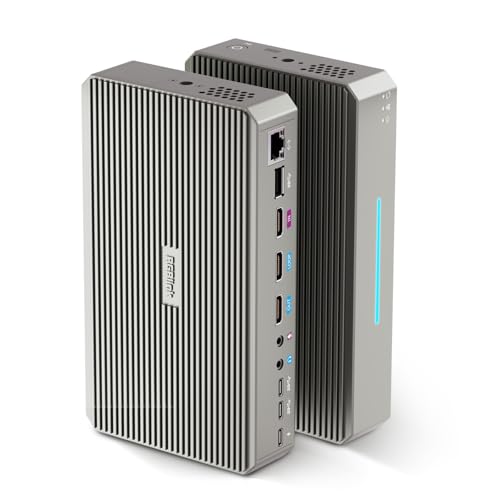
- Dual 4K30 recording or 5-channel ISO modes
- Built-in 128GB storage for lectures and events
- No-computer browser control for streaming
Best For: Educators and trainers needing an integrated dual-camera capture setup
Dual-View Teaching Webcam
AVerMedia PW313D DualCam for Lessons

- 2K document camera plus 1080p webcam
- Picture-in-Picture for face and materials
- Dual mics with AI noise reduction
Best For: Teachers and presenters needing a simple dual-view teaching camera
Pro PCIe Capture Card
Magewell Dual HDMI Ingest Card
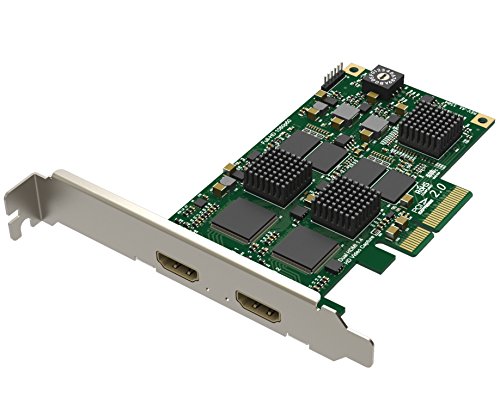
- Two independent HDMI inputs for simultaneous capture
- Up to 1080p per channel with hardware processing
- Low-latency PCIe card for production PCs
Best For: Internal capture for fixed lecture recording and streaming systems
Budget USB Capture Adapter
1080p HDMI Capture for Simple Setups

- Plug-and-play USB 3.0 capture with no driver
- 1080p HDMI capture plus HDMI loop-out
- Mic-in supports live commentary
Best For: Basic HDMI capture when you do not need full dual-camera switching
Dual-Source Control
IOGEAR UpStream Pro Capture Card

- Captures and mixes two live 4K inputs at 1080p.
- PIP, split-screen, and app-based scene control.
- Up to 18 hot keys for OBS or broadcast workflows.
Best For: Multi-camera lectures and live switching
Camera Feed Capture
AVerMedia CamStream 4K BU113G2

- Captures HDMI video up to 4K60 with RGB24 color.
- Plug-and-play with no drivers needed.
- Low-latency support for OBS, Zoom, and conferencing.
Best For: DSLR or mirrorless lecture camera feeds
Simple HDMI Capture
Audio Express AXHDCAP 4K HDMI Capture Card

- HDMI input up to 4K 60FPS with 1080p output.
- Plug-and-play setup with no drivers or external power.
- Works with Windows, MacOS, Linux, OBS, Zoom, and more.
Best For: Basic single-source lecture recording and streaming
PCIe Lecture Capture Pick
AVerMedia Live Gamer Duo 1080p Dual HDMI
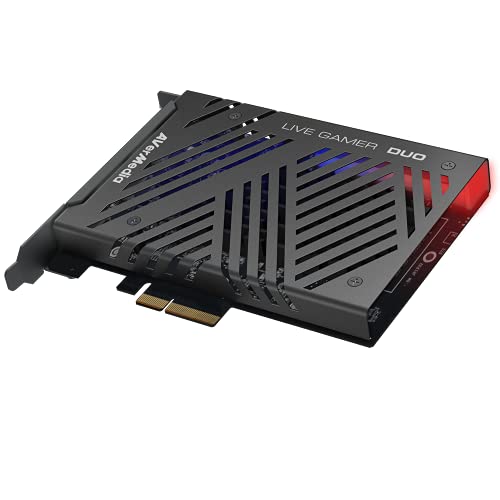
- Dual HDMI inputs in one PCIe slot
- Captures both sources at 1080p60
- Zero-lag pass-through with onboard processing
Best For: Stable two-camera lecture setups with internal PCIe installation
Easy-Setup USB Option
ezcap Dual 4K USB 3.1 Capture Card

- Captures two HDMI sources at once
- USB 3.1 with plug-and-play setup
- Works with Windows, macOS, and Linux
Best For: Portable or mixed-OS lecture setups with quick installation
Budget Entry Choice
PyleUsa HDMI to USB 3.0 Recorder
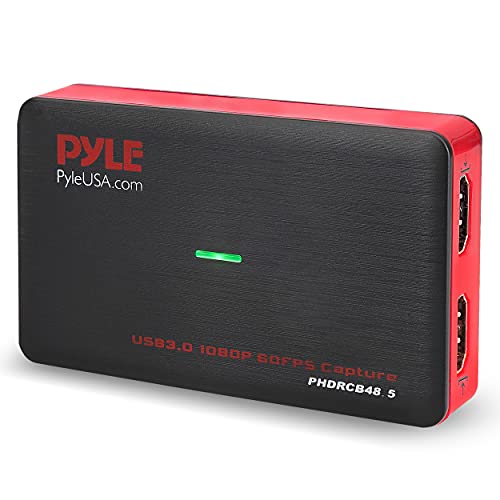
- 1080p recording with HDMI pass-through
- Plug-and-play USB 3.0 operation
- Hot-button recording and screenshots
Best For: Budget-minded basic lecture recording with a single HDMI source
All-in-One 4K Production Hub – RGBlink StreamZ 4K Live Switcher for Teaching
If you’re comparing dual camera lecture capture systems, the RGBlink StreamZ is built for users who want capture, recording, and live streaming in one box. It handles multi-camera workflows without a computer or OBS, and its browser-based control makes it practical for lectures, webinars, training sessions, and online teaching.
Best For: Educators, trainers, and creators who want a compact all-in-one setup for dual 4K capture and streaming.
Pros:
- Supports dual 4K30 recording or 5-channel ISO recording with built-in 128GB storage.
- Works without a computer for setup or operation, with browser-based control from phone, tablet, or computer.
- Connects HDMI and UVC sources, including cameras, webcams, laptops, and mobile devices.
- Includes mic input and headphone output for monitored audio in educational or corporate presentations.
Cons:
- Requires updating to the latest firmware before use.
- More feature-rich than a simple capture device, so it may be more than some users need.
The StreamZ stands out when you need lecture capture hardware that can switch, record, and stream from multiple sources with minimal setup. It’s best suited to users who value an integrated production workflow over a basic capture-only device.
Dual-View Teaching Webcam – AVerMedia PW313D DualCam for Lessons
For dual camera lecture capture systems, the AVerMedia PW313D is a straightforward desktop option that combines a document camera and webcam in one unit. It lets you show your face and teaching materials at the same time, making it a practical choice for online classes, training, demos, and hybrid meetings.
Best For: Teachers, trainers, and presenters who want a plug-and-play dual-view camera for live instruction.
Pros:
- Offers a 2K 30FPS document-view camera and a 1080p webcam in one device.
- Picture-in-Picture support helps show both the speaker and materials together.
- Real-time autofocus and keystone correction improve tabletop and document clarity.
- Dual omnidirectional microphones with AI noise reduction help in noisy rooms.
Cons:
- Designed around USB desktop use rather than a larger multi-input production workflow.
- Video resolution tops out at 2K for the document view and 1080p for the webcam.
This is a strong fit when you want a compact lecture capture solution that is easy to deploy and simple to use. It’s especially appealing for instructors who need both a face camera and a material camera without extra hardware.
Pro PCIe Capture Card – Magewell Dual HDMI Ingest Card
If your dual camera lecture capture systems need a dependable internal capture path, the Magewell Pro Capture Dual HDMI is a professional PCIe card with two independent HDMI inputs. It is designed for simultaneous HD ingest in streaming, recording, and production workflows, especially when low latency and system integration matter more than portability.
Best For: Production computers and custom lecture capture setups that need stable dual HDMI ingest.
Pros:
- Captures two HDMI sources at the same time through separate inputs.
- Supports up to 1080p per channel with hardware-based video processing.
- Low-latency PCIe 2.0 x4 connection suits live production and real-time encoding.
- Works across Windows, macOS, and Linux with driver and SDK support.
Cons:
- Requires a compatible PCIe system, so it is not a portable solution.
- It is a capture card only, so it does not include cameras or an all-in-one control interface.
This card makes sense when you already have a production PC and want reliable dual-source capture inside the system. It is a more specialized choice for lecture recording pipelines than an external teaching camera or standalone switcher.
Budget USB Capture Adapter – 1080p HDMI Capture for Simple Setups
For buyers looking at dual camera lecture capture systems on a tighter budget, this USB 3.0 HDMI capture card is a basic single-channel option for turning HDMI sources into webcam-style video. It supports plug-and-play use with Windows and Mac, and its microphone input can be useful when you want to add live commentary to a teaching or presentation setup.
Best For: Simple HDMI-to-USB capture for a camera, console, or classroom video source.
Pros:
- Plug-and-play operation with no driver or external power supply required.
- Supports up to 1080p capture and works with Windows and Mac OS.
- Includes HDMI loop-out and a mic-in for commentary.
- Compatible with common streaming tools and platforms such as OBS, Twitch, and YouTube.
Cons:
- Only captures one HDMI channel, so it is not a true multi-camera lecture system.
- Resolution is limited to 1080p capture.
This is the least complex option in the group, making it suitable for straightforward capture tasks rather than full lecture production. If your priority is basic, low-latency HDMI ingest, it delivers that without extra setup.
Dual-Source Control – IOGEAR UpStream Pro Capture Card
If you’re comparing dual camera lecture capture systems, the IOGEAR Upstream Pro is built for setups that need two live video sources, scene control, and flexible layout options. It captures and mixes two unencrypted 4K inputs at 1080p, while the app-based controls and hotkey deck make it easier to manage a lecture, demo, or live presentation from one device.
Best For: Multi-camera lectures, live demos, and streamers who want app-based scene control.
Pros:
- Captures and mixes two unencrypted live 4K videos at 1080p.
- Supports picture-in-picture and split-screen output for layered presentations.
- Works with a smartphone app over Bluetooth, plus up to 18 custom hot keys.
- USB-connected design supports desktop, laptop, or mobile workflows.
Cons:
- Capture resolution tops out at 1080p rather than full 4K output.
- Requires a more involved setup than a simple single-camera capture device.
- Best fit is for live mixing, not basic one-camera recording.
Overall, this is the most control-heavy option in the group, and that can be a strength if your lecture capture needs include switching between two sources and managing overlays or layouts on the fly.
Camera Feed Capture – AVerMedia CamStream 4K BU113G2
For dual camera lecture capture systems that rely on a DSLR, mirrorless camera, camcorder, or action camera, this AVerMedia capture card is a practical plug-and-play choice. It takes HDMI input at up to 4K60 and is designed for low-latency use, so you can feed a clean camera signal into OBS, Zoom, or similar software without driver hassles.
Best For: Lectures, webinars, and video conferencing with a DSLR or mirrorless camera feed.
Pros:
- Captures 4K60 HDMI input with true-to-life RGB24 color.
- Plug-and-play operation with no drivers needed.
- Designed for low latency and audio/video synchronization.
- Broad compatibility with Windows, Mac, iPadOS, OBS, Zoom, and Twitch.
Cons:
- Handles one HDMI source rather than native multi-camera mixing.
- Needs an external camera source such as a DSLR, camcorder, or GoPro.
- Not focused on built-in hotkey or scene control features.
This is a strong pick if your lecture setup uses a high-quality camera as the main feed and you want a simple path into conferencing or streaming software. It’s less of a production hub, but very solid as a capture link.
Simple HDMI Capture – Audio Express AXHDCAP 4K HDMI Capture Card
If you need a straightforward option for dual camera lecture capture systems, the Audio Express AXHDCAP focuses on simple HDMI-to-USB recording and streaming. It supports HDMI input up to 4K 60FPS and outputs at 1080p, with plug-and-play setup and ultra-low latency for lecture recording, live broadcasting, or conference use.
Best For: Basic lecture capture, teaching, and streaming from a single HDMI camera source.
Pros:
- HDMI input supports up to 4K at 60FPS, with 1080p USB output.
- Ultra-low latency preview helps with real-time recording and monitoring.
- Plug-and-play design needs no drivers or external power.
- Compatible with Windows, MacOS, and Linux for common streaming tools.
Cons:
- USB 2.0-only design limits performance compared with faster capture gear.
- Outputs at 1080p rather than full 4K.
- Not intended to add HDMI output to a computer.
This model is best viewed as a simple capture bridge rather than a full production system. For lecture setups that just need one reliable HDMI source into a computer, it covers the essentials without adding complexity.
PCIe Lecture Capture Pick – AVerMedia Live Gamer Duo 1080p Dual HDMI
For dual camera lecture capture systems, the AVerMedia Live Gamer Duo is a PCIe option built for creators who need two HDMI inputs in one slot. It captures both sources in uncompressed Full HD 1080p60, while onboard processing handles HDR to SDR tone mapping, 4K downscaling, and frame-rate conversion before the signal reaches your PC.
Best For: Lectures, presentations, and streamed sessions that need two HDMI sources with low-latency pass-through.
Pros:
- Dual HDMI inputs let you record two camera angles from one card.
- Zero-lag pass-through supports 4K HDR or FHD 240fps viewing while capturing 1080p60.
- Onboard processing can convert HDR to SDR and downscale 4K to 1080p.
- Works with RECentral 4, OBS, Streamlabs, vMix, and XSplit Broadcaster.
Cons:
- Requires a PCIe x4 slot, so it is not a USB plug-and-play option.
- Capture resolution is limited to 1080p even though pass-through is higher.
This is a strong fit if you want a dedicated internal capture card for a stable dual-input setup. It is especially useful when you need reliable simultaneous recording from two HDMI sources without changing your existing software workflow.
Easy-Setup USB Option – ezcap Dual 4K USB 3.1 Capture Card
The ezcap Dual 4K HDMI capture card is a practical choice for dual camera lecture capture systems when you want an external USB workflow. It supports two HDMI sources at once, offers USB 3.1 connectivity, and is designed for quick setup with no driver installation, making it easy to use across Windows, macOS, and Linux.
Best For: Fast setup lecture recordings and live streams that need two HDMI sources on multiple operating systems.
Pros:
- Dual 4K HDMI input supports simultaneous capture from two sources.
- USB 3.1 interface is built for fast, reliable performance with minimal latency.
- Plug-and-play operation avoids extra driver or software installation.
- Compatible with Windows, macOS, and Linux for flexible deployment.
Cons:
- The listed capture resolution is 1080p in the product details, despite dual 4K input support.
- Best suited to USB-based workflows rather than an internal card setup.
If you need an external capture option that is simple to deploy, this model makes sense. It is a good fit for lecture rooms or portable setups where ease of connection matters more than installing a PCIe card.
Budget Entry Choice – PyleUsa HDMI to USB 3.0 Recorder
For dual camera lecture capture systems on a tighter budget, the PyleUsa PHDRCB48 offers a straightforward HDMI to USB 3.0 capture workflow. It records in full HD 1080p with HDMI pass-through support, includes hot-button recording and screenshot capture, and is designed for plug-and-play use with common streaming and recording tasks.
Best For: Basic lecture recording, live streaming, and simple capture setups that need an inexpensive USB device.
Pros:
- Records full HD 1080p and supports HDMI pass-through.
- Plug-and-play design reduces setup complexity.
- On-board hot button supports one-click recording and screenshot capture.
- Works with a wide range of HDMI devices, including cameras and PCs.
Cons:
- It uses a single HDMI input, so it is not a true dual-input capture card.
- Minimum system requirements include an Intel Core i5 or above and 4GB RAM or above.
This model is best viewed as a simple, budget-friendly capture device rather than a full multi-camera solution. If your lecture workflow is basic and you mainly need reliable 1080p recording, it can still be a useful entry-level option.
How We Picked the Best Dual Camera Lecture Capture Systems
We focused on capture devices and all-in-one setups that can handle a lecture-style workflow with two video sources, stable recording, and broad compatibility. Priority went to models that support clean HDMI input, low-latency monitoring, useful audio options, and dependable software or hardware control.
We also considered whether each option suits a classroom, studio desk, mobile teaching setup, or PC-based production environment. For Dual Camera Lecture Capture Systems, ease of use matters as much as specs, so we favored products that reduce setup friction.
Quick Comparison
Some products are better for simple USB plug-and-play recording, while others are built for PCIe installs and higher-end multi-source production. If you need the fastest setup, USB capture devices are usually the easiest choice. If you want more robust ingest, lower overhead, or better switching control, internal capture cards and production switchers are stronger picks.
For dual-camera teaching, the best fit often depends on whether your priority is recording lessons, streaming to students, or switching between a document camera and presenter view in real time.
Key Buying Factors for Dual Camera Lecture Capture Systems
Video Inputs and Switching
Check how many HDMI inputs you need and whether the system can switch between them smoothly. True dual-source support is essential if you want to capture both a teacher camera and a document camera or slide feed.
Resolution and Frame Rate
1080p is usually enough for lecture capture, but 4K support can be helpful for future-proofing, sharper whiteboard text, and better crop flexibility in post-production. Pay attention to whether the system records natively in that resolution or only passes it through.
Audio Quality
Good audio often matters more than video for educational content. Look for mic inputs, line-level support, or cleaner integration with external audio mixers if you use lapel mics or classroom sound sources.
Compatibility and Workflow
Make sure the device works with your operating system and recording platform. OBS, Zoom, Teams, and similar tools are common lecture workflows, but PCIe models may require a dedicated desktop, while USB models are better for portability.
Who Should Buy Which Dual Camera Lecture Capture Systems?
If you need a simple, portable setup for live classes or screen-plus-camera recording, a USB capture card or compact dual-input solution is usually the best starting point. If you’re building a permanent teaching station, a PCIe capture card or production switcher offers more control and stability.
Educators who want the easiest path should prioritize plug-and-play compatibility and dependable audio. More advanced users should look for stronger switching features, multiple inputs, and higher-end monitoring tools to get the most from Dual Camera Lecture Capture Systems.