Need a fast, simple way to clone a drive without a computer? A hard drive enclosure with offline cloning lets you duplicate data directly between drives, making upgrades and backups far easier.
Below, we compare top docks and cloners for SATA and NVMe users, with options for everything from basic desktop storage to multi-bay setups.
Best 10 Hard Drive Enclosure with Offline Cloning Picks for 2026
RGB Dual-Bay Dock
Inateck SA02003 Offline Clone Dock
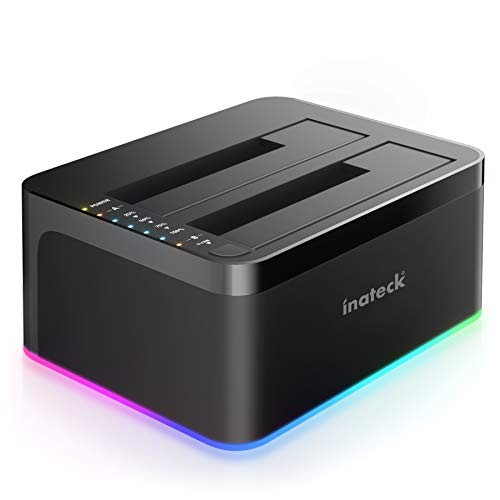
- Offline clone works without a PC.
- Supports two SATA HDDs or SSDs.
- USB 3.0 with UASP speeds transfers.
Best For: Dual-bay SATA users who want offline cloning and status lighting.
USB-C Hybrid Dock
SABRENT NVMe & SATA Offline Clone Dock

- Handles both NVMe and SATA drives.
- Offline cloning uses buttons and LEDs.
- USB-C and USB-A cables are included.
Best For: People who need one dock for mixed drive types and cloning.
Budget Dual-Bay Cloner

- Offline cloning is built in.
- Supports two SATA HDDs or SSDs.
- USB 3.0 with UASP and Trim.
Best For: Budget-minded buyers who need a simple SATA duplicator dock.
High-Speed NVMe Cloner
WAVLINK 40Gbps Dual SSD Enclosure
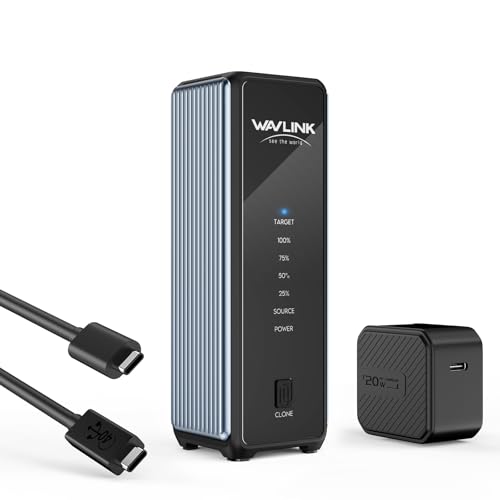
- USB4 40Gbps for fast NVMe transfers.
- One-click offline clone is included.
- Active cooling helps manage heat.
Best For: NVMe users who want top-speed transfers and built-in cloning.
4-Bay Docking Station
SABRENT 4-Bay USB 3.0 Hard Drive Docking Station

- Holds up to four 2.5-inch or 3.5-inch SATA drives
- Offline cloning works without a computer
- Trayless USB 3.0 design supports plug-and-play use
Best For: multi-drive SATA users who want direct cloning and easy drive swaps
NVMe + SATA Cloner Dock
GRAUGEAR M.2 NVMe & SATA SSD/HDD Dock

- Supports one M.2 NVMe SSD plus one SATA drive
- Offline SATA-to-NVMe cloning works without a PC
- Built-in fan and USB-C speeds up to 10Gbps
Best For: mixed NVMe and SATA users who want cloning and fast USB-C performance
Dual-Bay Clone Dock
GODO 2.5/3.5" SATA Dual-Bay Hard Drive Dock

- Supports two 2.5-inch or 3.5-inch SATA drives up to 20TB each
- Offline cloning works without a computer
- USB 3.0 with UASP offers faster transfers on compatible PCs
Best For: users who want a compact dual-bay SATA dock for cloning and backups
Offline 1-to-1 Cloner
SABRENT Dual-Bay USB-C SATA Dock & Cloner

- Offline SATA-to-SATA cloning at the press of a button
- Dual bays also work as separate USB-C drives
- Tool-free, hot-swappable design with LED status lights
Best For: SATA users who want a simple no-computer cloning dock for 2.5-inch or 3.5-inch drives
Triple-Bay Hybrid Cloner
Rosewill M.2 NVMe + SATA Offline Cloner Dock

- Offline cloning for HDDs and SSDs without a host computer
- Supports M.2 NVMe plus 2.5-inch/3.5-inch SATA drives
- USB 3.2 Gen 2x1 transfers up to 10Gbps
Best For: Users who need one dock for both NVMe and SATA drives with offline cloning
Bidirectional NVMe-to-SATA Cloner
Cysslogy Dual-Bay NVMe + SATA Offline Clone Dock
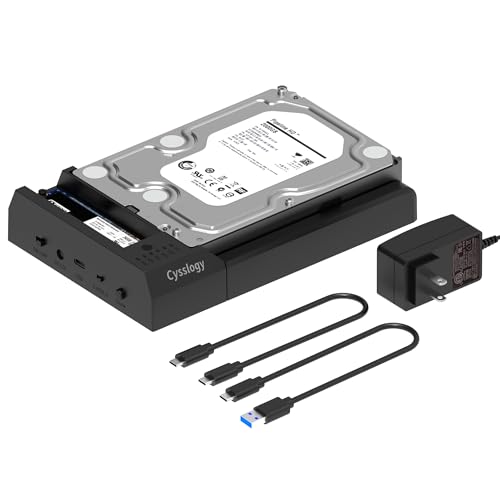
- Clones between NVMe and SATA in either direction
- Dual-bay dock also supports normal file access
- Tool-free design with USB-C and USB-A cables included
Best For: People who need bidirectional cloning between M.2 NVMe and SATA drives
RGB Dual-Bay Dock – Inateck SA02003 Offline Clone Dock
If you want a hard drive enclosure with offline cloning that also doubles as a simple desktop dock, the Inateck SA02003 is built for straightforward SATA drive swaps and backups. It supports up to two 2.5-inch or 3.5-inch HDDs and SSDs, works independently from a computer for cloning, and adds USB 3.0 plus UASP for faster transfers.
Best For: Users who want a simple dual-bay SATA dock with offline clone support and RGB status lighting.
Pros:
- Offline cloning works without connecting to a computer.
- Supports up to two 2.5-inch and 3.5-inch HDDs or SSDs.
- USB 3.0 with UASP is included for faster file transfers.
- RGB LED gives a clear visual cue when drives are active or sleeping.
Cons:
- Limited to SATA drives, so it does not support NVMe SSDs.
- Uses a plastic enclosure rather than metal.
- Target drive for cloning must be large enough for the source drive.
This is a practical pick if you mainly need a desktop SATA dock with offline cloning and easy day-to-day drive access. The RGB effect is a bonus, but the core appeal is the no-PC cloning workflow and broad compatibility with common 2.5-inch and 3.5-inch drives.
USB-C Hybrid Dock – SABRENT NVMe & SATA Offline Clone Dock
This hard drive enclosure with offline cloning is a flexible dock for people who use both NVMe and SATA drives. The SABRENT DS-UFNC reads M.2 PCIe NVMe SSDs as well as 2.5-inch and 3.5-inch SATA HDDs or SSDs, and its clone controls let you duplicate one drive to another without a computer.
Best For: Buyers who want one dock for both NVMe and SATA drives with easy offline cloning.
Pros:
- Supports both M.2 PCIe NVMe and SATA 2.5/3.5-inch drives.
- Offline clone mode works with a direction switch, button, and progress LEDs.
- Includes both USB-C to USB-C and USB-A to USB-C cables.
- Tool-free, hinged design makes drive changes quick.
Cons:
- Only one drive is supported at a time in the dock itself.
- Clone target must be equal to or larger than the source drive.
- 3.5-inch drives still need the included power adapter.
As a do-it-all dock, this model stands out for mixing NVMe and SATA support in one enclosure. If you move between modern SSDs and older HDDs, the offline cloning feature and dual-cable setup make it especially convenient.
Budget Dual-Bay Cloner – ORICO DD28U3-C Clone Dock
The ORICO DD28U3-C is a practical hard drive enclosure with offline cloning for SATA-based backup and duplication tasks. It supports 2.5-inch and 3.5-inch SATA HDDs and SSDs, offers USB 3.0 with UASP and Trim support, and includes a straightforward clone button for computer-free drive copying.
Best For: Users who want an affordable dual-bay SATA dock for easy offline duplication.
Pros:
- Offline clone function copies a drive without a computer.
- Supports up to 44TB total across two SATA drives.
- USB 3.0 with UASP and Trim supports faster transfers.
- Works with PCs, laptops, smart TVs, routers, PS4, and more.
Cons:
- Limited to SATA drives, not NVMe.
- Target disk must be larger than the source disk.
- The dock will not power on unless a hard drive is inserted.
This ORICO dock focuses on utility over extras, with solid compatibility and a simple clone workflow. It is a good fit if you want a no-fuss SATA duplicator that can also serve as a general-purpose dock for multiple devices.
High-Speed NVMe Cloner – WAVLINK 40Gbps Dual SSD Enclosure
If your priority is an NVMe-focused hard drive enclosure with offline cloning, the WAVLINK dual-slot enclosure is aimed at fast SSD workflows rather than traditional SATA drives. It supports M-key and B&M-key NVMe SSDs, offers USB4 with up to 40Gbps bandwidth, and includes a one-click offline clone function for drive migration.
Best For: NVMe users who want fast transfers, active cooling, and simple offline cloning.
Pros:
- USB4 40Gbps design targets very fast NVMe performance.
- Supports offline cloning with a one-click function.
- Active cooling, aluminum housing, and vents help manage heat.
- Compatible with multiple SSD sizes up to 8TB per drive.
Cons:
- Built for NVMe SSDs, not SATA HDDs or SATA SSDs.
- During offline cloning, the target SSD will be formatted.
- Clone target must be equal to or larger than the source SSD.
This enclosure is the most performance-oriented option in the group, especially if you are moving high-speed NVMe data between systems. The cooling setup and compact size make it a strong choice for fast, portable SSD work with cloning built in.
4-Bay Docking Station – SABRENT 4-Bay USB 3.0 Hard Drive Docking Station
If you need a hard drive enclosure with offline cloning for managing multiple SATA drives, this SABRENT 4-bay dock is built for practical desktop use. It accepts up to four 2.5-inch or 3.5-inch SATA HDDs and SSDs, connects over USB 3.0, and lets you clone drive to drive without software or a computer.
Best For: Users who want a trayless 4-bay dock for multi-drive access and direct offline cloning.
Pros:
- Supports up to four SATA HDDs or SSDs in one dock
- Offline clone function works without a computer
- Trayless design makes drive insertion simple
- USB 3.0 connection supports up to 5Gbps with plug-and-play use
Cons:
- Requires an external power adapter
- Only supports SATA drives, not M.2 storage
This is a strong fit if you want a straightforward multi-bay dock for backups, transfers, and hardware cloning. The LED progress indicators and tool-free layout make it easy to use, especially when you need frequent access to several drives.
NVMe + SATA Cloner Dock – GRAUGEAR M.2 NVMe & SATA SSD/HDD Dock
This hard drive enclosure with offline cloning is a flexible choice if you work with both NVMe and SATA storage. It supports one M.2 NVMe SSD plus one SATA drive, can clone SATA to NVMe without a computer, and adds USB-C connectivity with fast transfer speeds for everyday backup and migration tasks.
Best For: Users upgrading between NVMe and SATA drives who want cloning plus fast USB-C transfers.
Pros:
- Supports one M.2 NVMe SSD and one SATA drive
- Offline SATA-to-NVMe cloning works without a computer
- Offers up to 10Gbps for NVMe and 6Gbps for SATA
- Built-in 3-speed fan helps manage heat during use
Cons:
- Cloning requires a specific button sequence to start
- Only accommodates two drives at a time
For mixed-drive setups, this dock stands out because it combines cloning, high-speed access, and cooling in one unit. It is especially useful for backups, storage expansion, and data migration when you want both SATA and NVMe support in a single device.
Dual-Bay Clone Dock – GODO 2.5/3.5" SATA Dual-Bay Hard Drive Dock
If you want a compact hard drive enclosure with offline cloning for everyday SATA drives, this GODO dual-bay dock keeps things simple. It supports 2.5-inch and 3.5-inch SATA HDDs and SSDs, runs offline cloning without a computer, and uses USB 3.0 with UASP for faster file transfers when connected to a system.
Best For: Buyers who want a simple two-drive SATA dock for cloning, backup, and portable use.
Pros:
- Supports two SATA HDDs or SSDs up to 20TB each
- Offline cloning works independently from a computer
- USB 3.0 with UASP improves transfer speed on compatible systems
- Compact design is easy to carry and use with laptops or desktops
Cons:
- Only supports two drives
- Uses a USB 3.0 Type-A connection rather than USB-C
This dock is a practical pick for users who mainly need reliable SATA support and basic drive-to-drive cloning. The on/off switch and LED status indicators add convenience, while the compact footprint makes it easy to keep on a desk or move between setups.
Offline 1-to-1 Cloner – SABRENT Dual-Bay USB-C SATA Dock & Cloner
If you want a hard drive enclosure with offline cloning for simple drive-to-drive migration, this Sabrent dock keeps the process straightforward: insert two SATA drives, press the clone button, and copy without connecting to a PC. It also works as a dual-bay USB-C dock when you do want to access both drives on a computer, making it useful for backup, file moves, and general drive handling.
Best For: Users who want an easy SATA-to-SATA offline cloner and dual-drive dock for 2.5-inch or 3.5-inch drives.
Pros:
- Offline cloning works without a host computer.
- Supports both 2.5-inch and 3.5-inch SATA HDDs and SSDs.
- Dual bays mount as separate drives over USB-C for normal file access.
- Hot-swappable, tool-free design with per-bay activity LEDs.
Cons:
- Only supports SATA drives, not IDE/PATA, M.2, or NVMe.
- Target drive must be the same size as the source or larger.
- Offline clone speed is up to 60MBps by design.
This is a practical pick if your workflow stays within SATA and you value a no-computer cloning process. If you need NVMe support or faster cloning than the built-in offline mode provides, you’ll want a different style of dock.
Triple-Bay Hybrid Cloner – Rosewill M.2 NVMe + SATA Offline Cloner Dock
This hard drive enclosure with offline cloning is built for mixed-drive setups, letting you clone HDDs and SSDs without a host computer while also handling everyday data access. With support for M.2 NVMe and 2.5-inch or 3.5-inch SATA drives, it suits users who move between newer flash storage and traditional hard drives.
Best For: Buyers who want a compact triple-bay dock that handles both NVMe and SATA drives with offline cloning.
Pros:
- Offline cloning works without a computer.
- Supports M.2 NVMe plus 2.5-inch and 3.5-inch SATA drives.
- USB 3.2 Gen 2×1 interface offers up to 10Gbps transfer speeds.
- Tool-free design makes drive swaps quick and easy.
Cons:
- Product notes do not list detailed clone step indicators or bay-specific features.
- Some listed details are more general, so drive-type compatibility should be checked carefully.
- As with most cloning docks, target drive capacity must still suit the source drive.
For a mixed-format docking station, this Rosewill model stands out because it combines offline duplication with broad drive support. It is a strong fit if you want one dock that can bridge NVMe and SATA storage in the same workflow.
Bidirectional NVMe-to-SATA Cloner – Cysslogy Dual-Bay NVMe + SATA Offline Clone Dock
If you need a hard drive enclosure with offline cloning that can move data between newer NVMe storage and older SATA drives, this dual-bay dock is designed for that job. It supports bidirectional cloning without a computer, while still working as a high-speed USB-C dock for everyday file access and backup.
Best For: Users who want to clone between M.2 NVMe and SATA drives in either direction.
Pros:
- Bidirectional offline cloning between M.2 NVMe and SATA drives.
- Supports 2.5-inch and 3.5-inch SATA HDDs and SSDs plus M.2 NVMe.
- USB 3.2 Gen2 speeds up to 10Gbps for data access.
- Tool-free, hot-swap design with included USB-C to USB-C and USB-C to USB-A cables.
Cons:
- Not compatible with M.2 SATA (NGFF) SSDs.
- Target drive must be equal to or larger than the source drive for cloning.
- Product notes include multiple specs, so you should double-check your drive type before buying.
This dock is a flexible choice if you frequently migrate between NVMe and SATA storage and want cloning built in. The bidirectional support is the standout feature, especially for upgrade and maintenance workflows.
How We Picked the Best Hard Drive Enclosure with Offline Cloning
We focused on docks that support true offline cloning, stable power delivery, and broad drive compatibility. Priority went to units that work well with common 2.5-inch and 3.5-inch SATA drives, plus newer NVMe options where relevant. We also considered bay count, transfer speed, tool-free access, and how clearly the cloning process is indicated on the device.
Quick Comparison
Most buyers fall into three groups: simple SATA-to-SATA cloners, mixed-bay docks that handle both SATA and M.2 drives, and higher-capacity stations designed for frequent backups or drive swaps. If you mainly clone one drive at a time, a dual-bay model is usually the best value. If you work with multiple drives or mixed formats, a triple- or four-bay design offers more flexibility.
Key Buying Factors for a Hard Drive Enclosure with Offline Cloning
Drive Type Support
Make sure the dock matches your drives. SATA HDDs and SSDs are common, but NVMe M.2 drives need a different interface. Some models support both, which is useful if you upgrade across generations.
Clone Mode and Status Indicators
A good offline-clone dock should have a clear button-based process and visible progress lights. This reduces the chance of user error and helps confirm when the clone is finished.
Speed and Interface
For day-to-day copying to a host computer, USB 3.2 Gen 2 or USB-C 10Gbps is a strong baseline. For offline cloning itself, the internal drive interface matters more than the external port, but faster connections still help with file transfers and disk management.
Power and Cooling
Higher-capacity HDDs and multi-bay docks need dependable power and decent airflow. If you plan to clone large drives regularly, choose a model with a solid adapter and a design that helps manage heat.
Who Should Buy Which Hard Drive Enclosure with Offline Cloning?
If you want a simple upgrade path for a desktop hard drive, choose a dual-bay SATA cloner. If you need one dock that can handle newer SSDs and older spinning drives, look for a hybrid Hard Drive Enclosure with Offline Cloning and broad format support. Power users, technicians, and small offices should lean toward multi-bay units for faster workflows and easier drive rotation.
In short, match the dock to your drive type, your cloning frequency, and how much flexibility you want for future upgrades.