The right scanner depends on what you’re preserving. A flatbed gives you control over delicate prints, a film-capable model can digitize negatives and slides, and a photo feeder can make a large family archive far less time-consuming.
These seven picks span those different jobs. Use the buying guide below to match scanner design, real optical resolution, and workflow to your photos—not just the biggest dpi number on the box.
Best 7 High Resolution Photo Scanners Picks for 2026
Best for Detailed Photo Work
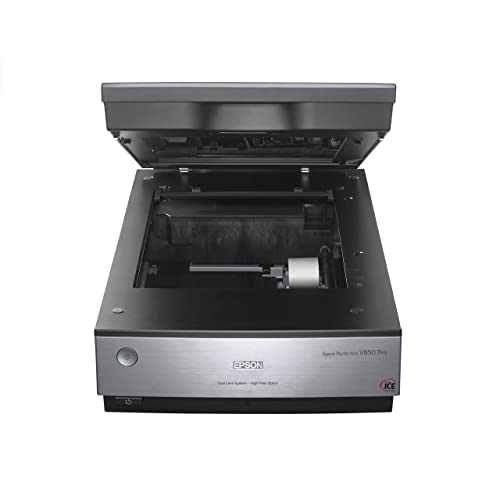
- 6400 dpi scanning
- Dual-lens system
- 4.0 Dmax for tonal detail
Best For: Detail-focused desktop photo scanning
Best for Basic Scanning

- 2400 x 2400 dpi optical resolution
- Automatic scan detection
- Scans photos and documents
Best For: Occasional mixed-media scanning
Best for Faded Photos

- 4800 dpi optical resolution
- One-click faded-photo color fix
- USB-powered flatbed
Best For: Restoring and scanning home photo collections
Best for Fast Everyday Scans

- 4800 x 4800 dpi resolution
- Scans as fast as 8 seconds
- One cable for data and power
Best For: Quick photo and document scans
Best Flatbed for Detail

- 4800 dpi optical resolution
- Scans photos, books, and artwork
- One-click faded-color restoration
Best For: Detailed scans of individual photos and mixed materials
Best Simple Photo Feeder

- 300 or 600 dpi settings
- Fast 4 x 6 scans at 300 dpi
- Supports common print sizes
Best For: Feeding stacks of loose prints one at a time
Best for Large Photo Collections

- Batch-scans up to 36 photos
- Captures notes on photo backs
- 600 dpi TIFF archiving option
Best For: Large photo archives with mixed prints and handwritten notes
Best for Detailed Photo Work – Epson Perfection V850 Pro
Among high resolution photo scanners, the Epson Perfection V850 Pro is a choice for buyers who prioritize tonal detail. It pairs 6400 dpi scanning with a dual-lens system and a stated 4.0 Dmax for fine shadow detail.
Best For: Photo scanning projects where detail and smooth tonal gradations matter more than a compact footprint.
Pros:
- 6400 dpi resolution supports detailed scans.
- Dual-lens system selects a lens for the scan.
- 4.0 Dmax is designed to capture smooth gradations and shadow detail.
Cons:
- At 20.9 pounds and 19.8 inches wide, it takes more space than the smaller flatbeds here.
- The listed operating-system support names older Windows and Mac OS X versions; check compatibility with your computer before buying.
The V850 Pro makes the most sense when scan quality is the priority and you have room for a substantial desktop scanner.
Best for Basic Scanning – Canon CanoScan LiDE 300
The Canon CanoScan LiDE 300 offers a straightforward entry into high resolution photo scanners, with 2400 x 2400 dpi optical resolution for digitizing photos and documents. Auto Scan Mode detects what you place on the flatbed, reducing setup for routine scans.
Best For: Occasional photo and document scanning with simple USB connectivity.
Pros:
- 2400 x 2400 dpi optical resolution.
- Auto Scan Mode detects the item being scanned.
- Handles photos, receipts, business cards and paper.
Cons:
- Lower stated optical resolution than the 4800 dpi and 6400 dpi options in this roundup.
- Scans one item at a time on the flatbed.
Choose the LiDE 300 if you want a practical scanner for mixed everyday materials rather than the highest stated resolution in this group.
Best for Faded Photos – Epson Perfection V19 II
The Epson Perfection V19 II is a versatile pick among high resolution photo scanners for home projects. Its 4800 dpi optical resolution helps capture photo detail, while Easy Photo Fix offers one-click color restoration for faded prints.
Best For: Digitizing and refreshing old photos alongside artwork, books and documents.
Pros:
- 4800 dpi optical resolution supports detailed photo scans.
- Easy Photo Fix restores color to faded photos with one click.
- USB-powered design and removable, high-rise lid add flexibility.
- Scans items up to 8.5 x 11.7 inches.
Cons:
- Single-item flatbed design is less suited to scanning stacks of loose pages.
- The stated scan area limits the size of items you can capture in one pass.
The V19 II is a sensible choice if your photo collection includes faded prints and you also need a flatbed for everyday materials.
Best for Fast Everyday Scans – Canon CanoScan LiDE 400
Canon CanoScan LiDE 400 Slim Scanner, 7.7" x 14.5" x 0.4", Document & Photo Scanner, Black
Check Price On AmazonThe Canon CanoScan LiDE 400 combines 4800 x 4800 dpi resolution with convenience features that make it appealing among high resolution photo scanners. Canon lists scans as fast as 8 seconds, and the included USB Type-C cable carries both data and power.
Best For: Buyers scanning photos and documents who want quick operation and simple cable setup.
Pros:
- 4800 x 4800 dpi resolution for detailed images.
- Color restoration and dust-removal image enhancements.
- USB Type-C connection handles data and power through one cable.
- EZ buttons, Auto Scan Mode and PDF buttons simplify common tasks.
Cons:
- Single-item flatbed design requires you to place scans individually.
- Listed paper sizes top out at 8.5 x 11.69 inches.
The LiDE 400 is a strong fit when you want photo-focused resolution without giving up convenient controls for routine document scans.
Best Flatbed for Detail – Epson Perfection V39 II
For shoppers comparing high resolution photo scanners, the Epson Perfection V39 II offers 4800 dpi optical resolution in a compact, USB-powered flatbed. It can scan photos alongside artwork, books, and documents.
Best For: Scanning individual photos and mixed materials when detail and flatbed versatility matter.
Pros:
- 4800 dpi optical resolution supports detailed scans and photo enlargements.
- One-click Easy Photo Fix can restore color to faded photos.
- Removable, high-rise lid accommodates book pages; included software can stitch oversized images.
Cons:
- One item at a time makes large photo collections more hands-on.
- USB connection only.
Choose this flatbed for varied originals and detailed scans rather than rapid photo batches.
Best Simple Photo Feeder – Plustek ePhoto Z300
The Plustek ePhoto Z300 is a practical pick among high resolution photo scanners if your priority is moving through loose prints quickly. Its CCD scanner offers 300 and 600 dpi settings, with a stated two-second scan time for a 4 x 6 photo at 300 dpi.
Best For: Digitizing stacks of loose photos with straightforward, one-by-one feeding.
Pros:
- Accepts common photo sizes from 3 x 5 through 8 x 10 inches, plus letter and A4 paper.
- Insert photos one at a time without repeatedly opening a flatbed lid.
- Included image-enhancement functions can improve faded pictures with a click.
Cons:
- 600 dpi maximum optical resolution is lower than the V39 II’s stated 4800 dpi.
- Photos still need to be inserted individually.
This model favors an easy, steady workflow over maximum resolution or unattended batch feeding.
Best for Large Photo Collections – Epson FastFoto FF-680W
If you are comparing high resolution photo scanners for a large family archive, the Epson FastFoto FF-680W puts throughput first. It can batch-scan up to 36 photos and scan as quickly as one photo per second at 300 dpi, with 600 dpi TIFF archiving and a 1200 dpi enlargement option.
Best For: Digitizing large photo collections, including prints with handwritten notes on the back.
Pros:
- Batch feeding handles up to 36 photos at a time.
- Single-step duplex scanning captures images and notes on photo backs.
- Includes color restoration and other automatic image corrections, plus USB and Wi-Fi connectivity.
- Supports photo archiving at 600 dpi TIFF.
Cons:
- Its fastest stated photo speed applies at 300 dpi, not the 600 dpi archiving setting.
- Delicate photos may call for the included carrier sheet.
Pick the FF-680W when batch handling and preserving back-of-photo notes matter more than a compact flatbed workflow.
How We Picked the Best High Resolution Photo Scanners
We focused on the jobs buyers actually face: scanning a few treasured prints, digitizing negatives and slides, and working through boxes of family photos. The selection includes flatbeds for hands-on placement and inspection, plus photo-focused feeders for higher-volume work. We considered stated optical resolution, media compatibility, handling of fragile originals, speed, desk space, and useful restoration or workflow features. Specifications describe capabilities, not guaranteed image quality: results also depend on the original, scan settings, and editing.
Quick Comparison: Which Scanner Type Fits?
For film and careful archival work: The Epson Perfection V850 Pro is the specialist choice here, with film-scanning capability, dual-lens scanning, and Digital ICE. Its added capability makes the most sense if negatives or slides are part of your collection.
For individual photo prints: The Epson Perfection V19 II and V39 II are 4800 dpi optical-resolution flatbeds suited to scanning prints one at a time. The Canon CanoScan LiDE 300 and LiDE 400 are slim alternatives for buyers who also scan everyday documents.
For many loose prints: The Plustek ePhoto Z300 prioritizes quick photo feeding, while the Epson FastFoto FF-680W is aimed at larger batches and can scan documents, too. Check the condition of each print before feeding it.
Key Buying Factors for High Resolution Photo Scanners
Optical Resolution and Source Material
Compare optical dpi, not interpolated dpi, which adds pixels without capturing more detail. High settings are useful when enlarging small prints or scanning film, but they produce bigger files and slower scans. For ordinary prints, the detail present in the original and a clean, well-exposed scan may matter more than choosing the highest setting.
Flatbed, Film, or Feeder?
Choose a flatbed when you need to position a print carefully or avoid sending a delicate original through rollers. Film requires a scanner and accessories explicitly designed for transparencies; a high dpi figure on a print-only scanner does not make it film-capable. Feeders save time on stacks of loose, sturdy photos, but mounted, curled, torn, or irreplaceable items call for more cautious handling.
Restoration and Workflow
Dust and scratch correction can reduce cleanup time, but check which media a feature supports; film-focused correction should not be assumed to work the same way on prints. Consider the software workflow as well: naming files, organizing batches, correcting orientation, and saving an archival-quality copy are as important as scan speed.
Who Should Buy Which High Resolution Photo Scanners?
Buy the V850 Pro if film is a priority or you want a dedicated tool for careful, high-detail scanning. Pick a V19 II, V39 II, LiDE 300, or LiDE 400 if you mainly scan individual prints and want a flatbed that can also handle documents; compare their size, controls, and software before deciding. Choose the ePhoto Z300 for a straightforward loose-print project, or the FastFoto FF-680W when batch speed and mixed photo-and-document archiving matter most. Whatever you choose, test a few representative originals before committing an entire collection to one set of scan settings.