A keyed laptop locking cable is a simple way to secure a computer to a desk, table, or other fixed anchor in shared or public spaces. The right option can help deter opportunistic theft without adding much bulk to your everyday setup.
This roundup compares 10 keyed and compatible laptop security cables, including standard keyed locks, universal designs, extra-long cables, and options for devices with less-common security slots.
Best 10 Keyed Laptop Locking Cables Picks for 2026
Best Traditional Keyed Pick
Kensington T-Bar Standard Keyed Laptop Lock

- Six-foot carbon-steel cable
- Pivoting 10 mm T-Bar lock head
- Eight-year limited warranty
Best For: Devices with a standard Kensington security slot
Best for Slotless Devices
Universal Keyed Laptop Cable Lock with Anchor Plate

- Includes adhesive anchor plate
- Six-and-a-half-foot steel cable
- Fits standard-slot laptops and many tablets
Best For: Devices without built-in security slots
Best Universal Fit
StarTech 3-in-1 Keyed Laptop Lock

- Supports three common slot types
- 6.5-foot cable with 217-pound pull rating
- Push-to-lock button and two keys
Best For: Mixed laptop fleets with different security slots
Best Keyless Convenience
Kensington Resettable Combination Laptop Lock

- Resettable four-digit code
- 10,000 possible combinations
- Six-foot carbon-steel cable
Best For: Users who prefer combination access over keys
MacBook Pro Pick

- Made for 2021–2024 14-inch and 16-inch MacBook Pro models
- 6.56-foot cut-resistant cable with rotatable lock head
- Includes two keys and a soft silicone contact point
Best For: Compatible MacBook Pro users needing portable keyed security
Heavy-Duty Standard

- 10mm twin lock heads fit even thin laptops and devices
- Hidden Pin Technology and T-Bar attachment
- Extra-thick carbon steel cable with two included keys
Best For: Compatible Kensington-slot devices needing robust keyed security
Universal Adhesive Kit

- Includes two adhesive anchor plate sets
- Six-foot cut-resistant galvanized steel cable
- Works with tablets, phones, laptops, monitors, and more
Best For: Multi-device setups needing flexible adhesive anchor security
Most Versatile Pick

- Fits many security-slot types
- Push-to-lock design
- Includes two keys and six-foot cable
Best For: Mixed laptop fleets and shared spaces
Best Compact K-Slot Option

- 4.6-foot steel cable
- PVC jacket helps protect surfaces
- Two-key keyed design
Best For: Standard K-slot devices near desks
Longest Reach
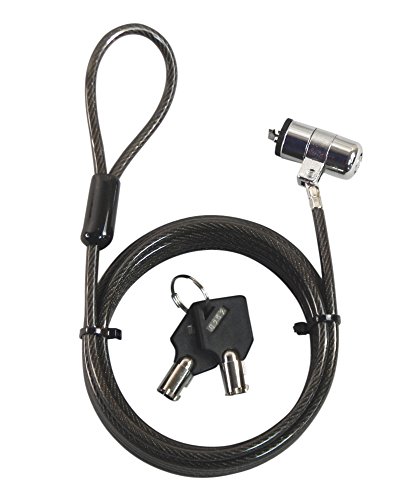
- Extra-long ten-foot cable
- Includes two keys
- Fits Kensington T-bar slots
Best For: Devices needing flexible reach to an anchor
Best Traditional Keyed Pick – Kensington T-Bar Standard Keyed Laptop Lock
For buyers seeking keyed laptop locking cables, this Kensington model offers a conventional T-Bar connection, a six-foot carbon-steel cable, and a tubular lock designed for devices with a Kensington security slot. Its pivoting lock head is intended to make attachment easier on thin devices.
Best For: Laptops and office equipment with a standard Kensington security slot.
Pros:
- Uses Kensington T-Bar locking technology for compatible laptops, monitors, projectors, and other equipment.
- Six-foot carbon-steel cable has a plastic sheath and is designed to resist cutting attempts.
- Pivoting 10 mm lock head and hinge can improve access and reduce awkward locking angles.
- Includes hidden-pin tubular lock technology and an eight-year limited warranty.
Cons:
- Does not work with newer Dell devices using a wedge lock slot.
- Some HP devices use a Nano security slot and require a different Kensington model.
- Requires a compatible security slot or suitable fixed anchor point.
This is a solid choice when your device uses the standard Kensington slot and you prefer a keyed lock over a combination mechanism. Check the laptop’s slot type before ordering.
Best for Slotless Devices – Universal Keyed Laptop Cable Lock with Anchor Plate
Among keyed laptop locking cables, this option stands out for its included adhesive anchor plate. It can attach to many tablets, phones, and MacBooks without a standard lock slot, while the included lock head also fits most laptops with compatible standard slots.
Best For: Tablets, phones, and laptops that may lack a built-in security slot.
Pros:
- Anchor plate expands compatibility to devices without a standard lock slot.
- Works with most laptops that have standard slots.
- Six-and-a-half-foot PVC-coated twisted-steel cable supports flexible everyday use.
- Rotating stainless-steel lock head can turn 360 degrees.
Cons:
- Slotless devices require attaching the adhesive anchor plate to a hard surface.
- Using the anchor plate may not suit buyers who do not want adhesive hardware on a device.
- Compatibility is described broadly as most standard-slot laptops rather than every model.
The included anchor plate makes this a practical alternative for mixed-device households or workspaces. Confirm that the device surface is suitable for the adhesive plate and that the standard lock slot matches.
Best Universal Fit – StarTech 3-in-1 Keyed Laptop Lock
These keyed laptop locking cables are especially useful when a household or workplace uses multiple security-slot standards. StarTech’s universal lock includes an adjustable tip for Noble Wedge, K-Slot T-Bar, and Nano slots, plus a 6.5-foot carbon-steel cable and two keys.
Best For: Users securing laptops with different industry-standard lock slots.
Pros:
- Adjustable three-in-one tip supports Noble Wedge, K-Slot, and Nano slots.
- Six-and-a-half-foot, 4.4 mm carbon-steel cable is rated for pull force up to 217 pounds.
- Push-to-lock button enables quick engagement without using the key.
- Ball and elbow joints help with rotation, coiling, and slot strain.
Cons:
- Anchor accessories for equipment without a security slot are sold separately.
- The adjustable selector must be set to match the device’s slot.
- Its broad compatibility may be unnecessary for a single-device setup with one known slot type.
This is the most flexible pick in the group for offices, labs, or shared equipment with varied laptop brands. Its universal tip reduces the need to keep separate locks for different slot standards.
Best Keyless Convenience – Kensington Resettable Combination Laptop Lock
Although it is not a keyed model, this Kensington combination lock is worth considering alongside keyed laptop locking cables if you prefer not to manage keys. It uses a resettable four-digit code, a six-foot carbon-steel cable, and a push-button design for one-handed attachment to standard Kensington slots.
Best For: Users who want a resettable combination instead of physical keys.
Pros:
- Four-wheel combination provides 10,000 possible codes.
- Resettable design avoids carrying or distributing keys.
- Push-button engagement supports quick one-handed attachment.
- Six-foot cut-resistant carbon-steel cable anchors to desks, tables, and other fixed structures.
Cons:
- It is a combination lock, not a keyed lock.
- May not work with newer Dell and Alienware devices using Noble or other nonstandard slots.
- Requires a compatible Kensington standard-size security slot.
Choose this model when convenience and shared access matter more than using keys. Check compatibility carefully, particularly for newer Dell laptops and tablets.
MacBook Pro Pick – AboveTEK Vent-Slot Lock
For MacBook Pro owners seeking keyed laptop locking cables, this AboveTEK model is designed specifically for 14- and 16-inch MacBook Pro models from 2021–2024. It attaches through the bottom-side vent slot and combines a rotatable lock head with a flexible 6.56-foot steel cable.
Best For: MacBook Pro users in offices, classrooms, cafés, coworking spaces, and other shared work areas.
Pros:
- Designed for 2021–2024 14-inch and 16-inch MacBook Pro models.
- Keyed lock system includes two keys, so there is no combination to remember.
- Cut-resistant steel cable, rotatable head, and soft silicone contact point support practical daily use.
- Lightweight 5.2-ounce design is convenient for travel and hybrid work.
Cons:
- Its stated fit is focused on specific MacBook Pro models and their bottom-side vent slots.
- Keyed operation requires carrying or storing a physical key.
This is a focused choice rather than a universal laptop lock. If you have a compatible MacBook Pro and want a portable keyed cable with flexible positioning, its purpose-built design is a strong match.
Heavy-Duty Standard – Kensington MicroSaver 2.0
Kensington MicroSaver 2.0 Keyed Ultra Cable Lock for Laptops & Other Devices (K64432WW)
Check Price On AmazonThe Kensington MicroSaver 2.0 is a robust option among keyed laptop locking cables, using a T-Bar attachment for laptops and devices with a Kensington Security Slot. Its 10mm twin lock heads, thick carbon steel cable, and Hidden Pin Technology are aimed at everyday security in shared environments.
Best For: Users with a compatible Kensington Security Slot who prioritize a thick cable and established keyed locking design.
Pros:
- 10mm twin lock heads are designed for thin laptops and other devices.
- Patented Hidden Pin Technology adds anti-pick features to the T-Bar lock design.
- Extra-thick ultra carbon steel cable provides substantial cut resistance.
- Includes two keys and a limited lifetime warranty.
Cons:
- Requires a compatible Kensington Security Slot.
- Not compatible with several 2016 Dell laptops and tablets using Noble lock slots; device specifications should be checked.
- The 72-inch cable may be less convenient than shorter options in compact setups.
Choose this model when your laptop has the right Kensington slot and you want a security-focused keyed lock with a thick cable. Compatibility is the main checkpoint, particularly for affected Dell models and tablets.
Universal Adhesive Kit – AboveTEK Multi-Device Lock
For shoppers comparing keyed laptop locking cables for multiple devices, this AboveTEK kit uses adhesive anchor plates rather than relying on a built-in security slot. It includes two adhesive-and-anchor sets, a six-foot galvanized steel cable, and compatibility across tablets, smartphones, laptops, monitors, and other flat-surface devices.
Best For: Homes, retail displays, offices, cafés, and other settings where several mobile devices need flexible anchor-based security.
Pros:
- Includes two adhesive sticker and anchor plate sets for multiple devices.
- Industrial-grade 3M adhesive is designed for most flat surfaces.
- Six-foot cut-resistant galvanized steel cable allows movement while secured.
- Keyed design works across tablets, smartphones, laptops, notebooks, and monitors.
Cons:
- Adhesive anchors require suitable flat surfaces and proper installation.
- Using adhesive plates may be less convenient for devices that frequently change locations.
- It is a broader anchor-based kit rather than a model-specific built-in-slot lock.
This kit makes the most sense when device variety is more important than a dedicated laptop-slot connection. The two anchor sets and universal application can help secure several gadgets, while the adhesive approach calls for careful placement.
Most Versatile Pick – Universal Keyed Laptop Lock
For shoppers comparing keyed laptop locking cables, this Sendt model stands out for broad slot compatibility. Its push-to-lock design, six-foot cut-resistant cable, and included pair of keys make it a practical choice for shared workspaces and public settings.
Best For: Securing laptops and other portable electronics with Kensington, Nano, Mini Saver, Noble Wedge, or Samsung security slots.
Pros:
- Works with a wide range of common security slots.
- Push-to-lock operation makes installation straightforward.
- Includes two keys, a hook-and-loop cable tie, and instructions.
- Six-foot black cut-resistant cable helps deter opportunistic theft.
Cons:
- Six feet may provide less reach than an extra-long cable.
- As a keyed lock, it requires keeping track of the keys.
This is the strongest all-around option when compatibility is a priority. Its one-year limited warranty and broad slot support add useful reassurance for everyday use.
Best Compact K-Slot Option – Manhattan Laptop Lock
This Manhattan lock is a straightforward choice among keyed laptop locking cables for devices with a built-in K-slot. The 4.6-foot steel cable, keyed mechanism, and PVC jacket are suited to desks, tables, classrooms, offices, and travel setups.
Best For: K-slot-compatible laptops, displays, projectors, cameras, and other electronics used near a fixed anchor.
Pros:
- Keyed design includes two keys.
- Steel cable has a PVC jacket to help reduce scratches.
- All-metal lock body uses diecast zinc alloy construction.
- Compact 4.6-foot length works well for nearby desk anchors.
Cons:
- Only fits devices with a compatible K-slot.
- Its 4.6-foot cable offers less reach than longer alternatives.
Choose this model when your device has a standard K-slot and you prefer a shorter, low-profile tether. It provides a simple keyed connection without changing normal device use.
Longest Reach – 10-Foot Keyed Cable
If reach is your main concern when shopping for keyed laptop locking cables, this Sendt model provides a full ten feet of cable. It is designed for laptops, projectors, LCD screens, plasma screens, and similar equipment with a Kensington T-bar security slot.
Best For: Kensington-compatible devices that need extra cable length around larger desks, tables, or fixed anchors.
Pros:
- Ten-foot length offers substantially more routing flexibility.
- Includes two keys for the keyed lock.
- Cut-resistant cable is designed as a theft deterrent.
- Works with compatible laptops and projectors.
Cons:
- Does not fit Dell laptops, Kensington Nano, or Noble Wedge slots.
- Longer cable may be more cumbersome to manage.
- Compatibility is limited to Kensington T-bar-style slots.
This is the practical pick for installations where a standard cable may not reach a suitable anchor. Confirm your device uses a compatible Kensington T-bar slot before buying.
How We Picked These Keyed Laptop Locking Cables
We focused on practical security cables from established and highly targeted designs, comparing slot compatibility, locking style, cable length, construction, included keys, and installation requirements. The selection includes traditional T-Bar and K-Slot products, universal locks, adhesive-anchor kits, and models intended for newer laptops or tablets.
No laptop cable lock can guarantee protection against determined theft. These products are best viewed as deterrents that make a device harder and slower to remove when it is left briefly unattended.
Quick Comparison
- Best for standard office laptops: A conventional T-Bar or K-Slot keyed lock is usually the simplest choice.
- Best for mixed-device environments: Choose a universal design that supports more than one security-slot style.
- Best for newer thin laptops: Verify whether the computer has a built-in slot before buying; some models require a compatible adapter or adhesive anchor.
- Best for flexible placement: A 6-foot cable suits most desks, while a 10-foot option reaches larger furniture or distant anchor points.
Key Buying Factors for Keyed Laptop Locking Cables
Slot Compatibility
Check the laptop’s security slot before ordering. T-Bar, Nano, wedge-shaped, and proprietary connectors are not automatically interchangeable. Product listings may describe a lock as universal, but compatibility should still be confirmed against the computer, monitor, tablet, or dock you plan to secure.
Keyed Versus Combination Locking
Keyed locks avoid remembering a code and can be convenient for organizations that issue matching keys. Combination locks eliminate loose keys but require users to manage a password. For this roundup, prioritize keyed models if simple shared access and quick operation matter most.
Cable Length and Construction
Six feet is a useful all-purpose length for desks and counters. Longer cables provide more anchoring flexibility but can be heavier and easier to handle poorly. Look for cut-resistant steel cable and a locking head that fits tightly without excessive movement.
Anchoring and Portability
A strong lock is only useful when attached to a sturdy, immovable object. Confirm that the desk, table leg, or anchor point can resist lifting or sliding. A swivel head and compact cable can also make daily packing and repositioning easier.
Who Should Buy Which Keyed Laptop Locking Cables?
Office and classroom users should generally choose a standard keyed T-Bar or K-Slot cable with a durable steel line and roughly six feet of reach. Travelers and remote workers may prefer a compact model that is easy to pack and quick to attach in coworking spaces.
IT departments should standardize on a compatible lock type, document key control, and check every device’s slot before purchasing in bulk. MacBook, tablet, and thin-device owners should look for a model specifically designed for their hardware or one that includes a suitable adhesive anchor, rather than assuming a standard laptop lock will fit.