A laptop locking cable is a simple way to make a computer harder to grab from an unattended desk, classroom, reception area, or shared workspace. The right choice depends on your laptop’s security-slot style, preferred lock type, cable length, and anchoring options.
We’ve compared 10 laptop locking cables and related security kits, including keyed, combination, universal, and adhesive-anchor designs, to help you choose dependable everyday theft deterrence.
Best 10 Laptop Locking Cables Picks for 2026
Best Dell-Specific Pick
Kensington N17 Dell Laptop Lock

- Fits Dell and Alienware wedge slots
- Resettable 10,000-code combination
- Six-foot carbon steel cable
Best For: Compatible Dell and Alienware laptops
Best Keyed Standard-Slot Option

- Fits standard Kensington security slots
- Six-foot sheathed carbon steel cable
- Keyed pivoting 10mm lock head
Best For: Standard-slot laptops and peripherals
Best Simple Keyed Value

- Keyed lock includes two keys
- 4.6-foot steel cable
- PVC jacket helps reduce scratches
Best For: K-slot electronics in shared spaces
Best Keyless Combination Design

- Resettable four-wheel combination
- 10,000 possible codes
- Push-button one-hand operation
Best For: Users who prefer keyless device security
Best Multi-Device Adhesive Kit

- Two adhesive anchor sets for multiple devices
- Six-foot galvanized steel cable
- Includes two keys and broad device compatibility
Best For: Securing laptops, tablets, phones, and monitors
Best Slim Combination Lock

- Designed for Nano-sized security slots
- Resettable four-digit combination
- Five-foot carbon steel cable
Best For: Thin laptops in shared spaces and while traveling
Best Flexible Keyless Option

- Works with built-in slots or an adhesive plate
- Six-foot-plus cable with 5mm braided wire
- Resettable four-digit combination
Best For: Devices with or without built-in security holes
Portable Keyed Protection
Retractable Laptop Cable Lock Kit
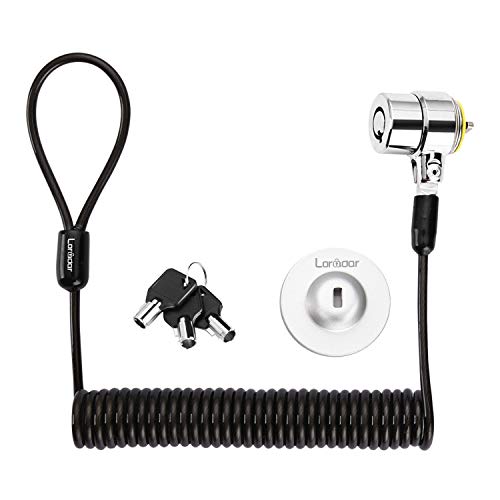
- 6.2-foot self-rolling steel cable
- Three keys with traceable numbering
- Works with slots or an adhesive anchor plate
Best For: Portable keyed security for compatible laptops and electronics
Universal Combination Security

- Fits standard, nano, and wedge slots
- Resettable four-digit combination
- Six-foot carbon-steel cable
Best For: Multi-device environments with varied laptop security slots
Simple Keyed Deterrence
Tripp Lite SEC6K Laptop Cable Lock

- Six-foot cut- and tamper-resistant cable
- Nickel-plated zinc-alloy lock
- Made for laptops and docking stations with security slots
Best For: Basic keyed protection for compatible laptops and docking stations
Best Dell-Specific Pick – Kensington N17 Dell Laptop Lock
Kensington N17 Dell Laptop Computer Lock, Combination Security Locking Cable (K68008WW) Black
Check Price On AmazonAmong laptop locking cables, the Kensington N17 is designed specifically for Dell and Alienware computers with wedge-shaped lock slots. Its resettable combination mechanism and six-foot carbon steel cable offer convenient everyday security without requiring a key.
Best For: Dell and Alienware laptops with compatible wedge lock slots in offices, homes, and schools.
Pros:
- Designed for Dell and Alienware wedge lock slots
- Resettable four-wheel combination with 10,000 possible codes
- Push-button attachment supports one-handed engagement
- Six-foot cut-resistant carbon steel cable and five-year warranty
Cons:
- Not intended for laptops with standard T-bar or other lock slots
- Combination locks require remembering the selected code
This is a strong fit when device compatibility is the priority. Confirm that your Dell or Alienware laptop has a wedge slot before buying.
Best Keyed Standard-Slot Option – Kensington T-Bar Laptop Lock
This Kensington model is one of the more versatile laptop locking cables for devices with a standard Kensington security slot. It combines a keyed T-bar lock, a pivoting lock head, and a six-foot carbon steel cable for securing compatible electronics to a fixed object.
Best For: Laptops, monitors, projectors, docking stations, and other devices with standard Kensington security slots.
Pros:
- Works with many devices using a standard Kensington slot
- Six-foot carbon steel cable with a protective plastic sheath
- Pivoting 10mm lock head helps with access and positioning
- Hidden-pin tubular lock design and limited lifetime warranty
Cons:
- Does not fit newer Dell devices using wedge lock slots
- Requires a key rather than a combination
Choose this option for a broad range of standard-slot equipment, but check your device specifications carefully. Kensington notes that some HP devices use a different NanoSaver slot.
Best Simple Keyed Value – Manhattan Laptop Lock
The Manhattan Laptop Lock is a straightforward choice among laptop locking cables for electronics with a built-in K-slot. Its keyed design, two included keys, and 4.6-foot steel cable make it practical for offices, classrooms, shared spaces, and travel.
Best For: K-slot-compatible laptops, displays, projectors, cameras, and other portable electronics.
Pros:
- Includes two keys for convenient access
- 4.6-foot steel cable reaches desks and other fixed anchors
- PVC jacket helps protect devices and furniture from scratches
- All-metal lock body uses diecast zinc alloy construction
Cons:
- Shorter cable than the six-foot alternatives in this roundup
- Compatibility depends on having a built-in K-slot
This is a sensible basic keyed lock when you want simple installation and broad K-slot compatibility. Verify the slot type and consider the shorter cable length when planning your anchor point.
Best Keyless Combination Design – Kensington Ultra Cable Lock
Kensington Combination Ultra Cable Lock for Laptops and Other Devices (K64675US),Silver
Check Price On AmazonFor shoppers comparing laptop locking cables without wanting to manage keys, the Kensington Ultra Cable Lock uses a resettable four-wheel combination. Its push-button design supports one-handed installation, while the lock head is built to resist tampering.
Best For: Laptops and other portable devices secured at home, in offices, or in public spaces.
Pros:
- Keyless resettable combination lock
- 10,000 possible combination codes
- Push-button design allows one-handed operation
- Designed to anchor to a desk, table, or fixed surface
Cons:
- The supplied notes do not specify the cable length
- Combination security depends on keeping the code private
- Compatibility requires a matching device security slot
This model suits users who prefer the convenience of a combination over carrying keys. Confirm the lock-slot fit and cable reach for your particular setup before ordering.
Best Multi-Device Adhesive Kit – AboveTEK Laptop Lock
If you need laptop locking cables for devices without built-in security slots, the AboveTEK kit combines adhesive anchor plates with a six-foot galvanized steel cable. Its two anchor sets also make it useful for securing multiple phones, tablets, laptops, or other flat-surface devices.
Best For: Households, offices, retail displays, and shared spaces securing multiple mobile devices.
Pros:
- Includes two adhesive sticker and anchor-plate sets.
- Six-foot cut-resistant galvanized steel cable allows device movement.
- Works with tablets, smartphones, laptops, notebooks, and monitors.
- Includes two keys and a stainless steel lock.
Cons:
- Adhesive anchors require a suitable flat surface and proper installation.
- Key-based design means the keys must be kept available.
The AboveTEK is a flexible choice when you want one security kit for several device types. Its adhesive mounting approach expands compatibility beyond laptops with dedicated lock slots, while the extra anchor set adds practical value.
Best Slim Combination Lock – Kensington Nano Laptop Lock
For thin laptops with a Nano-sized security slot, this Kensington model is a streamlined option among laptop locking cables. It uses a resettable four-digit combination, so you can secure a compatible device without carrying a key.
Best For: Thin laptops used in shared spaces, cafés, offices, and while traveling.
Pros:
- Five-foot carbon steel cable resists cutting attempts.
- Resettable four-wheel combination offers 10,000 possible combinations.
- Slim lock head is designed for Nano-sized slots.
- Pivoting head and rotating cable help preserve port access and device stability.
Cons:
- Designed for laptops with compatible Nano-sized security slots.
- Five-foot cable is shorter than some six-foot alternatives.
- Combination locks require remembering the selected code.
The Kensington is a good fit when a thin laptop has the right Nano security slot and you prefer a keyless setup. Confirm the slot size before buying, since compatibility is more specific than with adhesive-anchor systems.
Best Flexible Keyless Option – Computer Laptop Cable Lock
This laptop cable lock supports both computers with built-in security holes and devices without them. It includes an adhesive lock-slot plate, while the four-digit combination and one-hand push-button design provide a key-free way to secure compatible equipment.
Best For: Users who want one combination lock for laptops with or without built-in security slots.
Pros:
- Supports built-in security holes and adhesive-mounted devices.
- Six-foot-plus cable provides room to move the device while secured.
- Five-millimeter braided wire is described as 30% thicker than normal.
- Includes a four-digit combination with more than 10,000 possible codes.
Cons:
- Adhesive plate installation is required for devices without security holes.
- Combination locks depend on remembering the chosen code.
- Compatibility and adhesive performance depend on the device surface and slot design.
The main advantage of this model is installation flexibility: it can use a built-in slot or the included adhesive plate. Its longer cable and keyless combination make it practical for desks and other fixed objects, provided the device surface is suitable for the plate.
Portable Keyed Protection – Retractable Laptop Cable Lock Kit
For shoppers comparing laptop locking cables, this retractable keyed kit offers a portable option with a 6.2-foot cut-resistant steel cable. It works directly with compatible 3×7 mm security slots and includes an adhesive anchor plate for devices that lack one.
Best For: Users who want a keyed, self-rolling cable for compatible laptops, monitors, tablets, and other electronics.
Pros:
- Includes three keys and a traceable lock-and-key number.
- Retractable cable extends to about 6 feet and stores compactly.
- Supports direct slot attachment or adhesive anchor-plate installation.
- Stainless-steel lock head and cut-resistant twisted-steel cable.
Cons:
- Compatibility depends on having a supported 3×7 mm slot or using the anchor plate.
- The supplied notes specifically exclude newer Apple MacBooks and list several models requiring the anchor plate.
This is a flexible choice when portability and keyed access matter, but check your device’s security-slot style before buying and follow the anchor-plate preparation instructions.
Universal Combination Security – 3-in-1 Universal Laptop Lock
Among laptop locking cables, the Kensington Universal 3-in-1 Combination Laptop Lock stands out for supporting standard, nano, and wedge-shaped security slots. Its resettable four-number dial avoids keys while allowing the combination to be changed.
Best For: Offices, schools, and mixed-device environments that need one lock design for multiple laptop slot types.
Pros:
- Includes interchangeable tips for standard, nano, and wedge-shaped slots.
- Resettable four-digit combination provides 10,000 possible codes.
- Six-foot carbon-steel cable has a protective plastic sheath.
- Includes combination-retrieval registration and a five-year warranty.
Cons:
- Combination-based access may be less convenient if the code is forgotten and not registered.
- The lock tips must be changed to match the device’s slot type.
This is the most adaptable option in the group for households or workplaces with different laptop generations, especially if a keyless resettable lock is preferred.
Simple Keyed Deterrence – Tripp Lite SEC6K Laptop Cable Lock
For a straightforward laptop locking cable, the Tripp Lite SEC6K pairs a six-foot theft-deterrent cable with a keyed lock. It is designed for laptops and docking stations that already have a built-in security slot.
Best For: Users who need a basic keyed cable to secure a compatible laptop or docking station to a fixed structure.
Pros:
- Six-foot cable resists cuts and tampering.
- Nickel-plated zinc-alloy lock construction.
- Attaches to a table, desk, or other fixed structure.
- Includes a one-year limited warranty.
Cons:
- Designed for devices with a built-in security slot, so compatibility should be checked first.
- The supplied notes do not indicate support for multiple slot-tip formats or an included adhesive anchor.
This model keeps the setup uncomplicated and is a practical fit when your laptop or docking station already has a compatible slot and you prefer keyed operation.
How We Picked These Laptop Locking Cables
We focused on practical security features rather than marketing claims. Our comparison considers compatibility with common laptop security slots, keyed versus combination convenience, cable length, construction, portability, and whether the kit includes useful accessories such as multiple keys or adhesive anchors. Kensington, Tripp Lite, Manhattan, AboveTEK, and other options are represented because compatibility and installation needs vary widely between devices.
These products are intended as theft deterrents, not indestructible barriers. A lock works best when attached to a sturdy, immovable object and used in a location where suspicious activity is noticeable.
Quick Comparison
| Lock type | Best for | Main advantage | Potential drawback |
|---|---|---|---|
| Keyed cable lock | Fixed workstations and offices | Simple, familiar operation | Keys can be misplaced |
| Combination lock | Shared spaces and travel | No key required | Combination must be remembered |
| Universal or 3-in-1 lock | Mixed device fleets | Broader slot compatibility | May be bulkier |
| Adhesive-anchor kit | Devices without a built-in slot | Flexible installation | Surface preparation and adhesive strength matter |
Key Buying Factors for Laptop Locking Cables
Check the Security Slot First
Before buying, identify whether your laptop uses a standard T-Bar/Kensington slot, a Nano-style slot, or another proprietary design. Some newer thin laptops have no built-in slot and may require a compatible adhesive anchor. A cable advertised as universal can improve flexibility, but it is still important to confirm the manufacturer’s compatibility details.
Choose Keyed or Combination Security
Keyed locks are quick to use and work well when one person manages a workstation. Combination models are convenient for travel, classrooms, hot desks, and shared offices because there is no key to carry. Resettable combinations are especially useful when access changes between employees.
Consider Cable Length and Construction
A 4.6- to 6.2-foot cable generally offers enough reach for desks, monitor stands, and other fixed anchors. Longer cables provide more placement flexibility but can be less tidy. Look for steel cable construction and a lock head that matches your device’s slot; the strongest cable is not useful if the connector does not fit.
Think About Daily Portability
Frequent travelers should favor a compact lock that coils easily and does not add unnecessary weight. Office users may prefer a longer cable or a permanently assigned keyed lock. If several devices need protection, standardizing on one lock type can simplify management and replacement.
Who Should Buy Which Laptop Locking Cables?
- For a standard office laptop: Choose a keyed T-Bar lock or a resettable combination model that matches the built-in slot.
- For shared desks or classrooms: A combination lock avoids distributing and tracking keys.
- For newer thin laptops: Look for Nano-compatible, universal, or adhesive-anchor solutions after confirming device compatibility.
- For mixed laptop fleets: A universal or 3-in-1 design can reduce the need to stock several connector types.
- For travel: Select a lightweight cable with enough length to reach a secure anchor without excessive slack.
Whichever of these Laptop Locking Cables you choose, use it with a solid anchor, keep the cable positioned where it cannot be easily slipped off, and test the lock before leaving your device unattended.