A well-chosen laptop mount can clear valuable desk space while keeping your screen at a more comfortable height for sitting or standing. The best designs combine stable clamping, smooth adjustment, and enough capacity for your laptop.
We selected 10 laptop mounts for standing desks across clamp styles, monitor-arm combinations, size ranges, and weight capacities. Use the comparisons below to narrow your options by workspace, laptop size, and preferred setup.
Best 10 Laptop Mounts for Standing Desks Picks for 2026
Best Overall
VIVO Fully Adjustable Laptop Desk Mount

- Fits laptops up to 17 inches and supports 22 pounds
- C-clamp and grommet mounting options
- Extensive tilt, swivel, rotation, and height adjustment
Best For: Flexible standing-desk setups needing broad adjustment
Most Versatile
HUANUO 2-in-1 Laptop and Monitor Mount

- Switches between a laptop tray and monitor mount
- Fits laptops up to 17 inches and monitors up to 32 inches
- Includes ventilation and cable management
Best For: Flexible workstations using laptops and VESA monitors
Best Adjustment Range
WALI Adjustable Laptop Desk Mount

- Offers 16 inches of height adjustment
- Fits laptops up to 17 inches and supports 22 pounds
- Works with a laptop or compatible monitor
Best For: Standing-desk users needing substantial height adjustment
Balanced 2-in-1 Choice
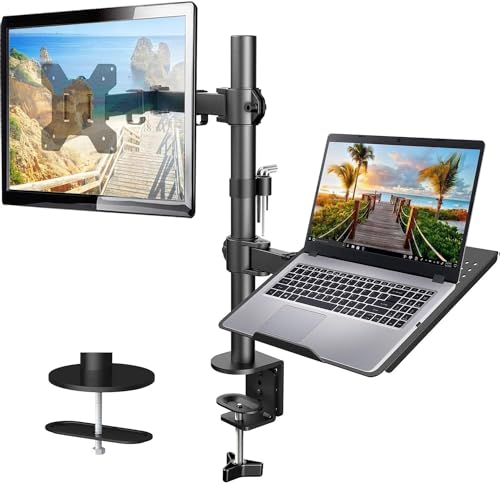
- Ventilated 14 x 12-inch laptop tray
- Supports monitors up to 32 inches and 22 pounds
- 17-inch height adjustment with clamp or grommet mounting
Best For: Flexible laptop-and-monitor workstation setups
High-Capacity Pick

- Fits laptops up to 17 inches and 22 pounds
- Supports monitors up to 32 inches and 26.4 pounds
- Offers 19.3-inch extension and broad full-motion adjustment
Best For: Large notebooks and heavier monitor setups
Secure Space-Saving Option

- Fits laptops up to 17 inches with anti-slip pads and Velcro straps
- Supports 13- to 32-inch VESA monitors
- Includes cable management and up to 16.9 inches of lift
Best For: Secure, organized home-office and gaming setups
Best Convertible Pick

- Removable tray for laptops or monitors
- Supports 13-27-inch VESA monitors
- C-clamp and grommet bases included
Best For: Flexible laptop-to-monitor workstations
Best Large-Monitor Option

- Fits monitors up to 34 inches
- Tray supports laptops up to 17 inches
- Reaches up to 17.5 inches high
Best For: Large-monitor and convertible setups
Best Extended-Reach Pick
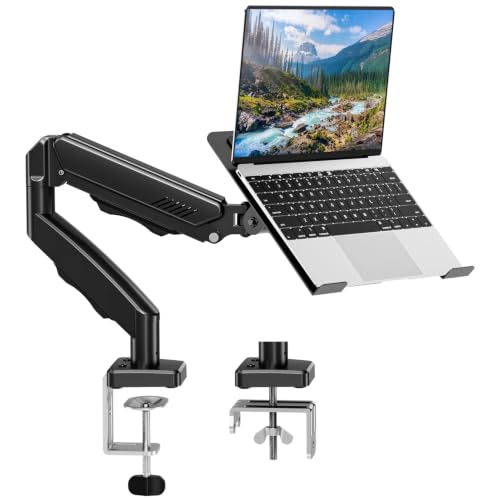
- Extends up to 21.5 inches
- Supports 14-17-inch laptops
- Includes clamp and grommet kits
Best For: Deep desks and extended screen positioning
Best Overall – VIVO Fully Adjustable Laptop Desk Mount
For shoppers comparing laptop mounts for standing desks, the VIVO STAND-V001L is a versatile choice with broad compatibility, flexible positioning, and two mounting methods. Its ventilated tray accommodates laptops up to 17 inches and supports up to 22 pounds.
Best For: Users who want a highly adjustable laptop mount with both C-clamp and grommet installation options.
Pros:
- Fits laptops up to 17 inches and supports up to 22 pounds.
- Offers tilt, swivel, rotation, height adjustment, and tray extension.
- Includes detachable cable clips and supports either a laptop or compatible monitor.
Cons:
- The mounting surface must be no thicker than 3.4 inches for the C-clamp or 3 inches for the grommet mount.
- The large range of adjustments may be more than needed for a simple fixed setup.
With its 17-inch center pole, extended tray, and dual mounting options, this VIVO model is a strong all-around pick for adaptable standing-desk configurations.
Most Versatile – HUANUO 2-in-1 Laptop and Monitor Mount
The HUANUO is one of the more adaptable laptop mounts for standing desks because its tray can be removed to support a monitor instead. A ventilated 13.8-by-11.8-inch tray, cable routing, and dual installation methods make it practical for changing workstations.
Best For: People who switch between a laptop and a VESA-compatible monitor and want one desk mount for both.
Pros:
- Supports laptops up to 17 inches or monitors from 15 to 32 inches.
- Removable tray, VESA compatibility, and 22-pound capacity add flexibility.
- Tray ventilation, cable clips, and adjustable positioning support a tidy workspace.
Cons:
- The stated tilt and swivel range is more limited than some competing mounts.
- Monitor use requires a compatible 75-by-75mm or 100-by-100mm VESA pattern.
This HUANUO mount stands out when your setup changes frequently, offering a straightforward transition between laptop and monitor use without replacing the arm.
Best Adjustment Range – WALI Adjustable Laptop Desk Mount
The WALI M00LP is a practical option among laptop mounts for standing desks, combining a 16-inch height adjustment range with a tray designed for laptops up to 17 inches. Its detachable plates also allow the mount to support a compatible monitor.
Best For: Users who prioritize height flexibility and want a mount that can accommodate either a laptop or screen.
Pros:
- Supports laptops up to 17 inches and weights up to 22 pounds.
- Provides 16 inches of height adjustment, plus swivel, tilt, and rotation.
- Includes both C-clamp and grommet mounting options with a ventilated tray.
Cons:
- The tilt range is limited to plus or minus 15 degrees.
- Monitor use requires mounting holes spaced at 75-by-75mm or 100-by-100mm.
Its broad height range and dual-device capability make the WALI a useful choice for standing desks where viewing height needs to change throughout the day.
Best Under-Desk Storage – VIVO Clamp-On Desk Leg Laptop Holder
Unlike arm-style laptop mounts for standing desks, the VIVO MOUNT-LHS1 is designed to store a device against a desk leg or other support structure. Its clamp-on steel holder keeps laptops and tablets off the work surface while adding a pegboard-style organization panel.
Best For: Standing-desk users who want hidden, under-desk device storage and additional accessory organization.
Pros:
- Stores 15.6- to 17.3-inch laptops vertically or laptops up to 14 inches horizontally.
- Clamps to desk legs, poles, or supports from 0.4 to 3.3 inches thick without drilling.
- Steel construction supports up to 22 pounds and includes a pegboard panel.
Cons:
- It is a storage holder rather than an adjustable laptop work surface.
- Pegboard accessories are not included.
- It does not provide the screen positioning adjustments offered by arm mounts.
This holder is a specialized solution for decluttering a standing desk, especially when you need to store a laptop or tablet securely rather than position it for active use.
Balanced 2-in-1 Choice – HUANUO Laptop and Monitor Arm
For shoppers comparing laptop mounts for standing desks, the HUANUO offers a flexible way to raise either a laptop or a VESA monitor while keeping the desktop more organized. Its ventilated tray, broad adjustment range, and two mounting options make it a practical choice for ergonomic workstation setups.
Best For: Users who want a single arm that supports both a laptop and a monitor.
Pros:
- 14 x 12-inch ventilated laptop tray includes a protruding bottom lip to help keep the device secure.
- Supports 13- to 32-inch VESA monitors weighing up to 22 pounds.
- Offers tilt, swivel, rotation, and up to 17 inches of height adjustment.
- Includes C-clamp and grommet mounting hardware plus integrated cable management.
Cons:
- Mounting hardware is intended for wooden desks.
- The laptop arm extends up to 16 inches, which may be less reach than some alternatives.
The HUANUO is a well-rounded option when you want laptop and monitor compatibility without using separate desk stands. Confirm your monitor’s VESA pattern, size, and weight before installation.
High-Capacity Pick – WALI Laptop Desk Mount
The WALI is a strong contender among laptop mounts for standing desks if you need support for a larger notebook or monitor. Its detachable tray, extended reach, and generous movement range make it useful for switching between laptop and monitor configurations.
Best For: Users with laptops up to 17 inches who want a higher-capacity, full-motion mount.
Pros:
- Detachable ventilated tray fits notebooks up to 17 inches and supports up to 22 pounds.
- Monitor arm supports 17- to 32-inch screens weighing up to 26.4 pounds with VESA 75×75 or 100×100 mounting.
- Provides -45 to +70 degrees of tilt, 180-degree swivel, 360-degree rotation, and up to 17.3 inches of height adjustment.
- Clamp and grommet installation works with desks from 0.39 to 2.76 inches thick.
Cons:
- The stated monitor size range tops out at 32 inches, despite the product details listing a 34-inch maximum supported screen size.
- It uses tabletop clamp or grommet mounting rather than a freestanding base.
Choose the WALI when laptop size, load capacity, and reach are priorities. Its detachable tray also makes it easier to transition from laptop use to a conventional monitor setup.
Secure Space-Saving Option – MOUNT PRO Laptop Arm Mount
The MOUNT PRO combines a laptop tray and monitor arm in a compact desk-mounted design, making it a practical choice when comparing laptop mounts for standing desks. Its ventilated tray, anti-slip pads, straps, and cable management focus on keeping the elevated setup secure and tidy.
Best For: Home offices, study spaces, and gaming desks that need secure laptop support and flexible positioning.
Pros:
- Fits laptops up to 17 inches and supports monitors from 13 to 32 inches.
- Ventilated tray includes four anti-slip pads and Velcro straps to help hold the laptop in place.
- Offers -45 to +90 degrees of tilt, 180-degree swivel, 360-degree rotation, and up to 16.9 inches of height adjustment.
- Includes built-in cable management and clamp or grommet mounting for desks from 0.39 to 2.76 inches thick.
Cons:
- Monitor support varies from 4.4 to 19.8 pounds depending on the setup.
- The notes caution against rotating the laptop tray to a vertical position.
- Grommet hole requirements differ slightly from the stated desk-thickness range.
The MOUNT PRO stands out for its laptop-retention features and useful positioning range. It is a good fit when keeping the device stable and the desk uncluttered matters as much as height adjustment.
Best Convertible Pick – Suptek Laptop Desk Mount
If you want laptop mounts for standing desks that can adapt as your setup changes, the Suptek combines a ventilated laptop tray with a removable VESA monitor mount. Its adjustable arm helps position a notebook or compatible display at a more comfortable height, angle, and distance.
Best For: Users who want one mount for a laptop now and a monitor later.
Pros:
- Detachable tray supports notebooks up to 15.6 inches and includes ventilation holes and a front lip.
- Supports compatible 13- to 27-inch monitors with 75x75mm or 100x100mm VESA patterns.
- Offers 180-degree arm swiveling, 360-degree monitor rotation, ±90-degree tilt, and 400mm height adjustment.
- Includes both C-clamp and grommet mounting options for desks 10-80mm thick.
Cons:
- The laptop tray is listed for notebooks up to 15.6 inches, not the full 17-inch size mentioned in the title.
- Monitor support is limited to 27 inches.
The Suptek is a flexible choice for a mixed laptop-and-monitor workstation. Its removable tray and two mounting methods make it especially useful when you want to reconfigure your desk without replacing the arm.
Best Large-Monitor Option – HUANUO 2-in-1 Laptop Mount
Among laptop mounts for standing desks, the HUANUO stands out for its broad monitor compatibility and generous height range. Keep the ventilated tray attached for a notebook up to 17 inches, or remove it to mount a VESA display up to 34 inches.
Best For: Larger monitors and users who want to switch between laptop and monitor modes.
Pros:
- 2-in-1 design supports notebooks up to 17 inches or 13- to 34-inch VESA monitors.
- Arm extends up to 18.1 inches and reaches a maximum height of 17.5 inches.
- Provides ±45-degree tilt, ±90-degree swivel, and 360-degree rotation.
- Ventilated 11.8-by-10.4-inch tray includes anti-slip pads, a bottom guard, and Velcro straps.
Cons:
- The counterbalance may cause the arm to rise when the laptop is removed, so the arm must be held securely.
- Its monitor weight capacity varies by setup from 4.85 to 19.8 pounds.
The HUANUO is a strong fit when screen size and adjustability matter most. Its large upper limit and secure tray make it suitable for a more substantial standing-desk display, while the removable tray preserves flexibility.
Best Extended-Reach Pick – MOUNTUP Adjustable Laptop Arm
If you need laptop mounts for standing desks with extra reach, the MOUNTUP arm extends up to 21.5 inches while supporting a laptop or VESA monitor. Its height and full-motion adjustments make it easier to position the screen for seated or standing work.
Best For: Desks where extended reach and broad positioning are priorities.
Pros:
- Supports 14- to 17-inch laptops and compatible monitors weighing 4.4-19.8 pounds.
- Arm extends up to 21.5 inches and rises up to 16.9 inches.
- Offers 360-degree rotation and swiveling, plus 90-degree upward and 45-degree downward tilt.
- Includes a ventilated tray, stopper, strip, non-slip pads, and integrated cable management.
Cons:
- The laptop range begins at 14 inches, so smaller notebooks may not be an intended fit.
- Monitor compatibility requires a 75x75mm or 100x100mm VESA pattern.
The MOUNTUP is a practical choice for users who need to pull a laptop or monitor farther toward them. Its long arm, cable management, and included clamp and grommet hardware support a clean, adaptable workstation.
How We Picked the Best Laptop Mounts for Standing Desks
We compared these mounts by looking at the features that matter most in everyday use: desk compatibility, laptop and monitor support, adjustment range, stability, tray dimensions, VESA compatibility, and overall flexibility. We also considered whether each design suits a dedicated laptop setup, a mixed laptop-and-monitor workstation, or a compact desk where every inch matters.
Because product specifications can vary by configuration, confirm the current weight limit, supported screen size, clamp clearance, and tray dimensions before buying. A mount should support your fully loaded laptop securely, not just its empty chassis.
Quick Comparison
| Best for | What to prioritize |
|---|---|
| Simple laptop-only setup | Dedicated tray, sturdy clamp, and broad height adjustment |
| Laptop and external monitor | Monitor-arm compatibility, VESA support, and sufficient weight capacity |
| Large laptops | Tray width, front lip depth, and a published 17-inch support rating |
| Small or shallow desks | Compact base, clamp clearance, and minimal rear overhang |
| Frequent sitting and standing | Smooth full-motion adjustment and reliable tilt or swivel control |
Key Buying Factors for Laptop Mounts for Standing Desks
Desk Clamp and Clearance
Measure the desk thickness and check the available space beneath or behind it. C-clamps generally provide a secure attachment, but they may not fit desks with modesty panels, built-in cable trays, or unusual edges. A clamp-on leg or side mount can work better in restricted spaces.
Weight Capacity and Tray Size
Match the mount to both laptop dimensions and weight. Larger 15- and 17-inch notebooks may need a wider tray and a stronger arm than ultraportables. Look for a retaining lip and a surface that supports the laptop without blocking ventilation.
Adjustment Range and Stability
For a sit-stand desk, height range is especially important. Check whether the arm offers enough vertical travel for both positions and whether it can tilt, swivel, or rotate the laptop. A heavy-duty arm may feel more stable, while lighter arms can be easier to reposition.
Monitor Compatibility
If you want one workstation for a laptop and monitor, verify the monitor’s VESA pattern, screen size, and weight. A 2-in-1 mount can save space, but its combined load limit must cover both devices.
Who Should Buy Which Laptop Mounts for Standing Desks?
Choose a dedicated laptop mount if you want a straightforward, space-saving platform and do not need to attach a monitor. Select a laptop-and-monitor arm when you are building a dual-screen workstation or want to switch between notebook-only and external-display use.
For larger notebooks, prioritize the models explicitly rated for 17-inch systems and compare tray measurements carefully. For a compact desk, choose a smaller clamp footprint or leg-mounted design. If you frequently alternate between sitting and standing, spend more attention on arm reach, vertical travel, and locking stability than on appearance alone.