Optical media remains useful for offline backups, photo libraries, family records, and other files you want preserved outside your computer or cloud account. The right drive can make reading, writing, and verifying archived discs much easier.
Our selection includes Blu-ray burners, M-DISC-compatible DVD writers, internal SATA models, drive enclosures, and portable USB options. Use the guide below to match the drive type, connection, media support, and workflow to your archiving needs.
Best 10 Optical Disc Drives for Archiving Picks for 2026
Versatile Blu-ray Hub
8-in-1 External Blu-ray/DVD Drive

- Reads and writes BD, DVD, CD, and M-DISC media
- Built-in USB hub and TF/SD card slot
- Portable design with up to 50GB Blu-ray recording
Best For: Portable Blu-ray archiving and computer backups
Desktop M-DISC Workhorse

- Internal 5.25-inch SATA DVD rewriter
- Supports M-DISC, DVD, DVD-RAM, and CD media
- Up to 24x DVD and 48x CD performance
Best For: Desktop DVD and CD archiving
Linux-Friendly Blu-ray Burner

- Burns BD at 6x, DVD at 8x, and CD at 24x
- USB 3.0 and USB-C dual-interface cable
- Supports Windows, macOS, and Linux
Best For: Portable cross-platform Blu-ray archiving
Ultra-Slim M-DISC Option
ASUS 9.5mm Internal DVD Writer

- 9.5mm SATA form factor for compatible laptops
- Supports M-DISC archival-quality DVD backup
- 8x DVD writing with quiet, power-saving features
Best For: Slim laptop and compact-system DVD archiving
Flexible Enclosure
5.25-inch SATA Optical Drive Enclosure

- Fits SATA Blu-ray, CD, and DVD drives up to 171 mm
- USB 3.0, plug-and-play, and hot-swappable
- Optical drive sold separately; IDE not supported
Best For: Reusing a full-size SATA optical drive externally
Slim Internal Option
LG BU40N Slim Blu-ray/DVD Drive

- 9.5 mm slim SATA tray-loading design
- Supports Blu-ray, DVD, and CD media
- Up to 6x write and 8x DVD read speeds
Best For: Compatible laptops and compact PCs
Portable Writer

- Reads and writes CDs and DVDs at up to 24x
- Includes USB-A and USB-C cables
- Portable design works across major desktop and laptop platforms
Best For: Portable CD/DVD backups and disc access
Best Value Internal Drive

- Internal half-height SATA design
- Up to 24x media speed
- Includes 2 MB cache
Best For: Desktop CD/DVD archiving and disc creation
Best Portable Option
Amicool Ultra-Slim USB CD/DVD Drive
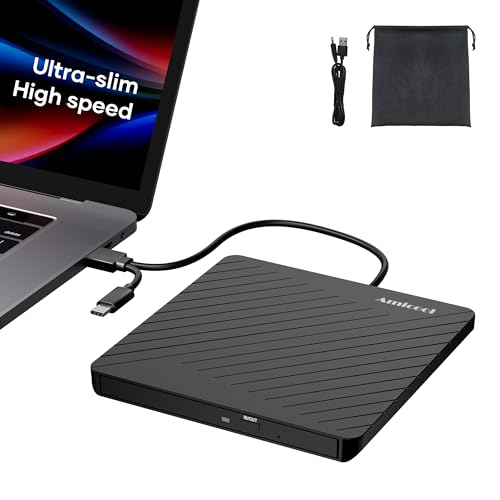
- USB-A and USB-C connectivity
- Burns CDs at 24x and DVDs at 8x
- Includes pouch and emergency eject
Best For: Portable laptop-based CD/DVD archiving
Best Multifunction Hub
8-in-1 USB CD/DVD Archiving Drive

- Optical drive plus USB and card-reader ports
- USB-A and USB-C compatibility
- Up to 24x CD and 8x DVD speeds
Best For: Disc archiving combined with photo and video transfers
Versatile Blu-ray Hub – 8-in-1 External Blu-ray/DVD Drive
For shoppers comparing optical disc drives for archiving, this external Blu-ray burner combines BD, DVD, CD, and M-DISC support with a built-in USB hub and memory-card slot. It can burn BD-R at 6x, DVD at 8x, and CD at 24x, while supporting up to 50GB Blu-ray recording.
Best For: Users who need a portable Blu-ray archiving drive with extra USB and card-reader connectivity.
Pros:
- Reads and writes Blu-ray, DVD, CD, and M-DISC media.
- Includes USB-A, USB-C, USB 3.0, USB 2.0, and TF/SD connectivity.
- Compact 300g design includes a carrying case and disc sleeves.
- Compatible with Windows and macOS computers.
Cons:
- Does not support 4K Blu-ray playback.
- BD-XL discs are read-only, and maximum Blu-ray recording is 50GB.
- Requires third-party software for Blu-ray playback.
This is a feature-rich choice for computer-based backups and media transfers, especially when portability and peripheral connectivity matter. Its 50GB recording limit should be considered for larger archival projects.
Desktop M-DISC Workhorse – LG 24X SATA DVD Rewriter
LG Electronics 24X SATA Super-Multi DVD Internal Rewriter with M-Disc Support (Black) GH24NS95B
Check Price On AmazonFor optical disc drives for archiving on a desktop PC, the LG GH24NS95B is a straightforward internal DVD rewriter with M-DISC support. Its SATA interface and compatibility with DVD±R/RW, DVD-RAM, CD-R/RW, and related formats suit routine data and media writing.
Best For: Desktop builders who want an internal SATA DVD drive with M-DISC support.
Pros:
- Supports M-DISC for archival-oriented DVD storage.
- Reads and writes DVD and CD formats, including dual-layer DVD media.
- Offers up to 24x DVD writing and 48x CD read/write capability.
Cons:
- Internal 5.25-inch design is not suitable for laptops without a compatible bay.
- Uses SATA rather than USB connectivity.
- Listed operating-system support focuses on Windows XP, Vista, and 7.
This LG drive is best suited to a conventional desktop with an available 5.25-inch bay and SATA connection. It is a practical DVD/CD archiving option, but not a Blu-ray solution.
Linux-Friendly Blu-ray Burner – External 6X BD-RE Drive
This external Blu-ray drive is a flexible option for optical disc drives for archiving, supporting BD, DVD, and CD writing at up to 6x, 8x, and 24x respectively. Its USB 3.0 and USB-C cable, slim enclosure, and compatibility with Windows, macOS, and Linux make it easy to use across multiple computers.
Best For: Users seeking a portable Blu-ray archiving drive for modern laptops, desktops, or Linux systems.
Pros:
- Supports Blu-ray, DVD, CD, BD-RE, DVD-RAM, and other common formats.
- Dual USB 3.0 and USB-C interface supports newer and older computers.
- Compatible with Windows, macOS, and Linux.
- Compact design includes cable storage and anti-slip pads.
Cons:
- External power may be needed for low-power devices.
- Not compatible with Chromebooks, TVs, tablets, iPads, or car systems.
- Third-party software is required for Blu-ray playback.
With broad computer compatibility and dual-interface connectivity, this drive is well suited to portable Blu-ray backups. Buyers should account for software and power requirements when setting it up.
Ultra-Slim M-DISC Option – ASUS 9.5mm Internal DVD Writer
For compact laptops and compatible desktops, the ASUS SDRW-08U1MT is one of the simpler optical disc drives for archiving. Its 9.5mm SATA form factor supports M-DISC and writes DVDs at up to 8x, making it appropriate for long-term DVD-based data storage in systems with an internal slim optical bay.
Best For: Laptop upgrades and compact computer builds needing an internal M-DISC DVD writer.
Pros:
- M-DISC support is designed for archival-quality data backup.
- Ultra-slim 9.5mm form factor fits compatible laptop bays.
- Supports Windows, macOS, and Linux systems.
- Includes quiet-use features and power-saving E-Green technology.
Cons:
- Internal SATA design requires a compatible optical-drive bay.
- Limited to DVD and CD storage rather than Blu-ray.
- Maximum DVD writing speed is 8x.
This ASUS writer makes sense when space is limited and M-DISC DVD backup is the priority. Confirm the computer’s 9.5mm SATA bay and mounting compatibility before purchasing.
Flexible Enclosure – 5.25-inch SATA Optical Drive Enclosure
For optical disc drives for archiving, this enclosure is a practical way to turn a compatible internal 5.25-inch SATA Blu-ray, CD, or DVD drive into an external USB drive. The optical drive is not included, so it suits shoppers who already have a SATA drive to install.
Best For: Users who want to reuse a full-size SATA optical drive for external backups, disc access, or media playback.
Pros:
- Fits 5.25-inch SATA optical drives up to 171 mm deep.
- USB 3.0 supports transfer rates up to 5 Gbps and includes plug-and-play operation.
- Aluminum-alloy construction is designed to reduce heat, noise, and vibration.
- Supports hot swapping and works with Windows, macOS, and Linux systems listed by the manufacturer.
Cons:
- The optical drive must be purchased separately.
- Supports SATA drives only, not IDE drives.
- Its 5.25-inch format is less portable than a slim external drive.
This is a strong option when you need enclosure flexibility and already own a compatible drive. Verify the drive interface, depth, and screw-hole arrangement before installation.
Slim Internal Option – LG BU40N Slim Blu-ray/DVD Drive
LG Electronics 183663 LG Ultra Slim Bd DVDRW 6X SATA 9.5mm Tray Retail Optical Drive BU40N
Check Price On AmazonFor optical disc drives for archiving in a compatible laptop or compact computer, the LG BU40N provides a slim SATA Blu-ray and DVD solution. Its tray-loading 9.5 mm design is intended for systems that accept a slim internal optical drive.
Best For: Laptop and small-form-factor PC owners seeking an internal Blu-ray/DVD drive with SATA connectivity.
Pros:
- Supports Blu-ray media along with CD and DVD formats listed in the specifications.
- Slim 9.5 mm form factor suits compatible laptop and compact-PC installations.
- Offers 6x optical write speed and up to 8x DVD read speed.
- Supports a broad range of Windows versions, including Windows 10, 8.1, 8, 7, Vista, and XP.
Cons:
- It is an internal SATA drive, not a ready-to-use external USB device.
- Compatibility depends on the computer accepting a 9.5 mm slim optical drive.
- The supplied information does not specify macOS or Linux support.
The BU40N is best considered a replacement or upgrade for compatible slim systems rather than a universal archival drive. Check the bay dimensions, connector arrangement, and computer compatibility before buying.
Portable Writer – USB 3.0 External CD/DVD Drive
For optical disc drives for archiving, this portable Rioddas drive offers a straightforward way to read and write CDs and DVDs from a laptop or desktop. USB 3.0 connectivity and included USB-A and USB-C cables make it convenient for computers with different ports.
Best For: Users who need a portable CD/DVD reader and burner for disc backups, file access, or software installation.
Pros:
- Portable external design works with laptops, desktops, PCs, MacBooks, and listed Windows, Linux, and macOS systems.
- Includes both USB-C and USB-A cables.
- Supports CD/DVD reading and writing, with listed speeds up to 24x.
- Compact dimensions make it easier to carry than a full-size enclosure.
Cons:
- Supports CD and DVD media, not Blu-ray discs.
- Some scratched, aged, specially formatted, or copy-protected discs may not read reliably.
- Playback and compatibility can also depend on the computer’s software.
This drive is a convenient general-purpose choice for portable CD/DVD archiving, but it is not suited to Blu-ray collections. For dependable results, use normally burned or undamaged discs and compatible playback or burning software.
Best Value Internal Drive – Lite-On IHAS124-14 DVD Burner
For optical disc drives for archiving on a desktop PC, the Lite-On IHAS124-14 is a straightforward internal SATA DVD writer. Its 24x media speed and half-height 5.25-inch design suit routine CD and DVD reading, writing, and data backup.
Best For: Desktop users who want a conventional internal DVD drive for personal archiving and disc creation.
Pros:
- Internal half-height form factor fits compatible desktop drive bays.
- SATA connectivity works with supported PC systems.
- Supports up to 24x media speed and includes a 2 MB cache.
- Compact 399 g design with a black finish.
Cons:
- Internal installation is less convenient than using a portable USB drive.
- Designed for CD/DVD media rather than Blu-ray archiving.
- Compatibility depends on having an available SATA connection and 5.25-inch bay.
This model is a practical choice when the computer already has the required internal bay and SATA interface. It is less suitable for laptops or users who need a drive they can move between systems.
Best Portable Option – Amicool Ultra-Slim USB CD/DVD Drive
For optical disc drives for archiving that can travel between computers, this Amicool external burner combines USB-A and USB-C connectivity with CD/DVD reading and writing. Its ultra-slim body, included pouch, and plug-and-play setup make it convenient for laptops and desktops.
Best For: Laptop users who need a lightweight external drive for reading, burning, and transferring CD/DVD archives.
Pros:
- Ultra-slim 0.5-inch design weighs 7.35 ounces.
- USB-A and USB-C interfaces support many Windows, Mac, and Linux computers.
- Reads and writes common CD/DVD formats at up to 24x CD and 8x DVD speeds.
- Includes error correction, an emergency eject hole, storage pouch, and separate charging support.
Cons:
- Does not support Blu-ray discs.
- Not compatible with Chrome OS, smartphones, tablets, TVs, or cars according to the supplied notes.
- Some ultra-thin laptops may need the dedicated power connection for reliable operation.
The Amicool is a flexible archiving companion for modern computers, especially when portability matters. Its format support is broad for CDs and DVDs, but users with Blu-ray collections or unsupported devices will need another solution.
Best Multifunction Hub – 8-in-1 USB CD/DVD Archiving Drive
For optical disc drives for archiving with added file-transfer flexibility, this external USB drive combines CD/DVD burning with a USB hub and SD/TF card reader. USB-A and USB-C support make it useful for moving photos or videos from cards while managing disc backups.
Best For: Laptop and desktop users who want one portable accessory for CD/DVD archiving, card transfers, and extra USB connectivity.
Pros:
- Combines an optical drive with one USB 3.0 port, three USB 2.0 ports, and SD/TF card reading.
- Supports USB-A and USB-C connections across compatible Windows, Mac, and Linux systems.
- Reads and writes supported CDs and DVDs at up to 24x CD and 8x DVD speeds.
- Offers error correction, anti-skid operation, plug-and-play use, and a one-year warranty.
Cons:
- SD and TF cards cannot be used simultaneously.
- Some Windows 10/11 laptops may require the extra power cable if USB power is insufficient.
- Does not support Blu-ray discs, smartphones, tablets, TVs, or cars.
This model stands out when archiving involves both optical discs and camera-card files. Its built-in ports add convenience, though the larger feature set and possible power requirement may be unnecessary for users seeking only a basic DVD burner.
How We Picked the Best Optical Disc Drives for Archiving
We focused on compatibility, practical connectivity, recording support, and suitability for repeated backup tasks. The roundup covers internal SATA drives for desktop installations, external USB models for flexible use, slim laptop-style drives, and enclosures that let you install a compatible 5.25-inch optical drive.
We also considered support for Blu-ray, DVD, and CD formats; M-DISC compatibility where specified; USB-C and USB 3.0 availability; physical size; and whether a drive is better suited to occasional disc access or regular archival writing. Because performance and media quality vary, always confirm the manufacturer’s specifications and your computer’s operating-system support before buying.
Quick Comparison
| Drive type | Best for | Main advantage | Potential limitation |
|---|---|---|---|
| External Blu-ray burner | Large photo, video, and document archives | Higher capacity than DVD | Requires compatible Blu-ray media |
| Internal SATA DVD writer | Desktop backup systems | Clean permanent installation | Needs an available drive bay and SATA connection |
| Slim internal DVD writer | Compact computers and laptops | Small 9.5mm form factor | Usually DVD/CD only |
| External USB CD/DVD drive | Portable or occasional use | Simple plug-in setup | Lower capacity than Blu-ray |
| 5.25-inch enclosure | Custom desktop configurations | Can house a compatible optical drive | Drive may need to be purchased separately |
Key Buying Factors for Optical Disc Drives for Archiving
Disc Format and Capacity
Choose Blu-ray when your archives contain large video files, extensive photo collections, or system images. DVD writers are more affordable and remain practical for smaller document sets. CD support is useful for legacy music and data discs, but CDs offer the least capacity.
M-DISC Support
M-DISC-compatible drives are designed to write to specialized archival media. Support does not guarantee that every disc will last indefinitely, so use reputable media, store discs properly, and maintain more than one copy in separate locations.
Connection and Installation
External USB drives are the easiest choice for laptops and shared workstations. USB-C can reduce adapter requirements, while USB 3.0 provides a convenient modern connection. Internal SATA models are better for a dedicated desktop archive station but require an open bay, data cable, power connection, and suitable mounting hardware.
Verification and Backup Workflow
For important records, use software that can verify written data, compare files after burning, and create checksums. Label discs clearly, keep a catalog of contents, and avoid relying on optical media as the only copy of irreplaceable data.
Who Should Buy Which Optical Disc Drives for Archiving?
- Choose an external Blu-ray drive if you need maximum disc capacity and want a flexible solution for several computers.
- Choose an internal SATA DVD writer for a desktop dedicated to routine CD and DVD backups.
- Choose a slim internal drive when your computer accepts a 9.5mm laptop-style optical mechanism.
- Choose a portable external CD/DVD drive for occasional archiving, software installation, media playback, or access to older discs.
- Choose an enclosure if you already own a compatible 5.25-inch drive or want to build a customizable external setup.
For most long-term projects, prioritize verified writes, reputable archival media, careful storage, and multiple copies over maximum advertised speed.