Powered KVM over IP switches let you control computers remotely while preserving access to video, keyboard, mouse, BIOS screens, and other pre-boot functions. The best choice depends on your resolution needs, port count, network design, and whether you need features such as PoE, virtual media, or secure remote access.
We compared 10 options ranging from compact single-system remote KVMs to rack-mounted multi-port platforms. Use the guide below to narrow the list by deployment type, connectivity, and day-to-day management requirements.
Best 10 Powered Kvm Over Ip Switches Picks for 2026
Best Wireless 4K Pick

- 4K@30 FPS video passthrough
- Dual-band Wi-Fi 6 and Ethernet
- Tailscale and optional self-hosting
Best For: Wireless home labs and flexible remote access
Best Open-Source 1080p Option

- 1080p@60 FPS H.264 streaming
- Browser, WebRTC, and Wake-on-LAN access
- Open-source firmware with SSH customization
Best For: Home-lab troubleshooting and BIOS-level rescue
Best Compact 4K Remote KVM

- 4K@30 Hz remote video
- BIOS-level access without host software
- Remote audio and file transfer
Best For: Compact remote PC and server management
Best Long-Distance KVM Extender

- 4K extension up to 390 feet over Cat5e
- USB keyboard, mouse, and peripheral control
- Supports up to 16 extender sets
Best For: Server rooms and distributed workstations
Compact PoE Pick

- Single-device remote KVM
- PoE and Type-C power
- 4K at 30FPS with 32GB eMMC
Best For: Single-server remote management
Enterprise Rack Choice
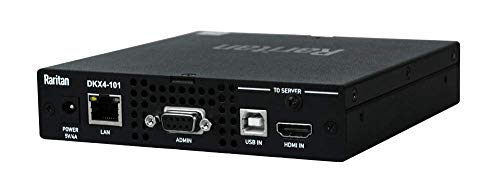
- Single-port 4K KVM-over-IP
- Rack-mount chassis
- Ethernet remote control
Best For: Rack-mounted access to one server
Multi-Host Powerhouse

- Four-host remote KVM control
- PoE with Type-C backup
- Touchscreen and rack brackets included
Best For: Home labs and IT teams managing four systems
Best Enterprise Capacity

- Controls up to 16 computers or servers
- Virtual media supports remote storage
- Dual redundant C14 power inputs
Best For: Larger server racks and TAA purchasing
Best 4K DisplayPort Choice
Single-Port 4K KVM Over IP Switch

- Supports 4K DCI DisplayPort video at 30Hz
- FPGA processor supports image quality and throughput
- Dual LAN and power provide redundancy
Best For: Single-system 4K remote management
Best Expandable Rack Option

- Controls eight systems with local and remote access
- Cascades to support up to 128 servers
- 1U rackmount design uses CAT5 cabling
Best For: Compact, expandable server racks
Best Wireless 4K Pick – GL-RM10 Comet Pro
For shoppers comparing powered kvm over ip switches for flexible remote access, the GL.iNet GL-RM10 Comet Pro combines wired and dual-band Wi-Fi 6 connectivity with 4K video passthrough. It also supports two-way audio, browser-based access, and optional self-hosted cloud deployment.
Best For: Home labs, offices, and users who want wireless connectivity with secure remote management.
Pros:
- Supports 4K at 30 FPS passthrough with H.264 encoding and two-way audio.
- Offers 2.4 GHz and 5 GHz Wi-Fi 6 plus wired networking.
- Includes built-in Tailscale and Windows, macOS, Linux, iOS, and Android access options.
- Can support BIOS recovery, OS reinstallation, and optional remote power control.
Cons:
- ATX Board and Fingerbot power-control accessories are sold separately.
- Remote cloud and self-hosted features may require additional setup.
The Comet Pro is a strong choice when wireless placement, high-resolution passthrough, and multiple remote-access methods matter more than a basic wired-only setup.
Best Open-Source 1080p Option – JetKVM IP KVM
The JetKVM is a compact choice for powered kvm over ip switches when quick installation and open-source flexibility are priorities. It uses HDMI for video, USB-C for keyboard and mouse signals and power, and Ethernet for browser-based access.
Best For: Home labs, troubleshooting, and users seeking browser, WebRTC cloud, and Wake-on-LAN access.
Pros:
- Streams 1080p at 60 FPS with stated latency of 30–60 ms.
- Provides LAN browser access, optional WebRTC cloud access, and Wake-on-LAN.
- Supports BIOS-level rescue, rebooting, safe-mode entry, and OS reinstallation.
- Uses open-source Linux and Golang firmware with SSH customization.
Cons:
- The non-PoE unit cannot control a completely powered-off host.
- It does not transfer audio through the HDMI connection.
- ATX, DC power, and serial-console modules are sold separately.
JetKVM delivers practical remote troubleshooting in a small enclosure, especially for users who value open-source customization and straightforward browser access.
Best Compact 4K Remote KVM – GL-RM1 Comet
The GL.iNet Comet GL-RM1 is a compact powered kvm over ip switch alternative for remote PC and server management. It provides 4K at 30 Hz, hardware H.264 encoding, BIOS-level control, remote audio output, and file transfer without requiring software on the controlled computer.
Best For: IT professionals, remote workers, and smart-home users managing computers or servers from elsewhere.
Pros:
- Supports 3840×2160 video at 30 Hz with low-latency remote control.
- Enables BIOS access, remote rebooting, OS installation, and power-on control.
- Works with laptops, desktops, servers, routers, and other compatible computers.
- Includes remote audio output and file-transfer functionality.
Cons:
- Power Delivery adapters cannot be used.
- The device has one USB port and a compact hardware design that may limit expansion.
- Power-control capabilities may depend on the connected setup.
With its small 85-gram form factor and 4K output, the GL-RM1 suits users who want capable remote management without installing software on the host system.
Best Long-Distance KVM Extender – AV Access 4K HDMI USB
The AV Access 4K HDMI USB KVM Extender is designed for powered kvm over ip switches buyers who need to place a computer away from the display and peripherals. It sends HDMI, audio, and USB signals over a single Cat5e or better cable, with support for network-based deployment.
Best For: Server rooms, control centers, offices, classrooms, and distributed workstation installations.
Pros:
- Extends 4K at 30 Hz up to 390 feet over Cat5e and up to 492 feet over Cat6/6A/7.
- Supports keyboard, mouse, controllers, and other USB 2.0 peripherals.
- Works through an existing IP network and supports up to 16 paired extender sets.
- Offers plug-and-play compatibility with Windows, macOS, and Linux.
Cons:
- This is an extender system requiring transmitter and receiver placement rather than a compact single-device KVM.
- Long-distance performance depends on suitable cabling or Gigabit network infrastructure.
- It is intended for local signal extension, not the broader browser and cloud-management features of dedicated remote KVM devices.
Choose this AV Access system when distance, peripheral control, and high-resolution signal extension are the main requirements for a professional installation.
Compact PoE Pick – GL.iNet Comet PoE Remote KVM
The GL.iNet Comet PoE Remote KVM is a compact option for anyone comparing powered kvm over ip switches for a single computer or server. It supports 4K video at 30FPS, Ethernet connectivity, Tailscale remote access, and flexible PoE or Type-C power.
Best For: Single-server remote management in home labs, small offices, and compact racks.
Pros:
- PoE and Type-C dual-power support
- 4K streaming at 30FPS
- Remote BIOS reinstall capability
- 32GB built-in eMMC storage
Cons:
- Supports only one device
- Remote management depends on an Ethernet network connection
Choose this model when size, straightforward single-host access, and PoE power are more important than switching between multiple systems.
Enterprise Rack Choice – Raritan Dominion KX IV-101
Raritan Dominion KX IV-101 Ultra High Performance 1-Port 4K KVM-Over-IP Switch
Check Price On AmazonThe Raritan Dominion KX IV-101 is a rack-mount, single-port choice for powered kvm over ip switches. It provides 4K KVM-over-IP control through Ethernet and supports remote operation for compatible Ethernet-enabled and USB devices.
Best For: Rack-mounted remote access to one server or compatible system.
Pros:
- 4K KVM-over-IP capability
- Rack-mount design
- Ethernet connectivity for remote control
- Two-year warranty description
Cons:
- Limited to one port
- Heavier and larger than the compact GL.iNet option
This is a practical fit for buyers who want a conventional rack-mount appliance and remote access to a single host rather than multi-system switching.
Multi-Host Powerhouse – GL.iNet Comet X Quad-Port KVM
The GL.iNet Comet X is the most flexible option here for powered kvm over ip switches, with four HDMI inputs and four dedicated USB Type-C device ports. PoE power, browser-based HTTPS access, a touchscreen, 4K 30Hz loop-out, and included rack brackets make it suited to larger home labs and IT setups.
Best For: Home labs, IT professionals, and rack environments managing up to four host systems.
Pros:
- Controls up to four host systems
- PoE with 5V Type-C backup power
- 4K 30Hz HDMI loop-out for local access
- 64GB eMMC and included 10-inch and 19-inch rack brackets
Cons:
- Larger and heavier than the single-port models
- 4K loop-out is limited to 30Hz
- More features may be unnecessary for a one-host setup
For multi-system environments, Comet X offers the broadest connectivity and installation flexibility in this group, while its local touchscreen and browser interface support both on-site and remote control.
Best Enterprise Capacity – 16-Port KVM Over IP Switch
Tripp Lite Cat5 KVM Switch Over IP 16-Port W/Virtual Media 2 Users 1URM TAA (B064-016-01-IPG)
Check Price On AmazonFor organizations managing a larger server rack, this powered KVM over IP switch provides simultaneous local and remote access to up to 16 computers or servers. Virtual media, redundant power inputs, and TAA compliance make it particularly practical for structured IT deployments.
Best For: Enterprise and government-connected environments that need high port capacity, remote storage access, and power redundancy.
Pros:
- Supports one local and one remote user controlling up to 16 systems.
- Virtual media supports remote DVD/CD drives and flash drives.
- Dual redundant C14 power inlets help maintain operation if one supply fails.
- TAA compliant for GSA Schedule purchasing.
Cons:
- Its 16-port capacity may be more than smaller installations need.
- It requires product-specific batteries.
Choose this model when capacity and uptime features matter more than minimizing hardware size. The dedicated laptop-connected port is also useful for straightforward console operation during setup or maintenance.
Best 4K DisplayPort Choice – Single-Port 4K KVM Over IP Switch
ATEN 1-Local/Remote Share Access Single Port 4K DisplayPort KVM Over IP Switch
Check Price On AmazonThis powered KVM over IP switch is designed for single-system access where high-resolution DisplayPort video is the priority. It supports up to 4K DCI at 30Hz locally and remotely, while dual power and dual LAN connections add backup options for critical installations.
Best For: Users needing remote and local control of one DisplayPort-equipped PC or server with 4K video support.
Pros:
- Supports DisplayPort resolution up to 4096 x 2160 at 30Hz at both consoles.
- FPGA graphics processing is designed to improve image quality and frame throughput.
- Dual power supply and dual LAN provide backup connectivity options.
- Relay/DI terminal supports environment monitoring and reboot control.
Cons:
- Its single-port design is not suited to managing multiple servers directly.
- 4K operation is specified at 30Hz rather than a higher refresh rate.
This is a focused choice for remote access to one high-resolution DisplayPort system. Its monitoring and redundancy features make it more compelling for specialized or unattended environments than for basic desktop switching.
Best Expandable Rack Option – 8-Port KVM Over IP Switch
For compact server rooms, this powered KVM over IP switch combines eight-port access with a 1U rackmount design and CAT5 cabling. It supports one local and one remote user, IPv4 and IPv6, and can be cascaded to manage up to 128 servers from one station.
Best For: Small and growing rack deployments that need compact cabling, browser-based remote access, and expansion potential.
Pros:
- Eight ports support simultaneous local and remote users.
- Cascading can expand control to up to 128 servers.
- 1U rackmount construction and CAT5 connectivity help reduce cable clutter.
- Supports IPv4, IPv6, RADIUS, LDAP/S, and PDU control.
Cons:
- It has fewer built-in ports than a 16-port switch.
- The remote web application is Java-based.
- The supplied warranty information lists a two-year limited warranty.
This model offers a useful balance for installations that may grow over time. Its cascading support and network features make it more flexible than a basic eight-port KVM, while the 1U form factor preserves rack space.
How We Picked the Best Powered Kvm Over Ip Switches
We evaluated these Powered Kvm Over Ip Switches by comparing remote-control capability, video support, installation requirements, network connectivity, and practical management features. Key considerations included 4K compatibility, BIOS-level access, USB emulation, remote and local user support, virtual media, PoE availability, port capacity, and suitability for home labs, offices, and data centers.
We also considered product format. Compact single-port devices can be easier to deploy at an individual workstation or server, while multi-port rack units are better suited to centralized administration. Open-source or Tailscale-oriented options may appeal to technically confident users who want flexible remote networking, whereas enterprise models typically prioritize structured management and support.
Quick Comparison
- Best for compact remote access: Single-port GL.iNet Comet and JetKVM devices.
- Best for PoE installations: GL.iNet Comet PoE models, especially where a separate power adapter is inconvenient.
- Best for multiple systems: GL.iNet Comet X, Tripp Lite 8-port and 16-port models.
- Best for high-performance enterprise use: Raritan Dominion and ATEN platforms.
- Best for long cable runs: The AV Access extender, which uses category cable for distances up to its rated limit.
Key Buying Factors for Powered Kvm Over Ip Switches
Resolution and Refresh Rate
Check both the maximum resolution and the supported refresh rate. A device advertised as 4K may be limited to 30Hz, while others are designed for smoother 4K output. Match the switch to the display interface and graphics hardware used by the connected computer.
Port Count and Expansion
Choose a single-port unit for one computer or a small remote-access project. For server rooms and test environments, an 8-port or 16-port model can reduce cabling and centralize administration. Leave room for future systems if your installation is likely to grow.
Power and Network Design
Confirm whether the unit uses a dedicated power adapter, USB power, or Power over Ethernet. PoE can simplify deployment, but it requires a compatible network switch or injector. Wired Ethernet is generally preferable for stable, low-latency access; Wi-Fi models offer more flexibility but depend on wireless coverage and congestion.
Remote Management and Security
Look for encrypted access, account controls, strong authentication options, and compatibility with your preferred VPN or secure overlay network. Features such as Tailscale support can simplify private remote access, while enterprise installations may need centralized administration, logging, and directory integration.
Virtual Media and Peripheral Control
Virtual media is valuable when you need to mount an ISO, install an operating system, or troubleshoot a machine without visiting it. Also verify USB compatibility, mouse synchronization, hotkey behavior, and whether local and remote users can work simultaneously.
Who Should Buy Which Powered Kvm Over Ip Switches?
Home-lab users and developers should consider compact GL.iNet or JetKVM units with straightforward remote access and flexible networking. Power users managing several machines may prefer a quad-port Comet X or a rack-mounted Tripp Lite switch. Server-room administrators should prioritize multi-port capacity, virtual media, IPv4/IPv6 support, structured access controls, and enterprise support from Raritan, ATEN, or Tripp Lite. Installers running cable between rooms may find a category-cable extender more practical than a conventional rack KVM. Before buying, verify connector type, operating-system compatibility, network policy, and the exact remote-access features included by the manufacturer.