The best subwoofers for desktop setups add convincing low-end impact without overwhelming a small room or taking over your workspace. The right choice depends on whether you need a complete speaker system or a standalone bass upgrade.
We’ve compared compact USB-powered options, affordable 2.1 systems, and higher-output powered subwoofers to help you match bass performance, connectivity, size, and budget to your desk.
Best 10 Subwoofers for Desktop Setups Picks for 2026
Best USB-Powered Pick
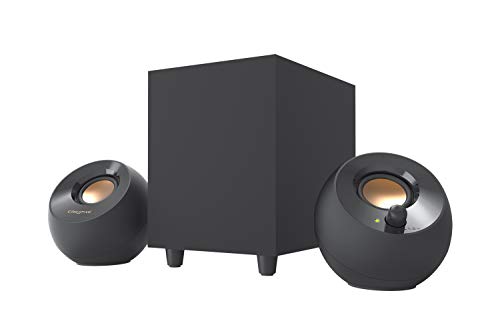
- 4-inch down-firing subwoofer
- USB-powered with 3.5mm AUX input
- Up to 8W RMS in High Gain Mode
Best For: Compact computer desks and laptops
Best Value Control Setup

- 9W RMS 2.1 speaker system
- Ported 4-inch side-firing subwoofer
- Control pod and separate bass control
Best For: Simple everyday desktop audio
Best Standalone Bass Upgrade
Ortizan Compact Active Subwoofer

- 5.24-inch long-throw woofer
- Class D amplifier with 60W maximum output
- Vibration pads for shelf placement
Best For: Gaming and studio desktops needing dedicated bass
Best High-Output 2.1 System

- 6.5-inch side-firing subwoofer
- THX-certified speaker system
- Up to 200W peak power
Best For: Gaming, movies, and music with room-filling sound
Powerful Bass Upgrade

- 8-inch driver with 70W RMS output
- 38Hz low-pass filter and MDF enclosure
- Wired RCA connectivity with auto standby
Best For: Desktop systems needing a substantial dedicated bass upgrade
Flexible RGB Desktop System

- 2.1 system with dedicated wired subwoofer
- Bluetooth 5.4, USB, USB-C, and AUX inputs
- 80W peak power, DSP tuning, and RGB lighting
Best For: Multi-device desks, gaming, and work-from-home audio
Compact Power Pick

- Compact 6-inch front-firing design
- Up to 210 watts with 33Hz response
- Auxiliary and RCA connectivity
Best For: Space-conscious desktop, gaming, and home-theater audio
Slim Bass Value
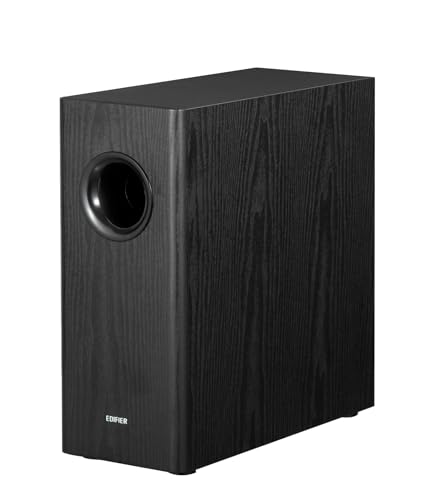
- 8-inch woofer with 70W RMS output
- Adjustable crossover and phase controls
- Includes RCA connection cables and auto-standby
Best For: RCA-equipped desktop and bookshelf-speaker systems
Studio Connectivity Pick

- 8-inch driver with 100 watts of power
- Bluetooth 5.0 and multiple wired inputs
- Crossover and room-tuning controls
Best For: Desktop music production, multimedia, and flexible monitoring setups
Best USB-Powered Pick – Creative Pebble Plus
If you want subwoofers for desktop setups without adding another wall-powered device, the Creative Pebble Plus combines compact stereo speakers with a standalone 4-inch down-firing subwoofer. Its USB power and 3.5mm AUX connection suit computers and laptops, while High Gain Mode can raise output to 8W RMS when paired with a 5V 2A USB adapter.
Best For: Compact computer desks, laptops, and users who want simple USB-powered bass.
Pros:
- 4-inch down-firing, ported subwoofer adds bass depth.
- USB-powered design avoids requiring a wall socket.
- Front-facing volume controls and angled 2-inch drivers are convenient for desktop listening.
Cons:
- 8W RMS High Gain Mode requires a 5V 2A USB adapter that is not included.
- Wired subwoofer connectivity limits placement flexibility.
The Pebble Plus is a practical choice when desk space and easy setup matter more than high output. It offers a straightforward 2.1 arrangement with useful bass enhancement for everyday desktop audio.
Best Value Control Setup – Cyber Acoustics CA-3090
The Cyber Acoustics CA-3090 is a straightforward 2.1 option for subwoofers for desktop setups, pairing two flat-panel satellite speakers with a ported 4-inch side-firing subwoofer. It delivers 9W RMS and includes a control pod for power and volume, plus separate bass adjustment on the subwoofer.
Best For: Everyday computer, laptop, phone, and tablet audio where simple controls are a priority.
Pros:
- 4-inch side-firing subwoofer supports fuller low-end sound.
- Control pod provides convenient power and volume adjustment.
- Separate bass control lets you tailor the low end.
Cons:
- 9W RMS output is modest compared with higher-powered systems.
- Uses wired auxiliary connectivity and corded electric power.
The CA-3090 focuses on basic functionality rather than premium features. Its dedicated controls and separate bass adjustment make it an accessible desktop speaker system for personal listening.
Best Standalone Bass Upgrade – Ortizan Compact Active Subwoofer
The Ortizan V8 is a standalone active subwoofer designed for desktop gaming and studio audio. For shoppers comparing subwoofers for desktop setups, its 5.24-inch long-throw woofer, Class D amplifier, vibration pads, and listed 60W maximum output point toward a more substantial bass-focused upgrade than a basic 2.1 desktop package.
Best For: Desktop users who want a dedicated active subwoofer for a computer-based gaming or audio system.
Pros:
- 5.24-inch long-throw woofer is sized for deeper bass extension.
- Class D amplifier and 60W maximum output support a higher-output design.
- Vibration pads can help suit shelf or desktop placement.
Cons:
- It is a standalone subwoofer, so compatible speakers or an existing audio system are needed.
- Its listed dimensions require more desk or shelf space than compact speaker systems.
- The supplied notes list Bluetooth connectivity but do not specify input details.
The V8 makes the most sense when bass is the main upgrade goal and you already have speakers to pair with it. Check system compatibility and available placement space before buying.
Best High-Output 2.1 System – Klipsch ProMedia 2.1 THX
The Klipsch ProMedia 2.1 is a strong choice for subwoofers for desktop setups when room-filling sound matters. Its 6.5-inch side-firing, ported subwoofer works with two-way satellites and Klipsch MicroTractrix horn technology, while the control pod provides main-volume and subwoofer-gain adjustment.
Best For: Gaming, movies, and music listeners who want a powerful wired desktop speaker system.
Pros:
- 6.5-inch side-firing subwoofer delivers substantial bass response.
- THX certification and Klipsch horn technology support a clear, energetic presentation.
- Control pod includes main volume and subwoofer gain controls.
Cons:
- The larger subwoofer needs more desk or floor space than compact alternatives.
- Its 3.5mm input and speaker connections are wired.
- High peak output may be more than needed for a small personal desk.
The ProMedia 2.1 is the performance-oriented option in this group. Choose it if you have room for its larger enclosure and want an all-in-one system built for forceful gaming, movie, and music playback.
Powerful Bass Upgrade – Edifier T5
Edifier T5 Powered Subwoofer - 70w RMS Active Woofer with 8 inch Driver and Low Pass Filter
Check Price On AmazonThe Edifier T5 is a practical choice for adding deeper bass to subwoofers for desktop setups. Its 8-inch driver, 70-watt RMS output, and wired RCA connectivity make it suited to desktop audio systems that have a compatible subwoofer or line-out connection.
Best For: Desktop listeners who want a dedicated, high-output bass upgrade with adjustable low-pass filtering.
Pros:
- 8-inch driver and 70-watt RMS output deliver substantial bass performance.
- Low-pass filter reaches down to 38Hz and helps supplement speakers’ low end.
- Thick MDF enclosure is designed to reduce acoustic resonance.
- Automatic standby helps avoid unnecessary power use when idle.
Cons:
- Uses wired RCA connectivity rather than a wireless subwoofer connection.
- Its tabletop footprint may be large for compact desks.
- Does not include a full-range speaker system.
The T5 is best treated as a serious bass supplement rather than an all-in-one desktop speaker set. Check that your existing speakers or audio source provide a compatible RCA subwoofer or line-out connection before buying.
Simple Desktop 2.1 Audio – Logitech Z313
The Logitech Z313 is a straightforward 2.1 speaker system for shoppers comparing subwoofers for desktop setups. It combines a compact wired subwoofer with two satellite speakers, 25 watts of RMS output, and an easy-to-reach control pod.
Best For: Everyday desktop, MP3 player, or television listening where simple controls and a complete speaker system matter.
Pros:
- Includes two satellite speakers and a dedicated compact subwoofer.
- 25 watts of RMS output provides a simple upgrade over basic built-in audio.
- Control pod makes volume adjustment convenient at the desk.
- 3.5mm auxiliary connectivity works with desktops and other compatible devices.
Cons:
- Lower output than larger powered subwoofers.
- Uses wired auxiliary connectivity rather than a wireless connection.
- The system is designed for personal desktop use rather than large-room listening.
The Z313 is a sensible plug-in option when you need both speakers and bass in one compact package. It is less appropriate for users who already own speakers and only want a standalone subwoofer.
Flexible RGB Desktop System – Bluedee SK900PRO
The Bluedee SK900PRO is an all-in-one 2.1 option for subwoofers for desktop setups, combining a dedicated wired subwoofer with computer speakers and multiple input choices. Bluetooth 5.4, USB, USB-C, and 3.5mm AUX support make it flexible for desktops, laptops, tablets, and other compatible devices.
Best For: Work-from-home, gaming, and everyday desktop users who want flexible connections, simple controls, and RGB lighting.
Pros:
- Dedicated subwoofer keeps low frequencies separate from the satellite speakers.
- Supports Bluetooth 5.4, USB, USB-C, and 3.5mm AUX connections.
- 80-watt peak power and DSP tuning are designed for balanced everyday audio.
- Control knob adjusts volume, playback, lighting effects, and modes.
Cons:
- Plastic enclosure may feel less substantial than an MDF cabinet.
- RGB lighting may not suit minimalist desk setups.
- Subwoofer connectivity is wired, despite Bluetooth support for source devices.
The SK900PRO is a versatile desktop speaker package rather than a standalone subwoofer. Its broad connectivity and integrated controls are useful when several devices share the same desk, while the RGB lighting adds a more styled gaming or entertainment look.
Compact Power Pick – Audioengine S6 Mini Subwoofer
The Audioengine S6 is a practical choice for listeners seeking subwoofers for desktop setups without giving up substantial bass output. Its compact, front-firing design delivers up to 210 watts and fits naturally into computer, gaming, stereo, and home-theater arrangements.
Best For: Desktop listeners who want powerful, space-conscious bass for music, movies, or gaming.
Pros:
- Compact 6-inch design with front-firing sound
- Up to 210 watts of output and a listed 33Hz frequency response
- Works with desktop systems and offers auxiliary and RCA connectivity
- Compatible with the Audioengine W3 wireless adapter
Cons:
- Wired subwoofer connectivity means it is not a fully wireless setup
- No waterproofing for outdoor or moisture-prone use
The S6 stands out when desk space is limited but you still want a strong low-end upgrade. Its small footprint and broad device compatibility make it an adaptable addition to a desktop audio system.
Slim Bass Value – Edifier T5s Powered Subwoofer
The Edifier T5s is a straightforward option for subwoofers for desktop setups, pairing an 8-inch woofer with 70 watts RMS and a slim cabinet. Its adjustable crossover and phase controls help you integrate the bass with compatible powered speakers or amplifiers.
Best For: Desktop and bookshelf-speaker users who want adjustable, plug-and-play bass through RCA connections.
Pros:
- 8-inch long-throw woofer reaches a listed 35Hz
- 70 watts RMS from a built-in Class-D amplifier
- Adjustable 30Hz–160Hz low-pass filter and 0°/180° phase selector
- Includes 3.5mm-to-RCA and RCA cables with auto-standby
Cons:
- No wireless communication technology
- Series connection without a sub-out requires main speakers with line input
- Its cabinet is slim but relatively deep at 15.71 inches
The T5s is especially appealing for desktop systems built around RCA-equipped speakers or amplifiers. Its connection flexibility and tuning controls make it easier to blend the subwoofer into an existing setup.
Studio Connectivity Pick – PreSonus Eris Sub 8BT
The PreSonus Eris Sub 8BT is a versatile contender among subwoofers for desktop setups, particularly for music production and multimedia work. It combines an 8-inch driver, 100 watts of power, Bluetooth 5.0, and multiple wired inputs with crossover and room-tuning controls.
Best For: Content creators, music listeners, and gamers who need flexible wired and Bluetooth connectivity.
Pros:
- 8-inch front-firing driver reaches a listed 30Hz
- Bluetooth 5.0 plus balanced TRS, RCA, and front-panel aux inputs
- Highpass and lowpass controls support cleaner monitor integration
- Front headphone output and built-in headphone amplifier add convenience
Cons:
- Bluetooth range is listed at 10 meters
- Its wider feature set may be more than basic desktop listeners need
- Power-saving mode activates after 40 minutes of idle time
The Eris Sub 8BT is the most connection-rich option of the three. Its adjustable filtering, tuning controls, and headphone features make it a strong fit when a desktop setup serves both creative and everyday listening purposes.
How We Picked the Best Subwoofers for Desktop Setups
We focused on models suited to nearfield listening, including compact 2.1 speaker systems and standalone powered subwoofers that can complement computer speakers, studio monitors, or home audio equipment. Our comparison considered driver size, amplifier output, claimed frequency range, connection options, footprint, controls, and setup complexity.
Because desktop audio varies widely, wattage was not treated as the only measure of performance. A small subwoofer with sensible tuning and easy volume control can work better at a desk than a larger model that produces excessive boom or lacks suitable inputs.
Quick Comparison
- Best for simple, low-cost upgrades: Creative Pebble Plus, Logitech Z313, and Cyber Acoustics CA-3090 offer straightforward 2.1 desktop audio.
- Best for stronger all-in-one sound: Klipsch ProMedia 2.1 combines a compact subwoofer with full-range satellite speakers and THX certification.
- Best standalone compact option: Ortizan’s active subwoofer is designed for desktop placement and includes vibration pads.
- Best premium compact option: Audioengine S6 emphasizes powerful output in a relatively small enclosure.
- Best for larger monitors or home audio: Edifier T5, T5s, and PreSonus Eris Sub 8BT provide larger 8-inch drivers and more adjustment potential.
Key Buying Factors for Subwoofers for Desktop Setups
System Type and Compatibility
A 2.1 package includes satellite speakers, making it the easiest choice if you are starting from scratch. A standalone subwoofer makes more sense when your existing speakers already sound good and provide a suitable subwoofer or line-level output. Check connector types carefully: some models use RCA, while others may rely on 3.5mm, speaker-level, Bluetooth, or proprietary connections.
Size, Output, and Room Balance
Driver size and amplifier power provide useful context, but desk distance changes how bass feels. Compact models are easier to place near a workstation and are less likely to overpower a small room. Larger 8-inch designs can deliver deeper, more authoritative bass, but they need additional floor or shelf space and careful level adjustment.
Controls and Crossover Adjustment
Volume control is essential for balancing the subwoofer with your main speakers. A low-pass or crossover control is especially helpful with standalone units because it lets you decide where the subwoofer takes over. Phase adjustment, Bluetooth, and remote controls are useful extras, but they should not replace basic compatibility and placement considerations.
Placement and Vibration
Keep the subwoofer on a stable surface with ventilation and avoid pressing it tightly against a wall or corner unless you specifically want more bass. Isolation feet or vibration pads can reduce desk shake. Start with a low volume, then increase it until the bass sounds full rather than boomy.
Who Should Buy Which Subwoofers for Desktop Setups?
Choose a compact 2.1 package if you need an affordable, uncomplicated computer audio system. Pick a standalone compact subwoofer if desk space is limited and you already own compatible speakers. For music production or detailed nearfield monitoring, prioritize adjustable crossover controls and predictable response, such as those found on studio-oriented models. If gaming and movies are the priority, a higher-output system with a larger driver can provide more impact, provided your room and neighbors can accommodate it.