Finding the right checkout system can make every sale faster, smoother, and easier to manage. The best touchscreen POS payment terminals combine payment acceptance, simple navigation, and dependable hardware in one streamlined setup.
In this roundup, we focus on systems that fit real-world small business needs, from compact counter terminals to larger all-in-one setups for busy retail and restaurant environments.
Best 10 Touchscreen POS Payment Terminals Picks for 2026
Complete Countertop POS

- Dual touchscreen countertop POS
- Built-in software and simple card pricing
- Durable IP54-rated design
Best For: Fixed-register businesses that want an all-in-one Square POS
Versatile Payment Terminal

- Accepts NFC, wallets, EMV, and magstripe
- Supports third-party apps via Merchant Marketplace
- Remote management and diagnostics support
Best For: Businesses needing compact payment acceptance and app support
15.6-Inch Touchscreen POS

- Large 15.6-inch capacitive touchscreen
- Quad-core CPU with 8GB RAM and 128GB SSD
- 6 USB ports plus support for common peripherals
Best For: Retail and restaurant setups that need a large, connected POS
Cloud-Synced Countertop Terminal
Clover Compact Payment Terminal
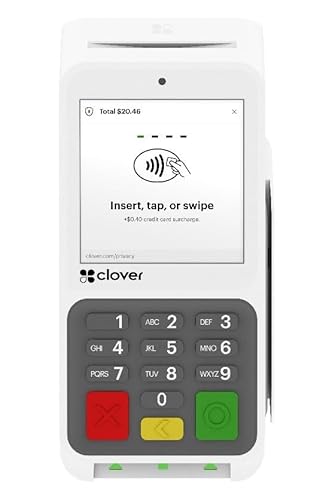
- Syncs with Clover Mini and Clover Station
- Cloud-based management of sales and transactions
- Requires new Powering POS processing account
Best For: Clover-based countertop merchants using Powering POS
Countertop Merchant Terminal
P1 Touchscreen Credit Card Machine

- 5-inch HD touchscreen plus physical keypad
- Built-in thermal receipt printer
- WiFi, Ethernet, and 4G LTE connectivity
Best For: retail counters, salons, and small restaurants
Dual-Screen POS Station
15.6" Android HD Cash Register

- 15.6-inch cashier screen with 10-inch customer display
- POS app software preinstalled with lifetime use
- Supports printers, scanners, cash drawers, and scales
Best For: small businesses needing a dual-screen counter POS system
Merchant-Ready Smart Terminal

- Requires new merchant account setup with SwyftPAY
- PCI DSS and PCI PTS certified with encryption
- Supports printers, cash drawers, and scanners
Best For: merchants comfortable with merchant account onboarding
Compact Windows POS

- Windows 11 Pro with Intel Core i5
- 15.6-inch capacitive touchscreen
- Compact metal base and small footprint
Best For: Space-conscious small businesses needing a Windows-based POS terminal
Dual-Screen POS Terminal
20.4" All-in-One Touch Terminal

- 20.4-inch dual capacitive touch screens
- 8 GB RAM and 128 GB SSD
- 6 USB ports plus COM and network
Best For: High-traffic counters needing a larger dual-screen POS terminal
POS Bundle with Printer
15.6" Touchscreen with Printer
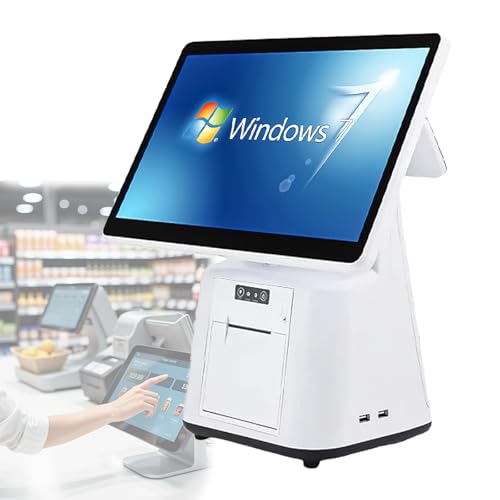
- 15.6-inch capacitive touchscreen
- Includes receipt printer
- 8 GB RAM and 128 GB SSD
Best For: Businesses wanting an all-in-one POS package with printer included
Complete Countertop POS – Square Register (2nd Gen)
If you need touchscreen POS payment terminals for a busy checkout lane, Square Register is built as a complete countertop system with dual responsive touchscreens, built-in POS software, and durable hardware. It’s designed to keep orders moving quickly through rush periods while handling card payments at a simple, transparent rate.
Best For: Countertop businesses that want an all-in-one POS with fast checkout and built-in software.
Pros:
- Dual responsive touchscreens for staff and customer use
- Built-in POS software with no long-term contracts
- Accepts major cards at one simple rate and can receive funds as soon as the next business day
- IP54-rated design helps resist spills, dust, and everyday wear
Cons:
- Corded electric power means it’s meant for fixed countertop setups
- Best suited to businesses that want Square’s POS ecosystem
Square Register focuses on speed, durability, and simplicity, making it a strong option for merchants who want one device to manage checkout without extra hardware complexity. Its responsive displays and stable performance are especially useful when the line gets long.
Versatile Payment Terminal – Verifone Engage V200C Plus
Verifone Engage V200C Plus is a practical option among touchscreen POS payment terminals if you want broad payment acceptance in a compact countertop device. It supports NFC, mobile wallets, EMV, and magstripe, and it can also support third-party apps through Verifone’s Merchant Marketplace.
Best For: Merchants who want a compact terminal with broad payment support and app flexibility.
Pros:
- Accepts NFC/CTLS, mobile wallets, EMV, and magstripe
- Supports third-party apps through Verifone’s Merchant Marketplace
- Optional dual-band WiFi and Bluetooth 4.2 BLE available
- Supports remote device management, updates, and diagnostics
Cons:
- No touchscreen details were provided in the supplied notes
- Optional features may depend on the configuration you choose
This terminal is a solid fit for businesses that want a versatile payment device with management tools built in. Its strength is in payment compatibility and remote oversight rather than an all-in-one register experience.
15.6-Inch Touchscreen POS – Smart Cash Register 15.6-inch
For businesses comparing touchscreen POS payment terminals, this Smart Cash Register stands out as a full-size 15.6-inch all-in-one system with capacitive touchscreens and a bright HD display. It is aimed at retail and service environments that need stable performance, plenty of ports, and easy peripheral connections.
Best For: Retailers and restaurants that want a large touchscreen POS with strong connectivity.
Pros:
- 15.6-inch capacitive touchscreen with 1366×768 HD resolution
- Quad-core processor, 8GB RAM, and 128GB SSD for responsive daily use
- Multiple ports including 6 USB, RJ45, COM, and audio
- Works with common peripherals like printers, scanners, cash drawers, and payment devices
Cons:
- Additional software installation is required
- At 13.22 pounds, it is a larger fixed setup than a compact terminal
This POS system is best viewed as a dependable checkout hub for busy small and medium-sized businesses. The combination of a large touchscreen and broad connectivity makes it practical for stores that need a more complete workstation.
Cloud-Synced Countertop Terminal – Clover Compact Payment Terminal
Clover Compact Payment Terminal - Requires New Merchant Processing Account Through Powering POS.
Check Price On AmazonThe Clover Compact Payment Terminal is a countertop option for merchants looking at touchscreen POS payment terminals, with syncing to Clover Mini and Clover Station through the Clover Dashboard and cloud-based network. It is designed as a plug-in device rather than a battery or mobile terminal, and it must be used with a new processing account through Powering POS.
Best For: Countertop merchants who want Clover ecosystem syncing and already plan to use Powering POS processing.
Pros:
- Syncs with Clover Mini and Clover Station through the Clover Dashboard
- Cloud-based network helps manage transactions, sales, and business data
- Plug-in countertop design with no battery or mobile reliance
- Rate match guarantee offered by the seller
Cons:
- Requires a new merchant processing account through Powering POS
- Cannot be used with a different processor
- Not a mobile or battery-powered terminal
Overall, this is a specialized Clover device for businesses that want shared data across multiple Clover terminals and are comfortable committing to the required processing setup. It is most compelling when you want a fixed register that fits into a Clover-based workflow.
Countertop Merchant Terminal – P1 Touchscreen Credit Card Machine
P1: Touchscreen Credit Card Machine - WiFi & 4G POS with Built-in Receipt Printer
Check Price On AmazonIf you need touchscreen POS payment terminals for a fixed checkout, the P1 is built around fast in-person transactions and low counter clutter. It combines a 5-inch HD touchscreen with a physical keypad, built-in receipt printing, and support for tap, EMV chip, magnetic swipe, and mobile wallets.
Best For: Retail stores, salons, and small restaurants that want an all-in-one countertop terminal with hybrid connectivity.
Pros:
- Supports Tap, EMV chip, swipe, and mobile wallets like Google Pay and Apple Pay.
- Built-in high-speed thermal receipt printer helps keep the counter tidy.
- WiFi, Ethernet, and 4G LTE support provide flexible connectivity options.
- Android-based interface with a 5-inch HD touchscreen and physical keypad.
Cons:
- Designed for fixed checkout locations, so it is less suited to mobile workflows.
- Some buyers may not need both touchscreen and physical keypad input.
The P1 is a practical all-in-one choice if you want a compact terminal that handles common payment types and includes printing on the device. Its strength is convenience at the counter, especially where dependable processing and a smaller footprint matter.
Dual-Screen POS Station – 15.6" Android HD Cash Register
For buyers comparing touchscreen POS payment terminals, this MR.BOSS system is more of a full POS station than a simple card reader. It pairs a 15.6-inch HD cashier display with a 10-inch customer screen, includes POS app software, and supports multiple peripherals for retail or food service setups.
Best For: Small businesses that want a desk-mounted POS system with dual displays, software, and expansion options.
Pros:
- Large 15.6-inch cashier screen plus 10-inch customer display.
- POS app software is already installed and setup.
- Supports printers, scanners, cash drawers, and electronic scales.
- Includes lifetime software use and no contract or compulsory fees.
Cons:
- It is a full POS register system, so it is bulkier than a standalone terminal.
- Payment terminal support is mentioned, but the listing emphasizes software and hardware more than built-in payment hardware.
This is a good fit if you want a broader checkout platform with dual screens and room to grow. The tradeoff is that it behaves more like a complete counter system than a compact payment terminal.
Merchant-Ready Smart Terminal – Poynt POS Smart Terminal
Poynt POS Smart Terminal - Requires New Merchant Account Set up Prior to Shipment
Check Price On AmazonIf your priority is touchscreen POS payment terminals that are ready for account-based setup, the Poynt smart terminal is aimed at merchants who want secure, fast acceptance. It accepts payments in minutes, emphasizes end-to-end encryption, and is built to work with common accessories like printers, cash drawers, and barcode scanners.
Best For: Merchants who are willing to set up a new merchant account and want a secure smart terminal with accessory support.
Pros:
- Accepts payments quickly and is positioned for fast setup after merchant account creation.
- End-to-end encryption and PCI DSS/PCI PTS certifications support security claims.
- Works with wired and wireless printers, cash drawers, and barcode scanners.
- Designed as a smart terminal for contactless, modern payment acceptance.
Cons:
- Requires a new merchant account set up with SwyftPAY before shipment.
- Not a plug-and-play option if you want to buy hardware first and configure later.
The Poynt terminal makes the most sense for sellers who are comfortable with the required merchant onboarding. In exchange, you get a security-focused smart terminal with strong accessory compatibility and a streamlined payment experience.
Compact Windows POS – 15.6" White Single Screen
If you want touchscreen POS payment terminals that feel more like a modern workstation than bulky checkout hardware, this Volcora unit is a practical fit. It combines a 15.6-inch capacitive display with Windows 11 Pro, a Core i5 processor, and a compact white all-in-one design for counter-friendly use in retail and food service.
Best For: Small businesses that want a space-saving Windows 11 POS terminal for retail, cafes, bars, and restaurants.
Pros:
- 15.6-inch capacitive touchscreen with 1366×768 resolution for easy touch input
- Windows 11 Pro with Intel Core i5, 4 GB memory, and 128 GB storage
- Compact metal-base design helps preserve counter space
- Useful connectivity: 2 serial ports, 4 USB ports, HDMI, Ethernet, and audio input
Cons:
- Hardware only, so you still need POS software and setup
- 4 GB RAM is modest for heavier multitasking
- Single-screen design may be less convenient than dual-display models
Overall, this is a straightforward touchscreen POS payment terminal for buyers who value a compact footprint, Windows compatibility, and the reassurance of lifetime warranty support.
Dual-Screen POS Terminal – 20.4" All-in-One Touch Terminal
For touchscreen POS payment terminals that need a larger presence at the counter, this all-in-one GBHJJ model brings a 20.4-inch dual-screen layout and a multi-touch capacitive display. It is aimed at busy retail and restaurant environments where responsive input, broad peripheral support, and continuous daily use matter.
Best For: Shops and restaurants that want a larger dual-screen POS setup with strong peripheral connectivity.
Pros:
- 20.4-inch dual touch screen setup with multi-point capacitive input
- 8 GB RAM and 128 GB SSD for a more capable business configuration
- 6 USB ports plus network, COM, and audio connections for peripherals
- Designed for multiple use cases, including convenience stores, supermarkets, and cafes
Cons:
- Native resolution is still 1366×768 despite the larger screen size
- Operating system support is listed as Windows 7/10 and Windows LTSC, which may require careful software matching
- Dual-screen design may be larger than some small counters can comfortably handle
This is a solid option if you want a larger touchscreen POS payment terminal with more room for customer-facing interaction and plenty of ports for checkout hardware.
POS Bundle with Printer – 15.6" Touchscreen with Printer
This all-in-one system is built for touchscreen POS payment terminals buyers who want a ready-to-connect checkout hub for small business use. It pairs a 15.6-inch capacitive touchscreen with 8 GB RAM, a 128 GB SSD, and a package that includes a receipt printer, making it especially useful where streamlined order handling matters.
Best For: Restaurants and retail stores that want a touchscreen POS bundle with a receipt printer included.
Pros:
- 15.6-inch capacitive touchscreen with multi-angle adjustable main display
- 8 GB RAM and 128 GB SSD for stable business performance
- Includes receipt printer in the package
- 6 USB ports, RJ45 network, COM, and audio ports support common peripherals
Cons:
- Software installation is required before use
- Native resolution is 1366×768, which is standard rather than high-end
- Single-screen design may not suit businesses wanting customer-facing secondary displays
As a practical checkout bundle, this POS terminal makes sense for owners who want fewer separate purchases and a more complete hardware setup from the start.
How We Picked These Touchscreen POS Payment Terminals
We focused on systems that balance usability, payment support, hardware reliability, and business fit. Priority went to models with responsive touch displays, practical software options, and enough processing power and storage for everyday checkout work.
We also considered setup requirements, merchant account compatibility, printer integration, and whether a terminal is better suited for retail, restaurants, or mixed-use environments.
Quick Comparison: Which Type Fits Your Business?
Compact devices are usually best for limited counter space and mobile or lower-volume checkout needs. Larger all-in-one systems are a stronger choice for busy lanes, menu-heavy restaurants, and stores that want a more traditional register experience.
If you need portability or backup connectivity, look for models with Wi-Fi, Ethernet, and cellular support. If your workflow depends on receipts, kitchen tickets, or faster order entry, built-in printing and larger displays can be worth the added footprint.
Key Buying Factors for Touchscreen POS Payment Terminals
Display Size and Layout
A larger screen can improve speed and reduce errors, especially when staff are entering orders all day. Smaller screens may be fine for simple checkout, but they can feel cramped in high-volume settings.
Operating System and Software Compatibility
Make sure the terminal works with your preferred POS software and payment processor. Some Touchscreen POS Payment Terminals are tied to specific merchant accounts or service providers, which can affect flexibility and costs.
Connectivity and Peripherals
Check for the connections you actually need: Ethernet, Wi-Fi, USB, Bluetooth, cash drawers, scanners, and printers. The best setup is the one that fits your workflow without extra adapters or workarounds.
Performance and Durability
For daily use, look for enough RAM and storage to keep the interface responsive. In restaurants and retail spaces, a stable stand, durable build, and easy-to-clean screen matter just as much as raw specs.
Who Should Buy Which Touchscreen POS Payment Terminals?
Small businesses with simple checkout needs should prioritize compact, easy-to-deploy units. Restaurants often benefit from larger displays and built-in receipt printing, while retail shops may prefer versatile all-in-one systems that support scanners, drawers, and inventory workflows.
If you’re comparing Touchscreen POS Payment Terminals for a new location, choose based on how your team works today, not just on features you might use later. The right terminal should reduce friction at checkout and fit naturally into your daily operations.