Choosing the right enclosure can turn an old SSD or HDD into fast, portable storage without much effort. The best USB-C hard drive enclosures balance speed, compatibility, cooling, and build quality.
Whether you need a simple tool-free shell for a 2.5-inch drive, a high-speed NVMe option, or a dock for larger SATA drives, this guide helps narrow down the best fit for your setup.
Best 10 USB C Hard Drive Enclosures Picks for 2026
Portable 2.5-inch SATA Pick
UGREEN Aluminum USB-C Enclosure

- 6Gbps support with UASP acceleration
- Tool-free enclosure for 2.5-inch SATA drives
- Aluminum body for better heat dissipation
Best For: Portable 2.5-inch SATA SSD or HDD users
Dual-Drive Cloning Pick
SABRENT USB-C Docking Station & Cloner

- Offline 1-to-1 cloning without a computer
- Supports two 2.5-inch or 3.5-inch SATA drives
- Hot-swappable bays with USB-C connection
Best For: Drive cloning and dual-bay SATA workflows
High-Capacity Desktop Pick
ACASIS 3.5/2.5-Inch Aluminum Enclosure

- Supports 2.5-inch and 3.5-inch SATA drives
- Up to 30TB capacity with USB 3.2 Gen 2
- Includes power switch and smart sleep mode
Best For: Large-capacity desktop SATA storage
Fast NVMe Pick
SABRENT USB-C M.2 PCIe Enclosure

- Tool-free enclosure for M.2 NVMe SSDs
- USB 3.2 Gen 2 connection up to 10Gbps
- Aluminum cooling with thermal pad support
Best For: Portable high-speed M.2 NVMe storage
Tool-Free Budget Pick
BENFEI 2.5 Inch SATA to USB Enclosure

- Tool-free installation with hot-swappable use
- USB Type-C and Type-A plug design
- Supports 2.5-inch SATA drives up to 6TB
Best For: Quick, easy 2.5-inch SATA drive access on a budget
Fast Aluminum Choice
Cable Matters 10Gbps USB C Enclosure

- 10Gbps USB-C enclosure for 2.5-inch SATA drives
- Aluminum housing aids protection and heat dissipation
- Includes USB-C cable and supports Thunderbolt 3
Best For: Faster SSD or HDD use with a sturdy USB-C enclosure
Stable Everyday Upgrade
BENFEI 6Gbps SATA to USB Enclosure

- JMS580 chipset with up to 6Gbps support
- Includes USB Type-C/Type-A 10Gbps cable
- Tool-free design for 2.5-inch SATA drives
Best For: Reliable everyday use with a simple, included-cable setup
High-Capacity 2-in-1 Dock
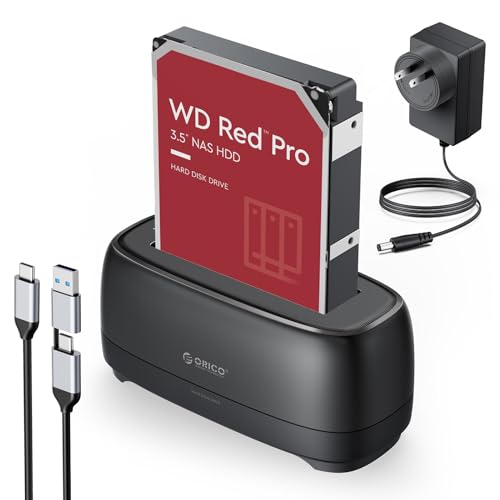
- Supports 2.5-inch and 3.5-inch SATA drives
- Up to 22TB capacity with UASP/TRIM
- Includes USB-C and USB-A 2-in-1 cable
Best For: Users who need one dock for large SATA drives across multiple devices
Aluminum 3.5-Inch Dock

- Supports 3.5-inch SATA drives up to 24TB
- Aluminum housing with vents and stand
- USB-A/USB-C cable with UASP support
Best For: Users who want a durable, high-capacity 3.5-inch enclosure for a desktop setup
Tool-Free 2.5-Inch Case
ELUTENG USB-C SSD/HDD Enclosure

- Tool-free 2.5-inch SATA installation
- USB-C connector with UASP support
- Built-in short-circuit and overcurrent protection
Best For: People who want a simple, compact 2.5-inch SSD or HDD enclosure
Portable 2.5-inch SATA Pick – UGREEN Aluminum USB-C Enclosure
If you want a straightforward option among usb c hard drive enclosures, this UGREEN model is built for 2.5-inch SATA SSDs and HDDs with tool-free installation. It supports up to 6Gbps SATA speeds, includes a USB-C to USB-C cable, and uses an aluminum shell with an ASM235CM chipset for better heat dissipation.
Best For: Users who need a compact, plug-and-play enclosure for portable 2.5-inch SATA drives.
Pros:
- Supports 2.5-inch SATA III/II/I HDDs and SSDs up to 6TB
- USB 3.1 Gen 2 Type-C connection with UASP acceleration
- Tool-free, plug-and-play setup with no extra power supply needed
- Aluminum housing helps with heat management
Cons:
- Limited to 2.5-inch SATA drives only
- No support for M.2, NVMe, or 3.5-inch drives
This is a practical pick if you mainly need a simple enclosure for drive upgrades, backups, or recovery work. It focuses on speed, portability, and broad OS compatibility rather than advanced multi-drive features.
Dual-Drive Cloning Pick – SABRENT USB-C Docking Station & Cloner
Among usb c hard drive enclosures, this SABRENT dock stands out because it handles two SATA drives at once and can clone one drive to another without a computer. It supports both 2.5-inch and 3.5-inch SATA HDDs and SSDs, connects over USB 3.0, and includes a USB-C cable plus a power adapter.
Best For: Users who want an easy dock for drive cloning, migration, and working with two SATA drives at the same time.
Pros:
- Offline one-to-one cloning with no PC required
- Reads and writes two drives at once over USB
- Fits both 2.5-inch and 3.5-inch SATA HDDs and SSDs
- Tool-free, hot-swappable bays with per-bay access LEDs
Cons:
- Does not support IDE/PATA, M.2, or NVMe drives
- Offline cloning is capped at up to 60MBps by design
- Requires a power adapter for operation
If your main goal is drive swapping or cloning rather than a tiny portable enclosure, this dock is a strong fit. It is more of a desktop-style utility than a travel accessory, but it offers useful flexibility for storage work.
High-Capacity Desktop Pick – ACASIS 3.5/2.5-Inch Aluminum Enclosure
If you need usb c hard drive enclosures for bigger desktop drives, this ACASIS unit supports both 2.5-inch and 3.5-inch SATA SSDs and HDDs with up to 30TB capacity. It uses USB 3.2 Gen 2, includes a USB-C to USB-C/A cable, and pairs an aluminum shell with an open-frame tray design to help move heat away from the drive.
Best For: Users who want a large-capacity enclosure for 3.5-inch or 2.5-inch SATA drives with active usability features.
Pros:
- Supports 2.5-inch and 3.5-inch SATA drives up to 30TB
- USB 3.2 Gen 2 with UASP support for up to 6Gbps speeds
- Independent power switch and 10-minute smart sleep mode
- Aluminum shell and open-frame tray help with heat dissipation
Cons:
- Larger desktop footprint than slim portable enclosures
- Requires the included 12V/2A power adapter
This is a good match if you need a more permanent storage setup for backups, content work, or large SATA drives. It emphasizes capacity, cooling, and convenience features over compactness.
Fast NVMe Pick – SABRENT USB-C M.2 PCIe Enclosure
For buyers comparing usb c hard drive enclosures but specifically needing NVMe performance, this SABRENT model is designed for M.2 PCIe SSDs rather than SATA drives. It supports 2230, 2242, 2260, and 2280 NVMe drives up to at least 8TB, uses USB 3.2 Gen 2 for up to 10Gbps, and features a flip-open, tool-free build with aluminum cooling.
Best For: Users who need a portable enclosure for fast M.2 NVMe SSDs.
Pros:
- Tool-free flip-open design for quick installation
- Supports NVMe sizes 2230 through 2280
- USB 3.2 Gen 2 connection rated up to 10Gbps
- Aluminum top and thermal pad help with heat transfer
Cons:
- Not compatible with M.2 SATA SSDs
- Only supports one drive at a time
This is the right choice if your priority is speed and portability for an NVMe SSD. It is a focused enclosure with good cooling features, but it is not meant for SATA-based drives.
Tool-Free Budget Pick – BENFEI 2.5 Inch SATA to USB Enclosure
If you want one of the simplest usb c hard drive enclosures for a 2.5-inch SATA drive, this BENFEI model keeps the setup straightforward. It supports SSDs and HDDs up to 6TB, offers tool-free installation, and includes both USB Type-C and Type-A connection options for flexible use across laptops and other devices.
Best For: Anyone who wants a low-friction 2.5-inch SATA enclosure for quick plug-and-play drive swaps.
Pros:
- Tool-free, plug-and-play design with hot-swappable use
- USB Type-C/Type-A plug design for broader connection options
- Supports UASP and up to 5Gbps transfer speed
- Compatible with Windows, Linux, and macOS 8.0+
Cons:
- Limited to 2.5-inch SATA drives only
- Top speed is lower than 10Gbps enclosures
- Not intended for larger 3.5-inch drives
This is a practical pick if you mainly need a dependable enclosure for drive transfers, backups, or repurposing a 2.5-inch SSD. The feature set is focused rather than flashy, but the dual-connector design and broad compatibility make it easy to recommend for everyday use.
Fast Aluminum Choice – Cable Matters 10Gbps USB C Enclosure
Among usb c hard drive enclosures, this Cable Matters model stands out if you want a faster 10Gbps option for a 2.5-inch SATA SSD or HDD. The aluminum housing is designed to help with heat dissipation, and the included USB-C cable makes it a strong fit for modern laptops, including Thunderbolt 3 systems.
Best For: Users who want a 10Gbps USB-C enclosure with aluminum construction and broad laptop compatibility.
Pros:
- Up to 10Gbps transfer rate with compatible computers
- Aluminum housing helps protect the drive and dissipate heat
- Supports UASP, TRIM, and S.M.A.R.T. with compatible systems
- Includes USB-C cable and works with Thunderbolt 3 computers
Cons:
- Only supports 2.5-inch SATA SSDs or HDDs
- Maximum drive thickness is 9.5mm
- Performance features depend on compatible OS, drive, and computer
If speed and a sturdier enclosure matter more than the lowest price, this is a well-rounded option. It is especially useful for portable backups, drive testing, and everyday SSD use where USB-C and higher transfer rates are priorities.
Stable Everyday Upgrade – BENFEI 6Gbps SATA to USB Enclosure
This BENFEI option is a practical pick in usb c hard drive enclosures if you want a simple 2.5-inch SATA enclosure with a focus on stable data transfer. It includes a USB Type-C/Type-A 10Gbps cable in the box, uses a JMS580 chipset, and supports up to 6Gbps with UASP for SSD-friendly performance.
Best For: Anyone who wants a dependable 2.5-inch SATA enclosure with stable 6Gbps performance and included dual-use cable.
Pros:
- Supports up to 6Gbps with JMS580 chipset
- Includes a USB Type-C/Type-A 10Gbps cable
- Tool-free, plug-and-play installation
- Compatible with Windows, Linux, and macOS 8.0+
Cons:
- Still limited to 2.5-inch SATA drives only
- No aluminum housing listed
- Performance depends on compatible UASP-capable setup
For users who want a straightforward enclosure for backups, drive transfers, or repurposing a SATA SSD, this model keeps the experience simple. The included cable and stable chipset make it a sensible everyday choice without extra complexity.
High-Capacity 2-in-1 Dock – ORICO 2.5/3.5 SATA USB-C Dock
If you want usb c hard drive enclosures that can handle both 2.5-inch and 3.5-inch SATA drives, this ORICO dock is built for flexibility. It supports UASP and TRIM, transfers at up to 5Gbps, and includes a 1m 2-in-1 USB-C/USB-A cable for broader device compatibility.
Best For: Users who need a simple dock for larger-capacity SATA HDDs and SSDs across PCs, laptops, consoles, and more.
Pros:
- Supports 2.5-inch and 3.5-inch SATA SSD/HDD use
- Up to 22TB capacity support with LED activity monitoring
- UASP and TRIM support for faster, more efficient transfers
- Tool-free design with dust-proof silicone and non-slip base
Cons:
- Limited to one supported drive at a time
- ABS build is practical, but not as rugged as metal enclosures
- Auto sleep after 10 minutes may interrupt long idle workflows
This is a strong pick if you want a straightforward SATA docking-style enclosure with wide OS and device support. Its main appeal is capacity flexibility, though buyers who only need a compact 2.5-inch case may find it larger than necessary.
Aluminum 3.5-Inch Dock – RSHTECH 24TB USB-C SATA Case
Among usb c hard drive enclosures for desktop-sized drives, this RSHTECH model stands out for its 3.5-inch focus, aluminum housing, and support for up to 24TB. It uses a detachable 2-in-1 USB-A/USB-C cable, supports UASP, and is designed to work with USB-A, USB-C, and Thunderbolt hosts.
Best For: Buyers who want a sturdy, high-capacity enclosure for a 3.5-inch SATA drive with flexible host compatibility.
Pros:
- Supports 3.5-inch SATA HDDs and SSDs up to 24TB
- UASP support and built-in ASM1153E chip for stable transfers
- Aluminum housing with bottom vents for heat dissipation
- Vertical bracket plus flat-or-upright placement options
Cons:
- Designed around 3.5-inch drives, so it is less compact than 2.5-inch cases
- Includes only one drive bay
- Sleep mode after 10 minutes may not suit nonstop access needs
This enclosure is a practical fit if your priority is drive size, cooling, and easy everyday use rather than portability. The metal build and stand options make it especially appealing for a fixed desktop setup.
Tool-Free 2.5-Inch Case – ELUTENG USB-C SSD/HDD Enclosure
If you need usb c hard drive enclosures for a 2.5-inch SATA drive, this ELUTENG case keeps things simple with tool-free installation and a USB-C connector that avoids cable-orientation mistakes. It supports UASP, transfers up to 5Gbps, and is made for 7mm/9mm SATA SSDs and HDDs.
Best For: Anyone looking for an easy-to-install 2.5-inch enclosure for everyday SSD or HDD use.
Pros:
- Tool-free design makes drive installation quick
- USB-C interface and plug-and-play use with no drivers
- Supports UASP and up to 5Gbps transfer rates
- Built-in protection against short circuit and overcurrent
Cons:
- Limited to one 2.5-inch SATA drive
- Capacity support is lower than larger dock-style options
- Clear plastic design is more basic than metal enclosures
This is a sensible choice if your goal is a compact, no-fuss enclosure for a SATA SSD or laptop hard drive. It focuses on convenience and safety rather than maximum capacity or premium materials.
How We Picked the Best USB C Hard Drive Enclosures
We focused on real buyer priorities: drive compatibility, transfer speed, enclosure build quality, thermal management, ease of installation, and value. For USB C Hard Drive Enclosures, the best choice is not always the fastest one; it is the one that matches your drive type and use case.
We also looked for practical details that matter day to day, including tool-free access, UASP support, USB-C and USB-A flexibility, and support for common capacities.
Quick Comparison
As a general rule, 2.5-inch SATA enclosures are the most affordable and easiest to use, making them ideal for repurposing laptop drives. NVMe enclosures are the better pick for speed-focused users, while 3.5-inch enclosures and docking stations are better suited for desktop hard drives and larger backups.
If you want simple portable storage, look for a compact SATA enclosure. If you want the highest transfer speeds, choose an NVMe model with 10Gbps support. If you are cloning or swapping multiple drives, a dual-bay dock is more practical than a single-drive case.
Key Buying Factors for USB C Hard Drive Enclosures
Drive Type and Size
Start by matching the enclosure to your drive: 2.5-inch SATA, 3.5-inch SATA, or M.2 NVMe. A mismatch can make the enclosure unusable, so confirm both form factor and interface before buying.
Speed and Interface
USB 5Gbps is fine for basic backups and everyday file transfers. USB 6Gbps and 10Gbps enclosures are better for SSDs and larger files. For spinning hard drives, the drive itself may be the speed limit, so enclosure quality matters more than headline numbers.
Cooling and Build
Aluminum shells usually dissipate heat better than plastic, especially during long transfers. That matters most for SSDs and high-capacity drives that stay active for extended periods.
Convenience Features
Tool-free installation, UASP support, auto-sleep, and included USB-C to USB-A cables can make a real difference. For users who switch drives often, a dock may be more convenient than a closed case.
Who Should Buy Which USB C Hard Drive Enclosures?
If you want a low-cost way to reuse an old laptop drive, choose a 2.5-inch SATA enclosure. If you work with modern SSDs and want the best performance, go with an NVMe enclosure. If your workflow involves backup drives, media libraries, or cloning, a 3.5-inch enclosure or dual-bay dock is the smarter option.
In short, the best USB C Hard Drive Enclosures are the ones that match your drive, your speed needs, and how often you plan to swap or carry it.