If you need to copy the same files to many drives, a standalone duplicator can save hours and reduce setup mistakes. The best models make bulk jobs fast, simple, and consistent.
Below, we focus on practical options for cloning, erasing, and sanitizing drives across different production sizes, from small office runs to higher-volume workflows.
Best 10 USB Duplicators for Bulk Copying Picks for 2026
Standalone 1:2 USB Duplicator
StarTech USBDUP12 USB Cloner & Eraser

- 1-to-2 standalone copying and erasing
- Supports compare, quick erase, and overwrite modes
- LCD menu and async mode for easy operation
Best For: Technicians and IT teams handling small-batch USB cloning
1-to-7 Bulk USB Copier
Systor SYS-USBD-7 Standalone Duplicator

- Copies one source to seven targets
- Up to 2GB per minute with no computer needed
- Supports synchronous and asynchronous modes
Best For: Teams that need regular multi-drive USB deployments
Portable 1:2 USB Cloner
BestDuplicator UB300 USB Copy Machine

- Standalone 1-to-2 cloning with no PC needed
- Quick Copy and whole-media bit-for-bit modes
- Includes capacity check, speed test, and erase tools
Best For: Portable small-batch cloning and basic drive testing
1-to-15 Bulk USB Duplicator
Systor SYS-USBD-15 High-Volume Duplicator

- Copies one source to fifteen targets
- Standalone bit-by-bit duplication with no PC
- Up to 2GB per minute transfer speed
Best For: Large deployment runs in a dedicated workspace
Standalone 1:15 USB Duplicator & Eraser
StarTech LCD Cloner for 15-Drive Jobs

- Standalone 1:15 cloning and erasing
- Copy, compare, quick erase, and overwrite options
- LCD menu with drive info and error checks
Best For: IT teams that need to clone, sanitize, and verify USB drives
High-Capacity 1:31 USB Duplicator
Systor 31-Bay Copier for Large Batches

- Copies up to 31 USB drives at once
- Up to 2 GB/min transfer rate
- Synchronous and asynchronous copy modes
Best For: Businesses needing high-volume USB copy and sanitizing runs
Touchscreen 1:10 USB Duplicator
EZ Dupe SOHO Touch for Easy Daily Copying

- Touchscreen controls for copy, compare, format, and erase
- High-speed duplication rated at 35 MB/s
- Supports all file formats and drive capacities
Best For: Offices and pro users wanting simple routine USB duplication
High-Volume Standalone Cloner
Systor 1 to 55 USB Duplicator & Sanitizer

- Copies up to 55 drives at once
- Standalone bit-by-bit duplication
- Up to 2GB per minute stated speed
Best For: Large batch jobs that need a 1-to-55 standalone copier
Compact Fast Batch Copier
EZ Dupe Mini USB Plus MK III 1 to 7

- Copies up to 7 drives at once
- Standalone plug-and-use operation
- Advertised 2.5GB/min copy speed
Best For: Small batches that need a compact, standalone copier
Versatile Mid-Size Cloner
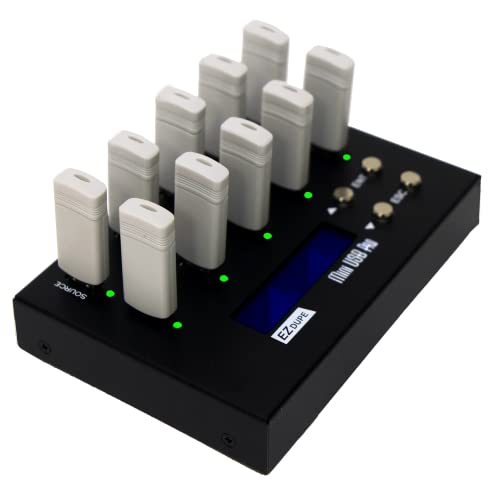
- Copies up to 9 drives simultaneously
- Quick copy and sector-by-sector modes
- Includes 2 erase functions
Best For: Users who want duplication and sanitizing in one standalone unit
Standalone 1:2 USB Duplicator – StarTech USBDUP12 USB Cloner & Eraser
If you need usb duplicators for bulk copying in a small, controlled workflow, the StarTech USBDUP12 is built for straightforward 1-to-2 cloning and erasing without a computer. It supports USB 3.0/2.0 flash media, offers quick and secure erase modes, and includes an LCD menu for checking drive status and running copy-verify tasks.
Best For: IT pros, technicians, and teams that need a compact standalone copier for small-batch USB duplication and sanitizing.
Pros:
- Standalone 1-to-2 copying and erasing with no PC required
- Supports system/file copy, sector-by-sector copy, and multiple erase modes
- Copy & Compare verification plus LCD status display
- Asynchronous mode helps speed repeated swaps for small source files
Cons:
- Only duplicates to two target drives at a time
- Asynchronous mode requires the source content to stay under 64 MB
- Best suited to flash drives and compatible USB storage, not broader high-volume production
Overall, this is a practical pick when you want a portable, standalone duplicator that can both clone and sanitize drives. Its strength is flexibility in copying and erasing, while the 1:2 design keeps it focused on smaller batch jobs.
1-to-7 Bulk USB Copier – Systor SYS-USBD-7 Standalone Duplicator
For usb duplicators for bulk copying, the Systor SYS-USBD-7 is aimed at users who want to replicate up to seven drives from one source without needing a computer. It copies at up to 2GB per minute, keeps the speed consistent as the load increases, and supports both synchronous and asynchronous copy modes for different workflows.
Best For: Businesses, IT departments, and support teams that need a standalone 1-to-7 duplicator for regular multi-drive deployments.
Pros:
- Copies one source to up to seven USB drives at once
- Standalone operation with no computer or software required
- Up to 2GB per minute transfer rate
- Supports synchronous and asynchronous copy modes
Cons:
- Larger desktop unit at 10 pounds
- Primarily focused on USB flash drives and optional 2.5-inch external drives
- No LCD or advanced media-test details listed in the supplied notes
This model makes sense when throughput and repeatability matter more than portability. The bigger load capacity and stable copy speed make it a strong fit for multi-drive duplication jobs in a fixed workspace.
Portable 1:2 USB Cloner – BestDuplicator UB300 USB Copy Machine
The BestDuplicator UB300 is a compact option for usb duplicators for bulk copying when you only need to clone up to two flash drives at a time. It works standalone, supports both quick copy and whole-media bit-for-bit duplication, and includes verification and erase tools for checking drives before rollout.
Best For: IT staff, schools, government users, and field technicians who need a portable standalone USB cloner with basic testing tools.
Pros:
- Standalone 1-to-2 duplication with no computer or software required
- Quick Copy and Whole Media Copy modes for different cloning needs
- Built-in capacity check, speed test, and erase functions
- Portable design with LCD and per-port LED indicators
Cons:
- Only clones two target drives simultaneously
- Best performance is tied to source and target media of similar capacity
- External card support depends on a compatible USB card reader sold separately
In practice, the UB300 is best when portability and basic drive validation matter as much as copying itself. It is not a high-volume tower, but it covers small jobs cleanly and without needing a host computer.
1-to-15 Bulk USB Duplicator – Systor SYS-USBD-15 High-Volume Duplicator
If you need usb duplicators for bulk copying at a much larger scale, the Systor SYS-USBD-15 is built to clone one source to as many as fifteen drives without a computer. It uses bit-by-bit duplication, supports synchronous and asynchronous copy modes, and is rated for up to 2GB per minute transfer speed.
Best For: Organizations that need a standalone 1-to-15 USB duplicator for larger deployment runs in a fixed workspace.
Pros:
- Copies one source to up to fifteen target drives
- Standalone operation with no computer or software required
- Up to 2GB per minute transfer speed
- Supports synchronous and asynchronous copy modes
Cons:
- Bulky desktop-style unit rather than a portable cloner
- Focuses on USB duplication, with no extra testing features highlighted in the notes
- Best suited to a dedicated copying station
This model is the most scalable option in the group and is a clear fit for users who repeatedly clone large batches of drives. If your workflow is about output volume and steady throughput, the 1-to-15 layout is the main advantage.
Standalone 1:15 USB Duplicator & Eraser – StarTech LCD Cloner for 15-Drive Jobs
If you need usb duplicators for bulk copying without tying up a computer, this StarTech model is built for straightforward drive management. It handles cloning, erasing, and verification in one standalone unit, making it practical for IT teams that regularly prepare or wipe multiple flash drives.
Best For: Technicians and IT pros who need to duplicate, sanitize, and verify USB drives in batches.
Pros:
- 1:15 standalone cloning, so no computer is required.
- Supports copy, compare, quick erase, and 3-pass overwrite modes.
- LCD menu and LEDs help monitor status and check for errors or bad sectors.
- Asynchronous copy mode can speed workflow when source content is under 128 MB.
Cons:
- Asynchronous mode is limited to source content under 128 MB.
- External USB devices may need their own power source.
- Bulk capacity tops out at 15 drives per run.
Overall, this is a strong choice if your priority is a standalone duplicator that also covers erasing and drive checks. It is best suited to controlled IT workflows where reliability and verification matter more than maximum slot count.
High-Capacity 1:31 USB Duplicator – Systor 31-Bay Copier for Large Batches
When you want usb duplicators for bulk copying at a larger scale, this Systor unit stands out with its 1 to 31 layout and fully standalone operation. It is designed for fast bit-by-bit copying and includes both synchronous and asynchronous modes, which makes it useful for batch production and repeated drive prep.
Best For: Businesses that need to copy or sanitize a large number of USB flash drives in one run.
Pros:
- Copies up to 31 drives at once without needing a computer.
- Transfer rate is rated up to 2 GB per minute, with speed staying consistent as loads increase.
- Supports both synchronous and asynchronous copy modes.
- Includes sanitizing/duplication features and lifetime technical support.
Cons:
- Uses USB 1.1 hardware interface, which is older than newer USB standards.
- No detailed display or advanced verification features are listed in the supplied notes.
- Focused on flash drive copying, so it is less flexible than multifunction desktop gear.
This is a practical pick if slot count is the main buying factor and you need a high-volume standalone duplicator. It makes the most sense for repetitive business workflows where consistency and scale matter.
Touchscreen 1:10 USB Duplicator – EZ Dupe SOHO Touch for Easy Daily Copying
If you prefer usb duplicators for bulk copying with a simpler interface, the EZ Dupe SOHO Touch focuses on easy operation and practical daily use. Its touchscreen control covers copy, compare, format, and erase tasks, making it a solid option for teams that want fast thumb-drive duplication with less menu complexity.
Best For: Offices and pro users who want a touchscreen USB duplicator for routine copying and erasing.
Pros:
- Touchscreen interface makes copy, compare, format, and erase tasks easier to manage.
- Rated for high-speed duplication at 35 MB per second.
- Supports all file formats, file sizes, and drive capacities on USB flash media.
- Lightweight but heavy-duty construction is intended for daily operation.
Cons:
- Copies up to 10 drives at once, which is less than higher-capacity systems.
- Does not list standalone sanitizing standards or multi-pass erase modes in the notes.
- Requires a touchscreen workflow, which may not suit users who prefer physical buttons.
For small-to-mid-size duplication jobs, this model balances speed, ease of use, and everyday durability. It is a good fit when your team values a friendly interface over maximum slot count or advanced erasure options.
High-Volume Standalone Cloner – Systor 1 to 55 USB Duplicator & Sanitizer
If you need usb duplicators for bulk copying at scale, the Systor SYS-USBD-55 is built for large production runs without tying up a computer. It works as a complete standalone unit, copies from a source drive in bit-by-bit mode, and keeps the stated transfer rate up to 2GB per minute even as the load increases.
Best For: High-volume teams that need a standalone 1-to-55 copier with sanitizing support and consistent copy speed.
Pros:
- Copies up to 55 USB drives at once.
- Standalone operation requires no computer or software.
- Bit-by-bit duplication with synchronous and asynchronous copy modes.
- Stated speed up to 2GB per minute, or 33MB per second.
Cons:
- Heavy unit at 62 pounds, so it is not very portable.
- Uses USB 1.1 hardware interface in the listed details.
- May be more machine than smaller batch jobs need.
This model makes the most sense when throughput and drive count matter more than compact size. For shops handling repeated bulk copying jobs, it offers a simple standalone workflow with a high lane count.
Compact Fast Batch Copier – EZ Dupe Mini USB Plus MK III 1 to 7
For usb duplicators for bulk copying in a smaller workspace, the EZ Dupe Mini USB Plus MK III focuses on speed and portability. It supports up to 7 USB flash drives at the same time, runs as a standalone unit with no computer needed, and advertises a faster 2.5GB per minute copy rate than the original version.
Best For: Small teams that want a compact standalone duplicator for quick 1-to-7 flash drive runs.
Pros:
- Copies up to 7 USB flash drives simultaneously.
- Standalone plug-and-use operation with no computer required.
- Advertised 2.5GB per minute, or 45MB per second, copy speed.
- Supports USB flash media and external USB storage with its own power source.
Cons:
- Lower capacity than larger multi-bay duplicators.
- External USB HDDs need their own power source.
- Best suited to flash media rather than very large production lines.
This is a practical choice if you want a compact duplicator that still handles a meaningful batch size. Its combination of standalone use, faster stated speed, and improved compatibility makes it a strong fit for recurring small-to-medium jobs.
Versatile Mid-Size Cloner – EZ Dupe MiniUSB Pro 1 to 9
If you want usb duplicators for bulk copying with a little more flexibility, the EZ Dupe MiniUSB Pro supports up to 9 simultaneous copies and works with USB flash media plus USB devices. It also offers quick copy for essential files, whole-media sector-by-sector copying, and erase functions, making it useful beyond basic duplication.
Best For: Buyers who need a standalone 1-to-9 duplicator that can also sanitize drives and handle different copy modes.
Pros:
- Copies up to 9 USB flash drives simultaneously.
- Standalone operation with no computer needed.
- Supports quick copy and whole-media sector-by-sector copy modes.
- Includes 2 erase functions for data sanitizing.
Cons:
- Smaller capacity than high-volume 1-to-55 systems.
- External USB hard drives must have their own power source.
- Stated copy speed is 2GB/min, which is solid but not the fastest in the group.
This model lands in the middle of the pack for capacity while adding more useful workflow options. It is a sensible pick for users who want duplication plus basic erasing in one standalone box.
How We Picked These USB Duplicators for Bulk Copying
For USB Duplicators for Bulk Copying, we prioritized standalone operation, dependable verification, clear menus, and support for common flash media. We also looked at target bay count, transfer speed claims, erase/sanitize functions, and whether the unit fits small teams or larger production runs.
Quick Comparison
Match the duplicator size to your workload first. Two-bay units suit simple master-to-copy jobs, 7- to 10-target systems fit office deployment, and 15-plus bay models are better for recurring batch distribution. If you need mixed media support or a faster workflow, look for USB 3.x compatibility and a touchscreen or LCD interface.
Key Buying Factors for USB Duplicators for Bulk Copying
Target Count and Throughput
More targets do not always mean faster per-drive performance, but they do improve batch efficiency. Choose the smallest unit that matches your weekly volume so you do not overpay for capacity you rarely use.
Speed and Media Compatibility
Check whether the duplicator supports only USB 2.0 flash drives or also handles USB 3.0/3.1 devices and, in some cases, USB hard drives. Real-world speed depends on the slowest drive in the batch, so mixed-drive jobs usually run at the pace of the weakest device.
Erase and Sanitization Features
If your workflow includes device reuse, secure erase or sanitization matters. These functions help IT, education, healthcare, and managed-service teams prepare drives for redeployment or disposal.
Interface and Workflow
LCD and touchscreen menus can make setup easier, especially for nontechnical staff. Look for clear status reporting, copy progress, and pass/fail indicators to reduce handling errors.
Who Should Buy Which USB Duplicators for Bulk Copying?
Buy a 1:2 or compact 1:7 unit if you need portable, low-volume duplication for small offices or field teams. Choose 1:9 to 1:15 models for regular deployment work, giveaways, or training materials. Step up to 1:31 or 1:55 systems when you need the highest batch output and consistent repeatability. For mixed media or a more modern workflow, a touchscreen model with USB 3.x support is often the most flexible choice.
In short, the best option depends on how many drives you duplicate at once, how often you do it, and whether sanitizing and reuse are part of the job.