A good USB extension cable can make a desktop setup cleaner, more comfortable, and easier to access. The right choice depends on the distance you need to cover, the USB speed your devices require, and whether you need extra ports.
We compared 10 options ranging from compact pedestal cables to long braided extenders and powered-style multiport hub designs, focusing on practical desktop use with keyboards, mice, webcams, storage devices, and adapters.
Best 10 USB Extension Cables for Desktop Setups Picks for 2026
Long-Reach Performance
Cable Matters 10ft USB 3.0 Extension

- 10-foot male-to-female USB extension
- Up to 5 Gbps transfer speeds
- Compatible with USB 3.0 and USB 2.0 devices
Best For: Large desks, VR gear, and long-distance peripheral placement
Flexible Two-Pack Value
UGREEN 3ft Braided USB Extensions
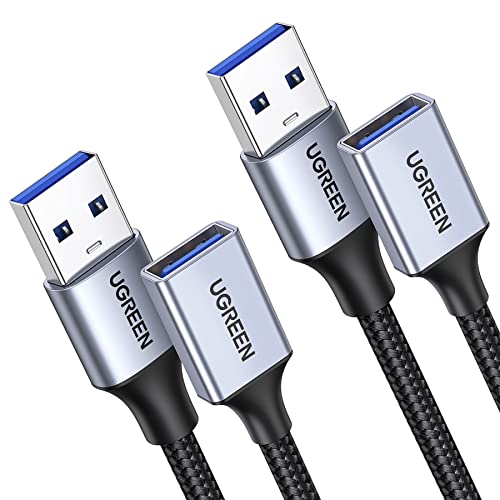
- Two 3-foot USB 3.0 cables included
- Up to 5 Gbps data transfer
- Braided design with 2A charging support
Best For: Office desks using multiple nearby USB peripherals
Reliable Desktop Standard
StarTech 5ft USB 3.0 Extension

- Five-foot desktop-friendly length
- Up to 5 Gbps transfer rates
- Shielded twisted-pair construction
Best For: Everyday desktop peripherals and accessible port placement
Extra-Length Twin Pack
JSAUX 10ft Braided USB Extensions

- Two 10-foot USB 3.0 cables
- Up to 5 Gbps transfer speeds
- Nylon braid with 18-month warranty
Best For: Large workstations, gaming areas, and distant peripherals
Desktop Port Expander
Tripp Lite 2-Port USB 3.0 Extension

- 6-foot USB 3.0 reach
- Up to 5 Gbps data transfer
- One data/power port and one power-only port
Best For: Desktop users needing extra USB-A reach and a second accessible port
Easy-Access Extension
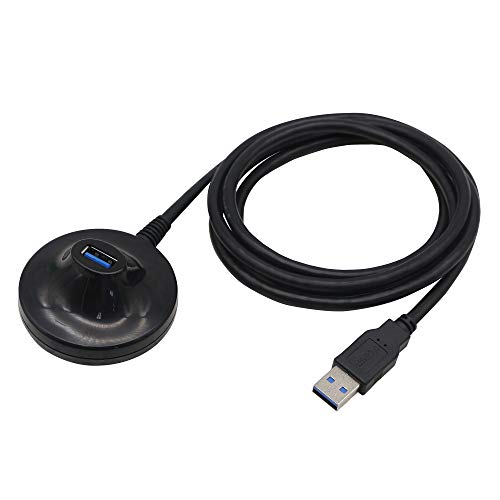
- Accessible pedestal-style port
- Up to 5 Gbps transfer speed
- Plug-and-play USB-A connection
Best For: Workstations needing a convenient port for frequently connected peripherals
Long-Reach Hub
Arvitek 4-Port USB 3.0 Hub with 10ft Cable

- Four USB 3.0 ports
- 10-foot cable for flexible layouts
- Up to 5 Gbps, data only
Best For: Multi-device desktop setups needing long-distance USB-A data connectivity
Best Value Pack
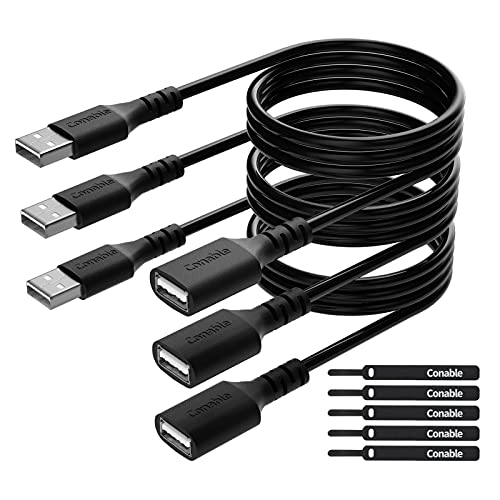
- Three 6-foot USB 2.0 cables
- 480 Mbps data transfer
- Includes five cable ties
Best For: Multi-device desktop cable extensions
Best for Port Expansion

- Four USB ports from one connection
- 5 Gbps data transfer
- 4-foot desk-friendly cable
Best For: Desktops needing extra peripheral ports
Best Desktop Dock
USB 3.0 Extension with Pedestal

- 4.9-foot male-to-female cable
- 5 Gbps USB 3.0 transfer speed
- Raised pedestal for desk access
Best For: Organized desktop USB access
Long-Reach Performance – Cable Matters 10ft USB 3.0 Extension
For desktop setups where a nearby USB port is out of reach, this 10-foot Cable Matters cable provides a practical way to extend USB 3.0 or USB 2.0 peripherals. It supports transfer rates up to 5 Gbps and works with devices such as hard drives, hubs, printers, keyboards, and VR headsets.
Best For: Large desks, VR equipment, and peripherals positioned several feet from the computer.
Pros:
- Long 10-foot reach for flexible desktop placement.
- Supports data transfer speeds up to 5 Gbps.
- Backward compatible with USB 2.0 and USB 1.x devices.
- Shielding, bare copper conductors, and gold-plated connectors support reliable transmission.
Cons:
- Its longer length may be more cable than compact setups need.
- Uses a round PVC outer jacket rather than a braided exterior.
This is a strong choice among USB extension cables for desktop setups when reach and high-speed compatibility matter most. Molded strain relief and grip treads also make frequent plugging and unplugging easier.
Flexible Two-Pack Value – UGREEN 3ft Braided USB Extensions
UGREEN’s two-pack gives desktop users two 3-foot USB 3.0 extension cables for positioning everyday peripherals without reaching behind a computer or desk. They support up to 5 Gbps data transfer and phone charging up to 2A.
Best For: Office workstations that need multiple short extensions for webcams, keyboards, hubs, printers, or mice.
Pros:
- Includes two 3-foot cables for multi-device setups.
- Supports up to 5 Gbps data transfer and up to 2A charging.
- Braided shielding and aluminum alloy connectors are designed for durability.
- Plug-and-play operation requires no driver installation.
Cons:
- Three feet may not be sufficient for widely separated equipment.
- The two-pack may be unnecessary if only one extension is needed.
For compact USB extension cables for desktop setups, this UGREEN kit balances convenient length, useful speed, and extra-cable flexibility. Its flat-and-round braided construction is especially practical for routine office connections.
Reliable Desktop Standard – StarTech 5ft USB 3.0 Extension
This 5-foot StarTech USB-A male-to-female extension relocates a computer’s USB port to a more accessible position on the desktop. It delivers up to 5 Gbps transfer speeds, supports USB 2.0 devices, and uses shielded twisted-pair construction to help limit interference.
Best For: Standard desktop workstations needing a moderate-length extension for storage devices, cameras, or flash drives.
Pros:
- Five-foot length suits many desktop arrangements.
- Supports USB 3.0 speeds up to 5 Gbps.
- Backward compatible with USB 2.0.
- Shielded twisted-pair construction helps support reliable data communication.
Cons:
- Only one cable is included.
- PVC construction lacks the braided exterior offered by some alternatives.
Among USB extension cables for desktop setups, this StarTech model is a straightforward middle-ground option: longer than a short patch cable without the extra slack of a 10-foot model. Its stated lifetime warranty adds reassurance for ongoing desktop use.
Extra-Length Twin Pack – JSAUX 10ft Braided USB Extensions
JSAUX supplies two 10-foot USB 3.0 extension cables for setups where peripherals need to be placed well away from the computer. They support up to 5 Gbps transfers, work with USB 2.0 and USB 1.1 devices, and can help reduce repeated access to an original USB port.
Best For: Extended desktop, entertainment, gaming, and workstation layouts using multiple distant USB devices.
Pros:
- Two generous 10-foot cables provide substantial placement flexibility.
- Supports data transfer speeds up to 5 Gbps.
- Nylon braiding, gold-plated connectors, and shielding support durability and signal clarity.
- Includes an 18-month warranty and compatibility with many common USB peripherals.
Cons:
- Ten-foot cables can create excess slack in compact desk setups.
- The pack may be more than needed for a single nearby device.
This is one of the more useful USB extension cables for desktop setups that need maximum reach and more than one connection. The twin-pack format is convenient for separating multiple devices, while the braided exterior is suited to regular handling.
Desktop Port Expander – Tripp Lite 2-Port USB 3.0 Extension
Tripp Lite 6ft 2-Port USB 3.0 Superspeed Desktop Extension Cable M/F 6' (U324-006-DSK2), Black
Check Price On AmazonFor desktop setups that need both extra reach and an additional connection point, this Tripp Lite cable combines a 6-foot USB 3.0 extension with two female ports. It supports transfer speeds up to 5 Gbps and works with earlier USB generations.
Best For: Expanding USB-A connectivity around a monitor, PC, or desktop workstation.
Pros:
- Provides one USB 3.0 data-and-power port plus one power-only port.
- Supports data transfer rates up to 5 Gbps.
- Offers a 6-foot reach and a lifetime limited warranty.
- Backward compatible with previous USB generations.
Cons:
- Only one of the two ports supports data transfer.
- Uses USB Type-A connectors, so it is not suited to USB-C-only devices without an adapter.
This is a practical choice among usb extension cables for desktop setups when you want a tidy, accessible pair of USB-A ports rather than a simple one-port extension.
Easy-Access Extension – 4.7ft USB 3.0 Pedestal Cable
This 4.7-foot USB 3.0 male-to-female cable brings a USB-A connection closer to your desk surface, making it easier to attach flash drives, keyboards, mice, and other peripherals. It supports transfer speeds up to 5 Gbps and requires no driver installation.
Best For: Desktop users who want a convenient, raised connection point for frequently used USB-A devices.
Pros:
- Pedestal design makes the extended USB port easier to access.
- Supports USB 3.0 transfer speeds up to 5 Gbps.
- Backward compatible with USB 2.0, 1.1, and 1.0.
- Shielding and braided construction are designed to help resist interference and pulling.
Cons:
- Its 4.7-foot length provides less reach than longer desktop extension options.
- It has a single USB-A extension port.
Among usb extension cables for desktop setups, this model stands out for accessibility: it is well suited to workstations where the computer’s USB port is inconveniently positioned.
Long-Reach Hub – Arvitek 4-Port USB 3.0 Hub with 10ft Cable
For a desktop setup that needs several peripherals positioned away from the computer, this Arvitek hub pairs a 10-foot cable with four USB 3.0 ports. It supports speeds up to 5 Gbps and works with Windows, Mac OS, and Linux without requiring drivers.
Best For: Desktops, laptops, gaming stations, and workspaces that need four remotely positioned USB ports.
Pros:
- Offers four USB 3.0 ports from one host connection.
- Its 10-foot cable accommodates flexible desk layouts.
- Supports data transfer speeds up to 5 Gbps.
- Compatible with Windows, Mac OS, and Linux using plug-and-play setup.
Cons:
- Designed for data transmission only, not charging.
- It is a hub rather than a basic single-port extension cable.
This is the most capable option here for centralized desktop connectivity. Choose it when your setup needs multiple USB-A data ports and substantial cable reach, but avoid it if charging is a primary requirement.
Best Value Pack – 6-Foot USB Extension Cables
For desktop setups that need extra reach without adding a hub, this three-pack of 6-foot USB 2.0 extension cables is a practical, budget-friendly option. The male-to-female design supports plug-and-play data transfer and standard charging for common USB peripherals.
Best For: Extending keyboards, mice, printers, flash drives, controllers, and other USB 2.0 accessories around a desk.
Pros:
- Three 6-foot cables provide useful reach for multiple desktop devices.
- Supports data transfer up to 480 Mbps and is backward compatible with USB 1.1.
- Includes five cable ties for tidier cable management.
- Pure copper conductors, shielding, and reinforced strain relief support everyday durability.
Cons:
- USB 2.0 is slower than USB 3.0 for large file transfers.
- The three-pack may be more than needed for a single-device setup.
This is a sensible pick when you want several long extension leads at a low cost. It is best suited to routine peripherals rather than speed-focused storage workflows.
Best for Port Expansion – 4-Port USB 3.0 Hub
For desktop setups that need both reach and more connections, this USB 3.0 hub combines a 4-foot extension cable with four USB ports. It can place frequently used accessories within easy reach while supporting data transfers up to 5 Gbps.
Best For: Desktop users connecting keyboards, mice, webcams, speakers, printers, flash drives, and other USB peripherals.
Pros:
- Expands one USB port into four.
- USB 3.0 supports data transfer rates up to 5 Gbps.
- The 4-foot cable helps position the hub conveniently on a desk.
- Plug-and-play operation, hot swapping, and backward compatibility with USB 2.0 and 1.1.
Cons:
- It is not designed to charge devices.
- A hub uses one host USB port for access to all four ports.
This is more versatile than a simple extension cable when your desktop is short on accessible USB ports. Choose it for peripheral connectivity and fast data transfer, not dedicated charging.
Best Desktop Dock – USB 3.0 Extension with Pedestal
This 4.9-foot USB 3.0 extension cable adds a freestanding pedestal that brings a USB-A port up onto the desktop. It is a convenient choice for setups where the computer port sits behind a desk, under a table, or in another hard-to-reach location.
Best For: Desktop organization and convenient access to USB Wi-Fi adapters, flash drives, card readers, keyboards, and mice.
Pros:
- Pedestal design provides an accessible desktop connection point.
- USB 3.0 supports transfer speeds up to 5 Gbps.
- Supports charging and synchronous data transmission.
- Backward compatible with USB 2.0, 1.1, and 1.0 devices.
Cons:
- Only one extension cable is included.
- The pedestal adds more desk hardware than a standard cable.
The built-in stand makes this a particularly tidy solution for desktop setups where accessibility matters. It offers faster USB 3.0 performance while also reducing repeated plugging into the computer’s original port.
How We Picked the Best USB Extension Cables for Desktop Setups
We focused on cable length, USB standard, connector type, construction, and desktop practicality. The selection includes USB 3.0 and 5Gbps options for faster peripherals, USB 2.0 cables for basic accessories, and hub-style products for users who need multiple connections. We also considered braided jackets, compact designs, pedestal bases, and cable arrangements that help keep ports within reach.
Because compatibility can vary by device, these products should be viewed by their stated specifications rather than appearance alone. A USB 3.0 or 5Gbps cable is generally the better fit for storage, cameras, and other high-bandwidth devices, while USB 2.0 is often sufficient for keyboards, mice, and printers.
Quick Comparison
| Best For | Recommended Type | Why It Makes Sense |
|---|---|---|
| Most desktop users | USB 3.0 or 5Gbps, 5–10 feet | Balances reach and data performance |
| Multiple peripherals | 4-port USB hub | Adds accessible connections from one cable |
| Basic accessories | USB 2.0 extender | Affordable for keyboards, mice, and printers |
| Desk-mounted access | Pedestal-style extension | Keeps the connection upright and easy to reach |
| Flexible routing | Nylon-braided cable | Useful for frequent repositioning and cable management |
Key Buying Factors for USB Extension Cables for Desktop Setups
USB Speed and Device Demands
Check whether you need USB 2.0 or USB 3.0/5Gbps performance. A faster cable cannot make a slow device faster, but choosing USB 3.0 or better helps avoid unnecessarily limiting compatible storage drives, cameras, and hubs.
Length and Signal Reliability
Choose the shortest cable that comfortably reaches your preferred position. Longer cables improve flexibility but can create more desk clutter. For demanding devices, avoid unnecessary daisy-chaining and confirm the product’s advertised speed at its listed length.
Connector and Port Layout
Most options here use USB-A male-to-female connections, so verify that your computer and peripheral have the required ports. If your desktop uses USB-C, you may need a different cable or a reliable adapter.
Build and Convenience
Braided jackets can better tolerate bending, while pedestal designs make front-facing access easier. A hub is more convenient than a simple extension when several devices must remain connected, but it occupies more space and may require closer attention to power limitations.
Who Should Buy Which USB Extension Cables for Desktop Setups?
Choose a 5–10-foot USB 3.0 or 5Gbps extension for a typical desktop where rear ports are difficult to reach. Pick a shorter cable when you only need to move a device slightly closer. A braided model suits users who frequently adjust their workstation, while a pedestal cable is useful for quick access to flash drives, wireless adapters, or other small peripherals.
If your setup regularly uses several accessories, select a 4-port USB hub instead of buying multiple separate extenders. For a keyboard, mouse, printer, or similarly low-bandwidth device, a USB 2.0 multi-pack can be a practical budget choice. Before ordering, confirm connector type, required speed, desired length, and whether the device needs more power than a standard desktop USB port can provide.