Choosing the right microscope can make solder joints, trace inspection, and component swaps faster and less frustrating. The best USB microscopes for electronics repair balance magnification, working distance, lighting, and stable focus.
Below, we’ve narrowed the field to practical options for bench use, from compact PC-connected units to larger screen-based models with more comfort for long repair sessions.
Best 10 USB Microscopes for Electronics Repair Picks for 2026
Flagship HDMI Workstation
Andonstar AD249S-M 10.1" 3-Lens Microscope

- 10.1-inch display with HDMI output
- 3-lens setup for repair and general use
- Pro boom arm and LED lighting
Best For: Bench users needing a versatile repair microscope with a large screen
Measurement-First Camera Kit
AmScope MU1000-CK 10MP USB Camera
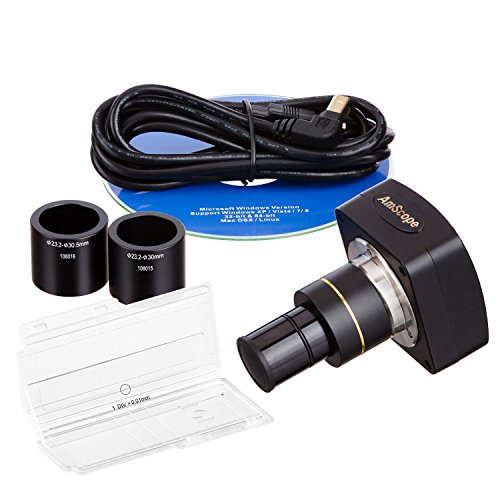
- 10MP USB camera with live video
- Calibration kit included for measurements
- Works with Windows, Mac, and Linux
Best For: Users with an existing scope who need a USB camera and measurement tools
Compact Bench Pick
Andonstar AD246S-M 7" HDMI Microscope

- 7-inch LCD with HDMI output
- 3 lenses for repair and general viewing
- Adjustable boom arm for bench use
Best For: Repair benches that need a smaller screen and the same multi-lens design
Portable LCD Option
4.3" Wireless USB Digital Microscope

- Built-in 4.3-inch LCD screen
- 50X-1000X magnification range
- Rechargeable battery and 8 LEDs
Best For: Portable inspection and quick electronics checks without a computer
Simple USB Repair Pick
Andonstar HD 2MP USB Digital Microscope

- USB microscope designed for repair and soldering tasks.
- 2MP HD imaging with LED illumination.
- Achromatic objective lens for basic close-up viewing.
Best For: Users who want a straightforward USB microscope for routine repair work.
Bench-Friendly Screen Microscope
TOMLOV DM9 7" Digital Microscope

- 7-inch rotatable screen helps reduce neck strain at the bench.
- 12MP camera with 1080P imaging and 5X-1200X range.
- PC compatibility, LED lighting, and 16GB SD card included.
Best For: Makers and repair users who want a built-in screen plus PC viewing for board work.
Premium Soldering Station Microscope
Andonstar AD249S-M Plus 10.1'' HDMI

- 3-lens system for repair, general use, and slides
- 10.1-inch display with HDMI and 2160P recording
- Includes helping hands, tool holder, and 32GB card
Best For: Bench-based electronics repair with a full accessory-packed station
Portable LCD Inspection Scope

- 4.3-inch 720P screen with 8 LED lights
- Windows and MacBook PC view support
- Height-adjustable stand for flexible inspection
Best For: Portable board inspection and simple PC-connected viewing
Flexible Arm Repair Microscope
5" LCD Digital Soldering Scope

- 5-inch IPS display with 1080P PC view
- Flexible goose-neck stand for tight workspaces
- Plug-and-play Windows and Mac connection
Best For: Users who want easy PC viewing and flexible bench positioning
Flagship HDMI Workstation – Andonstar AD249S-M 10.1" 3-Lens Microscope
If you want USB microscopes for electronics repair with a larger viewing setup, the Andonstar AD249S-M is built around a 10.1-inch display, HDMI output, and a pro boom arm stand. Its L lens is specifically aimed at soldering and repair work like circuit boards and mobile phones, while the other lenses expand it into coin, plant, and slide observation.
Best For: Bench users who want a versatile, large-screen microscope for electronics repair plus general inspection tasks.
Pros:
- 3 interchangeable lenses cover soldering, general viewing, and biological slides.
- Supports 2160P video recording and HDMI output for a larger screen.
- Upgraded metal boom arm is adjustable and suited to soldering environments.
- Includes measurement software support on Windows, plus remote control and LED brightness levels.
Cons:
- Uses a larger bench-style setup, so it is not the most compact option.
- Windows PC measurement features require separate software setup.
- Much of its value depends on using the screen and boom stand rather than handheld use.
This is the most feature-rich choice in the group if you need a microscope that can handle detailed board work and still double as a multi-purpose inspection tool. It makes the most sense when you want a fixed workstation instead of a small portable unit.
Measurement-First Camera Kit – AmScope MU1000-CK 10MP USB Camera
For USB microscopes for electronics repair, this AmScope unit is less of a full microscope and more of a digital camera solution for existing optics. It captures 10MP stills, streams live video, and includes a calibration kit, making it a practical fit when measurement and documentation matter more than built-in display features.
Best For: Users who already have a compatible microscope and want a USB camera with measurement tools.
Pros:
- 10MP USB camera captures still images and live video.
- Calibration kit is included for more precise measurement work.
- Compatible with Windows, Mac OS X, and Linux systems.
- Supports multiple software interfaces including Directshow, Twain, and Labview.
Cons:
- It is a camera accessory, not a complete microscope system.
- Requires a compatible mount size to install properly.
- Best results depend on using it with the right software and existing optics.
This model stands out when you need capture and calibration features for inspection records, not an all-in-one bench microscope. It is the most technical option here for users building a measurement-focused setup.
Compact Bench Pick – Andonstar AD246S-M 7" HDMI Microscope
If you want USB microscopes for electronics repair in a smaller bench footprint, the Andonstar AD246S-M keeps the same 3-lens approach but uses a 7-inch LCD instead of the larger 10.1-inch screen. It still supports 2160P video recording, HDMI output, and the adjustable pro boom arm, so it remains well suited to circuit board and mobile phone work.
Best For: Electronics repair users who want the Andonstar feature set in a more compact display format.
Pros:
- 3 lenses cover soldering, general viewing, and biological slide observation.
- 2160P recording and HDMI output support larger-screen viewing.
- Adjustable metal boom arm is designed for soldering and repair spaces.
- Includes remote control, LED lighting levels, and Windows measurement software support.
Cons:
- The 7-inch screen is smaller than the 10.1-inch version.
- Windows software is needed for measurement features on PC.
- Still a fixed bench setup rather than a portable handheld microscope.
This is the better fit if you like the Andonstar repair-focused design but do not need the largest built-in screen. It balances capability and footprint well for a dedicated electronics bench.
Portable LCD Option – 4.3" Wireless USB Digital Microscope
For buyers comparing USB microscopes for electronics repair, this 4.3-inch LCD model focuses on portability and simple operation. It offers 50X to 1000X magnification, adjustable LED lighting, a rechargeable battery, and a metal bracket, making it useful for quick inspection of circuit boards and other small parts.
Best For: Portable inspection and light repair work when you want an independent screen and battery power.
Pros:
- Built-in 4.3-inch LCD screen lets you use it without a computer.
- Battery-powered design supports 4-5 hours of use.
- 50X-1000X magnification covers circuit board inspection and similar tasks.
- Includes 8 adjustable LED lights and a 32GB microSD card for saving media.
Cons:
- It is a lighter-duty setup than the larger bench microscopes.
- Best suited to inspection and recording rather than a full soldering workstation.
- Magnification and focus are manual, so setup still matters for sharp results.
This is the most portable option in the roundup and makes sense if you want a microscope you can move around easily. It is a practical choice for quick checks, basic documentation, and users who do not want to rely on a PC.
Autofocus 4K Flex-Arm Choice – TOMLOV TM4K-AF Max 10.1" HDMI Microscope
If you want USB microscopes for electronics repair that reduce time spent refocusing, the TOMLOV TM4K-AF Max is built around autofocus, TOF distance sensing, and AI-assisted focusing. Its 10.1-inch IPS screen, 4K UHD output, and flexible spin arm make it a strong fit for soldering, inspection, and other close-up bench work where clarity matters.
Best For: Repair technicians and hobbyists who want hands-free focusing and a large built-in display for detailed board work.
Pros:
- Autofocus with TOF and AI support helps keep details sharp without constant manual adjustment.
- 10.1-inch IPS screen with 4K UHD video and 52MP images gives a roomy, detailed view.
- 360° spin arm and adjustable pillar support positioning for micro soldering and inspections.
- Ring light and real-time HDMI/USB output improve visibility and multi-screen use.
Cons:
- Large screen and flex-arm setup take more bench space than compact microscopes.
- Feature set may be more than needed for very basic inspection tasks.
Overall, this model stands out when you need fast focusing and a larger viewing area for electronics work. It is especially appealing for users who value convenience, sharp imaging, and the ability to capture photos or video without touching the display.
Simple USB Repair Pick – Andonstar HD 2MP USB Digital Microscope
For buyers comparing USB microscopes for electronics repair, the Andonstar HD 2MP model keeps things straightforward with a USB connection, LED lighting, and a design aimed at repair and soldering. It is a practical option when you mainly need a basic digital microscope for close inspection rather than a long list of extra features.
Best For: Users who want a simple USB microscope for routine repair and soldering tasks.
Pros:
- USB microscope design is simple and direct for repair setups.
- 2MP HD imaging is suitable for basic close-up inspection.
- LED light source helps illuminate small components during soldering.
- Achromatic objective lens supports clearer viewing for repair work.
Cons:
- 2MP resolution is modest compared with higher-end digital microscopes.
- Supplied details do not list advanced focusing or screen features.
This is a no-frills option for shoppers who want a USB-powered microscope focused on the essentials. It makes the most sense if you value simplicity over premium imaging or large-display convenience.
Bench-Friendly Screen Microscope – TOMLOV DM9 7" Digital Microscope
If you need USB microscopes for electronics repair that are easy to use on the bench, the TOMLOV DM9 offers a 7-inch rotatable screen, 1080P imaging, and a focusing setup aimed at close inspection. Its lighting, PC compatibility, and included storage make it a practical fit for soldering, PCB checks, and general micro work.
Best For: Makers and repair users who want a built-in screen with PC viewing for PCB inspection and micro soldering.
Pros:
- 7-inch rotatable FHD screen improves ergonomics and reduces neck strain.
- 12MP camera with 1080P imaging supports detailed close-up viewing.
- 5X-1200X range and multiple LED/gooseneck lights help with small components.
- PC compatibility and 16GB SD card add flexibility for viewing and storage.
Cons:
- Actual magnification depends on screen size and working distance.
- Not as compact as a purely USB-only microscope setup.
For users who want a balanced mix of screen-based convenience and PC connectivity, this model covers the basics well. It is a sensible choice for electronics repair when you want a clear view without jumping to a more complex premium system.
Premium Soldering Station Microscope – Andonstar AD249S-M Plus 10.1'' HDMI
If you want USB microscopes for electronics repair that can also double as a full soldering station, the Andonstar AD249S-M Plus is built for bench work. Its 10.1-inch display, HDMI output, and included helping hands make it practical for inspecting solder joints, holding parts, and recording repairs without crowding your workspace.
Best For: Repair benches that need a larger built-in display, HDMI monitor support, and integrated soldering accessories.
Pros:
- Three-lens system covers soldering, general inspection, and higher-magnification slide viewing.
- UHD 2160P video recording with HDMI output for larger-screen viewing.
- Upgraded boom arm stand adds workspace area and storage boxes.
- Includes helping hands, tool holder, slides, 32GB card, and remote.
Cons:
- More of a station setup than a compact handheld microscope.
- Highest magnification depends on lens choice and digital zoom.
- USB use is mainly for PC connection and software functions, not standalone portability.
For electronics repair shops or hobbyists who want an all-in-one bench microscope, this model stands out for its integrated accessories and large-screen workflow. The extra station features make it especially useful when you need inspection, recording, and hands-free soldering support in one unit.
Portable LCD Inspection Scope – Elikliv EDM4 4.3-Inch
For buyers comparing USB microscopes for electronics repair, the Elikliv EDM4 is a straightforward portable option with a 4.3-inch screen and PC view support. It is designed for circuit board inspection, and the adjustable stand plus 8 LED lights help make small components easier to see during routine bench checks.
Best For: Portable inspection, circuit-board checks, and users who want a simple microscope that can also connect to a computer.
Pros:
- 4.3-inch 720P HD display gives a clear real-time view without needing a separate monitor.
- Supports Windows and MacBook PC viewing for larger-scale inspection and sharing.
- 8 adjustable LED lights help improve visibility in low-light work areas.
- Height-adjustable stand adds flexibility for focus and working distance.
Cons:
- Memory card is not included for photo and video storage.
- Magnification is highly dependent on screen size and working distance.
- Battery life is limited to about 3 hours of continuous use.
This is a practical choice if you want a simple inspection tool rather than a full soldering station. Its balance of portability, PC connectivity, and built-in display makes it useful for everyday electronics checks, especially when space and setup time matter.
Flexible Arm Repair Microscope – 5" LCD Digital Soldering Scope
If your priority is a practical bench tool among USB microscopes for electronics repair, this 5-inch LCD model focuses on ease of use and a flexible setup. It offers a larger IPS display, plug-and-play PC view, and a goose-neck stand that helps you position the lens over tight soldering areas and small components.
Best For: Soldering benches, quick PC viewing, and users who want a flexible stand without complicated software setup.
Pros:
- 5-inch IPS display reduces eye and neck strain during long repair sessions.
- Plug-and-play PC mode works with built-in Windows Camera or Mac Photo Booth.
- Flexible arm stand adapts well to tight workspaces and irregular objects.
- 1080P recording support for saving repair photos and videos when a Micro SD card is installed.
Cons:
- Micro SD card is required for saving and is not included.
- Not auto-focus; magnification depends on manual distance and focus adjustments.
- Designed for micro-details, not for viewing large objects full-screen.
This microscope is a strong fit for users who value straightforward operation and a forgiving physical setup. The flexible stand and no-fuss PC connection make it especially appealing for repair work where you need to move quickly between inspection, soldering, and image capture.
How We Picked the Best USB Microscopes for Electronics Repair
We focused on features that matter most on a repair bench: usable magnification rather than inflated claims, image clarity for pads and pins, steady focusing, sufficient working distance for a soldering iron, and lighting that reduces shadows. We also favored models with convenient displays or PC output, since comfort and workflow matter as much as raw resolution.
Quick Comparison
In this category, screen-based microscopes are usually best for standalone bench work, while USB-connected models are often better if you want to view, capture, or annotate images on a computer. Larger displays can improve comfort during long sessions, while compact models may suit tighter workspaces or secondary inspection duties.
Key Buying Factors for USB Microscopes for Electronics Repair
Magnification and Image Quality
Look for clear, stable imaging at practical inspection distances. For electronics repair, a crisp view of solder joints, fine-pitch ICs, vias, and lifted pads matters more than extreme maximum magnification.
Working Distance and Stand Design
You need room to move tools under the lens. A stable stand or flexible arm helps maintain focus while giving enough clearance for tweezers, soldering irons, and hot-air tools.
Lighting
Adjustable LEDs are essential. Even illumination reduces glare on shiny solder joints and helps reveal bridges, cracks, and component markings.
Display or USB Workflow
Choose a built-in LCD if you want an all-in-one bench setup. Choose USB connectivity if you prefer using a larger monitor, saving images to a PC, or integrating the scope into documentation and repair logs.
Focus Control and Ease of Use
Fine, predictable focus is more useful than complicated extras. For electronics work, quick setup and repeatable framing save time during inspections and rework.
Who Should Buy Which USB Microscopes for Electronics Repair?
If you do frequent soldering and board-level repairs, a larger-screen model with strong illumination and a stable stand is often the most comfortable choice. If you primarily inspect boards, capture images, or work at a computer, a USB camera-style microscope may fit better. For hobbyists and occasional users, a simpler LCD model usually offers the best balance of cost and convenience.
For most buyers, the best choice is the one that makes your bench workflow easier, not the one with the biggest claimed zoom. Prioritize clear imaging, usable space under the lens, and lighting that helps you see the work clearly.