If you are searching for an Itramax Continuity Camera Mount for iMac review, this one is built for a very specific job: turning a compatible iPhone into a desk webcam.
It makes the most sense for people who want a cleaner continuity-camera setup above a monitor, not for anyone needing a universal phone stand.
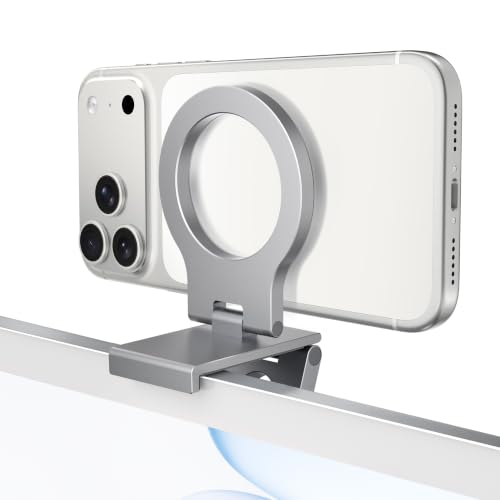
Continuity Camera Mount Review Summary
The Itramax Continuity Camera Mount for iMac is a focused accessory for desktop video calls, streaming, and content capture.
It suits buyers who already use an iPhone as a webcam and want a more stable, monitor-top position than a hand-placed phone or improvised stand can offer.
Verdict: Good if you want a portable, MagSafe-oriented webcam mount for a desktop monitor, but less ideal for laptops and tricky monitor edges.
Review Scorecard
| Category | Score | Rationale |
|---|---|---|
| Webcam setup fit | 9 | Designed specifically for continuity camera and rear-camera use on desk monitors. |
| Monitor compatibility | 7 | Works with many desktop displays, but thick, curved, or uneven edges may reduce fit. |
| Magnetic convenience | 8 | Strong magnetic hold for bare MagSafe iPhones and supported cases, with metal rings included. |
| Portability | 9 | Foldable body makes it easy to store and travel with. |
| Case flexibility | 7 | Included rings help, but thick or soft cases can weaken grip or adhesion. |
| Setup simplicity | 8 | Straightforward monitor-top placement with no complex moving parts. |
| Value for purpose | 8 | A purpose-built accessory with useful extras like rings, wipes, and guides. |
Key Features and Specifications of Itramax Continuity Camera Mount
This product is an aluminum-alloy, foldable phone webcam mount that sits above a monitor and positions an iPhone for rear-camera use.
The listing calls out compatibility with iMac, Mac mini, Apple TV 4K, Studio Display, external monitors, and desktop workstations.
The most important functional detail is the camera orientation.
The mount is meant for rear-camera use, so the phone screen faces away while the camera faces the user.
That is the right design for people who want higher-quality video calls or recordings using the camera on the back of the phone.
It is also more flexible than a bare magnetic clip.
The package includes 2 adhesive metal rings, 2 cleaning wipes, 2 positioning guides, and a user manual, which helps when the phone or case is not directly MagSafe-compatible.
Key evidence-based details:
- Aluminum alloy body with soft silicone contact pads
- Foldable design for storage and travel
- Built-in 1/4-inch threaded hole for compatible tripods and stands
- Includes 2 adhesive metal rings for non-MagSafe devices or cases
- Includes 2 cleaning wipes and 2 positioning guides
- Standard model does not include a 360-degree swivel
The compatibility notes matter more here than on a generic phone stand.
The listing says bare MagSafe iPhones and MagSafe-compatible cases should work best, while thick, rubberized, textured, or soft cases may reduce magnetic grip or ring adhesion.
It also warns that heavier phones may tilt some MacBook screens backward, which is why the desktop-monitor use case is the safer fit.
Pros and Cons of Itramax Continuity Camera Mount
Pros
- Purpose-built for continuity camera use instead of trying to be a do-everything desk accessory
- Foldable and portable for travel, hybrid work, or storage between calls
- Magnetic setup is convenient for supported iPhones and compatible cases
- Includes useful extras like metal rings, wipes, and alignment guides
- Tripod-compatible threaded hole expands setup options beyond monitor mounting
Cons
- Not ideal for thin laptops and can be a poor fit for some MacBook screen setups
- Monitor shape matters because thick, curved, or uneven top edges may interfere with fit
- No 360-degree swivel on this standard model
- Case compatibility is not universal if you use a thick or soft case
Who Should Buy Itramax Continuity Camera Mount?
Buy it if you already use an iPhone as a webcam and want a more intentional mount for a desktop display.
It is also a strong fit if you split time between home and travel and want something that folds flat.
This is especially relevant for Mac users who want a continuity-camera setup above an iMac, Studio Display, external monitor, or similar desk screen.
The product is also sensible for remote workers, streamers, and people who record from a fixed desk position.
Skip it if you mainly want a general-purpose phone stand, if your monitor has a difficult top edge, or if you rely on a thick case that weakens magnetic attachment.
It is also a weaker match if you plan to use it primarily on a laptop rather than a monitor.
Mounting and Usage Analysis
Monitor Top Fit
The core value of this product is simple: it places the phone where a webcam normally belongs.
That makes the setup feel cleaner and more deliberate than balancing a phone on a desk or propping it beside a monitor.
The limitation is also simple: not every monitor top is a good landing zone.
The listing explicitly warns that thick, curved, or uneven edges may affect fit, so buyers with unusual displays should treat compatibility as the first decision point.
Magnetic Hold and Case Limits
The magnetic system is the main convenience feature.
For bare MagSafe iPhones and MagSafe-compatible cases, it should be quick to attach and remove, which is exactly what you want for a daily-use webcam accessory.
The tradeoff is that magnet strength is only part of the story.
Thick, rubberized, textured, or soft cases can reduce grip or ring adhesion, so users with rugged cases may need to test carefully or use the included rings.
Rear Camera Workflow
The mount is clearly designed around the idea that your phone’s rear camera can outperform a typical built-in laptop camera.
That is the right logic for video meetings, streaming, and recording, where image quality often matters more than screen access.
Because the phone screen faces away during use, this is not a casual browsing stand.
It is a workflow accessory, and buyers should expect to treat it like one.
Portability and Desk Flexibility
The foldable format is a meaningful advantage for hybrid workers.
It keeps the accessory easy to pack, and the tripod thread adds another layer of flexibility if your setup changes from room to room.
That said, the product stays specialized.
The lack of 360-degree swivel means you are buying a stable mounting solution rather than a highly adjustable articulating arm.
Alternatives to Itramax Continuity Camera Mount
If you want a similar MagSafe-style desktop webcam accessory, the most obvious alternatives are the broader Belkin iPhone mount, Lamicall phone mount, and magnetic monitor phone holder options.
Those search results are useful if you want to compare magnet strength, monitor fit, and case compatibility across brands.
If you need a more adjustable mounting approach, look at tripod phone mounts or desktop webcam phone holder listings.
Those may be better if your display edge is awkward or you want more positioning freedom than this foldable clip-style design offers.
Is Itramax Continuity Camera Mount Worth It?
Yes, if your goal is a compact, monitor-top iPhone webcam mount for a desk setup and you are comfortable checking fit against your display and case.
The Itramax Continuity Camera Mount for iMac is worth it for buyers who want a practical continuity-camera accessory with portable storage and included ring adapters.
If you need broader compatibility, more articulation, or laptop-first use, look elsewhere.