JAV 65 Smart Board Pro review shoppers are usually looking for one thing: an all-in-one interactive display that can replace a projector, whiteboard, and meeting peripherals.
This 65-inch board is built to do exactly that.
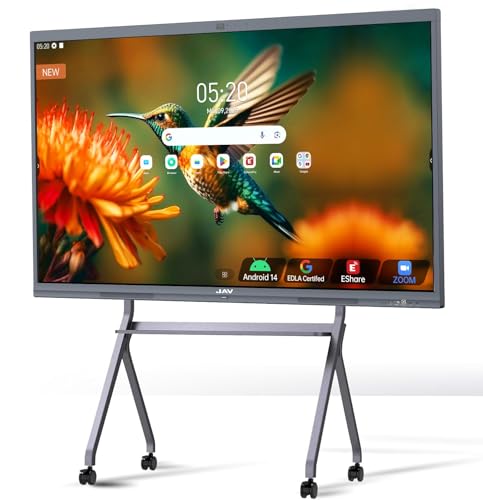
JAV Smart Board Review Summary
JAV Smart Board Pro is a strong fit for classrooms, training rooms, collaborative offices, and boardrooms that need a reliable shared display with modern software access.
If your team lives in Google Workspace, runs hybrid meetings, or needs a large touchscreen for annotation and screen sharing, this board makes a very practical case for itself.
What stands out most is the way JAV combines 4K UHD clarity, 20-point touch, Google EDLA certification, and integrated audio/video hardware into one large-format collaboration tool.
That is the big buying appeal: fewer separate devices, less setup friction, and a more polished workflow for teaching, presenting, and remote collaboration.
From a buyer’s perspective, the main trade-off is size and space.
The 65-inch footprint is ideal for dedicated rooms, but it may be too large for small offices or casual home use.
Still, for organizations that want a serious interactive display, the JAV Smart Board Pro lands in a compelling middle ground between classroom-first panels and premium enterprise boards.
Scorecard
| Category | Score | Why it matters |
|---|---|---|
| Display clarity | 9.0 | 65-inch 4K UHD panel, 350 brightness, 178-degree viewing angle, and etched AG glass improve readability in shared spaces. |
| Touch and annotation | 9.0 | 20-point touch, two-user writing, palm erase, zoom, handwriting recognition, and PDF annotation support collaborative work. |
| Collaboration features | 9.0 | Wireless sharing, mirroring, and E-Share software make it useful for classrooms, offices, and meetings. |
| Audio and conferencing | 8.0 | Eight-array microphones, 180-degree pickup, and a 100W soundbar reduce the need for extra hardware. |
| Software ecosystem | 9.0 | Google EDLA, Android 14, Google Play, Workspace, and Education Suite support a flexible workflow. |
| Hardware and responsiveness | 8.0 | 8GB RAM, 128GB storage, 4-core processor, 60Hz refresh, and 6.5ms response handle interactive use smoothly. |
| Installation and fit | 7.0 | Wall mount included, but the large format still needs dedicated wall space and planning. |
Bottom line: the JAV Smart Board Pro is best for buyers who want a genuinely useful large-format collaboration display, not just a giant screen.
It is especially attractive for Google-centric schools and businesses.
Key Features and Specifications of JAV Smart Board
The technical spec sheet shows a board designed for day-to-day collaboration rather than pure media consumption.
Here is a quick breakdown of the important details buyers should weigh before choosing the JAV Smart Board Pro.
| Spec | Details |
|---|---|
| Brand | JAV |
| Screen size | 65 inches |
| Resolution | 4K DCI 2160p |
| Native resolution | 3840 x 2160 |
| Maximum resolution | 3840 x 2161 pixels |
| Aspect ratio | 16:9 |
| Display type | DLED / LED |
| Brightness | 350 candela |
| Viewing angle | 178 degrees |
| Refresh rate | 60 Hz |
| Response time | 6.5 milliseconds |
| Color gamut | 72 |
| Processor | 4-core |
| Memory / storage | 8GB RAM, 128GB storage |
| Operating system | Android 14 |
| Connectivity | Bluetooth, HDMI, USB Type-C, Wi-Fi |
| Camera | 48MP AI camera |
| Audio | 100W soundbar |
| Microphones | Eight-array microphones with 180-degree pickup |
| Dimensions | 3.8 in D x 58.58 in W x 36.04 in H |
| Mounting | Wall mount included |
- Touch features: 20-point touch, two-user simultaneous writing, palm erase, multi-finger zoom, handwriting recognition, text recognition
- Annotation tools: PDF import and markup, note-taking, and drawing tools for lessons or presentations
- Screen sharing: Wireless sharing, mirroring, and E-Share Professional Edition
- App ecosystem: Google Play, Google Workspace, Google Education Suite, Google TV, YouTube, Gmail, Chrome, Drive, and Meet
- Meeting support: Zoom, Google Meet, Microsoft Teams, and Eshare compatibility
- Visibility aids: Etched AG glass to reduce glare and light reflection
The feature set makes the JAV Smart Board Pro look less like a display and more like a collaboration hub.
That matters because the best interactive boards save time by combining display, touch input, audio, camera, and software access in one unit.
Pros and Cons of JAV Smart Board
Like any all-in-one interactive display, the JAV Smart Board Pro has clear strengths and a few limits.
Here are the JAV Smart Board Pro pros and cons buyers should think through.
| Pros | Cons |
|---|---|
| Strong 4K display made for shared viewing | Large format may be overkill for small rooms |
| Excellent touch, writing, and annotation tools | Glossy screen finish can still show reflections |
| Google EDLA and Android 14 make the software stack flexible | No detailed stand or portability options are listed |
| Built-in camera, microphones, and soundbar reduce extra hardware needs | Bulkier than modular display-plus-accessory setups |
| Wireless sharing and meeting app support are broad | Best used in dedicated spaces rather than temporary setups |
| Wall mount included for easier installation planning | Room size and mounting compatibility must be checked first |
Key strength: this board solves the “too many devices” problem.
Key drawback: the size and integrated design are a commitment, so it is not a casual buy.
How the Google EDLA Certification Helps
One of the biggest buying reasons here is the Google EDLA certification.
For schools and businesses already working inside Google’s ecosystem, that certification is more than a badge; it is a practical workflow advantage.
With access to Google Play, Google Workspace, and the Google Education Suite, the JAV Smart Board Pro can feel more familiar to teams that rely on Docs, Drive, Meet, Gmail, and Chrome.
That reduces the learning curve compared with boards that have more limited app access or less polished Android support.
Android 14 and OTA updates also help make the platform feel current.
In a category where software stagnation can make hardware feel dated fast, regular updates are a meaningful advantage.
For IT teams, that can translate into a simpler long-term deployment story.
If your environment is Microsoft-only or heavily built around proprietary internal software, EDLA is still good to have, but it is less of a standout.
In that case, you should verify that your apps and workflows run as smoothly as your team expects.
Touch, Writing, and Annotation Experience
For interactive display buyers, this is where the board either earns its place or gets ignored after the novelty wears off.
The JAV Smart Board Pro looks well thought out on this front.
20-point touch is a solid number for collaborative use, and the board’s support for two-user simultaneous writing is especially useful in classrooms, workshops, and planning sessions.
Instead of taking turns, two people can actively contribute at once, which keeps meetings moving.
The inclusion of palm erase, multi-finger zoom, handwriting recognition, and text recognition gives it a more polished feel than basic touch panels.
These tools matter because they reduce friction during live teaching or brainstorming.
If you have ever used a laggy whiteboard display, you know how quickly a clumsy interface can slow the room down.
PDF import and annotation are also important.
Teachers can mark up lesson materials, and business users can review proposals or slides directly on-screen.
That makes the JAV Smart Board Pro more than a digital projector replacement; it becomes a real working surface.
Buyer takeaway: if writing responsiveness and annotation quality are top priorities, this board checks the right boxes.
Best Uses for Classrooms vs. Offices
The JAV Smart Board Pro is versatile, but it is not equally ideal in every setting.
The best purchase decision comes from matching the board to the room and workload.
For classrooms, the biggest advantages are collaborative touch, visible 4K detail, and the Google Education Suite access.
Teachers can write, open files, share content from phones or laptops, and support multiple students without constantly switching devices.
The anti-glare etched glass is also valuable in rooms with mixed lighting.
For offices and boardrooms, the integrated camera, microphones, and soundbar help create a more complete meeting station.
Teams can use Zoom, Google Meet, or Microsoft Teams without building a separate AV stack.
That can be a major convenience for organizations trying to simplify their conference room setup.
For family collaboration or shared spaces, the board is still useful, but it is easier to justify when multiple people actually use it regularly.
For casual home entertainment, it is probably more display than most buyers need.
Best fit: schools, training teams, hybrid offices, and organizations that need interactive presentation plus conferencing in one place.
Audio, Mic, and Video Meeting Performance
The conferencing hardware is one of the main reasons the JAV Smart Board Pro stands out from cheaper interactive screens.
The built-in 48MP AI camera, eight-array microphones, and 100W soundbar give it a much more complete meeting-room profile.
The microphone system is specified for 180-degree pickup, and the product claims noise reduction, voice gain, reverberation suppression, and echo cancellation.
That matters in real rooms, especially training spaces and boardrooms where people are not always sitting right in front of the screen.
For hybrid meetings, the board’s audio package should handle everyday calls without forcing buyers to add a separate mic bar or tabletop speaker system immediately.
That said, buyers who need broadcast-level audio or larger room coverage may still want to plan for supplemental equipment later.
Video quality depends on room lighting and room size, but the overall package is compelling for the category.
This is the kind of setup that can genuinely simplify a conference room purchase list.
Practical verdict: the JAV Smart Board Pro is well equipped for mainstream meetings, remote lessons, and group video sessions.
Installation, Wall Mount, and Space Requirements
Installation is one of the most important decision factors for a 65-inch interactive display.
The included wall mount is a helpful bonus, but it does not eliminate the need for planning.
At 58.58 inches wide and 36.04 inches high, this is a large piece of hardware that needs appropriate wall space, structural support, and good viewing distance.
Buyers should confirm mount compatibility, wall construction, and cable routing before ordering.
The slim all-in-one form factor is helpful because it avoids the clutter of separate projector components, speakers, and cameras.
However, the board is still not flexible in the way a portable cart-based setup would be.
If you need to move between rooms, this is probably the wrong style of product.
The display’s brightness level is suitable for many controlled indoor environments, and the etched AG glass should help in rooms with overhead lights.
Still, the glossy finish means highly reflective environments may require careful placement.
Important caution: check room size before buying.
This board is best when it has space to breathe.
Comparable Alternatives to Consider
If you are comparing the JAV Smart Board Pro with other Amazon-friendly interactive displays, a few names are worth checking.
These alternatives are commonly searched and represent the main decision set in this category:
- Samsung interactive display board — a strong alternative if you want a premium enterprise-style display ecosystem.
- ViewSonic ViewBoard — often attractive for schools and meeting rooms that want a familiar collaborative panel line.
- Promethean ActivPanel — a well-known classroom-focused option with deep education credibility.
- BenQ Board — a good fit for buyers who value polished presentation and teaching tools.
- SMART Board interactive display — worth comparing if you want a recognized interactive whiteboard brand.
Compared with those options, the JAV Smart Board Pro’s biggest appeal is the way it bundles Google EDLA, conferencing hardware, and touch collaboration into one platform.
That makes it especially appealing when simplicity and software access matter more than brand legacy.
Who Should Buy JAV Smart Board?
The JAV Smart Board Pro is a smart buy for buyers who need a serious shared display and will actually use its collaborative tools.
It is most appealing to schools, training centers, offices, and hybrid meeting spaces.
You should consider it if you want:
- A 65-inch 4K interactive display for shared visibility
- Google-friendly software access through EDLA certification
- Touch writing, PDF markup, and multi-user annotation
- Built-in camera, microphones, and soundbar for conferencing
- Wireless screen sharing for phones, tablets, and laptops
You should probably skip it if you:
- Need a small or portable display
- Have limited wall space or uncertain mounting support
- Prefer a more modular AV setup
- Will not use the Google-centric software ecosystem
Buyer-fit summary: if your team wants one screen that can teach, present, annotate, and host video meetings, this board is built for that job.
Is JAV Smart Board Worth It?
Yes — for the right room, the JAV Smart Board Pro is worth it. It is not a casual consumer gadget; it is a practical collaboration appliance for buyers who need interactive presentation, shared writing, and conferencing in one device.
The strongest reasons to buy are clear: 4K display quality, solid touch performance, Google EDLA access, integrated audio/video hardware, and broad screen-sharing support.
Those strengths directly improve day-to-day use in classrooms and meetings.
The main reasons to hesitate are just as clear: the board is large, it needs proper installation, and its glossy finish and brightness level may not be ideal for every environment.
If your room is small, overly bright, or infrequently used, the value drops fast.
For schools, businesses, and teams that need a dependable interactive hub, the JAV Smart Board Pro makes a convincing case.
If you want a capable all-in-one board that can reduce setup headaches and support real collaboration, this is a strong pick.
Final advice: buy it if your room, workflow, and Google-based tools match the product’s strengths.
Skip it only if space is tight or you need a more portable solution.