KODAK Luma 350 Portable Smart Projector review buyers usually want one thing: a tiny projector that actually feels smart and travel-friendly.
This model aims at convenience first, with enough flexibility for movies, casual gaming, and presentations.
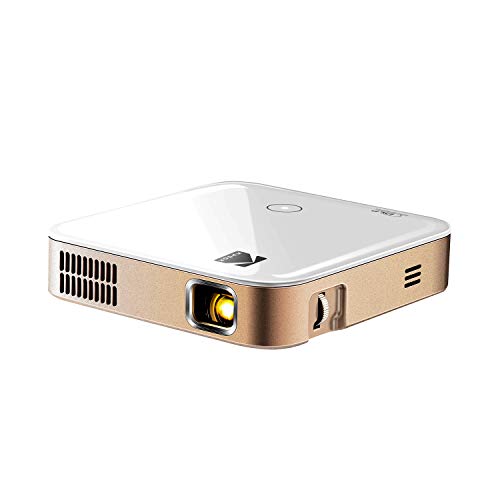
KODAK Luma 350 Review Summary
The KODAK Luma 350 Portable Smart Projector is best understood as a portable convenience projector, not a high-end home theater machine.
If you want a pocket-sized unit that can run apps, connect wirelessly, and travel easily between rooms, dorms, and weekend trips, this is a compelling option.
What makes it stand out is the mix of built-in Android-style app access, Wi-Fi and Bluetooth support, a rechargeable battery, and broad device compatibility in a very compact form factor.
That combination makes it especially attractive for people who do not want to carry a laptop, dongle, or separate streaming stick every time they set up a screen.
At the same time, the buying decision comes down to expectations.
The native 854 x 480 resolution is modest, so while it can handle HD content input and larger projected sizes, sharpness will not match a true 1080p portable projector.
In other words, the KODAK Luma 350 Portable Smart Projector is a smart buy for portability and flexibility, but not for buyers who prioritize crisp fine detail above all else.
Scorecard
| Category | Score | Why it matters |
|---|---|---|
| Image quality | 7/10 | DLP projection, 3500:1 contrast, and HD video support are helpful, but native 854 x 480 resolution limits sharpness. |
| Portability | 9/10 | Pocket-sized body, lightweight design, and rechargeable battery make it genuinely travel-ready. |
| Streaming and app access | 8/10 | Android-powered interface, Wi-Fi, and app downloads reduce dependence on external devices. |
| Connectivity | 9/10 | Wi-Fi, Bluetooth, HDMI, USB, and 3.5mm audio cover most modern use cases. |
| Ease of use | 7/10 | Manual focus and keystone correction help, but app navigation and updates may take some learning. |
| Audio and built-in features | 6/10 | The built-in speaker is fine for casual use, though external audio is better for fuller sound. |
| Versatility | 8/10 | Useful for business, education, gaming, and home cinema in small-space setups. |
Bottom line: buy it if you want a compact smart projector that is easy to move and easy to connect.
Skip it if you need a sharper image for critical movie watching or a stronger built-in audio system.
Key Features and Specifications of KODAK Luma 350
The KODAK Luma 350 Portable Smart Projector packs a surprising amount of functionality into a pocket form factor.
The spec sheet is clearly designed around travel, casual viewing, and flexible connectivity rather than maximum brightness or premium cinema output.
| Spec | Details |
|---|---|
| Brand / Model | KODAK / Luma 350 |
| Display technology | DLP |
| Native resolution | 854 x 480 |
| Maximum display resolution | 854 x 480 |
| Brightness | 150 lumens |
| Contrast ratio | 3500:1 |
| Maximum image size | Up to 150 inches |
| Maximum throw distance | 15 feet |
| Light source life | 30,000 hours |
| Battery | 7500 mAh rechargeable design |
| Connectivity | Wi-Fi, Bluetooth, HDMI, USB, 3.5mm audio jack |
| Controls | Remote control, light-up touch controls, phone control for certain functions |
| Included features | Built-in speaker, digital keystone correction, manual focus, screen mirroring, app downloads, internet browsing |
| Compatible devices | Gaming console, laptop, smartphone, speaker, tablet, television |
| Mounting | Tripod mount |
| Aspect ratio | 16:9 widescreen |
| Color | Black |
From a buyer’s perspective, the feature set is strong where it counts most for a portable model.
You get multiple input options, wireless freedom, and a self-contained smart interface, which reduces the hassle of building a separate streaming setup.
The trade-off is equally clear: the modest resolution and limited brightness mean this projector is happiest in dark or dim rooms.
That is not unusual for a pocket projector, but it is important for realistic expectations.
Pros and Cons of KODAK Luma 350
Here is the practical KODAK Luma 350 Portable Smart Projector pros and cons breakdown from a buyer’s perspective.
- Pros: Highly portable and easy to carry.
- Pros: Built-in wireless and app-based streaming options.
- Pros: Broad compatibility with phones, laptops, tablets, gaming consoles, and more.
- Pros: Built-in speaker adds convenience for quick setups.
- Pros: Digital keystone correction helps correct placement errors.
- Pros: Rechargeable design suits travel and flexible room use.
- Cons: Native 854 x 480 resolution is the biggest limitation.
- Cons: Mirroring restrictions can complicate some streaming services.
- Cons: Chromecast is not supported.
- Cons: Built-in audio is useful, but not full-bodied enough for everyone.
- Cons: Best results may require firmware updates and a little setup patience.
Verdict: the strengths are practical, not flashy.
If your top concern is convenience, the pros are meaningful.
If your top concern is image fidelity, the cons matter more.
How the Android Interface and App Loading Work
One of the most appealing parts of the KODAK Luma 350 Portable Smart Projector is the Android-powered interface.
In simple terms, it lets the projector function more like a small smart device than a dumb display.
That matters because it can reduce how often you need to attach another device.
You can browse the internet, download apps, and use certain streaming services directly from the projector, which makes spontaneous movie nights and quick demos easier.
For buyers comparing portable models, this is a major design choice.
Some projectors rely heavily on HDMI sources or external dongles, while the Luma 350 tries to be more self-sufficient.
That design is especially useful for travelers, students, and anyone who wants to keep a setup minimal.
The catch is that smart projector interfaces are only as good as their software ecosystem.
Firmware updates are recommended, and the experience may involve a learning curve if you are used to a TV-style streaming platform.
Still, for many casual users, the convenience outweighs the extra few setup steps.
Best Use Cases for Travel, Dorms, and Small Rooms
The KODAK Luma 350 Portable Smart Projector makes the most sense where space is tight and mobility matters.
That is why it fits so naturally into dorm rooms, bedroom walls, rentals, weekend travel, and temporary office setups.
Its pocket-sized footprint and rechargeable battery are the key reasons.
You do not need to dedicate a whole entertainment zone to use it, and you can move it from room to room without much effort.
For students, that means easy movie nights and presentation support.
For travelers, it means a portable screen option that can go into a bag.
It also works well for casual gaming and quick sharing from a phone or laptop.
In those situations, the goal is often low-friction setup, not reference-level picture performance.
The Luma 350 aligns with that use pattern very well.
Where it is less ideal is in bright living rooms or as a main television replacement.
If you expect daytime viewing with lots of ambient light, a brighter projector would be a better fit.
Picture Size, Throw Distance, and Placement Tips
According to the specs, the projector can reach a maximum image size of up to 150 inches and a maximum throw distance of 15 feet.
That is useful, but buyers should not focus only on the maximum number.
In real-world use, image quality depends heavily on distance, ambient light, and the surface you project onto.
Because this is a portable projector with 150-lumen brightness, it is best used close enough to keep the image usable in darker environments.
The 16:9 widescreen format is ideal for movies and streaming, while digital keystone correction helps square the picture when placement is not perfect.
Practical tip: use a tripod when possible, aim for a dark wall or screen, and keep expectations reasonable on very large image sizes.
Bigger is not always better if the room is not dark enough or the source content is not sharp to begin with.
Manual focus means you will need to take a few extra seconds to dial in the image.
That is not a deal-breaker, but it is part of the portable projector experience and worth noting for buyers who want instant perfection.
Built-In Speaker vs External Audio
The built-in speaker is convenient, and for solo viewing or a quick setup it is probably enough.
That said, this is still a compact projector, so the internal audio is best viewed as a utility feature rather than a main selling point.
If you plan to watch movies with more impact, use Bluetooth audio or a wired external speaker through the 3.5mm jack.
That single upgrade can improve the overall experience more than many buyers expect.
This is one of the clearest examples of the product’s design philosophy.
The Luma 350 prioritizes portability and simplicity, not oversized hardware.
So while the built-in speaker is helpful, the smartest buyers will assume they may want external sound for regular use.
Buyer tip: if audio quality is a top concern, look beyond the projector’s internal speaker and plan for a separate speaker solution from the start.
What to Know About Streaming Restrictions and Mirroring
This is an important section for anyone considering the KODAK Luma 350 Portable Smart Projector as a streaming device.
The projector supports screen mirroring, but some copyrighted services do not allow mirroring or screencasting in the way buyers might expect.
That means the best experience often comes from using apps directly through the projector’s interface rather than trying to mirror everything from a phone.
If you know you will rely on a specific streaming service, check how that service behaves inside the projector environment before you buy.
Also worth noting: Chromecast is not supported.
For some buyers, that will not matter.
For others, especially those who already live inside a Chromecast-based ecosystem, it is a real limitation.
The upside is that the projector remains flexible through HDMI, USB, Bluetooth, Wi-Fi, and phone/device compatibility.
But because some streaming workflows are restricted, this is not the kind of product you should buy without understanding your exact content sources.
Comparisons and Alternatives to Consider
If you are cross-shopping the KODAK Luma 350 Portable Smart Projector, the main question is whether you want similar portability with a different ecosystem or stronger image quality.
A few widely available alternatives on Amazon are worth considering.
- Anker Nebula portable smart projector — often a strong choice if you want a more polished smart-projector ecosystem and are willing to compare features carefully.
- XGIMI portable projector — a good line to explore if image processing and overall projector refinement matter to you.
- ViewSonic portable LED projector — useful if you want a more traditional portable projector with broad brand familiarity.
- BenQ portable home theater projector — worth comparing if image quality is more important than app-centric convenience.
- Epson portable projector with higher native resolution — a better direction for buyers who want sharper output first and portability second.
Compared with these alternatives, the KODAK Luma 350 Portable Smart Projector wins on pocketability and self-contained convenience, but it gives up ground in native resolution and, in some cases, ecosystem polish.
That is the central trade-off.
Who Should Buy KODAK Luma 350?
The KODAK Luma 350 Portable Smart Projector is a good fit for buyers who care about convenience, portability, and quick setup more than absolute image sharpness.
- Buy it if you travel often and want a projector you can pack easily.
- Buy it if you live in a dorm, small apartment, or shared space where flexibility matters.
- Buy it if you want built-in app access instead of relying on a separate streaming stick.
- Buy it if you need a projector for casual presentations, gaming sessions, or relaxed movie nights.
- Skip it if you want crisp 1080p-level detail for serious movie watching.
- Skip it if you need Chromecast support or seamless mirroring for protected content.
- Skip it if you want loud, room-filling built-in audio without external speakers.
For the right buyer, it is a very practical product.
For the wrong buyer, the limitations will show up quickly.
Is KODAK Luma 350 Worth It?
Yes, the KODAK Luma 350 Portable Smart Projector is worth it for portability-first buyers. It offers a genuinely convenient package: compact size, rechargeable power, wireless streaming, app support, and wide device compatibility.
That combination is exactly what many casual users want from a portable smart projector.
At the same time, you should not buy it expecting premium picture clarity or theater-grade sound.
The native 854 x 480 resolution is the biggest reason to pause, and the streaming restrictions mean it is best suited to buyers who are comfortable using the projector’s own app environment.
Final verdict: if you want a small, flexible, travel-ready smart projector for informal viewing and mixed-use convenience, the KODAK Luma 350 Portable Smart Projector is a smart pick.
If picture sharpness and audio power matter more than portability, keep shopping.