The Anker Nebula P1i Portable Projector review starts with a simple idea: this is a projector built for convenience.
If you want a smart, easy-to-use home cinema projector with solid sound and fast auto setup, the Anker Nebula P1i Portable Projector makes a strong case.
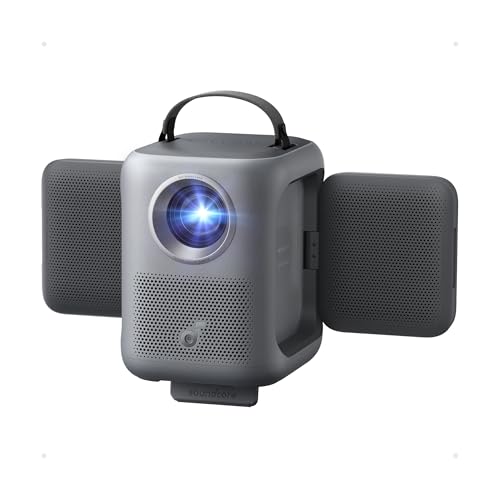
Nebula P1i Review Summary
The Anker Nebula P1i Portable Projector is best for buyers who want a streaming-first projector that feels simple from the first setup screen to movie night. It combines native 1080p Full HD, Google TV, auto focus, auto keystone correction, and a rotating 20W Dolby Audio speaker system into one portable package, which means you spend less time fiddling with settings and more time actually watching content.
From a buyer’s perspective, the biggest appeal is how much it does without extra accessories.
You get built-in apps like Netflix, YouTube, and Prime Video, plus Wi-Fi and Bluetooth 5 for easy connectivity.
The main tradeoff is equally clear: this is not a battery-powered projector, so it is portable in size and placement, not truly unplug-and-play anywhere.
Scorecard
| Category | Score | Buyer Take |
|---|---|---|
| Image clarity | 8.0/10 | Native 1080p and all-glass optics help deliver a crisp, detailed image. |
| Brightness | 7.0/10 | Good for dim rooms, but not a daylight monster. |
| Setup convenience | 9.0/10 | Auto focus, auto keystone, obstacle avoidance, and screen fit make setup quick. |
| Audio performance | 8.0/10 | 20W Dolby Audio with speaker rotation is unusually capable for a portable projector. |
| Streaming and connectivity | 8.0/10 | Google TV, Wi-Fi, and Bluetooth 5 reduce dependence on extra devices. |
| Portability | 7.0/10 | Compact and flexible, but no built-in battery limits true outdoor freedom. |
| Long-term durability | 8.0/10 | Sealed optical engine and all-glass lens design should help preserve image quality. |
Overall verdict: the Nebula P1i is a very appealing choice for casual home theater buyers, apartment users, and anyone who wants a smart projector with less setup friction than most competitors.
Key Features and Specifications of Nebula P1i
The Anker Nebula P1i Portable Projector focuses on practical home cinema features rather than extreme brightness or battery independence.
That makes its spec sheet unusually balanced for everyday use.
| Specification | Details |
|---|---|
| Brand | Soundcore / Anker Nebula |
| Model | Nebula P1i |
| Product type | Portable projector |
| Native resolution | 1920 x 1080 Full HD |
| Supported input | Supports 4K input |
| Brightness | 380 ANSI lumens |
| Display technology | LCD |
| Lens | All-glass lens |
| Optical engine | Fully sealed optical engine |
| Auto setup features | Auto focus, auto keystone correction, auto obstacle avoidance, screen fit |
| Smart platform | Google TV built in |
| Streaming apps | Netflix, YouTube, Prime Video |
| Connectivity | Wi-Fi, Bluetooth 5 |
| Audio | 20W Dolby Audio, 2 x 10W drivers |
| Speaker movement | Rotates 90° side to side, 200° up and down |
| Image size | 40 inches to 150 inches |
| Throw distance | 1.69 meters to 4.78 meters |
| Mounting | Floor mount |
| Compatible devices | Gaming console, laptop, smartphone, television |
| Color | Black |
| Power | 140 watts |
| Battery | No built-in battery |
Those numbers tell you a lot about the target buyer.
The 380 ANSI lumens rating is tuned for dark rooms and controlled lighting, while the 1080p resolution is enough to keep streaming, sports, and console gaming looking clean at typical living-room distances.
The 150-inch maximum image size is also useful for buyers who want the option of a larger screen without moving to a bulky projector class.
The design choices are clearly aimed at ease of use.
An all-glass lens is a smart inclusion because it is generally better for image stability and longer-term clarity than cheaper optical assemblies.
The sealed optical engine is another good sign for longevity, especially if you expect to move the projector around or use it in spaces where dust can be an issue.
Pros and Cons of Nebula P1i
Here is the quick breakdown of the Anker Nebula P1i Portable Projector pros and cons from a buyer’s perspective.
| Pros | Cons |
|---|---|
| Fast automatic setup cuts down on alignment hassle | No built-in battery, so it needs external power |
| Sharp native 1080p picture with 4K input support | 380 ANSI lumens is limited in bright rooms |
| Rotating 20W Dolby Audio speakers improve sound direction | Initial setup needs a Google account and internet access |
| Google TV built in reduces the need for a streaming stick | Best results may depend on a firmware update before first use |
| Sealed optical engine should help with durability | Less ideal for fully mobile use than battery projectors |
The biggest strength is convenience. The biggest drawback is that brightness and battery-free operation limit where you can use it most comfortably.
Who Should Buy Nebula P1i?
The Nebula P1i makes the most sense for buyers who want a projector that behaves like a smart TV substitute rather than a technical hobby device.
If you want quick access to streaming apps, good built-in sound, and automatic image correction, this projector fits that priority list well.
- Buy it if you want a simple home theater projector for movie nights in a dark or dim room.
- Buy it if you value easy setup and do not want to spend time manually focusing or correcting the image.
- Buy it if you want integrated streaming without adding a separate stick or box.
- Buy it if you want decent built-in speakers for casual viewing without external audio.
- Buy it if you may use external power outdoors for occasional backyard screenings.
On the other hand, you should probably skip it if you need a projector for bright daytime rooms, if you want a true battery projector, or if you need the highest possible brightness for large ambient-light spaces.
In those cases, a different projector class will suit you better.
Design and Usability: Where the Nebula P1i Helps Most
The Nebula P1i’s design is clearly aimed at reducing friction.
The floor-mount style, portable footprint, and automatic image tools mean it can be moved between rooms and still feel easy to live with.
For many buyers, that matters more than chasing a spec sheet filled with high-lumen numbers that only look good on paper.
The auto focus and auto keystone correction are especially important because they eliminate the most annoying part of casual projector ownership: setup delays.
If you place it on a coffee table, shelf, or floor mount position, the projector is designed to quickly square up the image without making you wrestle with menus.
The added screen fit and obstacle avoidance features are practical touches that help with real rooms where furniture, décor, and uneven placement are common.
That said, convenience does not make it a bright-room projector. If you regularly project with lamps on or in a sunlit living room, you will see the limits of 380 ANSI lumens faster than you would with a brighter Epson or BenQ alternative.
How Bright Is the Nebula P1i in Real Rooms?
This is one of the most important decision factors in any Anker Nebula P1i Portable Projector review.
On paper, 380 ANSI lumens is enough for movie nights, casual sports, and streaming in dim conditions.
In practice, that means the projector is best used after sunset, with curtains drawn, or in a room where you can control the light.
For a buyer, the key question is not whether the picture is usable.
It is whether the room matches the projector’s strengths.
In a dark room, the 1080p image should look pleasingly sharp, and the 4K input support helps ensure compatibility with modern media devices.
In bright daylight, though, the experience will be noticeably more washed out than with a higher-brightness smart projector.
If your use case is mostly nighttime movies, streaming marathons, or gaming sessions, the brightness level is acceptable.
If you want a projector that can double as a daytime TV replacement, this is probably not the right class of device.
Google TV and Streaming App Experience
One of the strongest reasons to consider the Anker Nebula P1i Portable Projector is the built-in Google TV platform.
That means the projector is not just a display device; it is a self-contained streaming hub.
For many buyers, that is a major convenience upgrade because it removes the need to carry an external streaming stick, HDMI adapter, or extra remote.
Access to apps like Netflix, YouTube, and Prime Video makes it especially attractive for households that want a straightforward entertainment setup.
The built-in Wi-Fi and Bluetooth 5 support also make connectivity flexible, whether you are pairing a speaker, connecting a phone, or using a laptop for playback.
There are a couple of caveats.
Google TV access requires a Google account and internet connection during initial setup, so this is not a plug-it-in-and-start system for offline users.
Also, the brief notes that a firmware update to Android 14 is recommended before first use, which suggests that early setup may be smoother after updating.
That is not a deal-breaker, but it is worth knowing before you buy.
Speaker Rotation and Audio Placement
Audio is a meaningful part of this projector’s identity.
The 20W Dolby Audio system is stronger than the weak mono speakers that often come in portable projectors, and the rotating speaker design gives the Anker Nebula P1i Portable Projector an unusual advantage in flexible room layouts.
The 2 x 10W drivers can rotate 90 degrees side to side and 200 degrees up and down, which helps aim sound more directly toward viewers.
In a living room, that can make a bigger difference than buyers expect because projector speakers are often fixed in one direction and can sound oddly placed relative to the screen.
That said, built-in audio always has limits.
If you care about deep bass, wider soundstage, or fuller movie theater-style impact, a dedicated soundbar or Bluetooth speaker will still outperform any projector speaker system.
The good news is that the Nebula P1i gives you strong enough built-in sound to use immediately, which is convenient for casual users and travel-light setups.
Setup, Focus, and Keystone Correction
This is where the Nebula P1i feels most premium in everyday use.
The automatic focus, auto keystone correction, obstacle avoidance, and screen fit features are exactly the kind of tools that make a portable projector feel less like a gadget and more like a living-room appliance.
For buyers who have used older projectors, the difference is substantial.
Manual correction can take several minutes every time you move the unit, but the Nebula P1i is designed to get you close to ready almost immediately.
That matters if you want something for spontaneous movie nights or if you move it between rooms often.
The biggest practical benefit is consistency.
The sealed optical engine and all-glass lens also support that goal by reducing the chance of dust-related image issues over time.
In other words, the product is not just easy to set up today; it is designed to stay easier to live with later.
Outdoor Use Without a Built-In Battery
The phrase “portable projector” can be misleading here if you expect battery-powered freedom.
The Anker Nebula P1i Portable Projector does not include a built-in battery, so outdoor use depends on external power.
That is an important limitation for campers and backyard movie fans.
The good news is that it can still be a capable outdoor projector if you plan around that limitation.
The product brief notes compatibility with an Anker SOLIX C300 Portable Power Station for roughly 3.5 to 3.7 hours with all features in use, which makes it viable for a movie or two away from wall power.
For many buyers, that is enough for occasional use.
If you want true grab-and-go portability, a battery projector is a better fit. But if you already own a power station or do not mind an extension cord, the Nebula P1i can absolutely work for outdoor screenings.
Comparable Alternatives to Consider
If you are comparing the Nebula P1i to other well-known options, think first about your priority: brightness, battery freedom, or smart convenience.
- BenQ portable home theater projector — A strong alternative if you want a more cinema-focused brand and may value image quality tuning or higher-end home theater positioning.
- Epson smart projector with higher brightness — Better if you need more output for mixed lighting or daytime use.
- XGIMI portable projector with battery — Worth a look if true portability and battery operation matter more than built-in Google TV convenience.
- Anker Nebula projector with built-in battery — A practical alternative if you like the Nebula ecosystem but need cordless use.
Compared with those alternatives, the Nebula P1i stands out for its balanced combination of easy streaming, automatic setup, and respectable built-in sound.
It is not trying to win the brightness contest; it is trying to be the most painless projector in the room.
Is Nebula P1i Worth It?
So, is Anker Nebula P1i Portable Projector worth it? For the right buyer, yes.
It is worth it if you want a smart, easy projector for dark-room viewing, value built-in apps over external accessories, and care about quick setup more than maximum brightness.
The Nebula P1i does a lot of things well for a portable home cinema projector: the 1080p image is sharp, the Google TV experience is convenient, the speakers are unusually flexible, and the sealed optical design is a smart durability choice.
Those strengths make it a very appealing all-in-one option for casual users and buyers who simply want movie night to work without hassle.
However, the answer becomes less favorable if you need daylight performance or cordless outdoor freedom.
It is not the best choice for bright rooms or battery-first portability. In those cases, a brighter Epson, a more cinema-focused BenQ, or a battery-equipped XGIMI or Nebula model will likely fit better.
Final buying advice: choose the Anker Nebula P1i Portable Projector if you want a convenient streaming projector for dim rooms and occasional outdoor use with external power.
If that matches your viewing habits, this is a smart and practical buy.