The Rongta RP425 Bluetooth Shipping Label Printer review comes down to one question: do you need a simple, compact thermal printer that works with phones and desktops without wasting time on ink or toner?
For small sellers and busy packing stations, the answer is often yes.
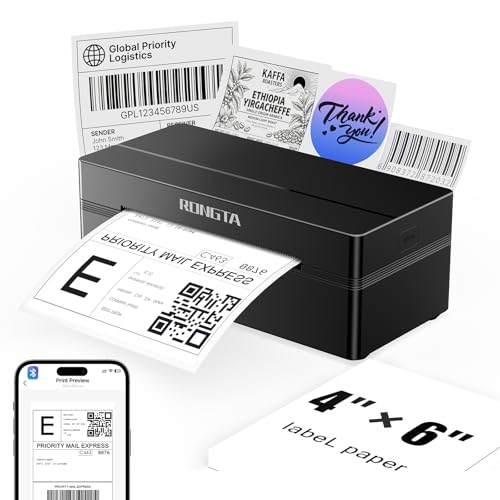
This Rongta RP425 Bluetooth Shipping Label Printer is built for fast, direct thermal shipping labels and barcode formats, with broad compatibility across common selling platforms and operating systems.
Rongta RP425 Review Summary
If you want a compact shipping label printer that handles everyday fulfillment without a lot of fuss, the Rongta RP425 Bluetooth Shipping Label Printer is an easy model to like.
It is especially appealing for Amazon, Shopify, Etsy, and UPS workflows where 4×6 labels are the norm, and it also suits sellers who prefer printing from a phone or tablet instead of always returning to a desktop.
What stands out most is the balance of portability, automatic label handling, and broad device support.
The RP425 is not trying to be a general office printer; it is focused on doing one job well.
That makes it a sensible buy for e-commerce owners, home businesses, and small workspaces where fast monochrome label output matters more than fancy features.
Scorecard
| Category | Score | Why It Matters |
|---|---|---|
| Bluetooth & USB Connectivity | 9.0 | Wireless printing from iOS and Android through the app, plus wired desktop support. |
| Shipping Label Compatibility | 9.0 | Built for direct thermal labels, including standard 4×6 shipping formats. |
| Print Speed | 8.0 | Designed for fast label output suited to busy shipping workflows. |
| Setup & Ease of Use | 8.0 | App pairing, automatic label identification, and drivers simplify setup. |
| Portability & Size | 8.0 | Compact, lightweight design is easy to move and store. |
| Print Quality | 8.0 | 203 dpi thermal printing is clear enough for addresses and barcodes. |
| Workflow Capacity | 7.0 | Practical for small-to-medium volume, but still a compact desktop unit. |
Bottom line: the Rongta RP425 offers a compelling mix of convenience, speed, and versatility for sellers who need a dedicated label printer.
It is best for users who want reliable shipping labels without ink costs and who value mobile printing as much as desktop printing.
Key Features and Specifications of Rongta RP425
The Rongta RP425 Bluetooth Shipping Label Printer is a direct thermal printer, which means it prints with heat instead of ink or toner.
That design choice is a major reason buyers look at thermal label printers in the first place: lower ongoing maintenance, less clutter, and faster turnaround when you are printing labels throughout the day.
| Spec | Details |
|---|---|
| Brand / Model | Rongta RP425 / Thermal Label Printer Bluetooth |
| Print Method | Direct thermal |
| Output | Monochrome |
| Resolution | 203 dpi |
| Max Print Speed | 150 mm/s |
| Connectivity | Bluetooth, USB |
| Compatibility | Windows 7+, Mac OS 10.11+, Chrome OS, iOS, Android |
| Max Media Size | 4 x 6 inches |
| Supported Label Width | 0.98 inches to 4.37 inches |
| Max Sheet Capacity | 100 |
| Dimensions | 10.24" W x 7.4" D x 5.3" H |
| Weight | 0.65 kg |
| Color | Black |
| Function | Print only |
Those specs make the RP425 a very focused device.
It is not meant for color labels, documents, or all-purpose office output.
Instead, it is optimized for shipping labels, barcode labels, QR codes, and other direct thermal formats.
- Wireless Bluetooth printing through the RLabel app for iPhone and Android.
- USB connection for stable desktop setup on Windows, Mac, and Chrome OS.
- Automatic label identification to reduce trial-and-error during loading.
- Auto-feed and automatic grabbing for smoother label handling.
- 203 dpi resolution that is appropriate for shipping addresses and scannable barcodes.
- Fast output up to 150 mm/s for efficient order fulfillment.
- Compact footprint for small desks, packing tables, or travel use.
For buyers comparing label printers, the biggest thing to notice is the balance between convenience and specialization.
The RP425 is purpose-built for shipping and inventory labels, not for document printing.
That specialization is a strength if your workflow is e-commerce heavy.
Pros and Cons of Rongta RP425
Understanding the Rongta RP425 Bluetooth Shipping Label Printer pros and cons is important before you buy.
The machine does several things well, but like any compact thermal printer, it has limits that matter depending on how you work.
Pros
- Works with both phones and computers, which is ideal for flexible shipping workflows.
- Portable, space-saving footprint makes it easy to fit on a desk or store in a drawer.
- Automatic label detection helps simplify setup and reduce loading mistakes.
- Supports common shipping label sizes, especially 4×6 formats used by major platforms.
- Thermal printing avoids ink and toner, which keeps ongoing maintenance low.
- Fast print output is a real advantage when orders stack up.
Cons
- Monochrome only, so it is not a fit for branding-heavy color labels.
- Best for labels rather than documents; it is not a substitute for a regular printer.
- Bluetooth setup depends on app workflow, which may take a moment to learn.
- Compact capacity is not ideal for industrial-scale volume.
In practical terms, the pros are stronger than the cons for the intended audience.
The main drawback is not quality but scope: this is a dedicated label printer, and that is exactly how it should be judged.
Who Should Buy Rongta RP425?
The Rongta RP425 Bluetooth Shipping Label Printer is a strong match for sellers who value convenience and speed over all-in-one versatility.
If you regularly print shipping labels, barcode stickers, or QR code labels, this model deserves attention.
It is a good fit for:
- Amazon, Shopify, Etsy, and UPS sellers who need quick 4×6 shipping labels.
- Small businesses and home offices that want a compact label printer on a packing desk.
- Mobile-first users who prefer printing from iPhone or Android through Bluetooth.
- Anyone trying to remove ink costs from the shipping process.
- Teams with limited space that need a portable label printer for daily use.
It is probably not the best choice for:
- Users who need color labels or branded sticker output.
- Businesses printing high-volume industrial runs every day.
- Anyone looking for a general-purpose printer for receipts, documents, and labels in one machine.
Best-fit verdict: if your main task is shipping and barcode labeling, the RP425 makes a lot of sense.
Bluetooth Setup on iPhone and Android
One of the biggest buying reasons for this printer is mobile flexibility.
The Rongta RP425 Bluetooth Shipping Label Printer supports iOS and Android printing through the RLabel app, which is useful for sellers who manage orders from their phones or tablets.
That matters because many small businesses do not sit at a desktop all day.
They confirm orders, print labels, and pack shipments from multiple devices.
A Bluetooth label printer removes friction from that workflow.
Instead of transferring files or staying tied to one computer, you can send labels wirelessly from compatible mobile devices.
Of course, app-based printing always introduces a little dependency on software setup.
That is not unusual in this category, but buyers should be aware that the best experience comes when they follow the manufacturer’s setup steps closely.
Once configured, however, the workflow should feel natural for everyday shipping tasks.
Buyer tip: if mobile printing is a priority, this is one of the RP425’s strongest selling points.
Label Size Support and Auto-Detection
Label compatibility is one of the most important decision factors in any shipping printer review, and the RP425 handles the basics well.
It supports direct thermal labels from 0.98 inches to 4.37 inches wide, with a maximum media size of 4 x 6 inches.
That covers standard shipping labels plus many common barcode and asset-tag formats.
For online sellers, the most important format is usually 4×6.
The RP425 is clearly designed around that workflow, but it also handles smaller label types such as 2×2 circular labels, 2×1 barcode labels, and 1×1 QR code labels.
That makes it more versatile than a printer that only handles shipping labels and nothing else.
Automatic label identification is another helpful design choice.
It reduces setup frustration and helps the printer adapt to different label stocks more smoothly.
Combined with auto-feed and automatic grabbing, it creates a more forgiving loading process than some cheaper desktop label printers.
What to watch: check your label stock width before buying so you stay inside the supported range.
Print Speed for Shipping Workflows
Speed matters when you are processing orders in batches.
The RP425 is rated for output up to 150 mm/s, which places it in a practical range for small business shipping and warehouse-style packing stations.
In everyday use, that kind of speed is valuable because it keeps labels from becoming a bottleneck when orders start piling up.
Just as important, the printer uses 203 dpi resolution.
That is a sensible choice for shipping labels because addresses, tracking numbers, and barcodes do not need ultra-high-resolution color output.
They need clarity and consistency.
For those tasks, 203 dpi is usually enough for clean, readable results.
For buyers comparing fast label printers, the RP425 is not trying to win on pure industrial speed.
Instead, it offers a good balance of speed, compact size, and reliability for smaller-scale operations.
That is exactly what many home sellers need.
Desktop, Warehouse, and Travel Use
Portability is one of the more underrated advantages of the RP425.
At 0.65 kg and with a compact footprint of 10.24 x 7.4 x 5.3 inches, it is easy to place on a desk, move between work areas, or store when not in use.
That matters for sellers who operate from shared spaces or temporary packing stations.
In a home office, the RP425 should be easy to tuck away.
In a warehouse or fulfillment area, the small form factor makes it useful as a secondary printer near the packing table.
For travel or pop-up workspaces, the compact build is another plus, especially because the printer does not require ink cartridges or toner storage.
The tradeoff is capacity.
A 100-sheet capacity is practical, but this is still a compact desktop machine rather than a heavy-duty industrial unit.
If your volume is moderate, it should be plenty.
If your workflow is very aggressive, you may want a more robust printer line.
Practical take: the RP425’s size is a real advantage for small operations that need efficiency without bulk.
Windows, Mac, and Chrome OS Compatibility
Another strong point is platform support.
The Rongta RP425 Bluetooth Shipping Label Printer works with Windows 7 and newer, Mac OS 10.11 and newer, Chrome OS, iOS, and Android.
That broad coverage is important because many sellers use different devices throughout the day.
USB support is useful for desktop users who want a more stable wired setup.
Bluetooth adds flexibility for mobile printing, while desktop drivers available from Rongta’s official website help round out the experience on computer systems.
In short, the printer is built to fit mixed-device work environments, which is exactly where many small businesses operate.
For shoppers comparing alternatives, this compatibility is a notable strength.
Not every label printer handles mobile and desktop workflows this cleanly.
If you switch between a laptop in the office and a phone on the packing table, the RP425’s versatility becomes a real selling point.
Rongta RP425 vs Alternatives
If you are still comparing options, the most relevant alternatives are other widely sold Amazon label printers.
A few common comparisons include the Rollo wireless shipping label printer, the DYMO thermal shipping label printer, the Jiose 4×6 thermal label printer, and the Munbyn Bluetooth shipping label printer.
Compared with other compact thermal printers, the RP425 stands out for its portable form factor, Bluetooth support, and straightforward shipping-label focus.
Some competitors may offer different software ecosystems, slightly different footprints, or more established brand recognition, but the RP425 earns attention by covering the essentials well without unnecessary complexity.
If you want the most premium ecosystem or a more established long-term brand presence, a comparison with Rollo or DYMO makes sense.
If you want a balanced Bluetooth label printer that looks designed for everyday seller workflows, the RP425 belongs in the conversation.
Is Rongta RP425 Worth It?
So, is Rongta RP425 Bluetooth Shipping Label Printer worth it?
For most small sellers and home businesses, yes.
It delivers the core features that matter most in a shipping printer: direct thermal output, 4×6 compatibility, mobile and desktop support, compact size, and fast enough performance for daily fulfillment.
The biggest reasons to buy are simple: low-maintenance printing, broad compatibility, and a space-saving design.
The biggest reasons to pass are equally clear: it is monochrome only, it is specialized for labels rather than documents, and heavy-volume users may outgrow it.
Final verdict: if you want a practical, affordable-feeling thermal printer for shipping labels and barcode stickers, the Rongta RP425 Bluetooth Shipping Label Printer is a smart buy.
If you need color printing, multi-purpose office features, or industrial throughput, look elsewhere.
Buying advice: choose the RP425 if your goal is fast, reliable label printing for e-commerce and small business fulfillment.
If that describes your workflow, this compact printer is very likely to earn its place on your desk.