The LYNCAST X3 Smart Projector review starts with one clear takeaway: this is built for people who want big-screen viewing without a complicated setup.
It aims to be an easy, flexible portable projector for movies, gaming, and casual streaming.
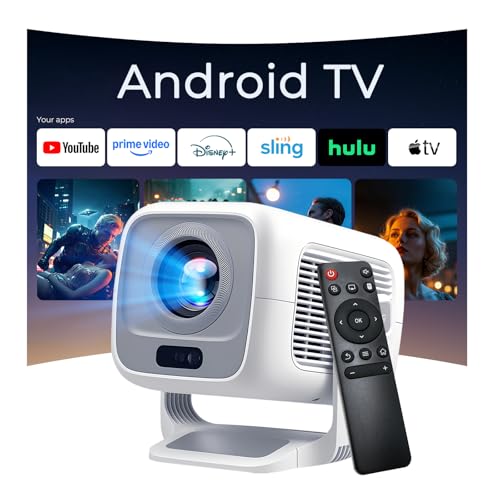
LYNCAST X3 Review Summary
If you want a projector that feels genuinely modern, the LYNCAST X3 Smart Projector makes a strong case for itself.
It combines native 1080p resolution, 600 ANSI lumens, Android TV OS, and auto correction tools in a compact body, which is exactly the kind of feature set most everyday buyers want from a home projector today.
For apartments, bedrooms, dorms, backyard movie nights, or a living room that doubles as a media space, the LYNCAST X3 Smart Projector is appealing because it reduces friction.
You do not need to fight with manual focus, external streaming sticks, or awkward placement as often as you do with basic mini projectors.
If your goal is fast setup and flexible viewing rather than a full dedicated theater build, this projector lands in a very practical sweet spot.
Scorecard
| Category | Score | Why it matters |
|---|---|---|
| Image clarity | 8.0/10 | Native 1080p and 600 ANSI lumens should produce a sharp, bright image for a portable projector, with support for up to 4K input. |
| Setup and auto-adjustment | 9.0/10 | Auto focus, auto keystone correction, and digital zoom make it quick to get a rectangular image without much manual tweaking. |
| Streaming and smart features | 8.0/10 | Android TV OS with built-in apps makes it more self-contained than basic mini projectors and reduces the need for external streaming sticks. |
| Connectivity | 9.0/10 | WiFi 6, Bluetooth 5.4, HDMI, USB, and 3.5mm audio give it broad wireless and wired compatibility for media and gaming. |
| Portability and placement flexibility | 8.0/10 | The compact portable form factor, 0.8:1 short throw, and 270° rotation make it easy to use in bedrooms, dorms, apartments, or outdoor setups. |
| Audio performance | 7.0/10 | Built-in dual HiFi stereo speakers are convenient, though serious home theater users may still prefer external audio. |
| Value for everyday viewing | 8.0/10 | It combines smart TV functions, auto setup, and broad compatibility in one unit, making it appealing for casual movie nights and gaming. |
Overall, the LYNCAST X3 Smart Projector looks best for buyers who want a convenient all-in-one projector rather than a premium theater projector.
It is especially suitable for casual streaming, family movie nights, dorm rooms, and portable entertainment.
Key Features and Specifications of LYNCAST X3
The LYNCAST X3 Smart Projector is packed with practical specs that directly affect everyday use.
Here is the hardware and feature set that matters most:
| Specification | Details |
|---|---|
| Brand / Model | LYNCAST X3 |
| Display type | LCD |
| Native resolution | 1920 x 1080 |
| Maximum display resolution support | 3840 x 2160 pixels |
| Brightness | 600 ANSI lumens |
| Contrast ratio | 10000:1 |
| Throw ratio | 0.8:1 |
| Maximum image size | 130 inches |
| Maximum throw distance | 3 meters |
| Light source life | 50000 hours |
| Wattage | 48 watts |
| Connectivity | HDMI, USB, Bluetooth, Wi-Fi, 3.5mm audio |
| Wireless features | WiFi 6, Bluetooth 5.4 |
| Smart platform | Android TV OS |
| Audio | Dual HiFi stereo speakers |
| Mounting options | Tabletop, ceiling, wall, bracket, tripod |
| Special features | Auto focus, auto keystone correction, digital zoom, 270° rotation |
| Included items | Remote control, HDMI cable, adapter, manual, cleaning kit |
| Remote batteries | 2 AAA batteries required, not included |
Those specs tell a clear story.
This is not just a basic display device; it is a portable smart projector designed to minimize setup effort while still offering enough picture quality for everyday home cinema use.
The native 1080p panel is important because it gives the image a cleaner look than low-resolution mini projectors that upscale everything from a softer source.
The 600 ANSI lumens rating also matters.
In practical terms, that is bright enough for a dim room, evening movie watching, and casual outdoor use, but it is not the kind of brightness you buy for a sunlit living room or bright office projector work.
That is a key buyer decision point for the LYNCAST X3 Smart Projector.
Pros and Cons of LYNCAST X3
Like any smart projector, the LYNCAST X3 Smart Projector pros and cons depend heavily on how you plan to use it.
Here is the honest breakdown.
Pros
- Fast setup thanks to auto focus and auto keystone correction.
- Native 1080p image quality is a big advantage at this size and class.
- Android TV OS makes streaming easier and more self-contained.
- WiFi 6 and Bluetooth 5.4 help with smoother wireless use and modern accessory support.
- 0.8:1 short throw and 270° rotation add real placement flexibility.
- Dual speakers are useful when you do not want extra gear.
- Wide compatibility with laptops, phones, tablets, game consoles, and speakers.
Cons
- Built-in audio is convenient but not cinema-grade, so external speakers may still be best for bigger movie nights.
- 600 ANSI lumens is not enough for very bright rooms or daylight-heavy viewing.
- Smart app performance can depend on WiFi quality and software stability, as with many Android-based projectors.
- Remote batteries are not included, which is a small but real inconvenience at unboxing.
From a buyer’s perspective, these trade-offs are reasonable.
The LYNCAST X3 Smart Projector is designed to be practical first, not overly specialized.
If you understand that, the value proposition makes sense.
Who Should Buy LYNCAST X3?
The LYNCAST X3 Smart Projector is a good fit for buyers who want a simple, flexible entertainment setup.
It is especially appealing if you are looking for a projector that can move between a bedroom wall, living-room ceiling mount, or outdoor screen without constant reconfiguration.
- Buy it if you want an easy bedroom or apartment projector. The compact size and short-throw design make it easier to use in smaller spaces.
- Buy it if you like built-in streaming apps. Android TV OS reduces the need for an external streaming stick.
- Buy it if you value fast setup. Auto focus and auto keystone save time and frustration.
- Buy it if you plan to use it for casual gaming or movie nights. The connectivity options and image quality suit relaxed entertainment well.
- Buy it if you want a portable projector for indoors and outdoors. The flexible mounting and 270° rotation are a real plus.
On the other hand, you should probably skip it if you need a projector for bright daytime use, a dedicated home theater with external audio gear already planned, or a presentation-first setup where ultimate brightness matters more than convenience.
How the 270° Rotation Changes Placement Options
One of the most useful design choices in the LYNCAST X3 Smart Projector is the 270° rotatable design.
This is more than a gimmick.
It allows the projector to be aimed at a wall, ceiling, or angled surface with much less physical repositioning than a standard box-style projector.
That flexibility matters in real life.
In a bedroom, you can project upward for ceiling viewing.
In an apartment or dorm, you can shift from tabletop movie nights to a wall mount without rebuilding your setup.
Outdoors, the ability to angle the projector more freely can help when your screen position is not ideal.
The benefit is convenience, but there is also a deeper product-design advantage here: the X3 is built for irregular spaces.
Many buyers do not have a perfect theater room, and this projector acknowledges that reality.
Auto Focus and Keystone: Real-World Setup Experience
For many shoppers, this is where the LYNCAST X3 Smart Projector stands out.
Manual projector adjustment can be frustrating, especially if the unit gets moved often.
Auto focus, auto keystone correction, and digital zoom all reduce the time spent fixing the picture after placement.
In everyday use, that means you can move the projector, power it on, and get to a usable image much faster.
The auto correction features are especially valuable for casual buyers who do not want to understand the geometry of projector placement.
They also make the projector more appealing for mixed-use spaces where the viewing position changes from night to night.
That said, automatic correction is not magic.
If the projector is placed at an extreme angle or outside its ideal range, image quality can still suffer.
But for normal living-room, bedroom, or backyard use, these tools are a major convenience advantage.
Best Room Sizes and Screen Distance for the X3
The LYNCAST X3 Smart Projector supports image sizes from 40 to 130 inches, with an 80-inch image achievable from about 1.4 meters.
That is a very useful detail because it shows the projector is suited to more than just large rooms.
For smaller spaces, the 0.8:1 throw ratio is a real benefit.
It means you do not need to place the projector far from the wall to get a decent image.
This helps in bedrooms, dorms, and apartments where depth is limited.
If you want the maximum 130-inch image, however, you need to be realistic about room layout and screen distance.
Bigger images will also reveal more about ambient light conditions and source quality.
In practice, the sweet spot for many buyers will likely be somewhere in the 70-100 inch range, where the image is large without becoming too demanding on the room.
For buyers comparing projector screen sizes, the practical advice is simple: choose the X3 if your room is moderately dark and you want a big picture without needing a huge throw distance.
Built-In Apps vs Using HDMI Sources
The Android TV OS gives the LYNCAST X3 Smart Projector a major usability edge over basic projectors.
Built-in apps mean you can stream directly without always connecting a laptop or external dongle.
That is helpful if you want a cleaner setup or plan to move the projector around frequently.
Still, HDMI remains important.
If you want the most stable playback, prefer a console, laptop, or streaming box, or simply want to bypass app compatibility issues, HDMI is often the safer choice.
The same is true for gaming: a wired source is usually the most reliable path for low-maintenance viewing.
Think of the smart platform as convenience, and HDMI as flexibility.
The best part is that the LYNCAST X3 Smart Projector offers both.
That dual approach makes it more versatile than projectors that rely only on external hardware.
Sound Quality: When the Built-In Speakers Are Enough
The built-in dual HiFi stereo speakers are a genuine convenience feature.
For solo viewing, bedroom use, workouts, or a quick backyard screening, they may be all you need.
This is especially true if you are not chasing a full theater experience.
However, buyers should treat the internal audio as good for convenience, not the main event.
The best movie-night experience usually comes from pairing the projector with external Bluetooth speakers or a wired sound system.
That is where the 3.5mm audio output and Bluetooth support become useful.
If sound quality matters a lot to you, this is one of the main reasons to consider a projector package like the X3 over a basic no-name model, but also one of the main reasons to plan for external audio.
In other words, the built-in speakers are enough for casual use, but not the whole story.
Alternatives to Consider
If you are comparing options before buying the LYNCAST X3 Smart Projector, these common Amazon-available alternatives are worth checking:
- Anker portable projector — good if you want a trusted mainstream portable option with a polished ecosystem.
- XGIMI smart projector — a strong choice for buyers who want a more premium smart projector experience.
- Samsung Freestyle projector — ideal for shoppers who like ultra-flexible placement and a recognizable brand.
- Epson portable home projector — worth considering if brightness and brand reputation are priorities.
- BenQ portable projector — a solid alternative for buyers who care about display quality and dependable projection hardware.
Compared with those choices, the LYNCAST X3 Smart Projector leans harder into convenience and all-in-one use.
That makes it more compelling for casual entertainment buyers than for enthusiasts chasing premium theater performance.
Is LYNCAST X3 Worth It?
So, is LYNCAST X3 Smart Projector worth it?
For the right buyer, yes.
It offers a well-balanced mix of image quality, smart features, wireless flexibility, and easy setup that makes it a strong everyday projector choice.
The most convincing reasons to buy are the native 1080p resolution, 600 ANSI lumens brightness, Android TV OS, and automatic correction tools.
Those features address the biggest frustrations people have with portable projectors: blurry setup, awkward positioning, and the need to attach extra devices.
The biggest drawback is also clear: if you want a serious home theater projector, this is not the final stop.
The built-in speakers are useful but limited, and brighter rooms will still challenge the image.
But for bedrooms, apartments, dorms, gaming, and casual movie nights, the LYNCAST X3 Smart Projector delivers a smart, flexible experience that feels thoughtfully designed.
Bottom line: if you want a portable smart projector that is easy to set up, easy to move, and easy to stream from, the LYNCAST X3 Smart Projector is a very sensible buy.
If you want a more cinematic setup with stronger sound and higher brightness, compare it against premium portable alternatives first.