The Liene PixCut S1 Sticker Printer review starts with a simple question: does an all-in-one print-and-cut machine actually make sticker making easier?
In this case, the answer is often yes.
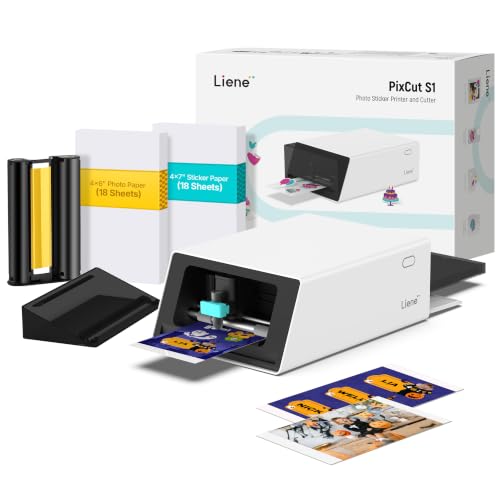
Liene PixCut S1 Review Summary
If you want a beginner-friendly way to make custom stickers, labels, phone skins, journaling elements, and small personalized gifts, the Liene PixCut S1 Sticker Printer is a compelling buy.
It is especially strong for users who value a guided workflow, durable laminated output, and the convenience of printing and cutting from one compact desktop machine rather than juggling separate devices.
The Liene PixCut S1 Sticker Printer is not built for industrial throughput or traditional office printing.
Instead, it focuses on creative, small-batch production with AI-assisted editing and edge cutting, which makes it a smart choice for DIY crafters, teachers, parents, and small sellers who want polished results without a steep learning curve.
Scorecard
| Category | Score | What it means |
|---|---|---|
| Print and cut convenience | 9.0 | Combines photo printing and die cutting in one device, simplifying sticker creation. |
| Cutting precision | 9.0 | AI-guided extraction and edge-following cutting help create clean outlines. |
| Print quality | 8.0 | 300 dpi thermal dye-sublimation output is vivid and detailed for stickers. |
| Creative software experience | 8.0 | The app includes editing, templates, and AI tools that are approachable for beginners. |
| Sticker durability | 9.0 | Four-layer output with automatic lamination aims for waterproof, scratch-resistant results. |
| Content library and templates | 9.0 | Large built-in asset library and template set support many project types. |
| Portability and footprint | 6.0 | At 6.2 pounds, it is still a countertop tool rather than a truly portable accessory. |
Bottom line: the Liene PixCut S1 Sticker Printer is best for buyers who want easy, attractive, durable sticker-making more than raw production speed.
If that fits your workflow, it is one of the more practical all-in-one creative devices in this category.
Key Features and Specifications of Liene PixCut S1
The Liene PixCut S1 Sticker Printer combines photo printing and die cutting into one Bluetooth-enabled workflow.
That matters because it removes a common pain point for crafters: getting a separate printer and cutter to align consistently.
| Spec | Detail |
|---|---|
| Brand | Liene |
| Model | DHP700 |
| Product type | Sticker printer and cutting machine |
| Connectivity | Bluetooth |
| Control method | Liene app on mobile, tablet, and desktop |
| Printing technology | Thermal dye sublimation |
| Print output | Color |
| Print resolution | 300 dpi |
| Maximum color print speed | 1 ppm |
| Maximum monochrome print speed | 1 ppm |
| Color | White |
| Weight | 6.2 pounds |
- All-in-one print-and-cut machine for stickers, labels, and craft projects.
- AI image extraction to isolate subjects from photos automatically.
- AI-guided cutting that follows edges for cleaner outlines.
- 300 dpi resolution with 16.7 million colors for detailed, vivid output.
- Four-layer thermal dye-sublimation process with automatic lamination.
- Waterproof and scratch-resistant sticker claims for everyday use.
- Supports custom badges, phone skins, ID cards, labels, journaling, and gifts.
- Includes more than 40,000 free images, fonts, and elements.
- Offers more than 2,000 ready-to-use templates.
- No subscription required for the included creative library.
From a buyer’s perspective, the specifications make the PixCut S1 look less like a general printer and more like a purpose-built craft machine.
That distinction matters when you compare it with broader photo printers or separate cutting tools.
Pros and Cons of Liene PixCut S1
Every buyer should weigh the Liene PixCut S1 Sticker Printer pros and cons before committing, especially because its strengths are closely tied to its app-driven workflow.
| Pros | Cons |
|---|---|
| Prints and cuts in one workflow | Speed is modest for large batch jobs |
| AI-assisted subject extraction and edge cutting | Not especially lightweight or pocketable |
| Vivid color output with 300 dpi resolution | AI/app workflow may not suit manual-control users |
| Durable laminated stickers with water- and scratch-resistant claims | Better for small creative jobs than high-volume production |
| Large template and asset library | Consumable and material compatibility should be checked first |
| No subscription required | Not a general-purpose office printer |
What stands out most is how much friction Liene removes from the creative process.
Instead of learning a complicated desktop design setup, users can work from a phone or tablet and still get polished results.
What may limit it is scale.
The stated output speed suggests this is a machine for thoughtful, repeatable hobby or small-business use, not rapid mass production.
Who Should Buy Liene PixCut S1?
The Liene PixCut S1 Sticker Printer is a strong fit for people who want to turn photos, illustrations, and labels into finished stickers with minimal setup.
It is particularly appealing for DIY crafters, journaling enthusiasts, teachers, parents, and small sellers who value convenience and attractive results.
- Buy it if you want a simple print-and-cut system for stickers, labels, and gifts.
- Buy it if you prefer app-based editing with ready-made templates and AI tools.
- Buy it if you want durable stickers that should hold up better than basic paper labels.
- Buy it if you make small batches and care more about polish than speed.
On the other hand, you should probably skip it if you need a printer for office documents, fast bulk sticker production, or a fully manual cutter workflow.
Buyers who want a traditional craft cutter with deeper hands-on control may prefer a different setup.
How the Print-and-Cut Workflow Works
The biggest reason to consider the Liene PixCut S1 Sticker Printer is the workflow itself.
It is designed so you can create, edit, print, and cut from one connected experience instead of managing separate tools.
That matters in real use because sticker production often fails when the cut line drifts away from the printed image.
By combining the print and cutting stages, Liene tries to reduce those alignment problems.
For buyers, that means less trial and error, fewer wasted sheets, and a better chance of getting usable stickers on the first pass.
The app-led process is also a major design choice.
It makes the machine more approachable for beginners, but it also means your comfort with smartphone or tablet software will affect how much you enjoy the product.
If you like tapping through templates and photo edits on mobile, the workflow should feel smooth.
If you prefer exporting files from desktop software and manually fine-tuning every detail, it may feel a bit guided.
AI Cutting Accuracy in Real-World Use
Cutting precision is one of the most important factors in any sticker printer review, and this is where the PixCut S1 looks especially competitive.
The device uses AI image extraction to recognize the subject in a photo and then guides cutting around the edges.
For buyers, that can be a real time-saver.
Instead of manually tracing a pet photo, character image, or product design, the machine tries to identify the outline automatically.
The result should be cleaner sticker shapes with less effort, which is exactly what most hobby users want.
The key caveat is that AI-assisted cutting is only as good as the source image and the user’s setup.
Busy backgrounds, low-contrast photos, or awkward compositions can still reduce accuracy.
So while the system is clearly a strength, it is not magic.
Good inputs still matter.
If you want a device that makes sticker cutting feel easier without requiring professional design skills, this is one of the strongest selling points of the Liene PixCut S1 Sticker Printer.
Sticker Durability and Finish
The durability story is another major reason this product stands out.
Liene describes the output as a four-layer thermal dye-sublimation process with automatic lamination, which is meant to improve durability and surface protection.
In practical terms, that should help the stickers survive everyday handling better than basic paper labels or budget craft prints.
The claimed water- and scratch-resistant finish is especially useful for items such as phone decorations, laptop stickers, water bottle labels, and gift tags that get touched often.
This is where the PixCut S1 begins to look more premium than a simple home printer workaround.
You are not just printing a sticker image; you are aiming for a finished craft piece with a more resilient surface.
For many buyers, that extra durability is worth the tradeoff in speed and size.
Best use case: decorative and practical stickers that need to look good after repeated handling.
Less ideal use case: fast, high-volume labels where speed matters more than finish quality.
App Templates, AI Tools, and Creative Options
The companion app is one of the biggest reasons the Liene PixCut S1 Sticker Printer feels beginner-friendly.
It includes editing tools, templates, AI image styles, and a large built-in library that removes a lot of the blank-page problem many creators face.
The library is a strong selling point.
With more than 40,000 free images, fonts, and elements plus more than 2,000 templates, the product is designed to help users make things quickly.
That is useful for specific projects like labels, name tags, phone skins, lens stickers, journaling pages, and personalized gifts.
The AI Lab feature also adds a fun creative angle.
Turning a photo into anime, fantasy, or holiday-themed artwork is not essential, but it does broaden the product’s appeal for families and casual makers who want more than plain labels.
The best part is that no subscription is required, which improves long-term value compared with tools that lock useful features behind ongoing fees.
For buyers who want a low-friction creative toolkit, this software package is one of the machine’s strongest arguments.
Best Projects for the PixCut S1
The Liene PixCut S1 Sticker Printer shines when the project is visual, personalized, and relatively small in scale.
It is less about office efficiency and more about creative output with a polished finish.
- Custom stickers for laptops, water bottles, planners, and scrapbooks
- Phone skins and decorative device labels
- Journaling and planner inserts for crafters and students
- Gift tags and badges for events and parties
- Classroom labels and name tags for teachers and parents
- Small-batch products for Etsy-style sellers or hobby entrepreneurs
If your day-to-day goal is simply to print a lot of shipping labels or document pages, the PixCut S1 is the wrong category.
But if your goal is to create attractive, durable, personalized pieces, it is very well targeted.
Comparable Alternatives to Consider
If you are comparing the Liene PixCut S1 Sticker Printer against alternatives, think in terms of workflow, not just brand names.
Some buyers will prefer a dedicated cutter, while others want a more traditional printer paired with separate tools.
- Cricut sticker and cutting machines — better if you want a well-known crafting ecosystem and broad accessory support.
- Canon photo printers — useful if you want strong photo output and are comfortable adding a separate cutter.
- Epson photo printers — another solid route for buyers who prioritize image quality first.
- Label maker printer — practical for functional labeling, but usually less creative than the PixCut S1.
- Desktop craft cutter — a better choice if you want manual control and already own a printer.
Compared with these options, the PixCut S1’s biggest advantage is that it combines printing, AI recognition, cutting, and template support into one system.
That convenience is hard to ignore for beginners.
Is Liene PixCut S1 Worth It?
So, is Liene PixCut S1 Sticker Printer worth it?
For the right buyer, yes — especially if you want a smart, beginner-friendly machine that produces durable stickers with less setup friction than a traditional craft workflow.
The strongest case for buying it is simple: it saves time, reduces alignment headaches, and gives you a better chance of getting professional-looking results without separate hardware.
The combination of AI cutting, a large template library, and laminated output makes it a strong fit for hobbyists and small creators who want convenience first.
The biggest drawbacks are also clear.
It is not built for high-volume production, it is not especially portable, and its app-centered workflow may frustrate users who prefer manual control.
Still, those limitations are reasonable given the product’s purpose.
Buy the Liene PixCut S1 Sticker Printer if you want an all-in-one creative tool for custom stickers and labels. Skip it if your main priority is speed, office printing, or a fully manual craft setup.
For DIY users who want a polished result with minimal hassle, this is a very practical purchase and one of the more appealing options in its class.