Choosing the right video wall controller can make the difference between a clean, seamless display and a frustrating setup. The best models handle scaling, rotation, input switching, and bezel correction with minimal hassle.
This roundup focuses on video wall controllers for multiple displays that suit everything from simple 2×2 walls to larger multi-screen installations, with options for HDMI, USB-C, and 4K workflows.
Best 10 Video Wall Controllers for Multiple Displays Picks for 2026
2x2 Wall Processor
HDMI/USB-C 4K60 2x2 wall controller

- HDMI or USB-C input for a 4-screen wall
- 2x2, 1x2, 2x1, 1x3, 3x1, 1x4, 4x1 modes
- Bezel adjustment, EDID management, RS-232, and audio extraction
Best For: Four-display video walls that need flexible input and rotation
6-Screen Wall Builder
4K60 6-output video wall controller

- Drives up to 6 TVs with 6 HDMI outputs
- HDMI and USB-C input support up to 4K60
- Multiple splice modes with 180° rotation
Best For: Six-screen walls that need 4K60 input and easy switching
2x2 Commercial Processor
4K30 2x2 wall processor with RS232

- 8 display modes including 2x2 and splitter mode
- 180° rotation plus edge masking for cleaner seams
- Toslink and 3.5mm audio extraction
Best For: Simple 4-screen walls with rotation and RS232 control
9-Display Wall Processor
3x3 HDMI/USB-C wall controller

- Supports up to 9 displays in 3x3 layouts
- HDMI and USB-C input up to 4K60
- Bezel correction, 180° rotation, and audio extraction
Best For: Large 9-screen walls with flexible layout options
Compact 4K Wall Splicer
ISEEVY 4K60 Controller for 4 TVs

- HDMI or USB-C input with 4K60 support
- Four HDMI outputs for a 2x2 wall
- Remote, button control, and 180° rotation
Best For: simple 4-screen 4K video walls
Flexible 2x2 Wall Splitter
DEANFINN 4K Video Wall Controller

- HDMI or DVI input with four HDMI outputs
- 11 layout modes plus edge mask and rotation
- IR remote, RS232, and button control
Best For: 2x2 video walls that need flexible setup control
Matrix Video Wall Pro

- 4x4 matrix plus video wall and multiviewer modes
- Bezel adjustment, EDID management, and rotation
- Optical and L/R audio extraction with Web GUI
Best For: advanced setups needing matrix routing and multiview
9-Screen Wall Splicer
3x3 HDMI Video Image Processor

- Drives 9 outputs for 3x3 video wall layouts.
- Supports HDMI and DVI input up to 4K@30Hz.
- Adds IR, RS232, memory, and bezel alignment tools.
Best For: Large multi-display walls needing 3x3 splicing and flexible modes
USB-C Four-Screen Controller
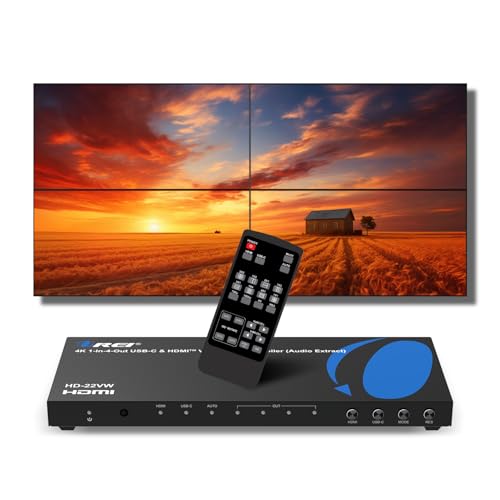
- Accepts HDMI or USB-C input for four displays.
- Supports 2x2 and other smaller wall modes.
- Includes rotation, bezel adjustment, and audio outputs.
Best For: Four-screen walls using HDMI or USB-C sources
Compact 4-Output Processor
2x2 HDMI+DVI Video Wall Controller
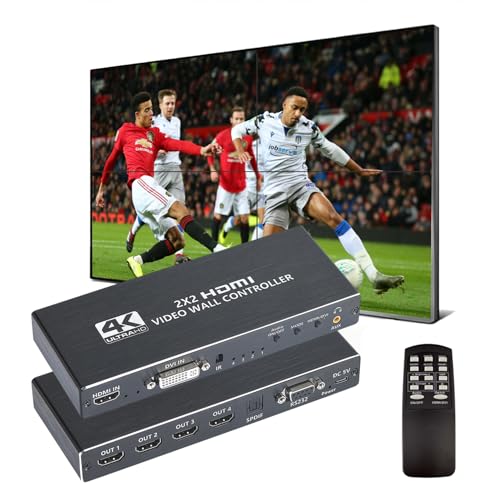
- Drives four HDMI outputs from HDMI or DVI input.
- Supports 2x2 plus several portrait and split modes.
- Includes 180° rotation, RS232, and optical audio.
Best For: Simple 4-screen walls with HDMI or DVI input
2×2 Wall Processor – HDMI/USB-C 4K60 2×2 wall controller
If you want video wall controllers for multiple displays that can handle a clean 2×2 layout from either HDMI or USB-C, this OREI model is built for straightforward wall setups. It supports several splice modes, bezel adjustment, EDID management, and 180° flipping in 2×2 mode, making it a practical pick for small commercial displays or a home AV project with four screens.
Best For: Users building a 4-screen video wall who want HDMI or USB-C input plus rotation and audio extraction.
Pros:
- Supports 2×2, 1×2, 2×1, 1×3, 3×1, 1×4, and 4×1 display modes.
- Accepts HDMI or USB-C input and includes bezel adjustment plus EDID management.
- Offers optical and L/R audio extraction, with RS-232, remote, and front-panel control.
- 180° flipping in 2×2 mode helps align inverted top displays.
Cons:
- Output behavior is tied to the supported mode and resolution limits listed in the notes.
- Does not support HDR10 or Dolby Vision.
This is a focused option if your priority is a reliable 4-display wall processor with flexible input choices and installation-friendly adjustment tools. It favors practical control and setup features over premium HDR support.
6-Screen Wall Builder – 4K60 6-output video wall controller
For larger video wall controllers for multiple displays, this ISEEVY unit stands out by supporting up to six TVs in one wall with 6 HDMI outputs. It accepts HDMI or USB-C input, handles multiple splice layouts, and supports 180° rotation on each output, which is useful when you need a flexible display grid that can be installed in different orientations.
Best For: Building a 6-screen video wall with 4K60 input and simple control options.
Pros:
- Supports up to 6 TVs with 6 HDMI outputs.
- Offers many splice modes, including 2×3, 3×2, 1×5, 1×6, 2×2, and 1×1 layouts.
- Accepts HDMI and USB-C inputs at up to 3840 x 2160@60Hz.
- Includes remote and button control for quick switching, plus 24/7 stable work design.
Cons:
- Audio output options are limited to built-in HDMI output audio and a 3.5mm port.
- Best suited for TV wall use rather than mixed projector or advanced AV workflows.
This is a strong choice when the main goal is expanding to six screens without adding complexity. The higher output count and broad layout support make it especially useful for signage, presentation walls, and multi-TV installations.
2×2 Commercial Processor – 4K30 2×2 wall processor with RS232
If you are comparing video wall controllers for multiple displays and want a simpler 4-screen processor, this PORTTA model is designed around a 2×2 wall with a fixed 1080p60 output. It adds 180° rotation, edge masking, RS232 control, and audio extraction, which makes it a solid fit for installs where consistent output and basic commercial controls matter more than ultra-high output resolution.
Best For: 4-screen video walls that need easy control, rotation, and edge masking.
Pros:
- Supports 2×2, 1×2, 2×1, 1×3, 3×1, 1×4, 4×1, and 1×1 splitter modes.
- Includes IR, manual, and RS232 control options.
- 180° rotation and edge masking help improve alignment and reduce visible seams.
- Extracts audio through Toslink and 3.5mm outputs.
Cons:
- Input is 4K30, and output is fixed at 1080p60.
- Only handles four HDMI outputs.
This controller makes sense when you need dependable wall-splicing features without paying for a higher-output platform. It is especially appealing for installations where edge cleanup and simple remote or RS232 control are the main priorities.
9-Display Wall Processor – 3×3 HDMI/USB-C wall controller
When you need video wall controllers for multiple displays and want to scale past a basic 2×2 setup, this OREI 3×3 controller is aimed at up to nine screens. It supports HDMI and USB-C input, multiple layout options, bezel correction, and 180° rotation, giving you the tools needed for a more advanced wall with flexible commercial placement.
Best For: Nine-display walls that need HDMI or USB-C input and layout flexibility.
Pros:
- Supports up to 3×3 walls with up to 9 displays.
- Offers 15 layout configurations, including 3×3, 2×3, 2×2, 3×2, 4×2, and 1×4.
- Accepts HDMI and USB-C DP Alt Mode input at up to 4K60.
- Includes bezel correction, 180° rotation, optical audio, and L/R output support.
Cons:
- Outputs are limited to up to 1080p60 per display.
- RS-232 image rotation requires computer software, and the cable is not included.
This model is the most scalable of the group for users planning a larger wall without moving into specialized custom AV gear. Its layout range and input flexibility make it a strong fit for signage, presentations, and multi-screen installations that need more than four or six panels.
Compact 4K Wall Splicer – ISEEVY 4K60 Controller for 4 TVs
If you want video wall controllers for multiple displays that are simple to deploy and support full 4K60 input, this ISEEVY unit is built for a clean 2×2 TV wall. It takes one HDMI or USB-C source and sends it to four HDMI outputs, making it a practical choice for basic wall-splice setups in retail, meeting spaces, or home AV projects.
Best For: Users who need an easy 4-screen 4K60 video wall with straightforward control.
Pros:
- Supports HDMI and USB-C input up to 3840×2160@60Hz.
- Four HDMI outputs can each support 4K resolution.
- Multiple splice modes include 2×2, 1×2, 2×1, 1×4, and 4×1.
- Includes 180-degree rotation, remote control, and button control.
Cons:
- Built for up to 4 TVs, so it is not expandable beyond a 4-screen wall.
- No advanced multiview or matrix features are listed.
This is a straightforward controller for users who mainly need reliable 4-screen splicing without a complicated setup. Its 24/7 stability claim and simple switching controls make it a sensible fit for fixed installations where ease of use matters.
Flexible 2×2 Wall Splitter – DEANFINN 4K Video Wall Controller
Among video wall controllers for multiple displays, this DEANFINN model is aimed at buyers who need a flexible 2×2 setup with several control options. It supports HDMI or DVI input, four HDMI outputs, and a range of splicing layouts, making it a practical fit for display walls that need basic configuration flexibility and audio output support.
Best For: Installers who want a 4-screen controller with 2×2 focus and multiple control methods.
Pros:
- Supports HDMI or DVI input and outputs to four HDMI displays.
- Offers 11 splicing modes, including 2×2, 1×2, 1×3, 1×4, 2×1, 3×1, and 4×1.
- Includes IR remote, RS232, and button-press control.
- Has edge mask, 180-degree rotation, and audio output.
Cons:
- Input support is up to 4K@30Hz, not 4K60.
- DVI input does not support 4K.
- Primary design center is a 2×2 wall rather than a full matrix setup.
This controller stands out if you want a capable but approachable wall-splitting box with useful alignment and audio features. The memory function and multiple control paths also help it slot into permanent installations without constant reconfiguration.
Matrix Video Wall Pro – OREI UHD-44MVW 4×4 Processor
If you need video wall controllers for multiple displays with both wall-splitting and matrix-style routing, the OREI UHD-44MVW is the most feature-rich option here. It supports four HDMI inputs and four HDMI outputs, plus multiviewer modes for a single screen, so it works well in setups that need to switch between a traditional video wall and a more configurable display layout.
Best For: Users who need a 4×4 processor with video wall, matrix, and multiviewer modes.
Pros:
- Supports 4×4 HDMI matrix mode and video wall layouts up to 2×2, 1×4, and 4×1.
- Includes multiviewer modes such as Single, PIP, Dual, Triple, Quad, and User Mode.
- Offers EDID management, bezel adjustment, RS-232, and Web GUI control.
- Provides audio extraction through optical and L/R outputs.
Cons:
- Does not support HDR10 or Dolby Vision.
- More complex than a basic 4-screen wall controller.
- Best value depends on needing matrix and multiviewer functions, not just simple splitting.
This OREI model is the strongest choice if your installation needs more than a fixed wall layout. Its combination of matrix routing, multiviewer tools, and audio extraction makes it a better fit for advanced AV environments where display flexibility matters.
9-Screen Wall Splicer – 3×3 HDMI Video Image Processor
If you need video wall controllers for multiple displays that can drive a true 3×3 layout, this model is built for large-format splicing across up to nine screens. It accepts HDMI or DVI input, supports several common wall layouts, and adds 180° rotation plus edge masking to help align the image across bezels.
Best For: Large 9-screen walls in retail, control rooms, or demo spaces that need flexible layout modes.
Pros:
- Supports 1 HDMI input, 1 DVI input, and 9 HDMI outputs for 3×3 splicing.
- Offers 13 display modes, including 3×3, 2×2, 1×4, and 4×2.
- Includes IR remote, RS232 control, memory function, and plug-and-play setup.
- 180° rotation and edge mask help improve bezel alignment.
Cons:
- DVI does not support 4K, and some TV box/Fire Stick inputs may not be read at 4K/60Hz.
- Notes recommend setting all screens to 1080p for proper operation.
- Splicing screens may need to be reset to factory default first.
This is the most flexible option here if your priority is a multi-screen wall with many layout choices. It favors installation convenience and display alignment over simple two-by-two use cases.
USB-C Four-Screen Controller – OREI 4K Video Wall Controller
For buyers comparing video wall controllers for multiple displays, this OREI unit is a straightforward choice for a 2×2 setup with modern source options. It accepts either HDMI or USB-C input, outputs at 1080p, and includes 180° rotation, bezel adjustment, and separate audio outputs for cleaner integration.
Best For: A four-screen wall built from a PC, laptop, media player, or gaming console with USB-C or HDMI output.
Pros:
- Supports HDMI and USB-C inputs for flexible source connection.
- Designed for 2×2 walls, with additional modes like 1×2, 2×1, 1×3, and 1×4.
- Includes 180° rotation, bezel adjustment, and EDID management.
- Offers optical and analog audio output plus RS-232 control.
Cons:
- Output is limited to 1080p, even though input supports up to 4K@60Hz.
- Mainly centered on four-screen layouts rather than larger walls.
- Dual-voltage support is supplied with a US plug and adapter/converter for international use.
This model stands out if you want a cleaner source connection with USB-C support and a practical four-display layout. It is a strong fit for conference-style or desktop-to-wall use where simplicity matters.
Compact 4-Output Processor – 2×2 HDMI+DVI Video Wall Controller
If you want video wall controllers for multiple displays but only need a compact 2×2 system, this unit focuses on the essentials. It takes HDMI or DVI input, sends the signal to four HDMI outputs, and includes 180° rotation, RS232 support, and optical audio output for basic wall deployments.
Best For: Small 4-screen installations that need a simple, metal-bodied processor with splicing modes.
Pros:
- Supports 1 HDMI or DVI input and 4 HDMI outputs for a 2×2 wall.
- Includes 8 splicing modes, covering 2×2 and several 1xN / Nx1 layouts.
- Offers 180° rotation on most splicing modes and RS232 control.
- Uses a metal chassis with gold-plated interfaces for durability and signal transmission.
Cons:
- Only outputs 1080p at 60Hz, despite 4K input support.
- Only output 1 and output 2 can be rotated 180°.
- Warranty is shorter than some alternatives at 6 months.
This is a practical pick when you need a no-frills wall processor for a four-display layout. It is less feature-rich than larger or USB-C-enabled options, but it covers the core job well.
How We Picked the Best Video Wall Controllers for Multiple Displays
We focused on controllers that offer practical display modes, stable signal handling, and enough input/output flexibility for real-world installations. Priority went to models with 4K support, rotation tools, audio handling, and setup features that reduce configuration headaches.
Quick Comparison
For smaller walls, 2×2 and 3×3 controllers are usually the easiest fit. If you need more flexible layouts or multiple source types, look for Video Wall Controllers for Multiple Displays with USB-C and HDMI inputs, RS-232 control, and clear output support. Larger matrix-style units are better when you want broader routing options or more display combinations.
Key Buying Factors for Video Wall Controllers for Multiple Displays
Display Layout Support
Check the supported wall sizes and split patterns first. A controller that handles 1×2, 2×2, 3×3, or mixed splicing modes will be more useful than one tied to a single configuration.
Input and Output Compatibility
Match the controller to your sources and screens. HDMI is standard, but USB-C, DVI, and multi-output 4K support can matter if you are connecting laptops, media players, or mixed hardware.
Image Control Features
Look for bezel adjustment, 180-degree rotation, scaling, and audio extraction if you want a polished result. These features help the wall look aligned and improve usability in commercial or presentation settings.
Control and Installation
RS-232, IR, and straightforward front-panel or software controls can simplify deployment. For permanent setups, confirm that the controller fits your rack, cabling, and power requirements.
Who Should Buy Which Video Wall Controllers for Multiple Displays?
Buy a compact 2×2 unit if you want an affordable setup for conference rooms, retail signage, or home theaters. Choose a 3×3 or 4×4-style controller if your priority is a larger visual impact or more advanced display routing. If your sources vary between laptops and AV gear, prioritize Video Wall Controllers for Multiple Displays with both HDMI and USB-C inputs and strong signal management.
In short, the best choice depends on wall size, source compatibility, and how much control you need over the final image. Match those basics, and you will end up with a system that is easier to install and much better to use.