Choosing the right mixer for a home studio depends on how many sources you record, whether you need hands-on controls, and how much computer integration your workflow requires.
This roundup compares compact USB interfaces, podcast consoles, gaming mixers, and multichannel boards so you can match the features to your recording space and creative goals.
Best 10 Audio Mixers for Home Studio Picks for 2026
Complete Studio Starter
Focusrite Scarlett 2i2 Studio 4th Gen

- Two inputs with Auto Gain, Clip Safe, and Air modes
- Includes condenser mic, headphones, and recording software
- Supports 24-bit/192kHz recording with 120dB dynamic range
Best For: Beginners and solo musicians building a complete recording setup
Analog Effects Hub

- 12 channels with four mic/line and four stereo line inputs
- Includes 12 reverb, chorus, and delay effects
- Provides EQ, low-cut filtering, phantom power, and RCA I/O
Best For: Small analog setups needing multiple inputs and onboard effects
Solo Recording Essential
Focusrite Scarlett Solo 3rd Gen

- One XLR mic preamp and one Hi-Z instrument input
- Records up to 24-bit/192kHz with switchable Air mode
- Includes software, balanced outputs, and three-year warranty
Best For: Solo vocalists, guitarists, and compact home studios
Podcasting and Streaming Console

- 10-channel console with up to 11 customizable sound pads
- Supports XLR microphones, instruments, smartphones, and loopback
- Adds denoise, reverb, auto-tune, tone controls, and pitch changing
Best For: Podcasters, livestreamers, and voice-over creators
Versatile Studio Hub
12-Channel Bluetooth USB Mixer
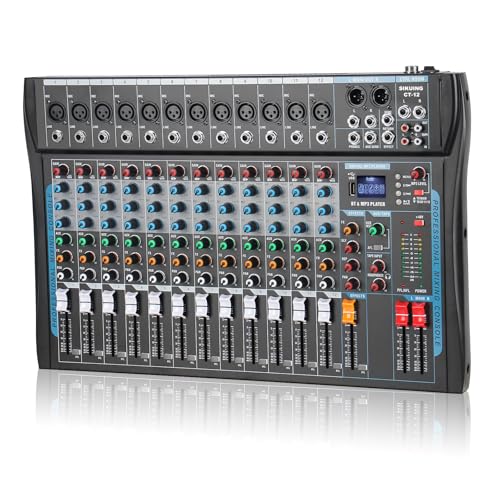
- 12 channels with XLR and balanced line inputs
- USB, Bluetooth, phantom power, and headphone monitoring
- 3-band EQ and DSP effects for recording or streaming
Best For: Flexible home studios with multiple microphones and devices
Streamer’s Control Center

- XLR input with built-in 48V phantom power
- Individual faders for mic, line, headphone, and output levels
- Sound effects, mute/monitor controls, and RGB lighting
Best For: Single-mic streaming, gaming, and podcast setups
Feature-Rich Workhorse
Pyle PMXU128BT 12-Channel Mixer

- USB soundcard for Mac or PC recording
- Bluetooth, 12 channels, and multiple I/O options
- 7-band EQ, 16 DSP effects, and 48V phantom power
Best For: Expanding home studios and small live-production setups
Versatile Home Studio Hub
8-Channel Professional Audio Mixer

- Eight inputs with XLR and 1/4-inch connectivity
- USB recording, Bluetooth playback, and headphone monitoring
- 3-band EQ, phantom power, reverb, and delay effects
Best For: Multi-device home studios, streaming, and small performances
Effects-Focused Compact Pick
6-Channel Bluetooth Audio Mixer

- Four XLR inputs with selectable 48V phantom power
- 16 DSP effects with 3-band EQ and independent faders
- USB, USB-stick playback, and Bluetooth connectivity
Best For: Karaoke, streaming, and home recording with built-in effects
Slim Bluetooth Console
FULUODE CT-80S 8-Channel Mixer

- Eight channels for microphones, instruments, and other sources
- Bluetooth 5.0, USB/MP3 playback, and USB recording
- Slim chassis with 48V phantom power, reverb, and LED display
Best For: Space-conscious studios with karaoke or live-use needs
Complete Studio Starter – Focusrite Scarlett 2i2 Studio 4th Gen
If you want audio mixers for home studio recording but prefer an interface-centered setup, the Focusrite Scarlett 2i2 Studio 4th Gen provides a ready-to-use package. It combines two mic preamps, two Hi-Z inputs, a condenser microphone, headphones, and recording software in one bundle.
Best For: Beginners and solo musicians who want the core equipment for recording vocals and instruments.
Pros:
- Includes the CM25 MkIII condenser microphone and SH-450 headphones.
- Offers 24-bit/192kHz recording, a 120dB dynamic range, and two inputs.
- Auto Gain, Clip Safe, and Air modes help simplify recording and tone shaping.
- Includes Ableton Live Lite, Cubase LE, Pro Tools Intro+, and Hitmaker Expansion.
Cons:
- It has two audio inputs, so it is less suited to larger multi-source sessions.
- The bundle is more equipment than needed if you already own a microphone and headphones.
As a complete home-studio package, this Scarlett bundle is a practical choice for getting from setup to first take quickly, with useful protection against clipping and a generous software collection.
Analog Effects Hub – Mackie Mix12FX Compact Mixer
For shoppers comparing audio mixers for home studio use, the Mackie Mix12FX offers a traditional 12-channel analog layout with integrated effects. Its mic/line inputs, stereo line channels, RCA connections, and control-room output make it useful for combining several sources.
Best For: Home studios, rehearsal spaces, and small setups that need multiple analog inputs and built-in effects.
Pros:
- Provides four mic/line inputs and four stereo 1/4-inch line inputs.
- Includes 12 integrated reverbs, choruses, and delays.
- Offers three-band EQ, low-cut filtering, pan controls, and phantom power.
- Dedicated RCA inputs and outputs support playback or recording.
Cons:
- It is a wired analog mixer rather than a USB audio interface.
- The supplied notes do not indicate included recording software.
- Its 1/4-inch and RCA connectivity may require adapters for some modern equipment.
The Mix12FX suits users who value hands-on analog mixing and several physical channels. Choose it when integrated effects and flexible line connectivity matter more than direct USB computer integration.
Solo Recording Essential – Focusrite Scarlett Solo 3rd Gen
Among audio mixers for home studio recording, the Focusrite Scarlett Solo 3rd Gen is a compact interface for one microphone and one instrument source. It combines a mic preamp, Hi-Z instrument input, Air mode, and high-resolution recording in a small USB-connected unit.
Best For: Solo vocalists, guitarists, podcasters, and compact music-recording setups.
Pros:
- Includes one XLR mic preamp and one Hi-Z instrument input.
- Supports recording and mixing up to 24-bit/192kHz.
- Air mode adds extra clarity to acoustic instruments and other sources.
- Includes Gain Halos, low-noise balanced outputs, software, and a three-year warranty.
Cons:
- Its single mic preamp limits simultaneous microphone recording.
- Only one instrument input is provided for guitar or bass.
- The package includes a USB cable but not a microphone or headphones.
The Solo 3rd Gen is a focused, space-saving option when your sessions center on one voice or instrument at a time. It delivers useful recording resolution and software without the extra channels of a larger mixer.
Podcasting and Streaming Console – MAONO AME2 Audio Mixer
The MAONO AME2 brings podcast and livestream controls to the home studio, making it a distinctive option among audio mixers for home studio creators. It supports XLR microphones, instruments, Bluetooth or smartphone audio, customizable sound pads, and loopback-oriented streaming connections.
Best For: Podcasters, livestreamers, voice-over creators, and musicians who want built-in audience-facing effects.
Pros:
- Offers 10-channel operation with up to 11 customizable sound pads.
- Includes 48V phantom power, up to 60dB gain, denoise, and a 32-bit chipset.
- Provides reverb modes, auto-tune, tone controls, pitch changing, sidechain, and loopback features.
- Supports XLR microphones, guitar or bass, smartphones, tablets, cameras, Windows, and Mac OS.
Cons:
- USB microphones are not supported.
- Its feature set is oriented toward podcasting, streaming, and content creation rather than conventional multitrack mixing.
- The supplied package list does not mention included recording software.
With sound pads, vocal effects, and multiple streaming outputs, the AME2 is built for interactive content production. It is especially compelling when live control and audience-ready processing are more important than a minimalist recording interface.
Versatile Studio Hub – 12-Channel Bluetooth USB Mixer
For creators comparing audio mixers for home studio use, this 12-channel model offers a broad set of inputs along with USB and Bluetooth connectivity. Its channel controls, 3-band EQ, DSP effects, and phantom power make it adaptable for recording, streaming, karaoke, and small live setups.
Best For: Home studios that need flexible inputs, wireless playback, and support for condenser microphones.
Pros:
- 12 channels with XLR and balanced line inputs for varied setups.
- USB and Bluetooth support convenient computer, phone, and streaming connections.
- +48V phantom power, 3-band EQ, headphone monitoring, and optional 16 DSP effects.
- Compact chassis with sealed rotary controls and LED indicators.
Cons:
- Its many controls and connections may be more than a basic beginner setup requires.
- The listing does not specify whether all DSP features are included in every configuration.
This is a practical all-purpose choice when a home studio needs room to connect multiple microphones and external devices. Bluetooth adds convenience, while the USB interface and monitoring output support recording and live content workflows.
Streamer’s Control Center – FIFINE Ampligame SC3 Mixer
For audio mixers for home studio setups centered on streaming or one-mic recording, the FIFINE Ampligame SC3 emphasizes hands-on control. Its individual faders, front-panel mute and monitor buttons, sound effects, and RGB lighting are designed for PC-based broadcasts and content creation.
Best For: Streamers, gamers, and podcasters using an XLR microphone with a Mac or Windows computer.
Pros:
- XLR microphone input with built-in 48V phantom power for compatible condenser microphones.
- Independent controls for microphone, line in, headphones, and line out.
- Front mute and monitor buttons make live operation straightforward.
- Custom sound buttons, voice-changing modes, auto-tune options, and RGB lighting add streaming flexibility.
Cons:
- It is designed around one microphone and a compact streaming workflow rather than a large multi-mic studio.
- USB microphones are not supported through the XLR input.
- XLR cable is not included.
The SC3 is more specialized than a traditional recording console, but that focus can be useful for creators who want physical control over a broadcast mix. Confirm your cable and microphone requirements before buying, especially if you use a USB mic.
Feature-Rich Workhorse – Pyle PMXU128BT 12-Channel Mixer
Among audio mixers for home studio applications, the Pyle PMXU128BT stands out for its combination of channel capacity, computer recording support, and physical I/O. It includes Bluetooth, a USB soundcard, phantom power, 16 DSP effects, and a 7-band EQ for more detailed control over studio or live mixes.
Best For: Home studios and small live setups needing numerous inputs, PC/Mac recording, and extensive tone shaping.
Pros:
- 12-channel design with XLR/combo inputs and multiple input/output options.
- USB soundcard supports recording and connection to Mac or PC.
- Bluetooth accepts wireless audio from phones, tablets, and MP3 players.
- +48V phantom power, 16 DSP effects, 7-band EQ, and 12-segment LED metering.
Cons:
- At 10.6 pounds and over 21 inches deep, it requires substantial desk or console space.
- The extensive controls may be unnecessary for simple one-microphone recording.
This Pyle is a strong fit when connectivity and hands-on mixing matter more than a compact footprint. Its USB recording interface and wide selection of inputs suit a growing home studio, while Bluetooth and onboard effects add useful options for playback and live production.
Versatile Home Studio Hub – 8-Channel Professional Audio Mixer
For anyone comparing audio mixers for home studio use, this 8-channel console offers plenty of connectivity for microphones, instruments, playback devices, and computer-based recording. Its USB interface, Bluetooth streaming, 3-band EQ, and built-in effects make it adaptable for recording, podcasting, streaming, and small live setups.
Best For: Home studios that need multiple inputs plus flexible USB, Bluetooth, and monitoring options.
Pros:
- Eight channels with XLR and unbalanced 1/4-inch inputs for connecting multiple devices.
- USB playback and recording, Bluetooth music streaming, and REC/TAPE connections.
- Per-channel gain, 3-band EQ, FX, PFL, fader, and peak-monitoring controls.
- Includes 48V phantom power, headphone monitoring, reverb, and delay effects.
Cons:
- Its many controls and connection options may take time to learn.
- The supplied information does not identify supported software updates.
This is a strong all-purpose choice when a home studio setup may also serve streaming, meetings, karaoke, or small performances. The rugged, slim chassis and one-year warranty add practical value for regular use.
Effects-Focused Compact Pick – 6-Channel Bluetooth Audio Mixer
This 6-channel model is a practical option among audio mixers for home studio setups that need microphone inputs, stereo sources, and built-in processing without moving to a larger console. It combines four XLR inputs, USB playback and recording functions, Bluetooth streaming, 3-band EQ, and 16 DSP effects.
Best For: Home recording, karaoke, streaming, and small setups that benefit from built-in reverb and DSP effects.
Pros:
- Four XLR inputs support dynamic and condenser microphones with selectable 48V phantom power.
- Six channels include 1/4-inch inputs for instruments and stereo sources.
- USB interface, USB-stick playback, and Bluetooth provide several music-source options.
- Built-in 16-effect DSP processor, 3-band EQ, gain controls, and independent faders.
Cons:
- The manufacturer warranty is listed as only 90 days from purchase.
- As a traditional analog mixer, it may require careful setup to avoid operation errors.
Choose this board if onboard effects are a priority and six channels meet your input needs. Its combination of phantom-powered XLR inputs and playback features makes it flexible, though the short stated warranty is worth considering.
Slim Bluetooth Console – FULUODE CT-80S 8-Channel Mixer
The FULUODE CT-80S is worth considering when shopping for audio mixers for home studio use and you want an eight-channel board with a slim footprint. It combines Bluetooth 5.0, USB and MP3 playback, USB recording, 48V phantom power, reverb, and an LED display for a range of studio, karaoke, conference, and live-music applications.
Best For: Space-conscious home setups that also handle karaoke, band practice, conferences, or live music.
Pros:
- Eight-channel design supports wired, wireless, and condenser microphones plus instruments.
- Bluetooth 5.0, USB/MP3 playback, and USB recording support convenient media handling.
- Includes 48V phantom power, reverb, and a large LED display with song information.
- Ultra-thin chassis is listed at approximately 1.57 inches thick.
Cons:
- The supplied details do not specify the channel-by-channel EQ or fader layout.
- It uses a 110V American plug, which may limit compatibility outside suitable power systems.
- The listed weight is 3.3 kg, so it is not the lightest option for frequent transport.
This mixer stands out for combining eight channels and broad playback options in a notably slim enclosure. It is a sensible fit for users who want one console for home audio, entertainment, and occasional performance duties.
How We Picked the Best Audio Mixers for Home Studio Use
We evaluated these models by looking at input count, connection types, USB recording capability, phantom power, onboard effects, monitoring controls, and overall suitability for common home-studio workflows. We also considered whether each mixer is better suited to recording instruments, podcasting, streaming, karaoke, or managing several sources at once.
Because “mixer” can describe both a traditional analog console and a compact USB audio interface, this selection includes both categories. That distinction matters: interfaces generally offer simpler, cleaner computer recording, while mixers provide more immediate hands-on control over multiple sources.
Quick Comparison
- Best for solo recording: Compact two-input interfaces such as the Scarlett Solo or Scarlett 2i2.
- Best for podcasting and streaming: Podcast-focused consoles with vocal effects, loopback features, and dedicated controls.
- Best for multiple microphones: Six-, eight-, or twelve-channel mixers with several XLR or combo inputs.
- Best for live-style control: Analog consoles with channel faders, onboard effects, Bluetooth, and sub outputs.
- Best for gaming: Small gaming mixers with quick access to mic, game, chat, and headphone levels.
Key Buying Factors for Audio Mixers for Home Studio Recording
Inputs and Expansion
Count the microphones, instruments, phones, and playback devices you expect to connect at the same time. XLR inputs are important for microphones, while combo inputs add flexibility for line-level gear and instruments. Leave some capacity for future equipment if your setup is likely to grow.
USB Recording and Computer Compatibility
A USB interface makes it easier to record directly into a computer or digital audio workstation. Check whether the mixer sends individual channels or only a combined stereo mix. Multitrack USB routing is more useful for detailed editing, while stereo output is often sufficient for livestreams, rehearsals, and simple podcasts.
Phantom Power and Preamps
Condenser microphones typically require 48V phantom power. If you use one, confirm that the mixer supplies it and that the feature is appropriate for your connected equipment. Preamplifier quality also affects gain, noise, and headroom, especially with quieter microphones.
Effects, Monitoring, and Controls
Built-in reverb, compression, equalization, mute buttons, headphone outputs, and independent monitor control can simplify a home setup. Physical faders are useful when you adjust several sources during a live session; a compact interface may be preferable when you mainly record one source at a time.
Size and Workflow
Measure your desk before buying. A larger console can offer more channels and controls but may be excessive for a solo vocalist or guitarist. Also verify Bluetooth, USB playback, sub outputs, and power requirements if those features are central to your workflow.
Who Should Buy Which Audio Mixers for Home Studio?
Solo musicians and voiceover artists should prioritize a reliable two-input interface with good preamps, direct monitoring, and straightforward DAW connectivity. Podcasters and streamers may prefer a dedicated console with quick mute, headphone, effects, and playback controls. Bands, rehearsal spaces, and creators using several microphones should choose a multichannel mixer with enough XLR inputs and practical output routing.
Gamers should focus on chat integration, simple level controls, and low-latency headphone monitoring rather than maximum channel count. If you perform karaoke, DJ, or live-style sessions, Bluetooth, onboard DSP effects, phantom power, and multiple stereo inputs may be more valuable than advanced multitrack recording.