The best ergonomic trackballs can reduce repetitive desk movement while keeping cursor control precise for work, creative tasks, and everyday computing. Instead of sliding across a surface, these mice let you position the pointer with a thumb, finger, or palm-controlled ball.
Our roundup includes wireless and wired options, compact thumb-operated designs, large finger-trackball models, and adjustable-angle choices. Use the guide below to compare comfort, controls, connectivity, and fit before choosing.
Best 10 Ergonomic Trackballs Picks for 2026
Best Wireless Value

- Wireless Bluetooth and Logi Bolt connectivity
- Thumb control works on any surface
- Up to 18 months from one AA battery
Best For: Compact desks and everyday wireless use
Best Wired Budget Pick

- Reliable USB connection with no charging
- Five programmable buttons and tilt scroll
- Optical thumb-ball tracking
Best For: Wired office, creative, and gaming setups
Best Premium Wireless

- 20-degree tilt supports a more upright posture
- Rechargeable battery with USB-C charging
- Six customizable buttons and dual wireless modes
Best For: Long productivity sessions and advanced setups
Best Ambidextrous Design
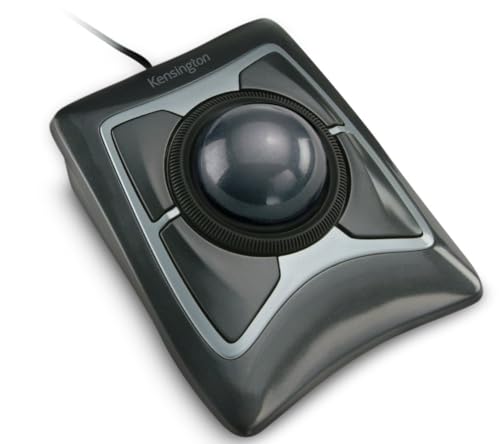
- Large 55mm ball for precise control
- Ambidextrous design with detachable wrist rest
- Dedicated scroll ring for page navigation
Best For: Shared desks and large-ball trackball fans
Best Wireless Thumb-Control Pick

- Wireless Bluetooth and USB connectivity for up to three devices
- Rechargeable battery with four DPI levels
- Angled right-handed design for compact workspaces
Best For: Right-handed users wanting a rechargeable wireless trackball
Best Established Ergonomic Option

- Sculpted thumb-control shape supports forearm posture
- Bluetooth and Logi Bolt wireless connections
- Up to 18 months of battery life with included AA battery
Best For: Office users seeking long battery life and software customization
Best Wired Option for Large Hands

- Large 44mm index-finger-controlled trackball
- Five DPI levels and optical precision tracking
- Plug-and-play wired USB connection with 1.8m cable
Best For: Large-handed users doing wired design and office work
Best Adjustable Angle
ProtoArc EM02 Wireless Trackball

- Adjustable 0° or 15° tilt
- Bluetooth and 2.4GHz connectivity
- Quiet clicks with USB-C charging
Best For: Right-handed users seeking customizable wireless comfort
Best Wired Value
PORLEI TM551 Ergonomic Trackball

- 34mm thumb-controlled trackball
- Stable 1.8m wired USB connection
- Five DPI levels and RGB lighting
Best For: Desktop users who prefer dependable wired control
Best Multi-Device Range

- Adjustable 0° or 18° angle
- Connects with up to three devices
- Rechargeable with DPI up to 4800
Best For: Students and users switching between multiple devices
Best Wireless Value – Logitech Ergo M575S
Logitech Ergo M575S Wireless Ergonomic Trackball Mouse, Black/Blue (910-007026)
Check Price On AmazonThe Logitech Ergo M575S is a practical choice for shoppers seeking ergonomic trackballs in a compact wireless design. Its thumb-controlled ball lets you move the cursor without moving your hand, making it useful on small desks or uneven surfaces.
Best For: Small workspaces, everyday office use, and users who want Bluetooth or USB receiver connectivity without frequent battery changes.
Pros:
- Thumb control reduces the need to move your hand across the desk.
- Bluetooth and included Logi Bolt receiver provide flexible wireless connection options.
- Included AA battery is rated for up to 18 months of use.
- Three customizable buttons support shortcuts and Smart Actions.
Cons:
- Uses a replaceable AA battery rather than USB-C charging.
- Its right-handed ergonomic shape may not suit left-handed users.
The M575S balances space-saving control, long battery life, and straightforward customization. It is a sensible everyday option when you want wireless ergonomic trackball comfort without the larger feature set or higher-end adjustments of premium models.
Best Wired Budget Pick – ELECOM EX-G Wired Trackball
The ELECOM EX-G is a wired option for shoppers comparing ergonomic trackballs for office work, creative software, gaming, or web navigation. Its thumb-operated ball supports cursor movement without requiring wrist and hand repositioning.
Best For: Users who prefer a dependable USB connection, programmable controls, and no batteries or charging routine.
Pros:
- USB power eliminates battery-life and charging concerns.
- Five programmable buttons can be tailored to different workflows.
- Tilt scrolling adds another navigation method.
- Optical tracking is designed for precise cursor movement.
Cons:
- The wired cable limits placement flexibility.
- Supplied compatibility details focus on Windows and macOS computers.
The EX-G is a straightforward, feature-rich wired trackball with a modest footprint and a lag-free USB connection. Choose it when reliability and button customization matter more than wireless freedom.
Best Premium Wireless – Logitech MX Ergo S
The Logitech MX Ergo S is a premium choice among ergonomic trackballs, combining a 20-degree tilt with rechargeable wireless operation. It is designed for medium- to large-sized hands and includes a button for switching between speed and high-precision tracking.
Best For: Productivity-focused users who want adjustable posture support, quiet clicks, extensive customization, and rechargeable connectivity.
Pros:
- Twenty-degree tilt is intended to improve forearm posture and reduce muscle strain.
- Bluetooth and included Logi Bolt receiver support dual wireless connectivity.
- USB-C charging provides up to 24 hours after a one-minute charge and up to 120 days on a full charge.
- Six customizable buttons and Smart Actions expand workflow control.
Cons:
- Designed for right-handed use and medium- to large-sized hands.
- Charging cable is not included.
- Requires Windows 11 or macOS 14 Sonoma according to the listed minimum operating systems.
The MX Ergo S is the most adjustable and productivity-oriented model in this group. Its tilt base, rechargeable battery, quiet clicks, and dual wireless modes make it a strong fit for long work sessions and advanced desk setups.
Best Ambidextrous Design – Kensington Expert Trackball
Kensington Expert Trackball Mouse (K64325), Black Silver, 5"W x 5-3/4"D x 2-1/2"H
Check Price On AmazonThe Kensington Expert Trackball is a wired desktop model for shoppers who want ergonomic trackballs with a large ball and ambidextrous layout. Its 55mm ball, optical tracking, scroll ring, and detachable wrist rest emphasize controlled navigation and comfort.
Best For: Shared workstations, users who prefer a large trackball, and anyone who wants ambidextrous positioning with a dedicated scroll ring.
Pros:
- Large 55mm ball is designed for precise cursor control.
- Patented scroll ring makes vertical page navigation convenient.
- Ambidextrous design works for either hand.
- Detachable wrist rest supports the hand and wrist.
Cons:
- Wired USB-A connectivity limits placement flexibility.
- Customization through KensingtonKonnect is unavailable for ChromeOS according to the supplied notes.
- The large desktop footprint may not suit compact workspaces.
The Expert Trackball stands out for its generous ball, scroll ring, and left- or right-hand flexibility. It is a strong traditional desktop pick when stable wired operation and broad physical usability are priorities.
Best Wireless Thumb-Control Pick – Nulea M501
The Nulea M501 is a practical choice among ergonomic trackballs if you want wireless connectivity, thumb control, and a rechargeable battery. Its angled shape is designed to keep the palm in a natural position, while four DPI levels help adjust cursor movement for different tasks.
Best For: Right-handed users who need a rechargeable trackball for compact desks, couches, beds, or other limited-space setups.
Pros:
- Connects to up to three devices through Bluetooth or the USB receiver.
- Rechargeable battery eliminates the need for disposable batteries.
- Six-button layout includes forward and back buttons.
- Works across Windows, macOS, PCs, laptops, and iPads.
Cons:
- Buttons are not programmable.
- Charging requires the included cable and a standard USB or 5V power source; fast chargers are not recommended.
- Designed for right-handed use only.
The M501 stands out for combining flexible wireless pairing with a space-saving thumb-controlled design. It is a strong fit for general productivity, especially when desk space or battery convenience matters more than button customization.
Best Established Ergonomic Option – Logitech ERGO M575S
The Logitech ERGO M575S is one of the more refined ergonomic trackballs for everyday office work. Its sculpted thumb-control shape is designed to reduce hand movement, support forearm posture, and provide quiet clicks, while Bluetooth and the included Logi Bolt receiver simplify connection.
Best For: Right-handed office users who want a comfortable, space-saving trackball with long battery life and software-based customization.
Pros:
- Sculpted shape supports a relaxed hand position and improved forearm posture.
- Offers Bluetooth or Logi Bolt wireless connectivity.
- AA battery is included and rated for up to 18 months.
- Logi Options+ enables cursor-speed adjustments, customizable buttons, and Smart Actions.
Cons:
- Uses a replaceable AA battery rather than a rechargeable battery.
- Right-handed design may not suit left-handed users.
- Customization depends on the Logi Options+ app.
The M575S is a sensible mainstream pick for users prioritizing comfort, quiet clicks, and dependable wireless operation. Its long battery life and software support make it particularly convenient for an office setup.
Best Wired Option for Large Hands – PORLEI TM552
The PORLEI TM552 takes a different approach to ergonomic trackballs with a large 44mm ball controlled by the index finger and a wired USB connection. Its hand-conforming shell is aimed at reducing wrist pressure, while five DPI levels and optical tracking support precise positioning for design and office work.
Best For: Right-handed users with large hands who prefer a wired, driver-free trackball for design, office tasks, and general computing.
Pros:
- Large 44mm index-finger trackball is designed for precise control.
- Hand-conforming shape targets reduced wrist pressure and muscle strain.
- Five adjustable DPI levels support different cursor-speed preferences.
- Plug-and-play USB-A connection includes a 1.8-meter cable.
Cons:
- Wired design does not provide wireless flexibility.
- Not recommended for gaming because of its tracking profile and response characteristics.
- Forward and backward buttons are not supported on Mac systems.
The TM552 is best suited to users who want a substantial, index-finger-controlled design and do not mind a cable. Its large ball and positioning technology favor precise productivity work, but its gaming limitation and Mac button restriction are important considerations.
Best Adjustable Angle – ProtoArc EM02 Wireless Trackball
The ProtoArc EM02 is one of the more adaptable ergonomic trackballs for users who want to change their hand position during the day. Its hinge switches between a flat 0° setup and a tilted 15° angle, while thumb control keeps wrist movement to a minimum.
Best For: Right-handed users who want wireless flexibility, adjustable tilt, and quiet operation in a home or office workspace.
Pros:
- Adjustable 0° or 15° angle supports a more personalized hand posture.
- Bluetooth and 2.4GHz wireless connectivity allow switching between devices.
- USB-C charging, quiet clicks, and up to 90 days of standby time add convenience.
- Five DPI settings from 200 to 1600 support different cursor-control preferences.
Cons:
- It is designed for right-handed use only.
- Forward and backward buttons are not compatible with Mac OS.
- New trackball users may need one to two weeks to adjust.
The EM02 is a practical choice when adjustability and wireless convenience matter most. Its compact-workspace-friendly design and long standby time make it particularly useful for everyday productivity.
Best Wired Value – PORLEI TM551 Ergonomic Trackball
The PORLEI TM551 is a straightforward wired option among ergonomic trackballs, using a 34mm thumb-operated ball to provide cursor control without moving the whole mouse. Its USB connection offers a stable setup for desks where wireless charging and pairing are not priorities.
Best For: Right-handed desktop users who prefer a reliable wired connection, large thumb control, and a compact solution for limited workspaces.
Pros:
- 34mm trackball supports thumb-controlled navigation with minimal wrist movement.
- Wired USB-A connection provides a direct, driver-free setup.
- Five DPI levels from 100 to 1200 accommodate slower or faster tracking.
- Back/Forward buttons, a scroll wheel, and removable ball simplify browsing and cleaning.
Cons:
- The 1.8m cable limits placement compared with wireless models.
- Back/Forward buttons are not compatible with Mac OS.
- Buttons are non-programmable.
Choose the TM551 if you value connection stability and simple plug-in operation over portability. RGB lighting is an added visual feature, while the trackball design helps conserve desk space.
Best Multi-Device Range – SABLUTE MAM1 Pro Trackball
The SABLUTE MAM1 Pro is a versatile choice among ergonomic trackballs, combining a 0°/18° adjustable design with wireless support for up to three devices. Its thumb-controlled ball is suited to tight desks, while the broad DPI range accommodates both general productivity and more precise cursor work.
Best For: Students and multi-device users who want adjustable tilt, rechargeable wireless operation, and flexible cursor-speed settings.
Pros:
- 0° or 18° tilt lets users choose a flatter or more natural wrist position.
- Connects with up to three devices through Bluetooth and 2.4GHz wireless.
- Five DPI levels from 800 to 4800 provide a wide tracking range.
- Rechargeable USB-C battery, quiet clicks, optional backlight, and receiver storage improve everyday convenience.
Cons:
- The customization driver is not compatible with Mac OS.
- It is intended for right-handed use.
- First-time trackball users may need one to two weeks to adapt.
The MAM1 Pro stands out for users who move between a computer, laptop, and tablet. Its adjustable angle and three-device wireless connectivity make it a flexible productivity tool, especially for study or shared workspaces.
How We Picked These Ergonomic Trackballs
We selected models across several ergonomic designs rather than treating one layout as universally best. The lineup includes thumb-control trackballs for familiar mouse-like handling, finger- and palm-operated models for larger movements, and adjustable-angle options that let you fine-tune wrist position. We also considered wired and wireless connectivity, charging or battery requirements, DPI adjustment, programmable controls, compatibility, and suitability for different hand sizes.
Because comfort is highly personal, we prioritized practical differences that affect long sessions: how much the hand must move, where the ball is positioned, whether the wrist can stay neutral, and how easily users can reach the buttons and scroll wheel.
Quick Comparison
| Type | Best for | Main advantage | Potential trade-off |
|---|---|---|---|
| Thumb-control wireless | Everyday office use | Familiar mouse-like layout | May fatigue the thumb for some users |
| Finger or palm control | Large movements and precision | Uses broader finger motion | Requires a larger desk footprint |
| Wired trackball | Fixed workstations | No charging or pairing | Cable limits placement |
| Adjustable-angle wireless | Wrist-position customization | Lets you tune hand posture | Usually costs more or weighs more |
Key Buying Factors for Ergonomic Trackballs
Control Style and Ball Size
Thumb trackballs are usually the easiest transition for conventional mouse users, while finger-controlled designs can offer smoother large cursor movements and reduce reliance on the thumb. Larger balls may provide finer control, but they also require more desk space and a different learning curve.
Shape, Angle, and Hand Fit
Look for a shape that supports the palm without forcing the wrist outward. Adjustable tilt can help you find a more neutral position, but it is not automatically better for everyone. Check dimensions carefully if you have particularly small or large hands, and consider whether the buttons sit naturally beneath your fingers.
Connection, Power, and Compatibility
Wireless models are convenient for uncluttered desks, but confirm whether they use Bluetooth, a USB receiver, or both. Check battery life and charging details before buying. Wired models are simple and dependable, especially for a permanent workstation, but cable length and port compatibility still matter.
Precision and Customization
Multiple DPI levels are useful when switching between detailed selection and fast navigation. Programmable buttons can speed up repetitive workflows, though software support may vary by operating system. A smooth scroll wheel and accessible left- and right-click buttons are just as important as maximum sensitivity.
Who Should Buy Which Ergonomic Trackballs?
- Choose a thumb-control wireless model if you want the most familiar transition from a standard mouse and need flexible desk placement.
- Choose a finger- or palm-controlled model if you prioritize broad cursor control, work with large screens, or prefer not to operate the ball with your thumb.
- Choose a wired option for a fixed desk where dependable plug-and-play operation matters more than portability.
- Choose an adjustable-angle design if wrist posture is your primary concern and you want to experiment with a flatter or more elevated position.
- Choose a rechargeable model if you want to avoid disposable batteries and regularly move between workspaces.
Whichever style you choose, expect a short adjustment period. Trackballs change how cursor movement works, but careful hand positioning and the right sensitivity setting can make the transition much easier.