The best audio interface with loopback can simplify livestreaming, podcasting, remote interviews, and music production by routing computer playback back into your recording or streaming software.
These 10 picks range from compact single-input interfaces to multi-channel models and podcast-focused mixers, with options for beginners, musicians, creators, and mobile setups.
Best 10 Audio Interface with Loopback Picks for 2026
Best Entry-Level Pick
Focusrite Scarlett Solo 4th Gen

- 120dB dynamic range and 24-bit/192kHz support
- One mic preamp plus Hi-Z instrument input
- Includes a broad recording-software bundle
Best For: Solo singer-songwriters recording vocals and guitar
Best Budget Loopback Option

- Dedicated Monitor Mix/Loopback function
- Two combo inputs with 48V phantom power
- 24-bit/192kHz USB-C recording
Best For: Budget-conscious creators needing loopback and two inputs
Best for Two Inputs
Focusrite Scarlett 2i2 4th Gen

- Two mic preamps and two Hi-Z inputs
- Auto Gain and Clip Safe support easier tracking
- 120dB dynamic range with 24-bit/192kHz audio
Best For: Musicians recording two sources simultaneously
Best for Podcasting and Streaming

- Loopback for computer live streaming
- Two XLR combo inputs with up to 60dB gain
- Eight customizable sound-effect buttons and battery power
Best For: Podcasters and streamers managing voices, effects, and live audio
Best Compact Yamaha Option
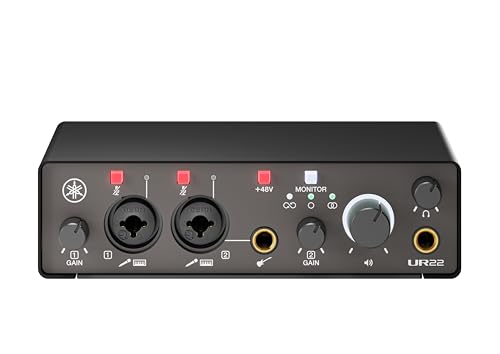
- 24-bit/192kHz 2-in/2-out interface
- Loopback and direct monitoring
- Compact metal casing with iOS support
Best For: Mobile musicians, podcasters, and compact home studios
Best Solo Recording Value
Focusrite Scarlett Solo 3rd Gen

- One mic preamp and one Hi-Z input
- 24-bit/192kHz recording with Air mode
- Includes a substantial software bundle
Best For: Solo musicians, vocalists, and entry-level home studios
Best for Streaming Expansion
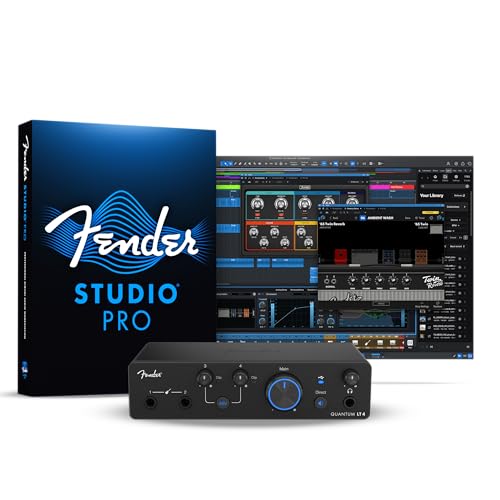
- 4x2 USB-C connectivity with loopback
- Dual mic preamps and instrument inputs
- Low-latency drivers for Mac and PC
Best For: Streamers, podcasters, and growing music-production setups
Best All-Around Choice

- Four combo inputs with 48V phantom power
- Hardware loopback and direct monitoring
- USB-C or AA battery operation
Best For: Musicians, multi-person podcasts, and flexible streaming setups
Best Compact Solo Setup

- XLR/TRS input with Hi-Z plus stereo 3.5mm input
- Hardware loopback and direct monitoring
- Lightweight, USB-powered design
Best For: Solo musicians, podcasters, and portable streamers
Best Entry-Level Pick – Focusrite Scarlett Solo 4th Gen
The Focusrite Scarlett Solo 4th Gen is a strong choice if you want an audio interface with loopback for basic solo recording, though the supplied specifications do not list a loopback function. It combines one microphone preamp, one Hi-Z instrument input, 24-bit/192kHz recording, and a compact USB-C design for home setups.
Best For: Solo singer-songwriters recording vocals and guitar.
Pros:
- 120dB dynamic range and 24-bit/192kHz support.
- Air modes add presence and harmonic drive to vocals and guitars.
- Includes Pro Tools Intro+, Ableton Live Lite, Cubase LE, and Hitmaker Expansion.
- Compatible with Mac, Windows, and iPad.
Cons:
- Only one XLR microphone input.
- The supplied notes do not confirm a loopback feature.
Choose the Solo when your priority is straightforward, high-quality one-person recording rather than confirmed computer-audio routing. Its included software and portable form make it an approachable starting point.
Best Budget Loopback Option – PIYONE Q28 2×2 Interface
The PIYONE Q28 is a practical audio interface with loopback for creators who need a simple two-input setup and computer-audio routing. Its USB-C, class-compliant design supports plug-and-play Mac and PC use, while 24-bit/192kHz conversion targets high-fidelity recording.
Best For: Budget-conscious home creators who need loopback and two combo inputs.
Pros:
- Explicitly includes a Monitor Mix/Loopback function.
- Two XLR/TRS combo inputs support microphones and instruments.
- Offers 24-bit/192kHz recording and 48V phantom power.
- USB-C carries data and bus power without an external supply.
Cons:
- The supplied operating-system details list Windows only.
- Its product notes do not provide a software bundle.
The Q28 stands out when loopback is essential but you want a compact 2×2 interface. Zero-latency direct monitoring and a 3.5mm headphone output add useful flexibility for home recording and streaming.
Best for Two Inputs – Focusrite Scarlett 2i2 4th Gen
The Focusrite Scarlett 2i2 4th Gen is a capable two-channel interface for recording two microphones or instruments at once. It is worth considering alongside an audio interface with loopback, but the supplied notes do not confirm loopback; its strengths are recording quality, input flexibility, and level-management tools.
Best For: Musicians recording two sources simultaneously on Mac, Windows, or iOS.
Pros:
- Two mic preamps and two Hi-Z instrument inputs.
- 120dB dynamic range with 24-bit/192kHz support.
- Auto Gain helps set levels, while Clip Safe helps prevent clipping.
- Air modes enhance vocal and guitar presence.
Cons:
- The supplied notes do not confirm a loopback function.
- It is larger and heavier than the Scarlett Solo.
The 2i2 is the more versatile Focusrite choice for duets, stereo sources, or simultaneous vocal-and-instrument recording. Select it over the Solo when two independent inputs matter more than a confirmed loopback workflow.
Best for Podcasting and Streaming – MAONO E2 Gen2 Podcast Mixer
The MAONO E2 Gen2 is a feature-rich audio interface with loopback designed for podcasting, streaming, and mobile content creation. It combines two XLR combo inputs, up to 60dB of preamp gain, sound-effect pads, phone connectivity, and a battery for up to eight hours of use.
Best For: Podcasters and streamers managing voices, effects, phones, and live audio.
Pros:
- Loopback supports computer live streaming with input and output managed together.
- Two low-noise XLR combo inputs provide up to 60dB of gain.
- Eight customizable sound-effect buttons support clips up to 20 seconds.
- Built-in 1500mA battery provides up to eight hours of use.
Cons:
- Its many podcast-focused controls may be more than a music-only user needs.
- The supplied package list is truncated before all included items are specified.
For live content, the E2 Gen2 offers the most complete loopback-oriented feature set in this group. Its mute control, voice effects, Bluetooth, phone I/O, and sound pads make it especially suited to interactive broadcasts rather than minimalist studio recording.
Best Compact Yamaha Option – Yamaha UR22MK3 B
The Yamaha UR22MK3 B is a practical audio interface with loopback for creators who need two-channel recording, direct monitoring, and flexible compatibility in a compact metal enclosure. Its USB-C connection, phantom power, and Hi-Z input cover common vocal, microphone, and guitar recording setups.
Best For: Mobile musicians, podcasters, and home studios needing compact 2-in/2-out connectivity with loopback.
Pros:
- 24-bit/192kHz recording with two analog inputs and outputs.
- Includes UR mic preamps, phantom power, and one Hi-Z input.
- Loopback, direct monitoring, and mute controls support streaming and recording workflows.
- Works with Windows, macOS, and iOS devices.
Cons:
- Two-channel I/O may be limiting for larger recording setups.
- The supplied warranty coverage is listed as one year and has authorized-retailer and regional conditions.
Choose the UR22MK3 B when portability and straightforward loopback functionality matter more than extensive inputs. Its lightweight metal housing and cross-platform support make it a flexible small-studio choice.
Best Solo Recording Value – Focusrite Scarlett Solo 3rd Gen
The Focusrite Scarlett Solo 3rd Gen is a streamlined audio interface with loopback for solo vocalists, guitarists, and home recordists. It combines one XLR mic preamp, a Hi-Z instrument input, 24-bit/192kHz converters, and a switchable Air mode in a compact USB-C-compatible setup.
Best For: Solo musicians, vocal recording, podcasts, and first home-studio setups.
Pros:
- High-performance mic preamp with switchable Air mode for added clarity.
- Dedicated Hi-Z instrument input suits guitar and bass recording.
- Supports recording and mixing up to 24-bit/192kHz.
- Includes a broad software bundle, including Pro Tools Intro+, Ableton Live Lite, Cubase LE, and Hitmaker Expansion.
Cons:
- Only one XLR mic preamp limits simultaneous microphone recording.
- Its two-channel design is less suitable for ensembles or multi-mic sessions.
- Loopback is not specifically listed among the supplied product features, so confirm routing needs before buying.
The Scarlett Solo is compelling for straightforward one-person recording and comes with useful software to get started. If loopback is essential to your workflow, verify the exact routing support for your operating system and software.
Best for Streaming Expansion – Fender Quantum LT 4
The Fender Quantum LT 4 is a flexible audio interface with loopback designed for creators who need more input capacity. Its 4×2 USB-C layout, dual MAX-HD mic preamps, two instrument inputs, balanced outputs, and low-latency drivers support music production, streaming, podcasting, and content creation.
Best For: Growing creators, guitarists, podcasters, and streamers who need multiple inputs and flexible monitoring.
Pros:
- Provides four inputs and two outputs for more expansive recording setups.
- Dual MAX-HD mic preamps offer up to 75 dB of gain.
- Two dedicated instrument inputs support guitars, basses, and line-level instruments.
- Loopback routing, balanced TRS outputs, and a powerful headphone amp suit streaming workflows.
Cons:
- The larger feature set may be more than a basic solo setup requires.
- Some Fender software benefits require registration, including the Fender Amp & FX Pack and trial access.
- Supplied compatibility is specified for macOS and Windows rather than mobile platforms.
The Quantum LT 4 is the strongest fit here for users who expect their setup to grow. Its extra inputs and dedicated loopback routing make it particularly practical for streaming, podcasting, and recording multiple sources.
Best All-Around Choice – Zoom AMS-44
The Zoom AMS-44 is a practical audio interface with loopback for musicians, podcasters, and streamers who need four inputs and flexible routing. Its dedicated Loopback and Direct Monitor switches simplify livestreaming and low-latency monitoring without extra software.
Best For: Musicians, multi-person podcasts, and content creators who need four-input recording or streaming.
Pros:
- Four XLR/TRS combo inputs with low-noise preamps and 48V phantom power
- Loopback and zero-latency direct monitoring are controlled by physical switches
- Music and Streaming modes support both DAW recording and combined livestream audio
- Can run from USB-C or two AA batteries for portable setups
Cons:
- Larger and less minimal than a one-input interface
- Its four-input design may be more than solo creators need
The AMS-44 is the strongest fit when input count and straightforward hardware routing matter. It also supports major operating systems and popular DAWs, making it a versatile choice for home recording and streaming.
Best for Mobile Creator Workflows – MAONO P2 Hybrid USB Interface
The MAONO P2 is an audio interface with loopback designed for creators who move between computer, phone, and tablet workflows. Dual USB connectivity, mobile compatibility, and included ProStudio 2 software make it useful for recording and streaming across several devices.
Best For: Mobile creators, streamers, podcasters, and musicians using computers and phones or tablets together.
Pros:
- Dual USB ports can connect a computer and phone or iPad simultaneously
- Built-in loopback combines instruments, voice, backing tracks, and desktop audio
- Dual XLR inputs support condenser and dynamic microphones with 24-bit/192kHz recording
- Independent mute and headphone/monitor controls add streaming flexibility
Cons:
- Advanced routing and effects depend on the ProStudio 2 software workflow
- Its broad creator-focused feature set may be unnecessary for basic recording
The P2 stands out for hybrid setups rather than simple desktop recording. Its simultaneous device connections and software-assisted routing give mobile-first creators more ways to record, stream, and manage audio.
Best Compact Solo Setup – Zoom AMS-22
The Zoom AMS-22 is a compact audio interface with loopback for solo musicians, podcasters, and streamers. It combines one XLR/TRS input, a stereo 3.5mm input, and simple hardware controls in a lightweight, USB-powered design.
Best For: Solo recording, mobile streaming, podcasts, and creators who need a small interface with stereo input support.
Pros:
- One XLR/TRS combo input includes Hi-Z support for instruments
- Stereo 3.5mm input accommodates additional line-level or stereo sources
- Loopback and Direct Monitor switches work without extra software
- Bus-powered design weighs 230 g and supports Mac, PC, iOS, and Android
Cons:
- Only one XLR/TRS combo input is available
- Maximum sample rate is 48 kHz
The AMS-22 is a sensible choice when portability and simple controls matter more than expansion. Its compact layout suits solo creators, while the loopback switch makes computer-audio streaming straightforward.
How We Picked the Best Audio Interface with Loopback
We compared these interfaces by looking at their input and output configurations, connection types, monitoring options, loopback support, recording resolution, portability, and intended use. We also considered whether each model is better suited to vocal recording, instruments, podcasting, livestreaming, or general home-studio work.
Loopback implementation varies by product. Some interfaces provide a clearly labeled loopback function, while others depend on bundled software, routing controls, or a mixer-style workflow. Before buying, confirm that the interface works with your computer, operating system, streaming platform, and preferred recording application.
Quick Comparison
- For solo creators: A compact one- or two-input interface is often enough for a microphone, guitar, or simple streaming setup.
- For two-person recording: Choose two independent mic inputs, especially if both speakers use XLR microphones.
- For multiple performers: Four-input interfaces offer more flexibility for several microphones or stereo instruments.
- For podcasting: Mixer-style models can make headphone monitoring, microphone control, and phone or computer integration easier.
- For mobile use: Check USB-C, iOS, iPad, and external-power requirements rather than assuming every interface is plug-and-play.
Key Buying Factors for an Audio Interface with Loopback
Inputs and Outputs
Count the sources you need today and leave room for growth. Combo inputs can accept XLR microphones or quarter-inch instruments, while dedicated instrument inputs may provide a more convenient guitar or bass connection. Also check the number of headphone and monitor outputs if you plan to record with another person.
Loopback Routing
Loopback lets software capture computer audio alongside microphone or instrument signals. It is useful for livestreams, tutorials, reaction videos, online lessons, and remote interviews. Look for straightforward routing controls and independent level adjustment so playback does not overwhelm the live microphone.
Monitoring and Latency
Direct monitoring can reduce distracting delay while recording. Hardware monitoring is especially valuable for vocalists and podcasters, but software control may be more useful when you need to balance multiple sources. Confirm that the interface and its drivers support your operating system reliably.
Resolution, Power, and Compatibility
24-bit recording and sample rates up to 192kHz are common, but they should not outweigh practical features such as clean preamps, stable drivers, phantom power, and simple controls. Verify USB-C requirements, iOS or iPad compatibility, and whether the unit needs a separate power supply.
Who Should Buy Which Audio Interface with Loopback?
Choose a compact Focusrite or Zoom model if you want a straightforward interface for solo recording, streaming, or voice work. Choose a two-input interface if you record two microphones, stereo sources, or want room to expand beyond a single channel.
Choose a MAONO mixer-style model if podcast controls, dual XLR inputs, phone connectivity, and hands-on routing are priorities. Choose Yamaha, Fender, or a four-input Zoom model if you need more channels for instruments, guests, or a growing home studio.
Finally, prioritize the workflow you will use most often. The best Audio Interface with Loopback is not necessarily the one with the highest specifications; it is the model that provides the right connections, monitoring controls, and routing without adding unnecessary complexity.