Commercial touchscreen kiosks can speed up service, improve product discovery, and create a more polished in-store experience.
Below, we’ve rounded up 10 strong options for retail environments, from countertop units to large floor-standing displays.
Best 10 Commercial Touchscreen Kiosks for Retail Picks for 2026
Floor-Standing Self-Service Pick
43 Inch Touch Screen Self Service Kiosk

- 43-inch FHD IPS display with 10-point touch
- Android 13 plus optional Windows host support
- Built for 24/7 commercial indoor operation
Best For: Retail and restaurant self-service, wayfinding, and signage
Rugged Countertop Touch
23.6" Commercial Grade Metal Housing Monitor

- Metal housing supports durability and heat dissipation
- 10-point capacitive touch for Windows systems
- Seamless flat panel and rear controls improve protection
Best For: Durable retail counters and kiosk builds
Digital Poster Standout
37 Inch Digital Signage Display

- 37-inch FHD IPS signage screen with wide viewing angles
- Android system with built-in media player and Wi-Fi
- Slim floor-standing design for indoor promotion
Best For: Indoor retail signage, promotions, and wayfinding
Countertop POS Classic
ViewSonic TD2423D 24 Inch Touch Monitor

- 24-inch Full HD monitor with 10-point IR touch
- 7H scratch-resistant glass for retail durability
- HDMI, VGA, DisplayPort, and USB connectivity
Best For: Retail POS and compact kiosk installations
Large-Format Retail Signage
37-Inch Floor Standing Interactive Kiosk

- 37-inch FHD IPS display with 178° viewing angle
- Android OS with Wi-Fi, Ethernet, HDMI, and USB support
- Smart split-screen playback for mixed media ads
Best For: Indoor retail and commercial spaces needing a tall, branded signage kiosk
Heavy-Duty Touch Monitor
17.3-Inch Commercial POS Touch Display

- 10-point capacitive touch with plug-and-play setup
- Seamless flat design helps resist dust and water
- FHD screen with enhanced brightness for busy spaces
Best For: Retail counters and kiosk stations that need a rugged touch monitor
Versatile Digital Poster Kiosk
37-Inch White Touchscreen Totem
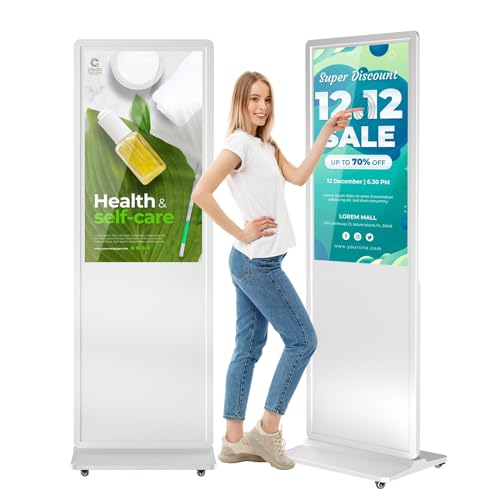
- 37-inch FHD IPS screen with 178° viewing angle
- Android OS with auto playback and app support
- Split-screen layout for ads, branding, and info
Best For: Indoor retail and public venues needing a flexible signage kiosk
Compact Countertop Touchscreen Kiosk
10.1 Inch Android Digital Signage Display
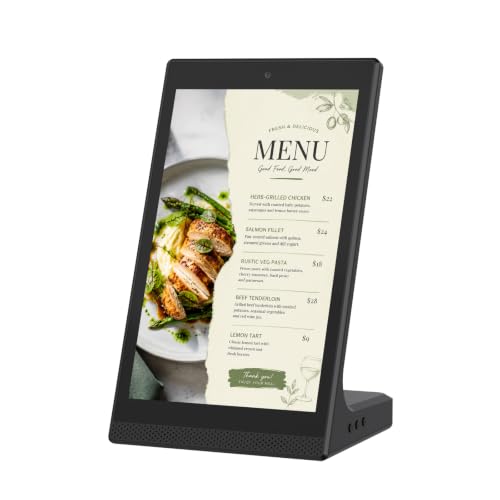
- 10.1-inch tabletop touchscreen for close-range use
- WiFi and USB support for simple updates
- Works for menus, notices, and product displays
Best For: Retail counters and other compact indoor customer touchpoints
Floor-Standing Self-Service Kiosk
32 Inch Interactive Retail Display

- 32-inch FHD IPS touchscreen with wide viewing angles
- Android 13 open OS supports custom software setups
- Wi-Fi, Ethernet, USB, TF card, and HDMI connectivity
Best For: Large indoor retail and self-service installations
Large 4K Touchscreen Signage Kiosk
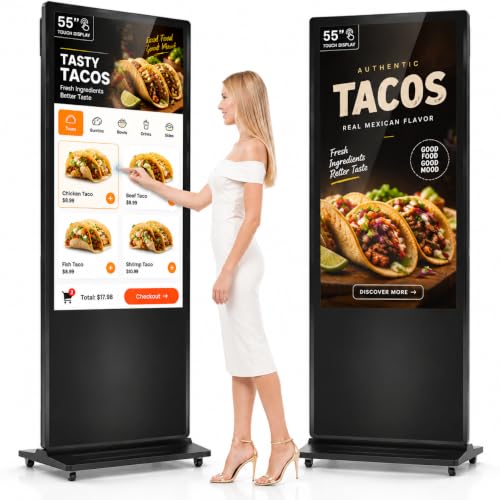
- 55-inch 4K UHD IPS screen for high visibility
- Built-in CMS enables remote publishing and scheduling
- Split-screen layouts support multiple content zones
Best For: High-traffic retail and mall advertising displays
Floor-Standing Self-Service Pick – 43 Inch Touch Screen Self Service Kiosk
If you need commercial touchscreen kiosks for retail that can handle self-ordering, wayfinding, and digital signage in one unit, this 43-inch floor-standing model is built around that use case. It combines a Full HD IPS touch display, Android 13, and an optional Windows host connection, so it can fit both simple app-based deployments and more advanced retail software workflows.
Best For: Retail stores, restaurants, and malls that want a large self-service kiosk with flexible software support.
Pros:
- 43-inch FHD IPS panel with 178° viewing angle and 450 cd/㎡ brightness for clear indoor visibility.
- 10-point capacitive touch supports responsive self-service and interactive browsing.
- Android 13 on board, with Windows host support for more demanding applications.
- Built for 24/7 use with lockable cabinet, strong stand, and heat management.
Cons:
- Larger floor-standing footprint may not suit tight retail spaces.
- Windows-based use depends on connecting an external host.
- Glossy screen finish may be less ideal in very reflective environments.
This is a strong all-in-one option when you want a visible, mobile commercial kiosk that can shift between ordering, information, and advertising roles.
Rugged Countertop Touch – 23.6" Commercial Grade Metal Housing Monitor
For commercial touchscreen kiosks for retail that need a tougher display surface and a straightforward monitor-style setup, this 23.6-inch ANGEL POS unit is aimed at demanding environments. Its metal housing, rear-mounted controls, and seamless flat capacitive panel are designed for durability, cleaner operation, and steady performance in busy public-facing spaces.
Best For: Retail counters, kiosks, and other high-traffic setups where durability matters more than all-in-one features.
Pros:
- Metal housing improves durability and also acts as a heat sink for continuous operation.
- 10-point multi-touch capacitive panel supports smooth interactive use on Windows 8/10/11.
- Seamless flat design helps reduce dust and water accumulation.
- Rear-mounted buttons help protect controls from accidental presses, dust, and tampering.
Cons:
- Monitor-only design means you supply the kiosk hardware or host system.
- Windows 7/XP/2000 support is single-touch only.
- More focused on ruggedness than on integrated signage or player features.
This is a practical choice when your priority is a sturdy touch monitor that can keep up with retail counter traffic and long operating hours.
Digital Poster Standout – 37 Inch Digital Signage Display
If your priority is a visually clean display for commercial touchscreen kiosks for retail, this 37-inch floor-standing signage unit is built to promote products, brand messages, and wayfinding content. It uses an Android system, built-in media player, and FHD IPS panel to support straightforward content playback in indoor retail and public spaces.
Best For: Retail stores, malls, and restaurants that need a slim digital poster kiosk for ads and information.
Pros:
- FHD IPS display with 178° viewing angle for strong visibility.
- Android OS with built-in media player, USB playback, Wi-Fi, and network connectivity.
- Split-screen layout support for showing multiple content types at once.
- Slim, white floor-standing design suited to indoor commercial spaces.
Cons:
- Focused on signage and content playback rather than heavy interactive use.
- Floor-standing format takes up more space than a wall-mounted display.
- Best suited to indoor environments only.
For businesses that want a modern vertical poster display with flexible playback and content management, this is a solid signage-first option.
Countertop POS Classic – ViewSonic TD2423D 24 Inch Touch Monitor
For commercial touchscreen kiosks for retail that need a dependable monitor for POS or kiosk workflows, the ViewSonic TD2423D focuses on touch accuracy, comfort, and broad connectivity. Its 24-inch Full HD panel, 10-point IR touch, and VESA-compatible design make it a practical fit for checkout counters, service desks, and compact interactive setups.
Best For: Retail POS stations and compact kiosks that need a versatile touch monitor with standard video inputs.
Pros:
- 24-inch Full HD display with 10-point infrared touch for natural interaction.
- Scratch-resistant 7H glass adds durability in busy retail use.
- Wide connectivity includes HDMI, VGA, DisplayPort, and USB.
- Flicker-free and blue light filter features help reduce eye strain.
Cons:
- Lower 250 cd/m² brightness than some signage-focused kiosks.
- Monitor format requires a separate kiosk enclosure or host system.
- IR touch may feel different from capacitive touch for some users.
This is a versatile retail touch monitor when you want reliable POS interaction, flexible input options, and a familiar countertop form factor.
Large-Format Retail Signage – 37-Inch Floor Standing Interactive Kiosk
If you need commercial touchscreen kiosks for retail that can double as advertising and customer engagement displays, this 37-inch floor-standing unit is built for high-visibility indoor use. It combines FHD 1080p IPS visuals, a 178° viewing angle, Android OS, and multiple media input options so you can run promotional content, menus, or brand messaging in a flexible setup.
Best For: Retailers, malls, restaurants, and other indoor venues that want a tall, floor-standing interactive display with strong signage features.
Pros:
- 37-inch FHD IPS panel with 178° viewing angle for clear visibility
- Supports HDMI, USB, Wi-Fi, Ethernet, remote control, and plug-and-play media playback
- Smart split-screen playback lets pictures and videos run at the same time
- Free logo and poster customization can help match store branding
Cons:
- Best suited to indoor commercial environments rather than compact countertop spaces
- Uses a glossy screen finish, which may be less ideal in very bright glare-prone areas
- Information provided focuses on signage functions more than detailed touch workflow specs
This is a strong pick if your priority is attention-grabbing retail signage with built-in flexibility for content management. The large screen, Android system, and multi-input support make it practical for rotating promotions and branded messaging.
Heavy-Duty Touch Monitor – 17.3-Inch Commercial POS Touch Display
For commercial touchscreen kiosks for retail that need a durable, responsive monitor rather than a standalone totem, this 17.3-inch ANGEL POS display is built for continuous use. It offers FHD resolution, 10-point capacitive touch, plug-and-play setup, and a seamless flat front that helps resist dust and water in busy environments.
Best For: Retail counters, POS stations, kiosks, and other high-traffic setups that need a rugged touch monitor.
Pros:
- Commercial-grade construction designed for long-term, heavy-use environments
- 10-point capacitive touch with plug-and-play compatibility on Windows systems
- Seamless flat screen design helps reduce dust and water accumulation
- FHD 1920 x 1080 resolution with enhanced brightness and wide viewing angles
Cons:
- It is a monitor, so you’ll need a separate host device or kiosk system
- Touch support is most fully featured on Windows 8/10/11
- Smaller 17.3-inch size may not suit large-format promotional signage needs
This model makes the most sense when touch responsiveness and durability matter more than screen size. It should fit well in retail or service environments where staff and customers interact with the display all day.
Versatile Digital Poster Kiosk – 37-Inch White Touchscreen Totem
This 37-inch indoor kiosk is a practical option if you want commercial touchscreen kiosks for retail that can handle advertising, brand storytelling, and customer information in one unit. It uses an FHD IPS display, Android OS, built-in media playback, and optional touch interaction, making it suitable for stores and other public-facing indoor venues.
Best For: Retail stores, malls, restaurants, airports, and other indoor locations that need a versatile advertising and information kiosk.
Pros:
- FHD IPS display with 178° viewing angle for broad visibility
- Android system supports app installation, USB playback, auto media playback, and timing control
- Smart split-screen layout can show multiple promotions or content types at once
- Supports Wi-Fi, network connectivity, HDMI input, and media player box integration
Cons:
- Primarily aimed at indoor use rather than portable deployment
- White finish may not fit every retail interior style
- Touch functionality is mentioned, but the core value centers on signage and playback
Overall, this kiosk stands out for flexible content delivery and strong visibility in indoor settings. It is especially useful when you want one display to cover ads, brand messages, and wayfinding without adding extra hardware.
Compact Countertop Touchscreen Kiosk – 10.1 Inch Android Digital Signage Display
If you need commercial touchscreen kiosks for retail in a space-saving form, this 10.1-inch Android tabletop display is built for close-range customer interaction. It works well for menus, price lists, notices, and product slides, with WiFi and USB support for straightforward local content updates.
Best For: Retail counters, reception desks, cafes, and other indoor spots where a compact customer-facing screen is enough.
Pros:
- 10.1-inch touchscreen keeps the footprint small for countertop use.
- WiFi and USB support make content transfer and updates simple.
- Android-based signage setup suits menu boards, notices, and product showcases.
- Designed for multiple indoor business settings, including retail shelves and front desks.
Cons:
- Small screen size is better for close viewing than for larger spaces.
- Best suited to indoor use rather than high-impact showroom displays.
For businesses that want a clean, low-profile digital sign at point of sale, this model focuses on easy operation and practical everyday content display. It’s a solid fit when you need a simple touchscreen kiosk that doesn’t take over the counter.
Floor-Standing Self-Service Kiosk – 32 Inch Interactive Retail Display
For commercial touchscreen kiosks for retail that need more screen presence and customer interaction, this 32-inch floor-standing unit offers a full-size FHD display with Android 13 open OS. It’s designed for flexible software use, making it suitable for navigation, info lookup, self-ordering, advertising, and other indoor kiosk roles.
Best For: Retail stores, malls, restaurants, and other high-traffic indoor locations that need a large interactive kiosk.
Pros:
- 32-inch FHD IPS screen provides clear visuals and wide viewing angles.
- Android 13 open OS supports external systems and custom software setups.
- Wi-Fi, Ethernet, USB 2.0, TF card, and HDMI offer flexible connectivity.
- Built-in speakers and wheels add media playback and easier movement.
Cons:
- No pre-installed software, so deployment requires your own app or system.
- Floor-standing design needs more space than countertop kiosks.
This model is a strong choice when you want a larger interactive display that can handle multiple retail-facing tasks. Its flexibility is the main advantage, especially if you already have software ready to deploy.
Large 4K Touchscreen Signage Kiosk – 55 Inch Android CMS Display
If you’re comparing commercial touchscreen kiosks for retail and want maximum impact, this 55-inch floor-standing display is built for high-visibility indoor advertising. Its 4K UHD IPS panel, Android OS, and built-in CMS are aimed at businesses that want to manage and schedule content across one or more kiosks.
Best For: Shopping centers, retail stores, restaurants, and other indoor venues that need a large-format touchscreen signage display.
Pros:
- 55-inch 4K UHD IPS display delivers sharp, vibrant visuals.
- Built-in CMS supports remote publishing and centralized content management.
- Timer scheduling helps automate playlists and daily content changes.
- Android OS and split-screen layout options support flexible commercial messaging.
Cons:
- Large footprint makes it better for dedicated floor space than tight areas.
- Primarily designed for indoor commercial use, not portable deployment.
This kiosk is built for brands that want a polished, high-impact digital sign with more advanced content control. It stands out when your priority is visibility, scheduling, and organized presentation in a busy retail environment.
How We Picked These Commercial Touchscreen Kiosks for Retail
We focused on screen size, touch responsiveness, display clarity, enclosure durability, and how well each unit fits common retail use cases such as self-service ordering, digital signage, and POS support. We also prioritized practical features like Android-based operation, VESA or floor-standing formats, and input flexibility for HDMI, USB, or VGA setups.
Quick Comparison: Which Type Fits Your Store?
Smaller 10.1-inch and 17.3-inch models are best for checkout counters, menu boards, and compact service stations. Mid-size 23.6-inch to 32-inch displays work well for POS and guided self-service. Larger 37-inch, 43-inch, and 55-inch kiosks are better for high-traffic retail floors, product browsing, advertising, and wayfinding.
Key Buying Factors for Commercial Touchscreen Kiosks for Retail
Touch Technology
Capacitive and multi-touch screens usually feel more responsive and support familiar smartphone-like interactions. For public-facing retail use, look for accurate touch performance and enough points of touch for fast navigation.
Display Size and Placement
Choose a size that matches viewing distance and available space. Countertop kiosks should be compact and easy to reach, while larger floor-standing units need enough screen real estate to present promotions clearly from several feet away.
Durability and Protection
Retail environments can be busy, so splash resistance, dust protection, scratch-resistant glass, and commercial-grade metal housing are valuable. These features help the kiosk hold up to daily use and cleaning.
Connectivity and Software Fit
Check whether the kiosk supports HDMI, USB, VGA, WiFi, and Android-based apps or content management. The best choice depends on whether you need a simple display, a connected signage player, or a self-service interface tied to your store systems.
Audio and Content Delivery
Built-in speakers can be helpful for promotional loops, instructions, or guided ordering. Make sure the kiosk supports the way you plan to deliver content, whether that’s local media playback or networked digital signage.
Who Should Buy Which Commercial Touchscreen Kiosks for Retail?
If you need a compact option for checkout or product sampling, choose a smaller countertop unit. If your priority is POS support or assisted selling, a 17- to 24-inch monitor is often the most practical. For retail promotions, self-service browsing, or branded entryway displays, a 32-inch or larger floor-standing kiosk will usually deliver more impact. Stores with larger footprints or premium visual merchandising needs should consider the 43-inch and 55-inch options for maximum visibility.
In short, the right Commercial Touchscreen Kiosks for Retail depend on your floor space, traffic level, and whether you need interaction, signage, or both. Matching those needs first will help you choose a kiosk that performs well and feels natural for shoppers to use.