The right computer case does more than house your components. It affects cooling performance, noise levels, upgrade room, cable management, and how easy your build is to assemble.
This roundup compares 10 strong options across compact, mainstream, panoramic, full-tower, and style-focused designs, helping you match your case to your hardware and budget.
Best 10 Computer Cases Picks for 2026
Balanced Airflow Pick

- Fine-mesh panels support high airflow
- Includes two 120mm fans
- Supports a 360mm front radiator
Best For: Compact ATX airflow builds
Flexible Micro-ATX Value

- Supports Micro-ATX and Mini-ITX
- Fits GPUs up to 360mm
- Features adjustable I/O placement
Best For: Compact budget-oriented builds
Most Customizable Mid-Tower

- Includes three ARGB PWM fans
- Supports dual 360mm radiators
- Offers modular FRAME customization
Best For: Expandable, lighting-focused ATX systems
Showcase Dual-Chamber Design

- Panoramic wraparound glass
- Includes three 120mm fans
- Supports ATX, Micro-ATX, and Mini-ITX
Best For: Clean, component-showcase builds
Best Panoramic Pick

- Wraparound tempered-glass view
- Three included reverse ARGB fans
- Supports up to 10 120mm fans
Best For: Showcase gaming builds with flexible cooling
Best Full-Tower Cooling

- Six PWM fans included
- Supports 420mm plus 360mm radiators
- 90-degree PSU mount and temperature display
Best For: Large E-ATX and enthusiast cooling builds
Best Flexible Mid-Tower

- Four included PWM ARGB fans
- Supports GPUs up to 420mm
- Tool-less panels and back-connect support
Best For: Flexible ATX gaming builds with large components
Design-Focused Airflow Pick

- Walnut front and tempered-glass side panel
- Two included 140mm PWM fans
- Supports ATX, micro-ATX, and Mini-ITX builds
Best For: Stylish, airflow-focused gaming PCs
High-Airflow Walnut Choice
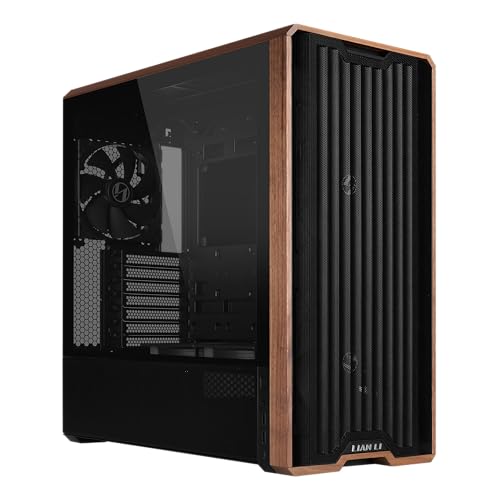
- Five pre-installed fans, including two 170mm front fans
- Flexible fan and PSU mounting options
- Back-connect motherboard support
Best For: High-airflow ATX gaming builds
Full-View Budget-Friendly Case

- 270-degree dual tempered-glass viewing panels
- Supports GPUs up to 410mm and 360mm radiators
- Four included 120mm non-LED fans
Best For: Showcase builds with large components
Balanced Airflow Pick – NZXT H5 Flow
The NZXT H5 Flow is a compact ATX mid-tower for builders who want strong airflow, straightforward cable management, and room for substantial cooling hardware. Its fine-mesh panels, perforated PSU shroud, and included front and rear fans make it a practical choice among computer cases for a first or performance-focused build.
Best For: Airflow-focused ATX builds and first-time PC builders.
Pros:
- Supports up to a 360mm front radiator and 240mm top radiator.
- Includes two 120mm fans for out-of-the-box airflow.
- Wide cable-routing channels, hooks, and straps simplify installation.
- Supports ATX and Micro-ATX motherboards with seven expansion slots.
Cons:
- The two included fans may not be enough for every high-heat configuration.
- Additional 120mm fans for the PSU shroud are not included.
Choose the H5 Flow if you value a compact footprint without giving up radiator support or useful cable-management features. It is especially well suited to a clean, cool build assembled with minimal extra case hardware.
Flexible Micro-ATX Value – Cooler Master Q300L
The Cooler Master Q300L is a compact mini-tower designed for Micro-ATX and Mini-ITX systems. Its perforated construction, magnetic dust filters, adjustable I/O panel, and generous graphics-card clearance make it a flexible option when comparing space-conscious computer cases.
Best For: Budget-conscious Micro-ATX or Mini-ITX builds with flexible placement needs.
Pros:
- Supports graphics cards up to 360mm long.
- Accommodates a CPU cooler up to 159mm tall and a 240mm liquid cooler.
- Perforated panels and magnetic dust filters support airflow and maintenance.
- Modular I/O placement can be configured on the front, top, or bottom sides.
Cons:
- Limited to Micro-ATX and Mini-ITX motherboards.
- Has four expansion slots, fewer than a typical ATX mid-tower.
- Only one listed internal 3.5-inch bay may limit larger storage setups.
The Q300L makes the most sense for compact systems where component clearance and adaptable I/O placement matter more than full ATX expansion. Its ventilated design also gives builders room to plan a multi-fan setup.
Most Customizable Mid-Tower – CORSAIR 4000D RS ARGB
The CORSAIR 4000D RS ARGB is an ATX mid-tower for builders who want configurable cooling, integrated lighting, and a case that can adapt over time. Its FRAME modular system, InfiniRail fan mounting, and three pre-installed ARGB PWM fans distinguish it from more conventional computer cases.
Best For: Custom-focused ATX builds with flexible fan placement and ARGB lighting.
Pros:
- Includes three pre-installed RS ARGB PWM fans with Zero RPM mode.
- InfiniRail supports flexible front and roof fan positioning.
- FRAME modular system allows future case component upgrades.
- Supports air cooling, liquid cooling, and dual 360mm radiators.
Cons:
- Its customization features may be more than a simple build requires.
- Only ATX is listed as the supported motherboard format, despite compatibility notes mentioning smaller boards.
The 4000D RS ARGB is a strong choice when cooling layout and future customization are priorities. It offers useful flexibility before you add optional modular parts, while the included fans provide a capable starting point.
Showcase Dual-Chamber Design – NZXT H6 Flow
The NZXT H6 Flow combines a compact dual-chamber layout with wraparound glass and three pre-installed 120mm fans. It is a visually focused option among computer cases, while its perforated top and side panels help balance the panoramic presentation with practical airflow.
Best For: Clean-looking ATX builds that showcase components through panoramic glass.
Pros:
- Wraparound glass provides an unobstructed view of the interior.
- Dual-chamber design helps create a cleaner, less crowded build.
- Includes three 120mm fans positioned for out-of-the-box cooling.
- Supports ATX, Micro-ATX, and Mini-ITX motherboards.
Cons:
- Its compact design may offer less internal flexibility than a larger mid-tower.
- Only two listed internal 3.5-inch bays may limit bulkier storage plans.
- The white finish may not suit builders seeking a black enclosure.
The H6 Flow is a compelling pick for a tidy showcase system where appearance and airflow are equally important. Its included fans and cable-management channels reduce the work needed to achieve a clean presentation.
Best Panoramic Pick – CORSAIR 3500X RS ARGB
The CORSAIR 3500X RS ARGB is one of the more visually focused computer cases for builders who want a clear view of their components without giving up airflow flexibility. Its wraparound tempered-glass design, three included reverse ARGB fans, and support for Mini-ITX through EATX motherboards make it a flexible mid-tower option.
Best For: Showpiece gaming builds using standard or reverse-connection motherboards.
Pros:
- Includes three RS120-R ARGB reverse fans.
- Supports up to 10 120mm fans and radiators up to 360mm.
- Removable front and side glass panels simplify building and access.
- Includes GPU anti-sag support and cable-routing features.
Cons:
- Only three fans are included; other components must be purchased separately.
- Its glass-heavy design may prioritize presentation over a more understated appearance.
The 3500X RS ARGB is a strong choice when aesthetics, airflow expansion, and easy access matter equally. Its reverse-connection motherboard support is especially useful for cleaner-looking builds.
Best Full-Tower Cooling – Antec Flux Pro Full-Tower
The Antec Flux Pro is a large, airflow-oriented choice among computer cases, combining a full-tower layout with six included PWM fans and extensive radiator support. Its metal, glass, and walnut wood construction also gives it a distinctive finish for high-end builds.
Best For: E-ATX workstations and enthusiast systems needing substantial air or liquid cooling.
Pros:
- Includes six PWM fans, including three 140mm front fans.
- Supports up to 12 fans and simultaneous 420mm and 360mm radiators.
- Offers an innovative 90-degree iShift PSU mount.
- Includes CPU and GPU temperature displays.
Cons:
- The full-tower chassis is relatively large and weighs 29 pounds.
- Its 800-watt power-supply specification may not suit every high-power configuration.
Choose the Flux Pro when cooling capacity and internal flexibility take priority over compact dimensions. The pre-installed fans and removable cooling brackets can reduce the work involved in setting up a demanding system.
Best Flexible Mid-Tower – Lian Li V100-ATX
The Lian Li V100-ATX is a practical mid-tower among computer cases, pairing four pre-installed PWM ARGB fans with support for large graphics cards and a 360mm top radiator. Its motherboard compatibility also includes back-connect ATX and Micro-ATX layouts for cleaner cable routing.
Best For: High-performance ATX builds that need strong hardware compatibility and convenient access.
Pros:
- Includes four daisy-chainable PWM-controlled 120mm ARGB fans.
- Accommodates GPUs up to 420mm and CPU coolers up to 178mm.
- Supports a top-mounted radiator up to 360mm.
- Tool-less side panels make component access easier.
Cons:
- Provides four internal bays, fewer than some larger cases.
- Its one-year warranty is shorter than the coverage listed for some alternatives.
The V100-ATX balances feature-rich hardware support with a manageable mid-tower footprint. It is particularly appealing for builders who want included lighting, broad GPU clearance, and back-connect motherboard compatibility.
Design-Focused Airflow Pick – Fractal Design North
The Fractal Design North is one of the more distinctive computer cases for builders who want natural materials without giving up practical airflow. Its open mesh front, two included 140mm PWM fans, tempered-glass side panel, and support for ATX, micro-ATX, and Mini-ITX boards make it a versatile mid-tower option.
Best For: Stylish gaming builds focused on airflow, clear component visibility, and broad motherboard compatibility.
Pros:
- Real walnut front accents and a clear tempered-glass side panel create a refined appearance.
- Includes two 140mm Aspect PWM fans and an open mesh front for ventilation.
- Supports GPUs up to 355mm, with seven expansion slots and multiple drive mounts.
- Provides USB-C connectivity and tool-friendly removable panels.
Cons:
- GPU clearance drops to 300mm when using a 360mm front radiator.
- Its two-year warranty is shorter than some competing options.
The North is a strong choice when appearance matters as much as component compatibility. Check your graphics-card and radiator dimensions before building, particularly if you plan a large front-mounted cooler.
High-Airflow Walnut Choice – Lian Li LANCOOL 217
The Lian Li LANCOOL 217 stands out among computer cases with five pre-installed fans, including two large 170mm front fans. It combines strong air-cooling potential with genuine walnut accents, flexible fan positioning, dual PSU mounting options, and support for back-connect motherboards.
Best For: Performance-oriented ATX builds that prioritize included cooling, cable-management flexibility, and a premium wood-accented design.
Pros:
- Five pre-installed PWM fans provide a strong cooling starting point.
- Large 170mm front fans can be repositioned to emphasize CPU cooling.
- Supports back-connect motherboards for a cleaner cable layout.
- Offers two PSU mounting configurations and genuine walnut panels.
Cons:
- Its 10.5kg weight and larger dimensions may require more desk or floor space.
- Compatibility is listed for ATX motherboards rather than smaller board formats.
- The listed warranty is one year.
For builders who want substantial airflow without buying additional fans immediately, the LANCOOL 217 is especially compelling. Its flexible layout is useful, but confirm your motherboard, PSU, and placement requirements before purchase.
Full-View Budget-Friendly Case – MUSETEX Y6
The MUSETEX Y6 is a practical option among computer cases for builders who want a showcase-style layout and generous component clearance. Its 270-degree tempered-glass design, dual-chamber interior, four included non-LED fans, and support for up to a 360mm top radiator give it a feature-rich specification.
Best For: Showcase ATX, micro-ATX, or Mini-ITX builds with large graphics cards and visible components.
Pros:
- Dual tempered-glass panels provide a broad view of the hardware.
- Supports GPUs up to 410mm and top-mounted liquid coolers up to 360mm.
- Includes four 120mm non-LED fans with a dual-chamber airflow layout.
- Includes USB-C, magnetic dust filters, and support for three motherboard sizes.
Cons:
- The included fans are non-LED, so builders seeking integrated lighting will need other options.
- Cooling and hardware accessories beyond the four fans are not included.
- The wide 10.83-inch body may not suit compact desk setups.
The Y6 makes sense for a component-display build where clearance and glass visibility are priorities. Its generous GPU and radiator support are useful, while the included fan arrangement helps reduce the initial cooling spend.
How We Picked These Computer Cases
We selected cases across several common build types rather than focusing on one size or style. Our evaluation criteria include motherboard support, graphics-card clearance, CPU-cooler and radiator compatibility, included fans, front-panel connectivity, airflow potential, cable-management space, construction quality, and ease of building.
Because component dimensions and cooling requirements vary, specifications should be checked against your exact parts before purchase. A case that works well for a compact micro-ATX system may be a poor fit for a long graphics card, large power supply, or 360mm liquid cooler.
Quick Comparison
| Build priority | Best case type to consider | Why it matters |
|---|---|---|
| Compact mainstream build | Compact ATX or micro-ATX mid-tower | Saves desk space while supporting popular components |
| High airflow | Mesh-front mid-tower | Improves fresh-air intake and helps manage component temperatures |
| Showcase appearance | Panoramic or dual-chamber case | Provides broad glass views and cleaner component presentation |
| Large or heavily upgraded system | Full-tower or spacious ATX case | Offers more room for expansion, storage, and custom cooling |
| Quiet, attractive workspace | Design-led case with controlled airflow | Balances visual appeal, fan placement, and everyday acoustics |
Key Buying Factors for Computer Cases
Motherboard and Component Compatibility
Confirm support for your motherboard size, graphics-card length, power-supply format, and CPU cooler height. If you plan to use a radiator, check both its thickness and the available fan position. Front-mounted radiators can also reduce graphics-card clearance.
Airflow and Included Fans
Look for a ventilated front or strategically placed intake openings, plus enough fan mounts for balanced intake and exhaust. Included PWM fans can reduce setup cost, but verify their size, connector type, and whether a controller is supplied.
Build Experience and Connectivity
Useful features include removable panels, routing channels, a PSU shroud, accessible dust filters, tool-free drive mounts, and a front USB-C port. Tempered-glass panels look attractive but require careful handling and may show dust or cables more readily.
Expansion and Long-Term Flexibility
Consider future graphics-card upgrades, additional storage, top-mounted cooling, and the number of expansion slots. Extra room is especially valuable if you expect to replace components or add custom water cooling later.
Who Should Buy Which Computer Cases?
Choose a compact ATX or micro-ATX model if you want a smaller footprint and are using standard components without extensive expansion plans. A mesh-front mid-tower is the safest choice for most gaming and productivity builds because it offers a practical balance of cooling, compatibility, and cost.
Panoramic and dual-chamber designs suit builders who prioritize presentation, visible components, and cleaner cable routing. Select a full-tower when you need maximum clearance, multiple drives, numerous fans, or elaborate liquid cooling. Design-focused wood-accented models are ideal for a living room or office where the case must complement the surrounding furniture, while fan-included options can be attractive when you want to reduce the number of extra accessories to buy.